
1. పరిచయం
ఎర్గోమోషన్ ఎర్గోస్పోర్టివ్ స్మార్ట్ అడ్జస్టబుల్ బెడ్ ఫ్రేమ్ యూజర్ మాన్యువల్కు స్వాగతం. ఈ గైడ్ మీ కొత్త అడ్జస్టబుల్ బెడ్ ఫ్రేమ్ యొక్క సురక్షితమైన మరియు సమర్థవంతమైన ఆపరేషన్, సెటప్ మరియు నిర్వహణ కోసం అవసరమైన సమాచారాన్ని అందిస్తుంది. మీ నిద్ర అనుభవాన్ని మెరుగుపరచడానికి ఎర్గోస్పోర్టివ్ అధునాతన నిద్ర సాంకేతికతను అనుకూలీకరించదగిన సౌకర్యంతో మిళితం చేస్తుంది.
దయచేసి ఈ మాన్యువల్ను అసెంబ్లీ మరియు ఉపయోగం ముందు పూర్తిగా చదవండి మరియు భవిష్యత్తు సూచన కోసం దాన్ని ఉంచండి.
2. ముఖ్యమైన భద్రతా సమాచారం
విద్యుత్ షాక్, కాలిన గాయాలు, అగ్ని లేదా గాయం ప్రమాదాన్ని తగ్గించడానికి, ఎల్లప్పుడూ ఈ ప్రాథమిక భద్రతా జాగ్రత్తలను అనుసరించండి:
- బెడ్ ఫ్రేమ్ ఉపయోగించే ముందు అన్ని సూచనలను చదవండి.
- శుభ్రం చేయడానికి లేదా సర్వీసింగ్ చేయడానికి ముందు పవర్ అవుట్లెట్ నుండి బెడ్ ఫ్రేమ్ను అన్ప్లగ్ చేయండి.
- వేడిచేసిన ఉపరితలాల నుండి పవర్ కార్డ్ను దూరంగా ఉంచండి.
- త్రాడు లేదా ప్లగ్ దెబ్బతిన్నట్లయితే బెడ్ ఫ్రేమ్ను ఆపరేట్ చేయవద్దు.
- ఆరుబయట ఉపయోగించవద్దు.
- శారీరక, ఇంద్రియ లేదా మానసిక సామర్థ్యాలు తగ్గిన పిల్లలు లేదా వ్యక్తులు పర్యవేక్షణ లేకుండా బెడ్ ఫ్రేమ్ను ఆపరేట్ చేయడానికి అనుమతించవద్దు.
- ఉపయోగం ముందు అన్ని భాగాలు సురక్షితంగా అమర్చబడి ఉన్నాయని నిర్ధారించుకోండి.
3. ప్యాకేజీ విషయాలు
అసెంబ్లీని ప్రారంభించే ముందు అన్ని భాగాలు ఉన్నాయని ధృవీకరించండి:
- సర్దుబాటు చేయగల బెడ్ ఫ్రేమ్ (ప్లాట్ఫామ్ ఫ్రేమ్)
- కాళ్ళు (పరిమాణం: మోడల్ను బట్టి మారుతుంది, సాధారణంగా 6-9)
- రిమోట్ కంట్రోల్
- పవర్ కార్డ్ మరియు అడాప్టర్
- మెట్రెస్ రిటైనర్ బార్(లు)
- వినియోగదారు మాన్యువల్ (ఈ పత్రం)

చిత్రం 1: పాక్షికంగా ఎత్తైన స్థితిలో ఎర్గోమోషన్ ఎర్గోస్పోర్టివ్ స్మార్ట్ అడ్జస్టబుల్ బెడ్ ఫ్రేమ్ (ట్విన్ XL). ఈ చిత్రం బెడ్ ఫ్రేమ్ యొక్క ప్రధాన భాగాలను వివరిస్తుంది.
4. సెటప్ సూచనలు
ఈ ఉత్పత్తికి అసెంబ్లీ అవసరం. దయచేసి ఈ దశలను జాగ్రత్తగా అనుసరించండి:
- భాగాలను అన్ప్యాక్ చేయండి: ప్యాకేజింగ్ నుండి అన్ని వస్తువులను జాగ్రత్తగా తీసివేసి, వాటిని శుభ్రమైన, చదునైన ఉపరితలంపై ఉంచండి.
- కాళ్ళను అటాచ్ చేయండి: బెడ్ ఫ్రేమ్ కింద భాగంలో ఉన్న థ్రెడ్ రంధ్రాలలోకి బెడ్ కాళ్లను స్క్రూ చేయండి. అవి సురక్షితంగా బిగించబడ్డాయని నిర్ధారించుకోండి.
- మ్యాట్రెస్ రిటైనర్ బార్ను ఇన్స్టాల్ చేయండి: బెడ్ ఫ్రేమ్ పాదాల వద్ద ఉన్న రంధ్రాలలోకి మ్యాట్రెస్ రిటైనర్ బార్(లు) చొప్పించండి.
- పవర్ కనెక్ట్ చేయండి: పవర్ కార్డ్ను బెడ్ ఫ్రేమ్లోని కంట్రోల్ బాక్స్లోకి ప్లగ్ చేసి, ఆపై అడాప్టర్ను గ్రౌండెడ్ ఎలక్ట్రికల్ అవుట్లెట్లోకి ప్లగ్ చేయండి.
- ప్రారంభ పరీక్ష: సరైన పనితీరును నిర్ధారించుకోవడానికి తల మరియు పాదాల ఉచ్చారణను పరీక్షించడానికి రిమోట్ కంట్రోల్ని ఉపయోగించండి.
- పరుపు ఉంచండి: సర్దుబాటు చేయగల బెడ్ ఫ్రేమ్పై మీ పరుపును జాగ్రత్తగా ఉంచండి.
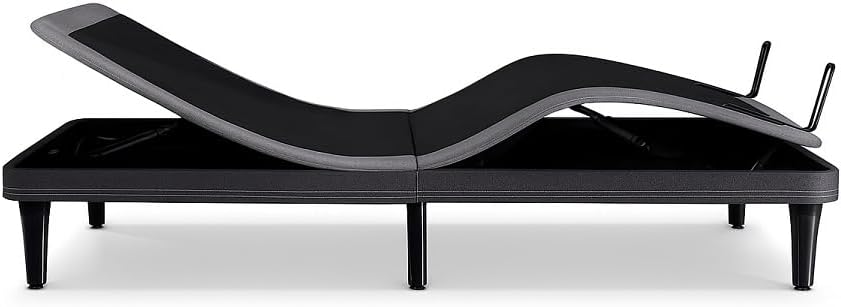
మూర్తి 2: వైపు view ఎర్గోమోషన్ ఎర్గోస్పోర్టివ్ బెడ్ ఫ్రేమ్ దాని సర్దుబాటు చేయగల ఉచ్చారణ పాయింట్లను ప్రదర్శిస్తుంది. ఇది view తల మరియు పాదాల ఎత్తుకు కారణమైన యాంత్రిక భాగాలను హైలైట్ చేస్తుంది.
5. ఆపరేటింగ్ సూచనలు
5.1. రిమోట్ కంట్రోల్ విధులు
మీ ఎర్గోస్పోర్టివ్ బెడ్ ఫ్రేమ్ సులభంగా సర్దుబాటు చేయడానికి వైర్లెస్ రిమోట్ కంట్రోల్తో వస్తుంది. సాధారణ విధులు:
- తల పైకి/క్రిందికి: మంచం యొక్క తల విభాగాన్ని సర్దుబాటు చేస్తుంది.
- కాలు పైకి/క్రిందికి: మంచం యొక్క పాదాల విభాగాన్ని సర్దుబాటు చేస్తుంది.
- ఫ్లాట్: మంచాన్ని పూర్తిగా చదునైన స్థానానికి తిరిగి ఇస్తుంది.
- జీరో-జి: వీపుపై ఒత్తిడిని తగ్గించడానికి మరియు ప్రసరణను మెరుగుపరచడానికి రూపొందించబడిన జీరో గ్రావిటీ ప్రీసెట్ పొజిషన్ను సక్రియం చేస్తుంది.
- మెమరీ ప్రీసెట్లు: మీకు ఇష్టమైన స్థానాలను ప్రోగ్రామ్ చేయండి మరియు గుర్తుకు తెచ్చుకోండి. (నిర్దిష్ట ప్రోగ్రామింగ్ సూచనల కోసం రిమోట్ కంట్రోల్ మాన్యువల్ చూడండి).
- మసాజ్ (వర్తిస్తే): మసాజ్ ఫంక్షన్ యొక్క తీవ్రతను సక్రియం చేస్తుంది మరియు సర్దుబాటు చేస్తుంది.
- పడక కింద లైటింగ్ (వర్తిస్తే): మసకబారిన LED లైటింగ్ను ఆన్/ఆఫ్ చేస్తుంది.
5.2. స్మార్ట్ స్లీప్ ట్రాకింగ్
మీ నిద్రను పర్యవేక్షించడానికి ఎర్గోస్పోర్టివ్ నాన్-కాంటాక్ట్ సెన్సార్లను కలిగి ఉంది. ఈ సెన్సార్లు నిద్రను ట్రాక్ చేస్తాయిtagమీరు ఏ పరికరాన్ని ధరించాల్సిన అవసరం లేకుండానే es మరియు వివిధ ఆరోగ్య కొలమానాలు. డేటాను సాధారణంగా ప్రత్యేకమైన మొబైల్ అప్లికేషన్ ద్వారా యాక్సెస్ చేయవచ్చు.

చిత్రం 3: మొత్తం నిద్ర సమయం, నిద్ర స్కోర్లు మరియు గురక నివారణ సంఘటనలతో సహా వివరణాత్మక నిద్ర ట్రాకింగ్ డేటాను చూపించే స్మార్ట్ఫోన్ స్క్రీన్. ఇది బెడ్ యొక్క స్మార్ట్ సెన్సార్లు అందించిన డేటాను వివరిస్తుంది.
5.3. గార్మిన్ ఇంటిగ్రేషన్
మెరుగైన ఆరోగ్య అంతర్దృష్టుల కోసం, ErgoSportive Garmin wearables తో సజావుగా కనెక్ట్ అవ్వగలదు. ఈ ఇంటిగ్రేషన్ మీ బెడ్ ఫ్రేమ్ మరియు మీ Garmin పరికరం నుండి డేటాను కలపడం ద్వారా సమగ్ర రికవరీ సలహాను అందిస్తుంది.

చిత్రం 4: ఒక వ్యక్తి తన మణికట్టుపై గార్మిన్ స్మార్ట్వాచ్ను సర్దుబాటు చేసుకుంటున్నాడు. ఈ చిత్రం సమగ్ర ఆరోగ్య ట్రాకింగ్ కోసం గార్మిన్ ధరించగలిగే పరికరాలతో ఎర్గోస్పోర్టివ్ బెడ్ ఫ్రేమ్ యొక్క ఏకీకరణ సామర్థ్యాన్ని సూచిస్తుంది.
5.4. ఆటో యాంటీ-స్నోర్ టెక్నాలజీ
బెడ్ ఫ్రేమ్ గురకను స్వయంచాలకంగా గుర్తించే సాంకేతికతతో అమర్చబడి ఉంటుంది. గుర్తించిన తర్వాత, గురకను తగ్గించడంలో సహాయపడటానికి ఇది తల స్థానాన్ని సున్నితంగా సర్దుబాటు చేస్తుంది, ఇది మరింత ప్రశాంతమైన నిద్ర వాతావరణాన్ని ప్రోత్సహిస్తుంది.

చిత్రం 5: సర్దుబాటు చేయగల మంచంలో తల భాగం కొద్దిగా పైకి లేపి, గాఢంగా నిద్రపోతున్న వ్యక్తి. ఇది ఆటో యాంటీ-స్నోర్ ఫీచర్ యొక్క సంభావ్య ప్రయోజనాన్ని వివరిస్తుంది.
5.5. సర్దుబాటు చేయగల కంఫర్ట్ ఫీచర్లు
జీరో-జి మోడ్తో పాటు, బెడ్ రక్త ప్రసరణను ప్రోత్సహించడానికి మరియు కీళ్ల నొప్పులను తగ్గించడానికి బహుళ స్థాన సెట్టింగ్లను అందిస్తుంది. స్ప్లిట్ కింగ్ పరిమాణాల కోసం, స్వతంత్ర నియంత్రణలు ప్రతి స్లీపర్కు వ్యక్తిగతీకరించిన సౌకర్యాన్ని అనుమతిస్తాయి.

చిత్రం 6: సర్దుబాటు చేయగల మంచంలో హాయిగా పడుకుని, తల మరియు పాదాలను ఎత్తైన స్థితిలో ప్రదర్శిస్తున్న వ్యక్తి. ఇది ఎర్గోస్పోర్టివ్ యొక్క అనుకూలీకరించదగిన కంఫర్ట్ సెట్టింగ్లను హైలైట్ చేస్తుంది.

చిత్రం 7: సర్దుబాటు చేయగల మంచంలో ఆనుకుని ల్యాప్టాప్పై హాయిగా పనిచేస్తున్న వ్యక్తి. ఇది వివిధ కార్యకలాపాల కోసం సర్దుబాటు చేయగల స్థానాల బహుముఖ ప్రజ్ఞను వివరిస్తుంది.
5.6. సౌకర్యవంతమైన ఫీచర్లు
- USB ఛార్జింగ్ పోర్ట్లు: పరికరాన్ని ఛార్జ్ చేయడానికి సౌకర్యంగా ఉండేలా బెడ్ ఫ్రేమ్కు రెండు వైపులా ఉంచబడింది.
- మసకబారిన LED లైటింగ్: పడక కింద లైటింగ్ను వాతావరణం కోసం లేదా రాత్రి లైటుగా సర్దుబాటు చేయవచ్చు.
- ప్రోగ్రామబుల్ వైబ్రేషన్: సున్నితమైన మేల్కొలుపు లేదా విశ్రాంతి కోసం రెండు తీవ్రత స్థాయిలు.

చిత్రం 8: ప్రకాశవంతమైన హెడ్బోర్డ్ ఉన్న మంచం మీద నిద్రిస్తున్న స్త్రీ, షోక్asinఇంటిగ్రేటెడ్ LED లైటింగ్ ఫీచర్. ఇది మృదువైన పరిసర కాంతిని అందిస్తుంది.
6. నిర్వహణ
సరైన నిర్వహణ మీ ఎర్గోస్పోర్టివ్ బెడ్ ఫ్రేమ్ యొక్క దీర్ఘాయువు మరియు సరైన పనితీరును నిర్ధారిస్తుంది.
- శుభ్రపరచడం: ప్రకటనతో ఫ్రేమ్ను తుడవండిamp వస్త్రం. కఠినమైన రసాయనాలు లేదా రాపిడి క్లీనర్లను నివారించండి.
- తనిఖీలు: అన్ని కనెక్షన్లు మరియు ఫాస్టెనర్లు సురక్షితంగా ఉన్నాయని నిర్ధారించుకోవడానికి కాలానుగుణంగా తనిఖీ చేయండి.
- పవర్ కార్డ్: ఏదైనా నష్టం జరిగిందా అని పవర్ కార్డ్ను తనిఖీ చేయండి. దెబ్బతిన్నట్లయితే, వాడకాన్ని ఆపివేసి, కస్టమర్ సపోర్ట్ను సంప్రదించండి.
- మంచం తరలించడం: బెడ్ను కదిలించేటప్పుడు, అది ఫ్లాట్ పొజిషన్లో ఉందని మరియు అన్ప్లగ్ చేయబడిందని నిర్ధారించుకోండి. కాళ్లు లేదా ఫ్రేమ్కు నష్టం జరగకుండా ఉండటానికి ఎత్తండి, లాగవద్దు.
7. ట్రబుల్షూటింగ్
మీ ఎర్గోస్పోర్టివ్ బెడ్ ఫ్రేమ్తో మీకు సమస్యలు ఎదురైతే, ఈ క్రింది సాధారణ సమస్యలు మరియు పరిష్కారాలను చూడండి:
| సమస్య | సాధ్యమైన కారణం | పరిష్కారం |
|---|---|---|
| బెడ్ పనిచేయదు. | పవర్ లేదు, కనెక్షన్ లేదు, రిమోట్ బ్యాటరీ తక్కువగా ఉంది. | అవుట్లెట్ మరియు బెడ్కు పవర్ కార్డ్ కనెక్షన్ను తనిఖీ చేయండి. అవుట్లెట్ పనిచేస్తుందని నిర్ధారించుకోండి. రిమోట్ బ్యాటరీలను మార్చండి. |
| మోటారు నడుస్తుంది కానీ మంచం కదలదు. | మంచం కింద అడ్డంకి, యంత్రాంగం స్తంభించిపోయింది. | మంచం కింద అడ్డంకులు ఉన్నాయా అని తనిఖీ చేయండి. కదిలే భాగాలకు ఎటువంటి పరుపులు లేదా వస్తువులు అంతరాయం కలిగించకుండా చూసుకోండి. |
| రిమోట్ కంట్రోల్ జత చేయడం లేదు. | జత చేసే క్రమం అనుసరించబడలేదు, జోక్యం. | ప్రత్యేక రిమోట్ మాన్యువల్లో రిమోట్ కంట్రోల్ జత చేసే సూచనలను చూడండి లేదా మద్దతును సంప్రదించండి. |
| స్మార్ట్ ఫీచర్లు ట్రాకింగ్/కనెక్ట్ చేయడం లేదు. | యాప్ సమస్య, Wi-Fi కనెక్టివిటీ, సెన్సార్ అడ్డంకి. | మొబైల్ యాప్ అప్డేట్ చేయబడిందని నిర్ధారించుకోండి. Wi-Fi కనెక్షన్ను తనిఖీ చేయండి. బెడ్ సెన్సార్లకు ఏదీ అంతరాయం కలిగించకుండా చూసుకోండి. |
ఈ పరిష్కారాలను ప్రయత్నించిన తర్వాత కూడా సమస్య కొనసాగితే, దయచేసి ఎర్గోమోషన్ కస్టమర్ సపోర్ట్ను సంప్రదించండి.
8. స్పెసిఫికేషన్లు
| ఫీచర్ | వివరాలు |
|---|---|
| మోడల్ | ఎర్గోస్పోర్టివ్ |
| పరిమాణం | ట్విన్ XL (80"L x 38"W x 12"H) |
| ప్రత్యేక లక్షణాలు | యాంటీ-స్నోర్, స్మార్ట్ సెన్సార్లు, USB ఛార్జింగ్ పోర్ట్లు, జీరో-జి పొజిషనింగ్ |
| రంగు | నలుపు |
| అప్హోల్స్టరీ ఫాబ్రిక్ రకం | మైక్రోఫైబర్ |
| చేర్చబడిన భాగాలు | ప్లాట్ఫారమ్ ఫ్రేమ్ |
| వస్తువు బరువు | 217 పౌండ్లు |
| అసెంబ్లీ అవసరం | అవును |
| భూమి నుండి వస్తువు దూరం | 12 అంగుళాలు |
9. వారంటీ మరియు మద్దతు
వివరణాత్మక వారంటీ సమాచారం కోసం, దయచేసి మీ ఉత్పత్తితో చేర్చబడిన వారంటీ కార్డును చూడండి లేదా అధికారిక ఎర్గోమోషన్ను సందర్శించండి. webసైట్. ఎర్గోమోషన్ ఏవైనా ప్రశ్నలు, సాంకేతిక సహాయం లేదా సేవా అభ్యర్థనలకు కస్టమర్ మద్దతును అందిస్తుంది.
సంప్రదింపు సమాచారం:
- Webసైట్: www.ergomotion.com (Exampలింక్, దయచేసి అధికారికంగా ధృవీకరించండి. webసైట్)
- ఫోన్: ఉత్పత్తి ప్యాకేజింగ్ను చూడండి లేదా webప్రాంతీయ సంప్రదింపు నంబర్ల కోసం సైట్.
సపోర్ట్ను సంప్రదించేటప్పుడు దయచేసి మీ మోడల్ నంబర్ (ఎర్గోస్పోర్టివ్) మరియు కొనుగోలు తేదీని సిద్ధంగా ఉంచుకోండి.