
TABWEE Tabwee T90
TABWEE T90 ఆండ్రాయిడ్ 16 టాబ్లెట్ యూజర్ మాన్యువల్
Model: Tabwee T90 | Brand: TABWEE
1. పరిచయం మరియు ఓవర్view
Welcome to the user manual for your new TABWEE T90 Android 16 Tablet. This device combines cutting-edge technology with user-friendly design, featuring the world's first Android 16 operating system and integrated Gemini AI 2.0. With an 11-inch Full HD display, 24GB RAM, 128GB internal storage expandable up to 2TB, and an 8000mAh battery, the T90 is designed for both productivity and entertainment. This manual provides essential information for setup, operation, maintenance, and troubleshooting to ensure you get the most out of your tablet.
2. పెట్టెలో ఏముంది
Upon unboxing your TABWEE T90 tablet, please verify that all the following components are included:
- TABWEE T90 Tablet
- బ్లూటూత్ కీబోర్డ్
- వైర్లెస్ మౌస్
- స్టైలస్ పెన్
- రక్షణ కేసు
- AC అడాప్టర్
- USB కేబుల్
- సిమ్ కార్డ్ పిన్
- వినియోగదారు మాన్యువల్
- Protective Film (pre-applied and one spare)

Image: All components included in the TABWEE T90 package.
3. సెటప్
3.1 ప్రారంభ ఛార్జింగ్
Before first use, fully charge your TABWEE T90 tablet using the provided AC adapter and USB cable. The charging port is located on the side of the tablet. A full charge typically takes approximately 2-3 hours.
3.2 పవర్ చేయడం ఆన్/ఆఫ్
- పవర్ ఆన్ చేయడానికి: Press and hold the Power button (located on the top edge) for a few seconds until the TABWEE logo appears.
- పవర్ ఆఫ్ చేయడానికి: పవర్ ఆప్షన్స్ మెనూ కనిపించే వరకు పవర్ బటన్ను నొక్కి పట్టుకోండి. "పవర్ ఆఫ్" ఎంచుకుని నిర్ధారించండి.
- పునఃప్రారంభించడానికి: పవర్ ఆప్షన్స్ మెను నుండి, "పునఃప్రారంభించు" ఎంచుకోండి.
3.3 ప్రారంభ Android సెటప్
Upon first power-on, the tablet will guide you through the Android 16 setup process. Follow the on-screen prompts to:
- మీ భాష మరియు ప్రాంతాన్ని ఎంచుకోండి.
- Wi-Fi నెట్వర్క్కి కనెక్ట్ చేయండి.
- మీ Google ఖాతాతో సైన్ ఇన్ చేయండి లేదా కొత్తదాన్ని సృష్టించండి.
- Set up screen lock (PIN, pattern, password, or facial recognition).
- Review మరియు నిబంధనలు మరియు షరతులను అంగీకరించండి.
3.4 కనెక్టింగ్ యాక్సెసరీలు
Your TABWEE T90 comes with a Bluetooth keyboard, mouse, and stylus for enhanced productivity.
- Bluetooth Keyboard/Mouse: Turn on the keyboard/mouse and put it into pairing mode (refer to their individual manuals if needed). On your tablet, go to సెట్టింగ్లు > కనెక్ట్ చేయబడిన పరికరాలు > కొత్త పరికరాన్ని జత చేయండి and select the keyboard/mouse from the list.
- స్టైలస్: The stylus is generally plug-and-play for basic touch input. For advanced features, ensure it is charged (if applicable) and compatible with the tablet's touch screen technology.
3.5 Expanding RAM
The tablet supports RAM expansion. To utilize the full 24GB (8GB physical + 16GB virtual boost), navigate to సెట్టింగ్లు and locate the option to expand RAM.
4. ఆపరేటింగ్ సూచనలు
4.1 Android 16 and Gemini AI 2.0
The TABWEE T90 runs on the advanced Android 16 operating system, enhanced with Gemini AI 2.0 for a smarter and more intuitive user experience.
- Interactive System: Enjoy smoother interactions and real-time information display.
- Video Call Enhancements: Utilize one-tap features like background blur and portrait lighting for professional video calls.
- Gemini AI 2.0: This AI optimizes workflows, allowing for tasks such as transforming voice notes into formatted reports and enhancing low-light photos automatically.

Image: Key features of the Android 16 operating system.

చిత్రం: పైగాview of Gemini AI functionalities.
4.2 డిస్ప్లే ఫీచర్లు
The 11-inch Full HD (1920x1200) display offers a vibrant visual experience. It features a 120Hz touch sampling rate for smooth navigation and gaming, along with anti-reflective and anti-fingerprint properties for comfortable outdoor use.
- వైడ్వైన్ L1 మద్దతు: Enjoy high-definition streaming from platforms like Netflix, Disney+, YouTube, HBO, and Prime Video.

Image: The 11-inch Full HD display in use.

Image: Widevine L1 support for high-definition content.
4.3 పనితీరు మరియు నిల్వ
The TABWEE T90 is powered by an Octa-core Unisoc T615 processor, ensuring smooth performance for multitasking, gaming, and media consumption. It features 24GB of RAM (8GB physical + 16GB virtual) and 128GB of internal storage, expandable up to 2TB via a microSD card.
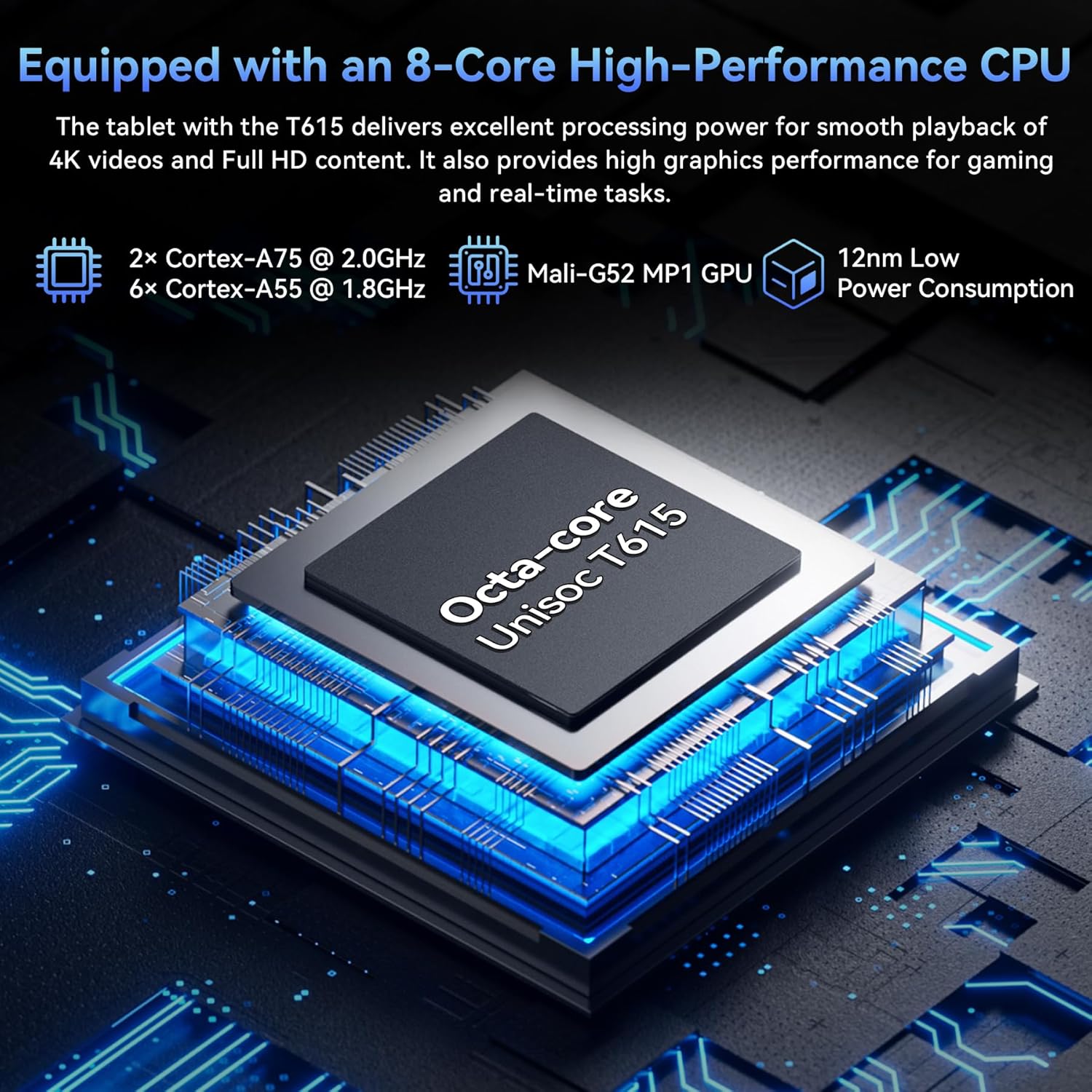
Image: The Octa-core Unisoc T615 processor.

Image: Large capacity storage and expansion capabilities.
4.4 కెమెరా సిస్టమ్
Capture stunning photos with the 13MP rear camera and 5MP front camera. The camera system is enhanced with AI album editing, APV codec support, and Google Lens integration.
- గూగుల్ లెన్స్: Identify objects, plants, and text in real-time, and optimize photos with scene recognition and night view.

Image: Dual high-resolution cameras.

Image: Google AI image editing capabilities.
4.5 బ్యాటరీ లైఫ్
The tablet is equipped with an 8000mAh battery, providing extended usage times for various activities:
- Up to 10 hours of video playback.
- Up to 8 hours of gaming.
- 40 గంటల వరకు సంగీత ప్లేబ్యాక్.
- Up to 840 hours of standby time.

Image: 8000mAh battery performance.
4.6 కనెక్టివిటీ
The TABWEE T90 supports fast and reliable wireless connections:
- 5G వైఫై: Stream 4K videos and download content buffer-free with dual-band 5G WiFi (802.11a/b/g/n/ac).
- బ్లూటూత్ 5.0: Easily pair with wireless earbuds, speakers, and other Bluetooth-enabled devices for seamless audio and data transfer.

Image: High-speed 5G WiFi and Bluetooth 5.0 connectivity.
5. నిర్వహణ
Proper maintenance ensures the longevity and optimal performance of your TABWEE T90 tablet.
5.1 సాధారణ సంరక్షణ
- శుభ్రపరచడం: స్క్రీన్ మరియు బాడీని శుభ్రం చేయడానికి మృదువైన, మెత్తటి బట్టను ఉపయోగించండి. రాపిడి పదార్థాలు లేదా కఠినమైన రసాయనాలను నివారించండి.
- ఉష్ణోగ్రత: Avoid exposing the tablet to extreme temperatures (hot or cold) or direct sunlight for prolonged periods.
- నీటి బహిర్గతం: The tablet is not waterproof. Keep it away from liquids.
- భౌతిక రక్షణ: చుక్కలు మరియు గీతల నుండి రక్షించడానికి అందించిన రక్షణ కేసును ఉపయోగించండి.
5.2 సాఫ్ట్వేర్ నవీకరణలు
మీ టాబ్లెట్ తాజా ఫీచర్లు, భద్రతా ప్యాచ్లు మరియు పనితీరు మెరుగుదలలను కలిగి ఉందని నిర్ధారించుకోవడానికి సిస్టమ్ నవీకరణలను క్రమం తప్పకుండా తనిఖీ చేసి, ఇన్స్టాల్ చేయండి. వెళ్ళండి సెట్టింగ్లు > సిస్టమ్ > సిస్టమ్ అప్డేట్ అందుబాటులో ఉన్న నవీకరణల కోసం తనిఖీ చేయడానికి.
5.3 బ్యాటరీ సంరక్షణ
- బ్యాటరీని తరచుగా పూర్తిగా డిశ్చార్జ్ చేయడాన్ని నివారించండి.
- Do not leave the tablet plugged in for extended periods after it's fully charged.
- ఒరిజినల్ ఛార్జర్ లేదా ధృవీకరించబడిన అనుకూల ఛార్జర్ను మాత్రమే ఉపయోగించండి.
6. ట్రబుల్షూటింగ్
If you encounter issues with your TABWEE T90 tablet, try the following solutions before seeking professional support.
6.1 సాధారణ సమస్యలు మరియు పరిష్కారాలు
| సమస్య | సాధ్యమైన పరిష్కారం |
|---|---|
| టాబ్లెట్ ఆన్ అవ్వడం లేదు | Ensure the battery is charged. Connect the charger and wait a few minutes before attempting to power on again. If unresponsive, press and hold the power button for 10-15 seconds to force a restart. |
| Wi-Fi కనెక్షన్ సమస్యలు | మీ Wi-Fi రూటర్ను పునఃప్రారంభించండి. టాబ్లెట్లో, Wi-Fiని ఆఫ్ చేసి, ఆపై మళ్లీ ఆన్ చేయండి. నెట్వర్క్ను మర్చిపోయి తిరిగి కనెక్ట్ చేయండి. మీరు Wi-Fi సిగ్నల్ పరిధిలో ఉన్నారని నిర్ధారించుకోండి. |
| నెమ్మదిగా పనితీరు లేదా గడ్డకట్టడం | Close unused applications. Clear cache for problematic apps (Settings > Apps > [App Name] > Storage > Clear cache). Restart the tablet. Ensure sufficient storage space is available. |
| Apps crashing or not responding | Force stop the app (Settings > Apps > [App Name] > Force stop). Clear the app's cache and data. Uninstall and reinstall the app. Check for app updates in the Google Play Store. |
| బ్యాటరీ త్వరగా అయిపోతుంది | Reduce screen brightness. Disable Wi-Fi/Bluetooth when not in use. Close background apps. Limit location services. Check battery usage in Settings to identify power-hungry apps. |
6.2 ఫ్యాక్టరీ రీసెట్
సమస్యలు కొనసాగితే, ఫ్యాక్టరీ రీసెట్ అనేక సాఫ్ట్వేర్ సంబంధిత సమస్యలను పరిష్కరించగలదు. హెచ్చరిక: A factory reset will erase all data on your tablet. Back up important data before proceeding.
- వెళ్ళండి సెట్టింగ్లు > సిస్టమ్ > రీసెట్ ఎంపికలు > మొత్తం డేటాను తొలగించండి (ఫ్యాక్టరీ రీసెట్).
- మీ నిర్ణయాన్ని నిర్ధారించి, స్క్రీన్పై ఉన్న సూచనలను అనుసరించండి.
7. స్పెసిఫికేషన్లు
| ఫీచర్ | వివరాలు |
|---|---|
| మోడల్ పేరు | T90-Android 16 |
| ఆపరేటింగ్ సిస్టమ్ | ఆండ్రాయిడ్ 16 |
| ప్రదర్శన పరిమాణం | 11 అంగుళాలు |
| స్క్రీన్ రిజల్యూషన్ | 1920 x 1200 పిక్సెల్లు |
| ప్రాసెసర్ | Octa-core Unisoc T615 (2 GHz) |
| RAM | 24GB (8GB భౌతిక + 16GB వర్చువల్) |
| అంతర్గత నిల్వ | 128 GB |
| విస్తరించదగిన నిల్వ | మైక్రో SD కార్డ్ ద్వారా 2TB వరకు |
| వెనుక కెమెరా | 13 ఎంపీ |
| ఫ్రంట్ కెమెరా | 5 ఎంపీ |
| బ్యాటరీ కెపాసిటీ | 8000mAh |
| వైర్లెస్ కనెక్టివిటీ | 802.11a/b/g/n/ac (5G WiFi) |
| బ్లూటూత్ | బ్లూటూత్ 5.0 |
| వస్తువు బరువు | 11.2 ఔన్సులు |
| ఉత్పత్తి కొలతలు | 10.1 x 6.7 x 0.3 అంగుళాలు |
8. వారంటీ మరియు మద్దతు
Your TABWEE T90 tablet comes with a 2 సంవత్సరాల వారంటీ, providing peace of mind for any potential issues. TABWEE also offers 24/7 US/CA support to assist you with any questions or concerns.
For warranty claims, technical assistance, or general inquiries, please visit the official TABWEE website or contact their customer support directly through the channels provided on their webసైట్ లేదా మీ ఉత్పత్తి ప్యాకేజింగ్లో.
Thank you for choosing TABWEE. We hope you enjoy your new tablet!
Ask a question about this manual
Ask about setup, troubleshooting, compatibility, parts, safety, or missing instructions. Manuals+ will review the question and use this page’s manual context to help answer it.