
Dubstep Pop 610
Dubstep Pop 610 Wireless Speaker User Manual
Model: Pop 610
1. పరిచయం
The Dubstep Pop 610 is a compact wireless speaker designed for portable audio. It features 52mm dynamic drivers, 6W sound output, and True Wireless Stereo (TWS) pairing capability for an enhanced audio experience. With up to 15 hours of playtime, it is suitable for various indoor and outdoor settings. This manual provides essential information for setting up, operating, and maintaining your speaker.

Figure 1: Dubstep Pop 610 Wireless Speaker
2. పెట్టెలో ఏముంది
అన్బాక్సింగ్ తర్వాత ప్యాకేజీ కంటెంట్లను తనిఖీ చేయండి:
- Speaker (1 Unit)
- Charging Cable (1 Unit)
- Lanyard (1 Unit)

Figure 2: Contents of the Dubstep Pop 610 package
3. ఉత్పత్తి ముగిసిందిview
3.1 నియంత్రణలు మరియు పోర్ట్లు
Familiarize yourself with the control buttons and ports on your Dubstep Pop 610 speaker.

Figure 3: Control buttons on the speaker's bottom panel
- పవర్ బటన్: పవర్ ఆన్/ఆఫ్ చేయడానికి నొక్కి పట్టుకోండి.
- ప్లే/పాజ్ బటన్: ఆడియోను ప్లే చేయడానికి లేదా పాజ్ చేయడానికి నొక్కండి.
- మునుపటి ట్రాక్ బటన్: మునుపటి పాటకు వెళ్లడానికి నొక్కండి.
- తదుపరి ట్రాక్ బటన్: తదుపరి పాటకు వెళ్లడానికి నొక్కండి.
- Answer/Hangup Button: కాల్కు సమాధానం ఇవ్వడానికి లేదా ముగించడానికి నొక్కండి.

Figure 4: Type-C charging port
- టైప్-సి ఛార్జింగ్ పోర్ట్: స్పీకర్ను ఛార్జ్ చేయడానికి ఉపయోగించబడుతుంది.
4. సెటప్
4.1 స్పీకర్ను ఛార్జ్ చేయడం
- అందించిన టైప్-సి ఛార్జింగ్ కేబుల్ను స్పీకర్ ఛార్జింగ్ పోర్ట్కు కనెక్ట్ చేయండి.
- కేబుల్ యొక్క మరొక చివరను USB పవర్ అడాప్టర్ (చేర్చబడలేదు) లేదా కంప్యూటర్ యొక్క USB పోర్ట్కు కనెక్ట్ చేయండి.
- ఛార్జింగ్ ఇండికేటర్ లైట్ వెలుగుతుంది. పూర్తిగా ఛార్జ్ కావడానికి దాదాపు 2 గంటలు పడుతుంది.
- పూర్తిగా ఛార్జ్ అయిన తర్వాత, మోడల్ను బట్టి సూచిక లైట్ మారుతుంది లేదా ఆపివేయబడుతుంది.
పూర్తిగా ఛార్జ్ చేస్తే 15 గంటల వరకు ప్లే టైమ్ లభిస్తుంది.
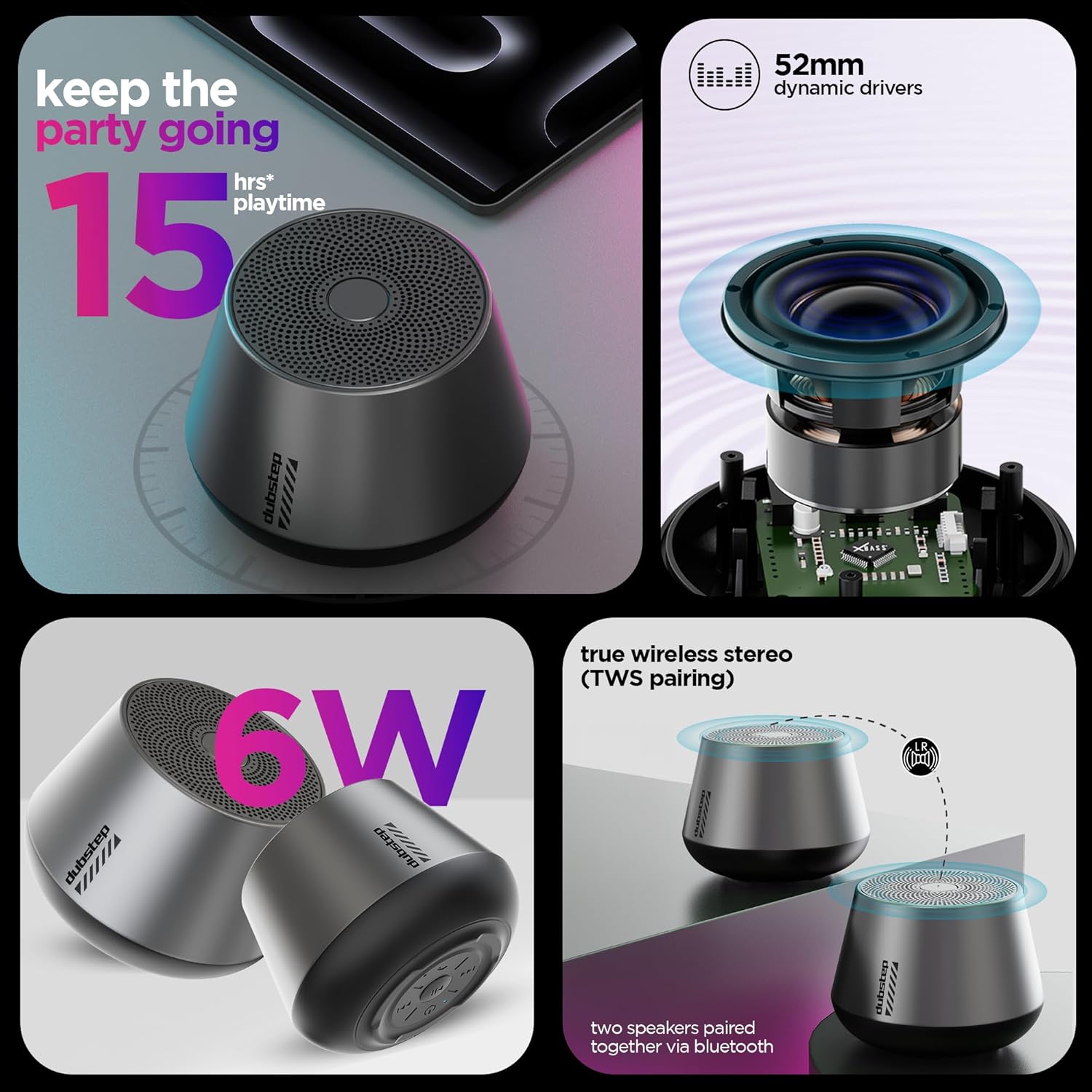
Figure 5: Visual representation of key features including 15 hours playtime
4.2 పవర్ చేయడం ఆన్/ఆఫ్
- పవర్ ఆన్ చేయడానికి, మీరు వినగల ప్రాంప్ట్ వినిపించే వరకు లేదా సూచిక లైట్ వెలుగుతున్నట్లు చూసే వరకు పవర్ బటన్ను నొక్కి పట్టుకోండి.
- పవర్ ఆఫ్ చేయడానికి, స్పీకర్ షట్ డౌన్ అయ్యే వరకు పవర్ బటన్ను మళ్లీ నొక్కి పట్టుకోండి.
5. ఆపరేటింగ్ సూచనలు
5.1 బ్లూటూత్ జత చేయడం
Connect your speaker to a Bluetooth-enabled device.
- Ensure the speaker is powered on and in pairing mode (indicator light will flash, usually blue).
- మీ పరికరంలో (స్మార్ట్ఫోన్, టాబ్లెట్, మొదలైనవి), బ్లూటూత్ సెట్టింగ్లకు వెళ్లి బ్లూటూత్ను ఆన్ చేయండి.
- కోసం వెతకండి available devices and select "Dubstep Pop 610" from the list.
- Once connected, the indicator light will become solid, and you will hear a confirmation sound.
The wireless connectivity range is approximately 10 meters.

Figure 6: Speaker connected wirelessly to a smartphone
5.2 ట్రూ వైర్లెస్ స్టీరియో (TWS) జత చేయడం
Pair two Dubstep Pop 610 speakers for an immersive stereo sound experience.
- రెండు స్పీకర్లు ఆన్లో ఉన్నాయని మరియు మరే ఇతర బ్లూటూత్ పరికరానికి కనెక్ట్ కాలేదని నిర్ధారించుకోండి.
- On one speaker (this will be the primary speaker), press and hold the TWS pairing button (refer to product diagram if available, otherwise assume a dedicated button or a combination).
- ప్రాథమిక స్పీకర్ ద్వితీయ స్పీకర్ కోసం శోధిస్తారు.
- Once paired, you will hear a confirmation sound, and the indicator lights on both speakers will synchronize.
- ఇప్పుడు, విభాగం 5.1లో వివరించిన విధంగా బ్లూటూత్ ద్వారా మీ పరికరాన్ని ప్రాథమిక స్పీకర్కు కనెక్ట్ చేయండి. స్టీరియోలోని రెండు స్పీకర్ల ద్వారా ఆడియో ప్లే అవుతుంది.

Figure 7: Two speakers demonstrating True Wireless Stereo (TWS) pairing
5.3 ఆడియో ప్లేబ్యాక్ మరియు కాల్ నిర్వహణ
- ప్లే/పాజ్: ప్లే/పాజ్ బటన్ను నొక్కండి.
- తదుపరి ట్రాక్: తదుపరి ట్రాక్ బటన్ను నొక్కండి.
- మునుపటి ట్రాక్: మునుపటి ట్రాక్ బటన్ను నొక్కండి.
- సమాధానం/ముగింపు కాల్: Press the Answer/Hangup button during an incoming call or to end an ongoing call.
6. నిర్వహణ
6.1 శుభ్రపరచడం
- స్పీకర్ను మృదువైన, పొడి గుడ్డతో తుడవండి.
- కఠినమైన రసాయనాలు, శుభ్రపరిచే ద్రావకాలు లేదా బలమైన డిటర్జెంట్లు ఉపయోగించవద్దు.
6.2 నిల్వ
- స్పీకర్ను తీవ్రమైన ఉష్ణోగ్రతలకు దూరంగా చల్లని, పొడి ప్రదేశంలో నిల్వ చేయండి.
- ప్రత్యక్ష సూర్యకాంతి లేదా తేమకు ఎక్కువసేపు గురికాకుండా ఉండండి.
6.3 నీటి నిరోధకత
The Dubstep Pop 610 features sweat and splash resistance, making it suitable for light outdoor use or near water. However, it is NOT waterproof and should not be submerged in water.

Figure 8: Speaker shown with water droplets, illustrating sweat and splash resistance
7. ట్రబుల్షూటింగ్
| సమస్య | సాధ్యమైన కారణం | పరిష్కారం |
|---|---|---|
| స్పీకర్ పవర్ ఆన్ చేయదు. | తక్కువ బ్యాటరీ. | స్పీకర్ను పూర్తిగా ఛార్జ్ చేయండి. |
| శబ్దం లేదు. | Volume too low; Device not connected; Speaker paused. | Increase volume on speaker and device; Re-pair Bluetooth; Press Play/Pause. |
| బ్లూటూత్ జత చేయడం విఫలమైంది. | స్పీకర్ జత చేసే మోడ్లో లేదు; పరికరం బ్లూటూత్ ఆఫ్లో ఉంది; పరికరం నుండి చాలా దూరంలో ఉంది. | Ensure speaker is in pairing mode; Turn on device Bluetooth; Move device closer (within 10m). |
| TWS జత చేయడం విఫలమైంది. | స్పీకర్లు ఇప్పటికే ఇతర పరికరాలకు కనెక్ట్ చేయబడ్డాయి; TWS జత చేసే మోడ్లో లేదు. | Disconnect speakers from other devices; Ensure both speakers are in TWS pairing mode. |
8. స్పెసిఫికేషన్లు
| ఫీచర్ | వివరాలు |
|---|---|
| మోడల్ | పాప్ 610 |
| స్పీకర్ రకం | బ్లూటూత్ స్పీకర్ |
| ఆడియో డ్రైవర్ రకం | డైనమిక్ డ్రైవర్ |
| ఆడియో డ్రైవర్ పరిమాణం | 52 మి.మీ |
| స్పీకర్ అవుట్పుట్ | 6 వాట్స్ (ఆర్ఎంఎస్) |
| కనెక్టివిటీ టెక్నాలజీ | బ్లూటూత్ |
| బ్లూటూత్ రేంజ్ | 10 మీటర్లు |
| ప్రత్యేక లక్షణాలు | X-Bass Technology, TWS Pairing, Sweat & Splash Resistance |
| బ్యాటరీ రకం | లిథియం అయాన్ |
| బ్యాటరీ సగటు జీవితం | 15 గంటలు |
| ఛార్జింగ్ సమయం | 2 గంటలు |
| వస్తువు బరువు | 210 గ్రాములు |
| ఉత్పత్తి కొలతలు | 9D x 8W x 9H సెంటీమీటర్లు |
| మెటీరియల్ | యాక్రిలోనిట్రైల్ బుటాడిన్ స్టైరీన్ (ABS) |
| మూలం దేశం | చైనా |
9. వారంటీ మరియు మద్దతు
9.1 వారంటీ సమాచారం
The Dubstep Pop 610 Wireless Speaker comes with a 6 నెలల వారంటీ కొనుగోలు తేదీ నుండి, తయారీ లోపాలను కవర్ చేస్తుంది.
9.2 తయారీదారు సంప్రదింపు సమాచారం
For support, service, or warranty claims, please contact:
- తయారీదారు: Nuworld Retail Private Limited
- చిరునామా: Plot No.17-18, Pole No.9, PO Dhoolsiras, Dwarka, Sector-28, New Delhi - 110077
- ఇమెయిల్: hello@Dubstepworld.com
- టెలిఫోన్: +91-8826257630
10. ఉత్పత్తి వీడియో
Watch the official product video for a visual guide to the Dubstep Pop 610 Wireless Speaker.
వీడియో: అధికారిక ఉత్పత్తి వీడియో ప్రదర్శనasing the features and design of the Dubstep Pop 610 Wireless Speaker.
Ask a question about this manual
Ask about setup, troubleshooting, compatibility, parts, safety, or missing instructions. Manuals+ will review the question and use this page’s manual context to help answer it.