
పరిచయం
This manual provides detailed instructions for the setup, operation, and maintenance of your ZealSound M19 Wireless Lavalier Microphone system. This system is designed for clear audio capture across various devices and applications.
ప్యాకేజీ విషయాలు
క్రింద జాబితా చేయబడిన అన్ని వస్తువులు మీ ప్యాకేజీలో చేర్చబడ్డాయని ధృవీకరించండి:
- 2 x వైర్లెస్ మైక్రోఫోన్లు (ట్రాన్స్మిటర్లు)
- 1 x Dual-Interface Receiver (USB-C & Lightning)
- 1 x USB-A Adapter
- 1 x టైప్-C నుండి USB-A ఛార్జింగ్ కేబుల్
- 2 x Black Foam Windshields
- 2 x Pink Furry Muffs
- 2 x Black Furry Muffs
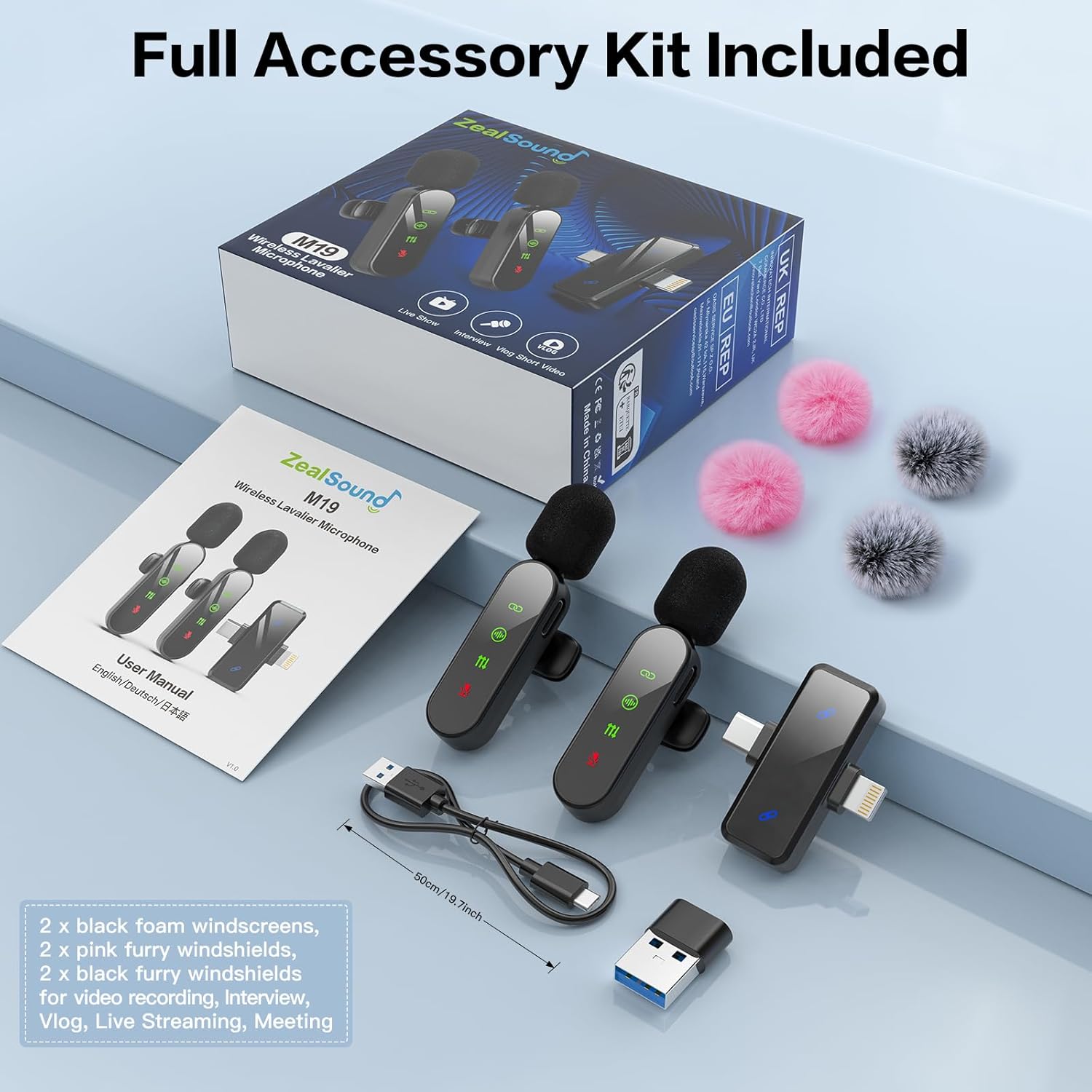
ఉత్పత్తి ముగిసిందిview
The ZealSound M19 system consists of two transmitters (microphones) and one receiver. The transmitters feature an LED display for status indication, while the receiver offers broad compatibility.
ట్రాన్స్మిటర్ (మైక్రోఫోన్)
- పవర్ బటన్: Controls power, mute, and reverb functions.
- LED డిస్ప్లే: Shows connection status, noise cancellation, reverb mode, and mute status.
- మైక్రోఫోన్ ఇన్పుట్: Omnidirectional పికప్.
- ఛార్జింగ్ పోర్ట్: USB-C for recharging.
- క్లిప్: For attaching to clothing.
రిసీవర్
- Dual Connector: Integrated USB-C and Lightning connectors for direct connection to compatible devices.
- USB-A అడాప్టర్: For connecting to computers or other devices with USB-A ports.
- సూచిక కాంతి: Shows connection status with transmitters.

సెటప్ సూచనలు
- ట్రాన్స్మిటర్లను ఛార్జ్ చేయండి: Before first use, fully charge both wireless microphones using the provided Type-C to USB-A charging cable. The LED display will indicate charging status.
- రిసీవర్ని కనెక్ట్ చేయండి:
- For iPhone/iPad: Plug the Lightning connector of the receiver directly into your device's port.
- For Android/USB-C Devices: Plug the USB-C connector of the receiver directly into your device's port.
- For Laptops/PCs: Attach the USB-A adapter to the USB-C end of the receiver, then plug it into a USB-A port on your computer.
గమనిక: If your phone has a protective case, it may need to be removed to ensure the receiver connects properly.
- పవర్ ఆన్ ట్రాన్స్మిటర్లు: Press and hold the power button on each microphone until the LED display illuminates. The microphones will automatically pair with the receiver. A solid green connection indicator on the microphone's LED display confirms successful pairing.
- పరికర గుర్తింపు: Your device should automatically recognize the external microphone. For computers, you may need to select the ZealSound microphone as the input device in your sound settings.


ఆపరేటింగ్ సూచనలు
పవర్ ఆన్/ఆఫ్
- To power on, press and hold the power button on the transmitter until the LED display lights up.
- To power off, press and hold the power button again until the LED display turns off.
స్వయంచాలక జత చేయడం
Once the receiver is plugged into your device and the transmitters are powered on, they will automatically pair. The connection indicator on the transmitter's LED display will show a solid green light when connected.
నాయిస్ తగ్గింపు
The microphone features built-in intelligent noise filtering to minimize ambient distractions. This feature is active by default. The LED display will show a specific icon for noise cancellation when active.

Reverb Echo Effect
- To activate the reverb mode, double-press the power button on the transmitter. The "Echo" LED display will light up.
- To deactivate, double-press the power button again. The "Echo" LED will turn off.
మ్యూట్ ఫంక్షన్
- To mute the microphone, single-press the power button on the transmitter. The mic icon on the LED display will turn red.
- To unmute, single-press the power button again. The red mic icon will turn off.
బ్యాటరీ లైఫ్ మరియు ఛార్జింగ్
- Each microphone provides up to 4 hours of recording time. When using both microphones, the total system battery life is approximately 8 hours.
- ఛార్జింగ్ సమయం సుమారు 1.5 గంటలు.
- The microphones can be used while charging for uninterrupted performance.

వైర్లెస్ రేంజ్
The system operates on 2.4GHz transmission, providing a stable connection up to 100 feet (30 meters) with minimal latency.

నిర్వహణ
- శుభ్రపరచడం: Use a soft, dry cloth to clean the microphone and receiver. Avoid using liquids or abrasive cleaners.
- నిల్వ: పరికరాన్ని ప్రత్యక్ష సూర్యకాంతి మరియు తీవ్రమైన ఉష్ణోగ్రతలు లేకుండా చల్లని, పొడి ప్రదేశంలో నిల్వ చేయండి.
- విండ్షీల్డ్లు: Regularly clean or replace the foam and furry windshields to maintain optimal sound quality and protect the microphone capsule.
ట్రబుల్షూటింగ్
| సమస్య | సాధ్యమైన కారణం | పరిష్కారం |
|---|---|---|
| సౌండ్ రికార్డింగ్ లేదు. |
|
|
| Poor audio quality (muffled, distorted). |
|
|
| మైక్రోఫోన్ ఛార్జ్ కావడం లేదు. |
|
|
| Cannot use for phone calls or messenger apps. |
| This microphone system is designed for content recording (video, audio) and not for standard phone calls or voice chat in most messenger applications. |
స్పెసిఫికేషన్లు
| ఫీచర్ | వివరాలు |
|---|---|
| మోడల్ పేరు | M19-CA |
| అంశం మోడల్ సంఖ్య | H19 |
| బ్రాండ్ | ZealSound |
| కనెక్టివిటీ టెక్నాలజీ | 2.4GHz Wireless, Lightning & USB-C, USB Adapter |
| కనెక్టర్ రకం | Lightning & USB-C |
| అనుకూల పరికరాలు | iPhone/iPad, USB-C Smartphones/Devices, PC, Computers |
| ప్రత్యేక లక్షణాలు | Noise Reduction, Upgraded Smart Display Screen, Reverb Echo Effect |
| ధ్రువ నమూనా | ఓమ్నిడైరెక్షనల్ |
| ఆడియో సెన్సిటివిటీ | 38 డెసిబెల్స్ |
| సిగ్నల్-టు-శబ్ద నిష్పత్తి | 65 డిబి |
| ఫ్రీక్వెన్సీ రెస్పాన్స్ | 48 KHz |
| మైక్రోఫోన్ ఫారమ్ ఫ్యాక్టర్ | లావాలియర్ |
| శక్తి మూలం | Battery Powered (2 Nonstandard Battery batteries included) |
| ఉత్పత్తి కొలతలు | 5.89 x 0.99 x 1.09 సెం.మీ; 60 గ్రా |
| ఎన్క్లోజర్ మెటీరియల్ | అక్రిలోనిట్రైల్ బుటాడిన్ స్టైరీన్, దృఢమైన పదార్థం |
| మూలం దేశం | చైనా |
వారంటీ మరియు మద్దతు
వారంటీ: ఈ ఉత్పత్తి కొనుగోలు తేదీ నుండి 365 రోజుల వారంటీతో వస్తుంది.
For technical support or warranty claims, please refer to the contact information provided with your purchase documentation or visit the official ZealSound webసైట్.