
1. పరిచయం
The Tenveo 4K NDI AI Auto-Tracking PTZ Camera (Model TEVO-VHD20H4KN) is designed for professional video conferencing and live streaming applications. It features 4K resolution at 30FPS, a 1/2.8" Sony CMOS sensor, and 20x optical zoom. Advanced AI humanoid and face auto-tracking ensures subjects remain centered. Connectivity options include USB 3.0, HDMI, LAN/NDI, and Power over Ethernet (PoE) for simplified installation and operation. This camera supports various streaming protocols like RTMP, RTSP, and SRT, making it compatible with platforms such as YouTube, Facebook, OBS, and vMix.
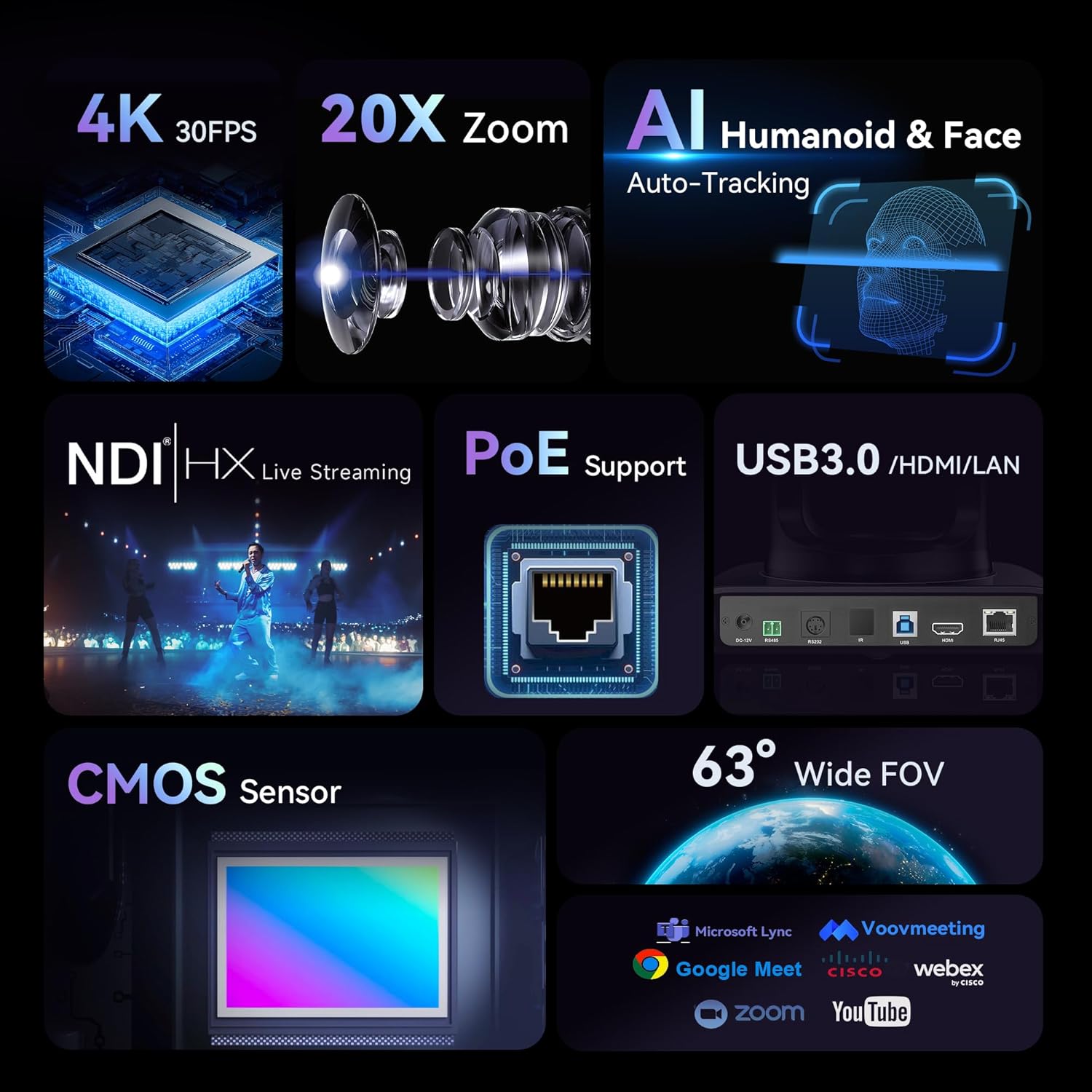
This image highlights the key features of the Tenveo PTZ camera, including 4K 30FPS resolution, 20x optical zoom, AI humanoid and face auto-tracking, NDI|HX live streaming, PoE support, USB3.0/HDMI/LAN connectivity, CMOS sensor, and a 63° wide field of view.
2. పెట్టెలో ఏముంది
ప్యాకేజీ కింది అంశాలను కలిగి ఉంటుంది:
- Tenveo NDI AI Auto Tracking 4K PTZ Live Streaming Camera
- IR రిమోట్ కంట్రోల్
- DC12V పవర్ అడాప్టర్
- USB3.0 కేబుల్
- వినియోగదారు మాన్యువల్
- వాల్ మౌంట్
- మౌంటు మరలు
3. సెటప్ సూచనలు
Follow these steps to set up your Tenveo PTZ camera:
- అన్ప్యాకింగ్ మరియు తనిఖీ: Carefully remove all components from the packaging. Inspect for any signs of damage.
- పవర్ కనెక్షన్: Connect the DC12V Power Adapter to the camera's power input. Alternatively, if using Power over Ethernet (PoE), connect an Ethernet cable from a PoE-enabled switch to the camera's LAN port.
- వీడియో అవుట్పుట్ కనెక్షన్:
- For USB 3.0 output, connect the provided USB3.0 cable to your computer.
- For HDMI output, connect an HDMI cable (not included) to a display or video switcher.
- For LAN/NDI streaming, connect an Ethernet cable (not included) to your network.
- మౌంటు: The camera supports desktop, monitor, wall, or ceiling mounting. Use the provided wall mount and screws for wall installation, or place the camera on a stable surface for desktop use.

This image shows the rear panel of the Tenveo PTZ camera, detailing the power input, USB3.0, HDMI, and LAN/NDI ports for various connections.
4. ఆపరేటింగ్ సూచనలు
The camera offers various control methods for flexible operation.
AI Auto-Tracking
The camera features advanced AI humanoid and face auto-tracking. This function automatically adjusts the camera's pan, tilt, and zoom to keep the subject in frame.
- ప్రెజెంటర్ మోడ్: Tracks a single presenter, ensuring they remain centered even if they move.
- Autoframing Mode: Automatically frames multiple participants in a meeting room.
To activate or deactivate AI tracking via remote control:
- For Auto-framing: Press the 'A' button on the remote control.
- To initiate AI tracking: Briefly press 'AI', then select the target (if multiple people are present), and press 'Home' to confirm.
- To disable AI tracking: Briefly press 'AI' to exit tracking (returns to auto-framing), or press 'A' directly to disable AI (returns to normal mode).

This image shows the Tenveo PTZ camera remote control, highlighting the buttons used for AI auto-tracking and auto-framing functions. The 'A' button is for auto-framing, and the 'AI' button is for initiating or disabling AI tracking.
Web ఇంటర్ఫేస్ నియంత్రణ
The camera can be controlled via a web interface for advanced settings and real-time preview.
- Connect the camera to your network via the LAN port.
- Find the camera's IP address (refer to the network settings or camera's display if available).
- తెరవండి a web బ్రౌజర్లోకి వెళ్లి కెమెరా యొక్క IP చిరునామాను నమోదు చేయండి.
- Log in using the default credentials (refer to the user manual for default username/password).
- నుండి web interface, you can control pan, tilt, zoom, focus, and access AI tracking settings.

This image displays the Tenveo PTZ camera's web interface, showing video preview, PTZ controls, and settings for tracking modes like Presenter and AutoFraming.
5. Connectivity and Streaming
The Tenveo PTZ camera offers multiple interfaces for versatile live streaming and video production:
- USB 3.0: Provides simultaneous video output up to 4K@30fps for direct connection to a computer.
- HDMI: Outputs video up to 4K@30fps, suitable for monitors or video switchers.
- LAN/NDI: Supports Power over Ethernet (PoE) for power, control, and video transmission over a single Ethernet cable. NDI enables low-latency IP-based production workflows.
- స్ట్రీమింగ్ ప్రోటోకాల్స్: Compatible with RTMP, RTSP, and SRT for direct streaming to platforms like YouTube, Facebook, and OBS without additional hardware.

This image illustrates the various connectivity ports on the Tenveo PTZ camera, including USB 3.0, HDMI, and LAN/NDI, demonstrating its versatile integration into different streaming setups.
6. సంస్థాపనా పద్ధతులు
The camera can be installed in various ways to suit different environments:
- డెస్క్టాప్ మౌంటు: Place the camera on a flat, stable surface.
- వాల్ మౌంటు: Use the provided wall mount and screws to secure the camera to a wall.
- సీలింగ్ మౌంటు: The camera can also be mounted to the ceiling using appropriate hardware (not included, but compatible with the camera's design).
- త్రిపాద మౌంటు: For temporary setups or portability, the camera can be mounted on a standard tripod.

This image displays the Tenveo PTZ camera installed in various configurations: wall-mounted, ceiling-mounted, desktop placement, and on a tripod, illustrating its adaptability for different usage scenarios.
7. స్పెసిఫికేషన్లు
| ఫీచర్ | వివరాలు |
|---|---|
| బ్రాండ్ | టెన్వియో |
| మోడల్ పేరు | TEVO-VHD20H4KN పరిచయం |
| మోడల్ సంఖ్య | DE-CA-VHD20H-AI-4K |
| సెన్సార్ టెక్నాలజీ | CMOS |
| ఆప్టికల్ సెన్సార్ పరిమాణం | 1/2.8 అంగుళాలు |
| వీడియో క్యాప్చర్ రిజల్యూషన్ | 4K (3840x2160) |
| ఫ్రేమ్ రేట్ | 30FPS (at 4K) |
| ప్రభావవంతమైన వీడియో రిజల్యూషన్ | 8.29 ఎంపీ |
| ఆప్టికల్ జూమ్ | 20x |
| గరిష్ట ఫోకల్ పొడవు | 99 మిల్లీమీటర్లు |
| కనిష్ట ఫోకల్ లెంగ్త్ | 4.95 మిల్లీమీటర్లు |
| గరిష్ట ఎపర్చరు | f/1.7 |
| కనిష్ట ఎపర్చరు | f/3.7 |
| ఫోకస్ రకం | ఆటో ఫోకస్, మాన్యువల్ ఫోకస్ |
| చిత్రం స్థిరీకరణ | డిజిటల్ |
| కనెక్టివిటీ టెక్నాలజీ | Ethernet, HDMI, USB 3.0 |
| PoE మద్దతు | అవును |
| మద్దతు ఉన్న ఆపరేటింగ్ సిస్టమ్స్ | Windows, Mac, Linux, Android |
| ఉత్పత్తి లక్షణాలు | AI Auto-Tracking (Humanoid & Face), Multiple Connections (HDMI/LAN/NDI/USB3.0), PoE Support |
| రంగు | Nero Classico (Classic Black) |
| అనుకూల డిస్ప్లే పరిమాణం | 20 అంగుళాలు |
| సిఫార్సు చేసిన ఉపయోగాలు | Live Concert, Church Events, Sports Events, University Lecture, Online Meeting, Studio Live Streaming, Video Conferencing |
8. నిర్వహణ
To ensure optimal performance and longevity of your Tenveo PTZ camera, follow these maintenance guidelines:
- క్లీనింగ్: Use a soft, dry cloth to clean the camera body. For the lens, use a specialized lens cleaning cloth and solution. Avoid harsh chemicals or abrasive materials.
- నిల్వ: When not in use for extended periods, store the camera in a dry, dust-free environment.
- ఫర్మ్వేర్ నవీకరణలు: Periodically check the Tenveo official website for any available firmware updates to ensure the camera operates with the latest features and improvements.
9. ట్రబుల్షూటింగ్
If you encounter issues with your Tenveo PTZ camera, refer to the following common troubleshooting steps:
- పవర్ లేదు: Ensure the DC12V power adapter is securely connected to both the camera and a working power outlet. If using PoE, verify the Ethernet cable is connected to a PoE-enabled switch and the switch is powered on.
- వీడియో అవుట్పుట్ లేదు:
- Check all video cables (USB, HDMI, Ethernet) for secure connections.
- Verify the input source on your display or video switcher is correctly selected.
- Ensure the camera is powered on and its indicator lights are active.
- AI ట్రాకింగ్ పనిచేయడం లేదు:
- Ensure there is sufficient lighting in the environment.
- Check for obstructions between the camera and the subject.
- Verify AI tracking is enabled via the remote control or web ఇంటర్ఫేస్.
- Ensure the subject is within the camera's effective tracking range.
- రిమోట్ కంట్రోల్ స్పందించడం లేదు:
- రిమోట్ కంట్రోల్లోని బ్యాటరీలను తనిఖీ చేయండి మరియు అవసరమైతే భర్తీ చేయండి.
- Ensure there are no obstructions between the remote control and the camera's IR receiver.
- నెట్వర్క్ కనెక్టివిటీ సమస్యలు:
- Verify the Ethernet cable is properly connected.
- Check network settings on your computer and the camera's web ఇంటర్ఫేస్.
- Ensure the camera's IP address is correct and not conflicting with other devices on the network.
మరింత సహాయం కోసం, దయచేసి టెన్వియో కస్టమర్ సపోర్ట్ను సంప్రదించండి.
10. వారంటీ మరియు మద్దతు
The Tenveo 4K NDI AI Auto-Tracking PTZ Camera comes with a 3-సంవత్సరం ఉత్పత్తి వారంటీ.
For any technical support or inquiries, please contact Tenveo customer service via email at sales@tenveo.com. Tenveo offers 24/7 after-sales email support.
అదనంగా, ఎ 30-రోజుల మనీ-బ్యాక్ గ్యారెంటీ అందించబడుతుంది.


