
1. పరిచయం
This manual provides instructions for the Tenveo PTZ NDI Camera with AI Auto Tracking. This camera is designed for professional videoconferencing and live streaming applications, offering high-quality video capture and advanced features for various environments.
ముఖ్య లక్షణాలు ఉన్నాయి:
- Full HD 1080P resolution at 60 frames per second (FPS)
- 20x optical zoom for detailed imaging
- AI-powered humanoid and face auto-tracking
- Multiple video output interfaces: USB3.0, HDMI, and LAN with Power over Ethernet (PoE) support
- NDI protocol support for low-latency IP-based production workflows

చిత్రం 1.1: ముగిసిందిview of Tenveo PTZ NDI Camera features, including 20x zoom, AI tracking, NDI, PoE, USB3.0/HDMI/LAN, 1080P 60FPS, and 61-degree field of view.
2. సెటప్
2.1. ప్యాకేజీ విషయాలు
ప్యాకేజీలో అన్ని అంశాలు ఉన్నాయని నిర్ధారించుకోండి:
- Tenveo PTZ NDI Camera
- IR రిమోట్ కంట్రోల్
- వాల్ మౌంట్
- USB3.0 కేబుల్
- 12V 2A పవర్ అడాప్టర్
- మౌంటు స్క్రూలు
- వినియోగదారు మాన్యువల్ (ఈ పత్రం)
2.2. సంస్థాపనా పద్ధతులు
The PTZ camera supports various installation methods to suit different environments:
- డెస్క్టాప్ మౌంటు: కెమెరాను చదునైన, స్థిరమైన ఉపరితలంపై ఉంచండి.
- వాల్ మౌంటు: Use the provided wall mount and screws to secure the camera to a wall.
- సీలింగ్ మౌంటు: Attach the camera to the ceiling using appropriate mounting hardware (not always included, check specific model).
- త్రిపాద మౌంటు: పోర్టబుల్ సెటప్ల కోసం కెమెరాను ప్రామాణిక త్రిపాదపై అమర్చవచ్చు.

Image 2.1: Illustration of various installation methods: wall, ceiling, desktop, and tripod mounting.
2.3. కెమెరాను కనెక్ట్ చేస్తోంది
కెమెరా బహుళ కనెక్టివిటీ ఎంపికలను అందిస్తుంది:
- పవర్ కనెక్షన్: Connect the 12V 2A power adapter to the camera's power input. Alternatively, if using a PoE-enabled network, connect an Ethernet cable from a PoE switch to the camera's LAN port.
- USB3.0 Connection: Connect the provided USB3.0 cable from the camera to your computer for direct video and control.
- HDMI కనెక్షన్: Connect an HDMI cable from the camera to a display or video mixer.
- LAN Connection (IP/NDI): Connect an Ethernet cable from the camera's LAN port to your network router or switch. This enables IP streaming, NDI streaming, and IP control.

Image 2.2: Diagram illustrating easy plug-and-play installation: connecting to a local network with PoE, accessing the camera's IP address, and live streaming via OBS, vMix, YouTube, or Facebook.

Image 2.3: Diagram showing the camera's multiple connection interfaces including power, USB3.0, HDMI, and LAN, and how they integrate into a streaming setup with a joystick controller and display devices.
3. ఆపరేటింగ్ సూచనలు
3.1. PTZ నియంత్రణ (పాన్, టిల్ట్, జూమ్)
The camera features pan, tilt, and zoom capabilities. Pan allows horizontal movement, tilt allows vertical movement, and zoom adjusts the focal length. The 20x optical zoom provides clear magnification without loss of quality.

Image 3.1: The camera's 20x optical zoom and pan (350°) and tilt (180°) capabilities, shown in a church setting.
3.2. AI Auto Tracking
The camera incorporates advanced AI algorithms for humanoid and face auto-tracking, ensuring subjects remain centered and in focus during movement. This feature supports both Presenter mode and Auto Cropping.
- ప్రెజెంటర్ మోడ్: ఒకే నియమించబడిన స్పీకర్ను ట్రాక్ చేస్తుంది.
- Auto Cropping: Automatically adjusts the frame to keep the subject optimally positioned.
- అంతరాయం లేని ట్రాకింగ్: Maintains smooth tracking even if the target is temporarily obscured or moves quickly.
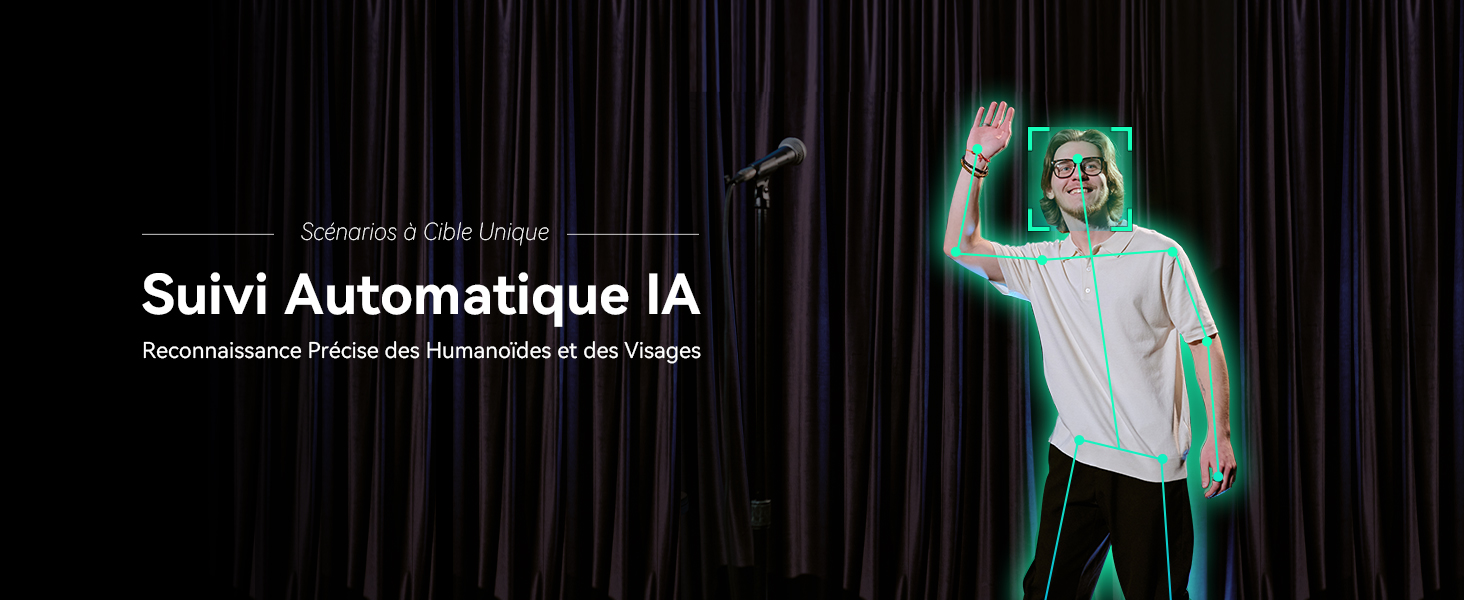
Image 3.2: Illustration of AI Auto Tracking with precise humanoid and face recognition.
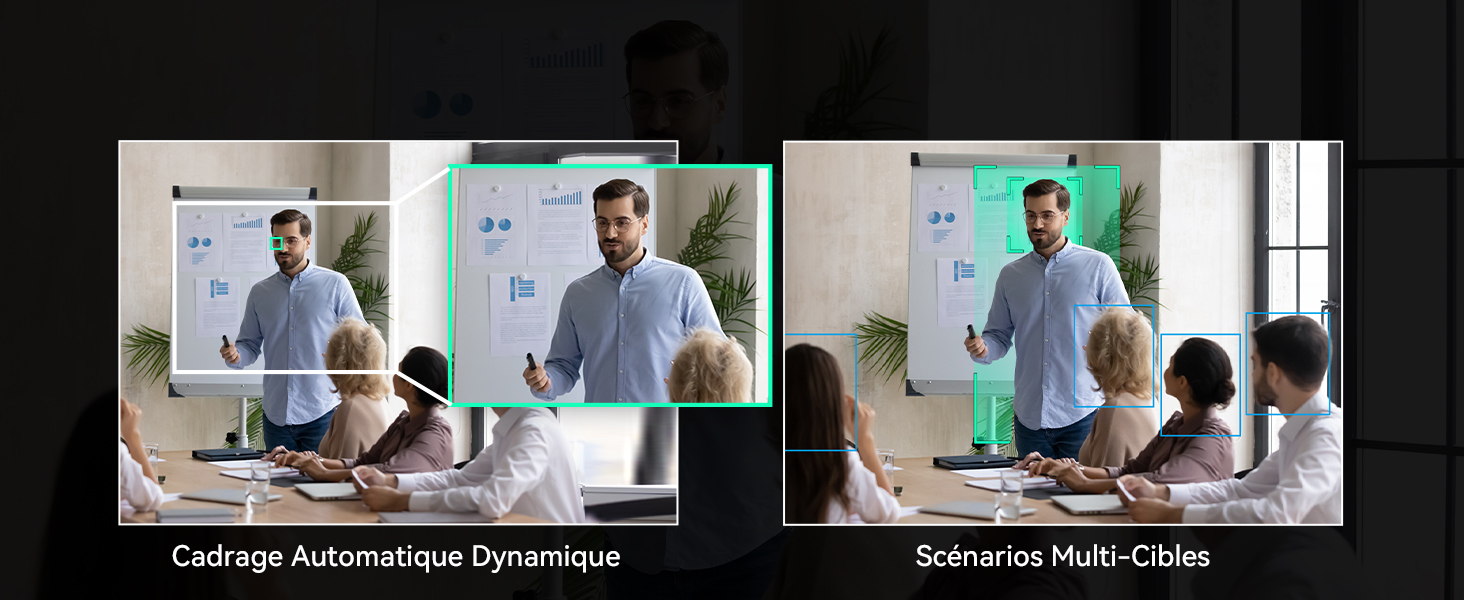
Image 3.3: Comparison of Dynamic Auto Framing for a single target and Multi-Target Scenarios, showing how the camera adapts its framing.
3.3. నియంత్రణ పద్ధతులు
The camera can be controlled via the included IR remote control or a web ఇంటర్ఫేస్.
3.3.1. రిమోట్ కంట్రోల్
Use the IR remote control to manage PTZ functions, AI tracking, and other camera settings.
- ఆటో ఫ్రేమింగ్: Press the dedicated button to activate/deactivate auto framing.
- AI ట్రాకింగ్ను యాక్టివేట్ చేయండి: Briefly press the AI button, then select the target (if multiple are present), and confirm.
- Deactivate AI Tracking: Briefly press the auto framing button to exit tracking, or press the AI button directly to disable AI (returns to normal mode).
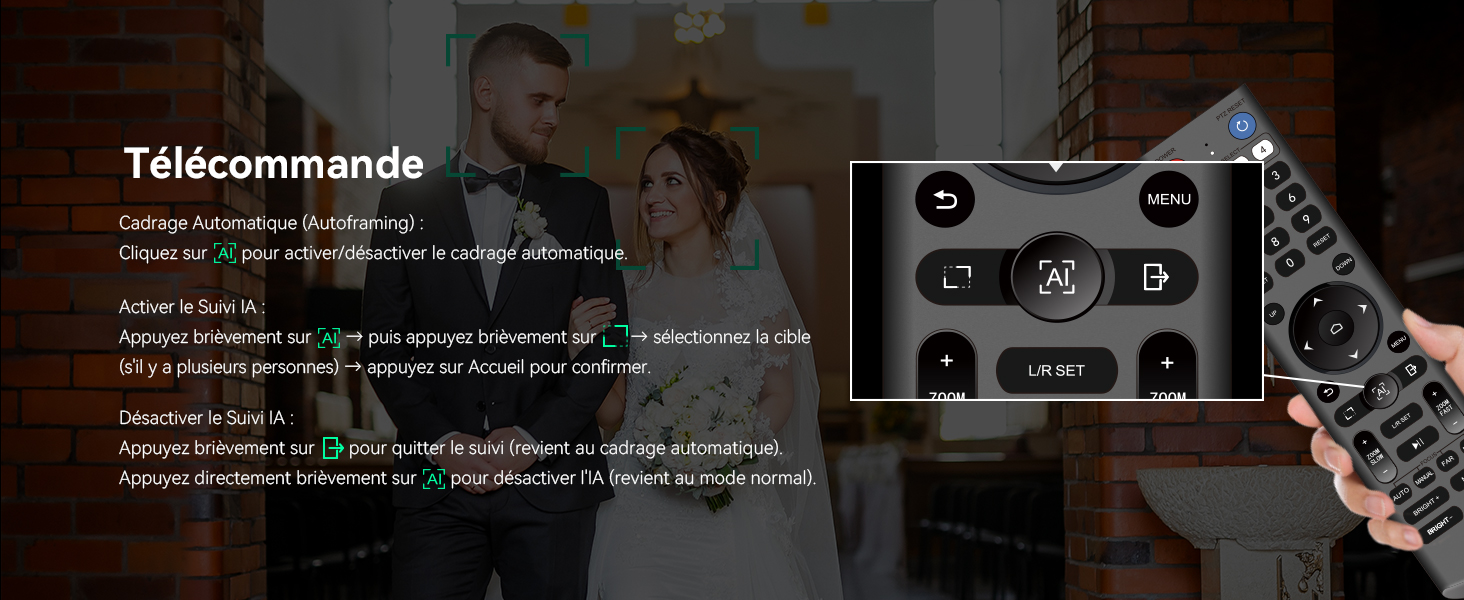
Image 3.4: The IR remote control, highlighting buttons for auto framing and AI tracking activation/deactivation.
3.3.2 Web ఇంటర్ఫేస్ నియంత్రణ
కెమెరాను యాక్సెస్ చేయండి web దాని IP చిరునామాను a లో నమోదు చేయడం ద్వారా ఇంటర్ఫేస్ web browser. The interface allows for comprehensive control over PTZ movements, tracking modes, image settings, and network configurations.

Image 3.5: Screenshot of the web interface for controlling the camera, showing options for tracking, PTZ, and various settings.
3.4. Live Streaming and Connectivity
The camera supports various streaming protocols and integrates with popular platforms:
- NDI Protocol: Enables low-latency, high-quality video streaming and PTZ control over IP networks.
- RTMP, RTSP, SRT: Compatible with these protocols for direct broadcasting to platforms like YouTube, Facebook, OBS, vMix, and more.
- Multi-Camera Synchronization: Supports multi-camera setups for complex productions, compatible with video mixers and Tenveo PTZ controllers.

Image 3.6: System diagram showing the Tenveo NDI AI-Tracking PTZ Camera connected via HDMI to a Blackmagic ATEM, USB3.0 to a computer, and LAN for IP control and streaming (RTSP, RTMP, NDI) to various platforms like Zoom, Google Meet, Webex, and YouTube.
4. నిర్వహణ
To ensure optimal performance and longevity of your Tenveo PTZ NDI Camera, follow these maintenance guidelines:
- శుభ్రపరచడం: Gently wipe the camera lens with a soft, dry, lint-free cloth. For the camera body, use a slightly damp cloth and avoid harsh chemicals or abrasive materials.
- పర్యావరణం: కెమెరాను శుభ్రమైన, పొడి వాతావరణంలో, తీవ్రమైన ఉష్ణోగ్రతలు, తేమ మరియు ప్రత్యక్ష సూర్యకాంతికి దూరంగా ఆపరేట్ చేయండి మరియు నిల్వ చేయండి.
- నిర్వహణ: Avoid dropping or subjecting the camera to strong impacts. When adjusting manually, do so gently.
- శక్తి: Always use the provided power adapter or a compatible PoE switch to prevent electrical damage.
5. ట్రబుల్షూటింగ్
If you encounter issues with your Tenveo PTZ NDI Camera, consider the following basic troubleshooting steps:
- శక్తి లేదు: Ensure the power adapter is securely connected to both the camera and a working power outlet, or that the PoE switch is active and providing power through the Ethernet cable.
- వీడియో అవుట్పుట్ లేదు: Check all video cable connections (USB, HDMI, LAN). Verify that the correct input source is selected on your display or video mixer. Ensure drivers are installed for USB connections if required by your operating system.
- No PTZ Control: Confirm that the remote control batteries are functional and that there are no obstructions between the remote and the camera's IR receiver. For IP control, verify network connectivity and the camera's IP address.
- ట్రాకింగ్ సమస్యలు: Ensure the lighting conditions are adequate and that the subject is clearly visible to the camera. Avoid rapid, erratic movements that might exceed the tracking system's capabilities.
- పేలవమైన చిత్ర నాణ్యత: Check for dirt or smudges on the lens. Ensure the camera's resolution and frame rate settings are appropriate for your setup.
For more complex issues or persistent problems, please refer to the support section for assistance.
6. స్పెసిఫికేషన్లు
| ఫీచర్ | స్పెసిఫికేషన్ |
|---|---|
| బ్రాండ్ | టెన్వియో |
| మోడల్ సంఖ్య | EU-CA-VHD20H-AI-N |
| మోడల్ పేరు | TEVO-VHD20HAN |
| రంగు | మాట్ బ్లాక్ |
| ఫోటో సెన్సార్ టెక్నాలజీ | CMOS |
| వీడియో రికార్డింగ్ రిజల్యూషన్ | 1080p |
| గరిష్ట ఫోకల్ పొడవు | 99 మిల్లీమీటర్లు |
| కనిష్ట ఫోకల్ పొడవు | 4.95 మిల్లీమీటర్లు |
| మాక్స్ ఎపర్చరు | 1.8 f |
| Min Aperture | 3.9 f |
| ఆప్టికల్ జూమ్ | 20x |
| డిజిటల్ జూమ్ | 8x |
| కనెక్టివిటీ టెక్నాలజీ | USB, HDMI, LAN |
| ఆప్టికల్ సెన్సార్ పరిమాణం | 1/2.8 అంగుళం |
| చిత్రం స్థిరీకరణ | ఆప్టికల్ |
| ఫోకస్ రకం | ఆటో ఫోకస్, మాన్యువల్ ఫోకస్ |
| వీడియో క్యాప్చర్ ఫార్మాట్ | MP4 |
| మద్దతు ఉన్న ఆడియో ఫార్మాట్ | AAC, MP3 |
| సిఫార్సు చేసిన ఉపయోగాలు | Live streaming, religious services, video production, videoconferencing, education, live events |
| అనుకూల పరికరాలు | ల్యాప్టాప్, పర్సనల్ కంప్యూటర్, టాబ్లెట్, స్మార్ట్ఫోన్ |
7. వారంటీ మరియు మద్దతు
7.1. ఉత్పత్తి వారంటీ
The Tenveo PTZ NDI Camera comes with a standard 3 సంవత్సరాల వారంటీ covering parts and labor. This warranty ensures your product is free from defects in materials and workmanship under normal use.
Additionally, Tenveo offers a 30-రోజుల మనీ-బ్యాక్ గ్యారెంటీ for risk-free purchase.
7.2. సాంకేతిక మద్దతు
Tenveo provides జీవితకాల సాంకేతిక మద్దతు for this product. If you have any questions, require assistance with installation, or encounter any issues, please contact our support team.
Our support team aims to respond within 12 hours and provide a satisfactory solution. Remote assistance for installation can be provided if necessary.
సంప్రదింపు ఇమెయిల్: sales@tenveo.com