
పరిచయం
This manual provides essential instructions for the installation, operation, and maintenance of your ASAHOM S1080 Waterproof Control Box. This control box is designed exclusively for use with ASAHOM S1080 Series RGBCW Permanent Outdoor Lights PRO. Please read this manual thoroughly before use to ensure proper functionality and safety.
ప్యాకేజీ విషయాలు
క్రింద జాబితా చేయబడిన అన్ని వస్తువులు మీ ప్యాకేజీలో చేర్చబడ్డాయని ధృవీకరించండి:
- 1 x ASAHOM S1080 Waterproof Control Box with Dual Output and WLED
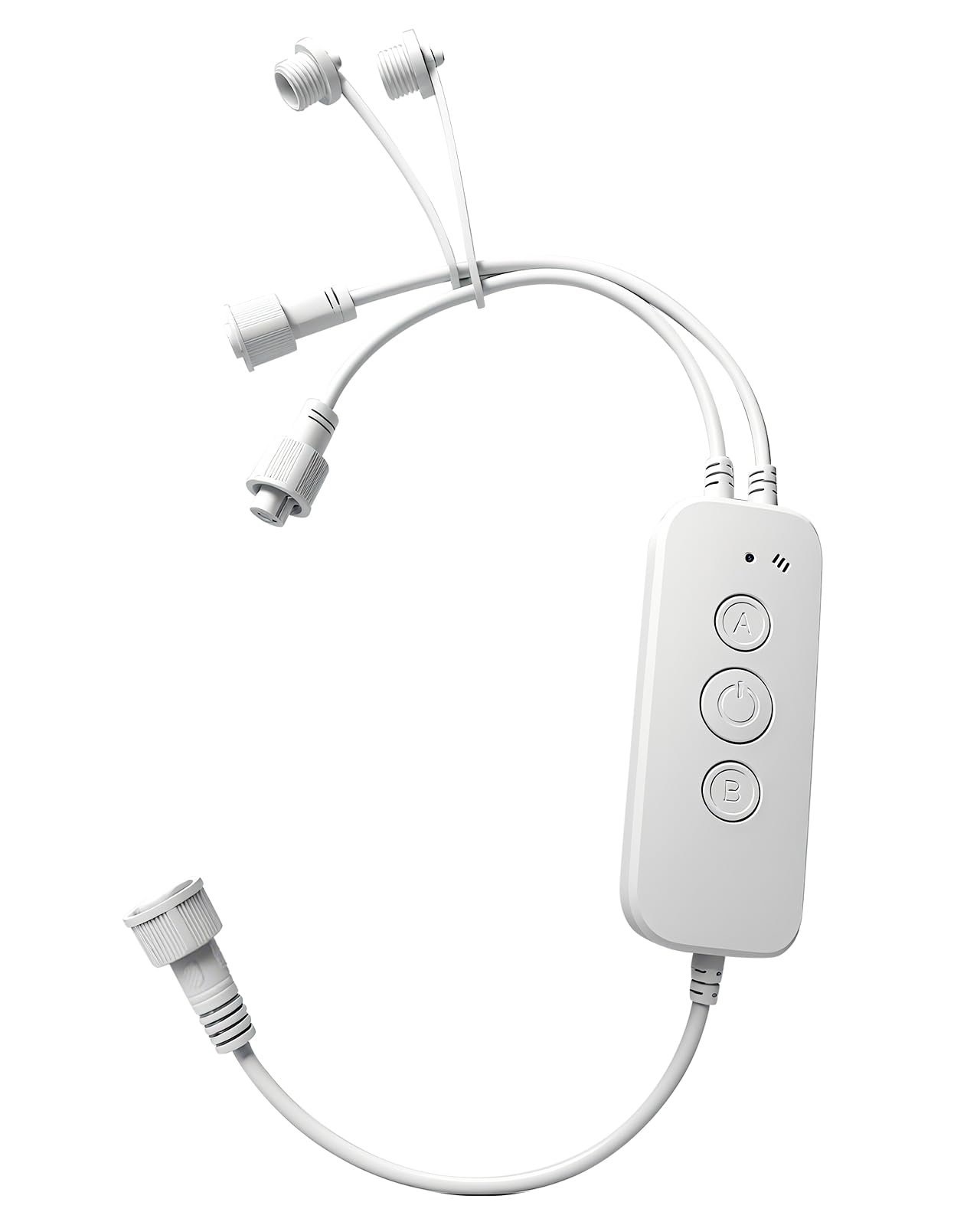
Image: The ASAHOM S1080 Waterproof Control Box, showing its compact design and white casing.
సెటప్
The ASAHOM S1080 Control Box is designed for straightforward integration with your ASAHOM S1080 Series RGBCW Permanent Outdoor Lights PRO. Ensure the power supply is disconnected before making any connections.
- లైట్ స్ట్రింగ్లను కనెక్ట్ చేయండి: The control box features dual output ports. Connect your ASAHOM S1080 light strings to either or both output ports as required by your installation layout.
- Secure Unused Ports: If only one output port is utilized, ensure the waterproof cap on the unused port is securely tightened. This is crucial for maintaining the waterproof integrity of the control box.
- మైక్రోఫోన్ ప్లేస్మెంట్: During installation, position the control box so that the microphone opening is not obstructed. This ensures optimal sound pickup for the Audio Reactive feature.
- పవర్ కనెక్షన్: Once all light strings are securely connected and unused ports are capped, connect the control box to the compatible ASAHOM S1080 power supply.

Image: The ASAHOM S1080 Control Box illustrating its dual output ports for connecting light strings.
ఆపరేటింగ్ సూచనలు
బటన్ విధులు
The control box features three physical buttons for direct control:
- ఆన్/ఆఫ్ బటన్:
- లైట్లను ఆన్ లేదా ఆఫ్ చేయడానికి క్లుప్తంగా నొక్కండి.
- ఫ్యాక్టరీ సెట్టింగ్లను పునరుద్ధరించడానికి 5 సెకన్ల కంటే ఎక్కువసేపు నొక్కి పట్టుకోండి.
- ఒక బటన్: Single press to change the color of the lights.
- బి బటన్: Single press to switch between different lighting modes.
ద్వంద్వ అవుట్పుట్
The control box supports connecting light strings to either or both output ports. This flexibility allows for various installation configurations. Always ensure any unused output port has its waterproof cap securely tightened to prevent water ingress.
మైక్రోఫోన్
The integrated microphone enables the Audio Reactive feature, allowing the lights to respond to sound. For optimal performance, ensure the microphone opening is unobstructed and the sound source is positioned as close as possible to the microphone when this feature is active.
సూచిక కాంతి
The indicator light provides visual feedback on the device's status:
- మెరిసే నీలం: The device is in pairing mode, ready to connect to a network.
- ఘన నీలం: పరికరం విజయవంతంగా నెట్వర్క్కు కనెక్ట్ చేయబడింది.
The indicator light can also be turned off via the settings within the associated mobile application.
నిర్వహణ
To ensure the longevity and optimal performance of your ASAHOM S1080 Waterproof Control Box, follow these maintenance guidelines:
- రెగ్యులర్ క్లీనింగ్: Periodically wipe the exterior of the control box with a soft, damp దుమ్ము మరియు చెత్తను తొలగించడానికి వస్త్రం. కఠినమైన రసాయనాలు లేదా రాపిడి క్లీనర్లను ఉపయోగించడం మానుకోండి.
- కనెక్షన్లను తనిఖీ చేయండి: Regularly check all cable connections to ensure they are secure and free from damage. Verify that waterproof caps on unused ports are tightly sealed.
- పర్యావరణ పరిరక్షణ: While the control box is waterproof, avoid submerging it in water or exposing it to extreme weather conditions beyond its rated specifications.
- సాఫ్ట్వేర్ అప్డేట్లు: Keep the associated mobile application updated to the latest version to benefit from performance improvements and new features.
ట్రబుల్షూటింగ్
If you encounter issues with your ASAHOM S1080 Waterproof Control Box, refer to the following common troubleshooting steps:
- లైట్లు ఆన్ చేయడం లేదు:
- Ensure the control box is properly connected to the power supply and the power supply is plugged into a functional outlet.
- Check all connections between the control box and the light strings.
- Briefly press the ON/OFF button on the control box.
- No Network Connection (Indicator Blinking Blue):
- మీ Wi-Fi నెట్వర్క్ యాక్టివ్గా ఉందని మరియు పరిధిలో ఉందని నిర్ధారించుకోండి.
- Follow the pairing instructions in the mobile application to reconnect the device.
- మీ Wi-Fi రూటర్ను పునఃప్రారంభించడానికి ప్రయత్నించండి.
- Incorrect Light Behavior:
- If the lights are not responding as expected, try restoring the control box to factory settings by pressing and holding the ON/OFF button for more than 5 seconds.
- Verify settings within the mobile application.
- Audio Reactive Feature Not Working:
- Ensure the microphone opening is not blocked.
- Position the sound source closer to the control box.
- Check if the Audio Reactive feature is enabled in the mobile application.
If problems persist, contact ASAHOM customer support for further assistance.
స్పెసిఫికేషన్లు
| బ్రాండ్ | అసహోమ్ |
| మోడల్ పేరు | కంట్రోల్ బాక్స్ |
| మోడల్ సంఖ్య | A1029 |
| రంగు | తెలుపు |
| కనెక్టివిటీ టెక్నాలజీ | Wi-Fi |
| కంట్రోలర్ రకం | Button Control, Remote Controlled (via app) |
| బటన్ పరిమాణం | 3 |
| అనుకూల పరికరాలు | ASAHOM S1080 Series RGBCW Permanent Outdoor Lights PRO, Smartphone |
| మద్దతు ఉన్న పరికరాల గరిష్ట సంఖ్య | 1 (Control Box per light system) |
వారంటీ
ASAHOM products are manufactured to high-quality standards. For specific warranty details, including coverage period and terms, please refer to the warranty information provided with your original purchase documentation or visit the official ASAHOM webవారంటీ క్లెయిమ్ల కోసం మీ కొనుగోలు రుజువును ఉంచండి.
మద్దతు
For technical assistance, product inquiries, or to report any issues not covered in this manual, please contact ASAHOM customer support. You can typically find contact information on the ASAHOM official webసైట్ లేదా మీ కొనుగోలు ప్లాట్ఫారమ్ ద్వారా.
ఆన్లైన్ వనరులు: సందర్శించండి ASAHOM Store on Amazon అదనపు ఉత్పత్తి సమాచారం మరియు ఉపకరణాల కోసం.