
1. పరిచయం
This manual provides essential information for the installation, operation, and maintenance of your Rosewill VSB 650W 80+ Bronze Semi-Modular ATX 3.1 Power Supply (Model VSB650). Please read this manual thoroughly before installation and retain it for future reference.
The Rosewill VSB 650W power supply is designed to deliver stable and efficient power to your computer system. Key features include:
- Intel ATX 3.0 & 3.1 Ready for broad compatibility.
- 80 PLUS Bronze Certified for energy efficiency.
- Semi-Modular design for improved cable management.
- Native PCIe 5.1 / Gen 5 12V-2x6 Connector for next-generation GPUs.
- Optimized Thermal Control with a 120mm ICB Silent Fan.
- Compact chassis (140x150x86mm) for flexible integration.
- Advanced six-protection suite (OCP/OPP/OTP/OVP/SCP/UCP) for system safety.
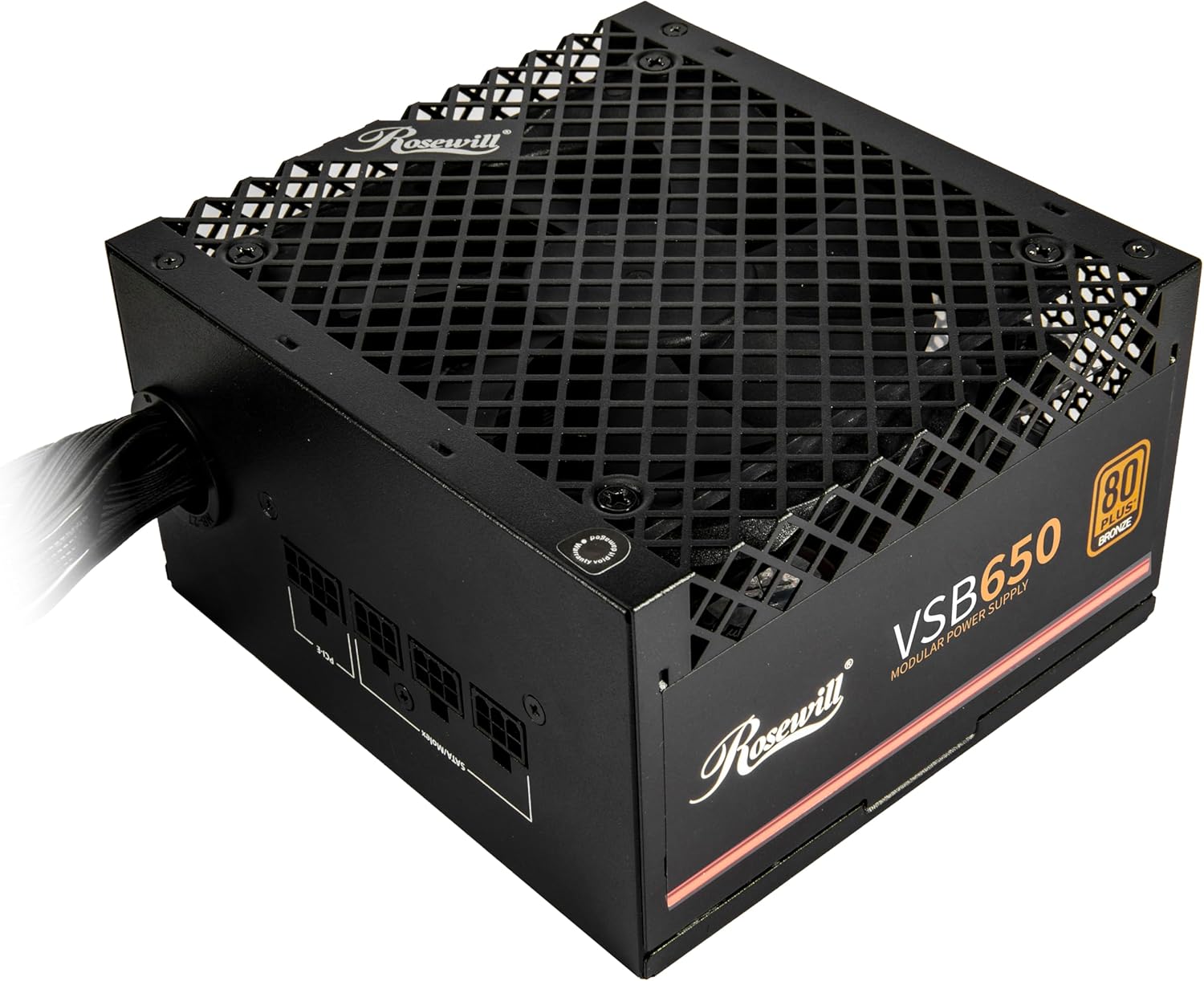
Image: Front-top view of the Rosewill VSB 650W Power Supply, showcasing its black finish and fan grille.
2. భద్రతా సమాచారం
Please observe the following safety guidelines to prevent injury and damage to your equipment:
- చేయవద్దు విద్యుత్ సరఫరా యూనిట్ తెరవండి. అధిక వాల్యూమ్tagయూనిట్ అన్ప్లగ్ చేయబడినప్పటికీ, es లోపల ఉంటాయి.
- చేయవద్దు ఫ్యాన్ గ్రిల్ లేదా వెంటిలేషన్ ఓపెనింగ్స్లోకి ఏవైనా వస్తువులను చొప్పించండి.
- Ensure the power supply is installed in a well-ventilated area, free from excessive heat, humidity, or dust.
- Use only the cables provided with the power supply. Using incompatible cables may cause damage.
- విద్యుత్ సరఫరాను గ్రౌండెడ్ ఎలక్ట్రికల్ అవుట్లెట్కు కనెక్ట్ చేయండి.
- Before installing or removing the power supply, ensure the system is powered off and the AC power cord is disconnected from the wall outlet.
The Rosewill VSB 650W power supply incorporates an Advanced Protection Suite to safeguard your system:
- OCP (ఓవర్ కరెంట్ ప్రొటెక్షన్): Prevents damage from sudden current surges.
- OPP (ఓవర్ పవర్ ప్రొటెక్షన్): Automatically adjusts power output during overloads.
- OTP (ఓవర్ టెంపరేచర్ ప్రొటెక్షన్): Guards against critical overheating.
- OVP (ఓవర్ వాల్యూమ్tagఇ రక్షణ): వాల్యూమ్ను స్థిరీకరిస్తుందిtage spikes instantly.
- SCP (Short Circuit Protection): Neutralizes short-circuit risks.
- UCP (Under Current Protection): Maintains performance during low voltagఇ షరతులు.

Image: Visual representation of the advanced protection features integrated into the power supply.
3. సెటప్ మరియు ఇన్స్టాలేషన్
Follow these steps to properly install your Rosewill VSB 650W power supply into your computer system.
3.1 అన్ప్యాకింగ్ మరియు తనిఖీ
- Carefully remove the power supply from its packaging.
- Inspect the unit for any signs of physical damage. If damage is present, contact your retailer.
- Verify that all included cables and accessories are present.
3.2 భౌతిక సంస్థాపన
- మీ కంప్యూటర్ సిస్టమ్ పవర్ ఆఫ్ చేయబడిందని మరియు వాల్ అవుట్లెట్ నుండి అన్ప్లగ్ చేయబడిందని నిర్ధారించుకోండి.
- Open your computer case according to its manufacturer's instructions.
- సాధారణంగా కేసు యొక్క పైభాగంలో లేదా దిగువన వెనుక భాగంలో విద్యుత్ సరఫరా మౌంటు ప్రాంతాన్ని గుర్తించండి.
- Gently slide the power supply into the designated bay.
- Secure the power supply to the case using the provided screws.

Image: Rear panel of the power supply with the AC power inlet and on/off switch.
3.3 కేబుల్ కనెక్షన్లు
The Rosewill VSB 650W is a semi-modular power supply, meaning some essential cables are permanently attached, while others can be connected as needed.

చిత్రం: పైగాview of the power supply's modular cable connections and included cables.
- 24-Pin ATX Motherboard Cable: Connect the main 24-pin cable to your motherboard's ATX power connector.
- 4+4 Pin CPU (EPS) Cable: Connect the 4+4 pin CPU cable to your motherboard's CPU power connector. Some motherboards may require only 4 pins, while others require all 8.
- PCIe 5.1 12V-2x6 Connector: For compatible graphics cards, connect the dedicated 12V-2x6 cable directly to the GPU. This cable delivers up to 450W.
- 6+2 Pin PCIe Cables: For graphics cards requiring standard PCIe power, connect the 6+2 pin cables to the modular ports labeled "PCI-E" on the power supply, then to your graphics card.
- SATA కేబుల్స్: Connect SATA power cables to your storage drives (HDDs, SSDs) and other SATA-powered devices.
- 4-Pin Molex Cables: Connect Molex cables to peripherals that require this type of power connector.

Image: Close-up of the 12V-2x6 PCIe 5.1 connector, designed for direct power delivery to modern GPUs.
Ensure all connections are firm and correctly seated. Route cables neatly to improve airflow and aesthetics within your case.
4. ఆపరేటింగ్ సూచనలు
4.1 ప్రారంభ పవర్ ఆన్
- After all internal components are connected and the power supply is secured, close your computer case.
- AC పవర్ కార్డ్ను పవర్ సప్లై ఇన్లెట్కి మరియు తరువాత గ్రౌండెడ్ వాల్ అవుట్లెట్కి కనెక్ట్ చేయండి.
- Flip the power switch on the rear of the power supply to the "I" (On) position.
- వ్యవస్థను ప్రారంభించడానికి మీ కంప్యూటర్ కేస్లోని పవర్ బటన్ను నొక్కండి.
4.2 ఫ్యాన్ ఆపరేషన్
The Rosewill VSB 650W features a 120mm ICB Silent Fan with optimized thermal control. The fan speed will automatically adjust based on the power supply's temperature and load to maintain optimal cooling while minimizing noise.
4.3 Power Excursion Capabilities
This power supply is designed to handle temporary power spikes, supporting up to 235% power excursion and 300% GPU power excursion, ensuring stability during demanding workloads and transient power demands from modern components.
5. నిర్వహణ
To ensure the longevity and optimal performance of your power supply, periodic maintenance is recommended.
- దుమ్ము తొలగింపు: Regularly clean the exterior of the power supply and the fan grille to prevent dust buildup, which can impede airflow and cooling. Use compressed air or a soft brush. Ensure the system is powered off and unplugged before cleaning.
- పర్యావరణ పరిస్థితులు: Operate the power supply within recommended environmental conditions (temperature and humidity) as specified in the technical specifications.
- కేబుల్ తనిఖీ: అన్ని కేబుల్ కనెక్షన్లు సురక్షితంగా ఉన్నాయని మరియు దెబ్బతినకుండా ఉన్నాయని నిర్ధారించుకోవడానికి కాలానుగుణంగా వాటిని తనిఖీ చేయండి.
6. ట్రబుల్షూటింగ్
If you encounter issues with your power supply, refer to the following common troubleshooting steps.
6.1 No Power / System Not Starting
- Check AC Power: Ensure the AC power cord is securely connected to both the power supply and a working wall outlet.
- పవర్ స్విచ్: Verify that the power switch on the rear of the power supply is in the "I" (On) position.
- అంతర్గత కనెక్షన్లు: Double-check all internal power connections, especially the 24-pin motherboard cable and the 4+4 pin CPU cable, to ensure they are fully seated.
- షార్ట్ సర్క్యూట్: Disconnect all modular cables except the essential motherboard and CPU power. If the system powers on, reconnect other components one by one to identify a potential short circuit.
6.2 System Instability / Random Shutdowns
- ఓవర్లోడ్: Ensure your system's total power consumption does not exceed the power supply's 650W capacity. Use a power calculator if unsure.
- వేడెక్కడం: Check for proper airflow within your computer case. Ensure the power supply's fan is not obstructed and is spinning.
- కాంపోనెంట్ సమస్యలు: Instability can also be caused by other faulty components (RAM, GPU, CPU). Test components individually if possible.
6.3 అసాధారణ శబ్దాలు
- ఫ్యాన్ శబ్దం: A slight fan noise is normal. If the noise is excessive or grinding, ensure no cables are obstructing the fan blades.
- Coil Whine: Some power supplies may exhibit a faint "coil whine" under certain loads. This is generally harmless and does not indicate a defect.
If troubleshooting steps do not resolve the issue, please contact Rosewill customer support.
7. స్పెసిఫికేషన్లు
Detailed technical specifications for the Rosewill VSB 650W 80+ Bronze Semi-Modular ATX 3.1 Power Supply (Model VSB650).
| ఫీచర్ | స్పెసిఫికేషన్ |
|---|---|
| మోడల్ పేరు | VSB650 |
| అవుట్పుట్ వాట్tage | 650 వాట్స్ |
| 80 ప్లస్ సర్టిఫికేషన్ | కంచు |
| ఫారమ్ ఫ్యాక్టర్ | ATX |
| పవర్ సప్లై డిజైన్ | సెమీ మాడ్యులర్ |
| ATX ప్రమాణం | ATX 3.0 & 3.1 Compatible |
| PCIe కనెక్టర్ | Native PCIe 5.1 / Gen 5 12V-2x6 |
| శీతలీకరణ పద్ధతి | Air (120mm ICB Silent Fan) |
| ఉత్పత్తి కొలతలు (L x W x H) | 5.51 x 5.9 x 3.38 అంగుళాలు (140 x 150 x 86 మిమీ) |
| వస్తువు బరువు | 4.59 పౌండ్లు |
| కెపాసిటర్లు | 105°C/221°F Japanese Capacitor |
| రక్షణ లక్షణాలు | OCP, OPP, OTP, OVP, SCP, UCP |

Image: Detailed electrical specifications label for the VSB650 power supply.
8. వారంటీ మరియు మద్దతు
8.1 వారంటీ సమాచారం
The Rosewill VSB 650W Power Supply comes with a 5 సంవత్సరాల వారంటీ కొనుగోలు చేసిన తేదీ నుండి. ఈ వారంటీ సాధారణ ఉపయోగంలో మెటీరియల్స్ మరియు పనితనంలో లోపాలను కవర్ చేస్తుంది. వారంటీ క్లెయిమ్ల కోసం దయచేసి మీ కొనుగోలు రుజువును ఉంచుకోండి.
వారంటీ దీని వల్ల కలిగే నష్టాన్ని కవర్ చేయదు:
- సరికాని సంస్థాపన లేదా ఆపరేషన్.
- Accidental damage, abuse, or misuse.
- అనధికార మరమ్మతులు లేదా మార్పులు.
- Natural disasters or power surges outside of the unit's protection capabilities.
8.2 కస్టమర్ మద్దతు
For technical assistance, warranty claims, or further inquiries, please visit the official Rosewill webసైట్ లేదా వారి కస్టమర్ మద్దతు బృందాన్ని సంప్రదించండి.
Rosewill Official Webసైట్: www.rosewill.com