
పరిచయం
This manual provides detailed instructions for the installation, operation, and maintenance of your Rosewill VSB 750W 80+ Bronze Semi-Modular Power Supply. Please read this manual thoroughly before installation and use to ensure proper function and safety.
భద్రతా సమాచారం
WARNING: Power supplies contain high voltage components. Do not open the power supply unit. There are no user-serviceable parts inside. Opening the casing will void the warranty and poses a risk of electric shock.
- ఇన్స్టాలేషన్ లేదా హ్యాండ్లింగ్ చేసే ముందు AC పవర్ అవుట్లెట్ నుండి విద్యుత్ సరఫరా డిస్కనెక్ట్ చేయబడిందని నిర్ధారించుకోండి.
- బాగా వెంటిలేషన్ ఉన్న ప్రదేశంలో విద్యుత్ సరఫరాను ఏర్పాటు చేయండి.
- విద్యుత్ సరఫరాతో పాటు అందించిన కేబుల్లను మాత్రమే ఉపయోగించండి.
- Do not block any ventilation openings on the power supply.
- This product is designed for use in personal computers. Do not use it for any other purpose.
సెటప్ మరియు ఇన్స్టాలేషన్
1. అన్ప్యాకింగ్
Carefully remove the power supply and all accessories from the packaging. Verify that all components are present:
- Rosewill VSB 750W Power Supply
- AC పవర్ కార్డ్
- Modular Cables (PCIe, SATA, Molex)
- మౌంటు స్క్రూలు
- కేబుల్ సంబంధాలు
2. భౌతిక సంస్థాపన
Install the power supply into the designated PSU bay of your computer case. Secure it with the provided mounting screws.
The Rosewill VSB 750W features a compact 140x150x86mm chassis, which is 35% smaller than many regular ATX PSUs, allowing for flexible integration into various PC builds.
The power supply includes a 120mm ICB silent fan for optimized thermal control and quiet operation.

చిత్రం 1: పై నుండి క్రిందికి view of the Rosewill VSB 750W Power Supply, highlighting the fan grill and branding.
3. కేబుల్ కనెక్షన్లు
The Rosewill VSB 750W is a semi-modular power supply. Essential cables (24-pin motherboard, 4+4 pin CPU) are permanently attached, while others are modular.
Connect the necessary cables to your motherboard and components.

చిత్రం 2: పైగాview of available connectors for the Rosewill VSB 750W Power Supply.
మదర్బోర్డు కనెక్షన్
Connect the 24-pin ATX cable from the power supply to the corresponding port on your motherboard.
CPU Power Connection
Connect the 4+4 pin CPU power cable(s) to the CPU power port(s) on your motherboard. Most motherboards require one 8-pin (4+4) connector, while some high-end boards may require two.
PCIe 5.1 / Gen 5 12V-2x6 Connector
This power supply includes a native PCIe 5.1 / Gen 5 12V-2x6 cable, designed to deliver up to 600W directly to compatible next-generation graphics cards. Connect this cable directly to your PCIe 5.1 GPU if applicable.

Figure 3: The native 12V-2x6 PCIe 5.1 connector for direct GPU power.
Additional PCIe Connections
For other graphics cards requiring 6+2 pin PCIe connectors, use the provided modular cables. Connect one end to the power supply's PCIe ports and the other to your graphics card.
SATA and Molex Connections
Connect the modular SATA power cables to your storage drives (SSDs, HDDs) and optical drives. Use Molex connectors for any peripherals that require them.
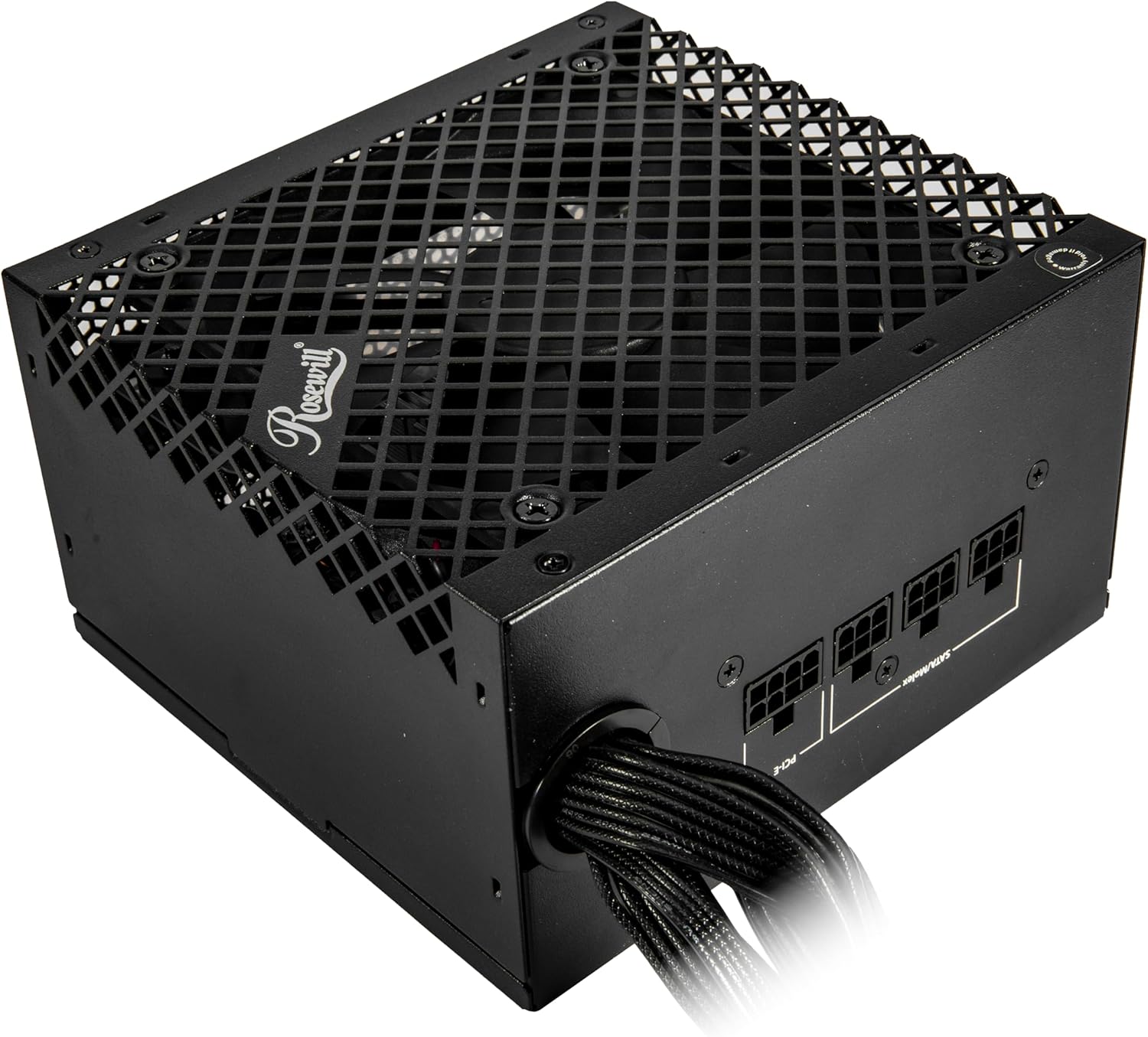
Figure 4: Modular cable connection ports on the power supply.
4. పవర్ కనెక్షన్
Once all internal connections are secure, connect the AC power cord to the power supply and then to a wall outlet or surge protector. Ensure the power switch on the back of the PSU is in the "OFF" (0) position before connecting to AC power.
ఆపరేషన్
After completing all connections, flip the power switch on the back of the power supply to the "ON" (I) position. You can then power on your computer using the case's power button.
The 120mm ICB silent fan operates to maintain optimal temperatures while minimizing noise.
This power supply is Intel ATX 3.0 & 3.1 Ready, supporting up to 235% power excursion and 300% GPU power excursion for stable performance under demanding loads.
నిర్వహణ
To ensure the longevity and optimal performance of your power supply:
- దుమ్ము తొలగింపు: Periodically clean the exterior of the power supply and the fan grill to prevent dust buildup, which can impede airflow and cooling. Use compressed air or a soft brush. Ensure the power supply is disconnected from AC power before cleaning.
- కేబుల్ నిర్వహణ: Proper cable management helps maintain good airflow within your PC case, contributing to better cooling for all components, including the PSU.
- పర్యావరణ పరిస్థితులు: Operate the power supply within recommended temperature and humidity ranges. Avoid extreme heat or moisture.
ట్రబుల్షూటింగ్
మీ విద్యుత్ సరఫరాలో సమస్యలు ఎదురైతే, ఈ క్రింది సాధారణ సమస్యలు మరియు పరిష్కారాలను చూడండి:
- శక్తి లేదు:
- AC పవర్ కార్డ్ విద్యుత్ సరఫరా మరియు వాల్ అవుట్లెట్ రెండింటికీ సురక్షితంగా కనెక్ట్ చేయబడిందో లేదో తనిఖీ చేయండి.
- PSU వెనుక ఉన్న పవర్ స్విచ్ "ON" (I) స్థానంలో ఉందని నిర్ధారించుకోండి.
- Verify all internal cables (24-pin ATX, CPU, PCIe) are correctly and securely connected.
- దానికి శక్తి ఉందని నిర్ధారించుకోవడానికి మరొక పరికరంతో గోడ అవుట్లెట్ను పరీక్షించండి.
- System Instability or Random Shutdowns:
- This could indicate an overloaded power supply or a component issue. Ensure your system's power requirements do not exceed the PSU's 750W capacity.
- The Rosewill VSB 750W features an advanced protection suite (OCP, OPP, OTP, OVP, SCP, UCP) designed to prevent damage from various electrical anomalies. If these protections are triggered, the PSU may shut down to protect your components.
- ఫ్యాన్ శబ్దం:
- While designed for silent operation, excessive fan noise could indicate dust buildup. Refer to the Maintenance section for cleaning instructions.
- If the noise persists, ensure the PSU is securely mounted and not vibrating against the case.
If troubleshooting steps do not resolve the issue, contact Rosewill customer support.

Figure 5: The Advanced Protection Suite ensures system safety.
స్పెసిఫికేషన్లు
The following table details the technical specifications of the Rosewill VSB 750W Power Supply.
| ఫీచర్ | వివరాలు |
|---|---|
| మోడల్ పేరు | VSB750 |
| బ్రాండ్ | రోజ్విల్ |
| అవుట్పుట్ వాట్tage | 750 వాట్స్ |
| ఫారమ్ ఫ్యాక్టర్ | ATX |
| పవర్ సప్లై డిజైన్ | సెమీ మాడ్యులర్ |
| సమర్థత ధృవీకరణ | 80 ప్లస్ కాంస్యం |
| ATX ప్రమాణం | ATX 3.0 & 3.1 Compatible |
| PCIe కనెక్టర్ | Native PCIe 5.1 / Gen 5 12V-2x6 |
| శీతలీకరణ పద్ధతి | Air (120mm ICB Silent Fan) |
| కొలతలు (L x W x H) | 5.51 x 5.9 x 3.38 అంగుళాలు (140 x 150 x 86 మిమీ) |
| గరిష్ట ఇన్పుట్ వాల్యూమ్tage | 240 వోల్ట్లు (AC) |
| కనిష్ట ఇన్పుట్ వాల్యూమ్tage | 110 వోల్ట్లు (AC) |
| కెపాసిటర్లు | 105°C/221°F Japanese Capacitor |
| Protection Suite | OCP, OPP, OTP, OVP, SCP, UCP |
| UPC | 840951136058 |
వారంటీ
The Rosewill VSB 750W Power Supply comes with a 5-year manufacturer's warranty. For warranty claims or detailed terms and conditions, please refer to the official Rosewill webసైట్ లేదా వారి కస్టమర్ సపోర్ట్ని సంప్రదించండి.
మద్దతు
For technical assistance, troubleshooting beyond this manual, or warranty inquiries, please visit the official Rosewill support website or contact their customer service department. Keep your purchase receipt and product serial number handy when contacting support.
మీరు మరింత సమాచారం మరియు మద్దతు వనరులను ఇక్కడ కనుగొనవచ్చు Rosewill Store on Amazon.