This manual provides detailed instructions for the AILRINNI 4K Digital Camera, Model X9-M. Please read this manual carefully before using the camera to ensure proper operation and to maximize your photography experience. Keep this manual for future reference.
పెట్టెలో ఏముంది
AILRINNI X9-M Digital Camera Body
Rechargeable Battery (1 included)
64GB మెమరీ కార్డ్
డేటా కేబుల్
వినియోగదారు మాన్యువల్
సెటప్
1. బ్యాటరీ సంస్థాపన మరియు ఛార్జింగ్
The camera uses a Lithium-Ion battery. Ensure the battery is fully charged before first use.
కెమెరా దిగువన ఉన్న బ్యాటరీ కంపార్ట్మెంట్ కవర్ను తెరవండి.
Insert the rechargeable battery, ensuring the correct polarity.
బ్యాటరీ కంపార్ట్మెంట్ కవర్ను సురక్షితంగా మూసివేయండి.
Connect the camera to a power source using the provided data cable to charge the battery. The charging indicator light will show the charging status.
2. మెమరీ కార్డ్ సంస్థాపన
A 64GB memory card is included for storage.
మెమరీ కార్డ్ స్లాట్ను గుర్తించండి, సాధారణంగా కెమెరా వైపు లేదా దిగువన.
Insert the 64GB memory card into the slot until it clicks into place. Ensure it is inserted in the correct orientation.
తీసివేయడానికి, కార్డు బయటకు వచ్చే వరకు సున్నితంగా నెట్టండి.
3. ప్రారంభ పవర్ ఆన్
పవర్ బటన్ను నొక్కి పట్టుకోండి (సాధారణంగా దీనితో గుర్తించబడుతుంది ఆన్/ఆఫ్ or a power symbol) to turn on the camera. Follow any on-screen prompts for initial setup, such as setting the date and time.
ఆపరేటింగ్ సూచనలు
కెమెరా ఓవర్view మరియు నియంత్రణలు
Familiarize yourself with the camera's buttons and screens.
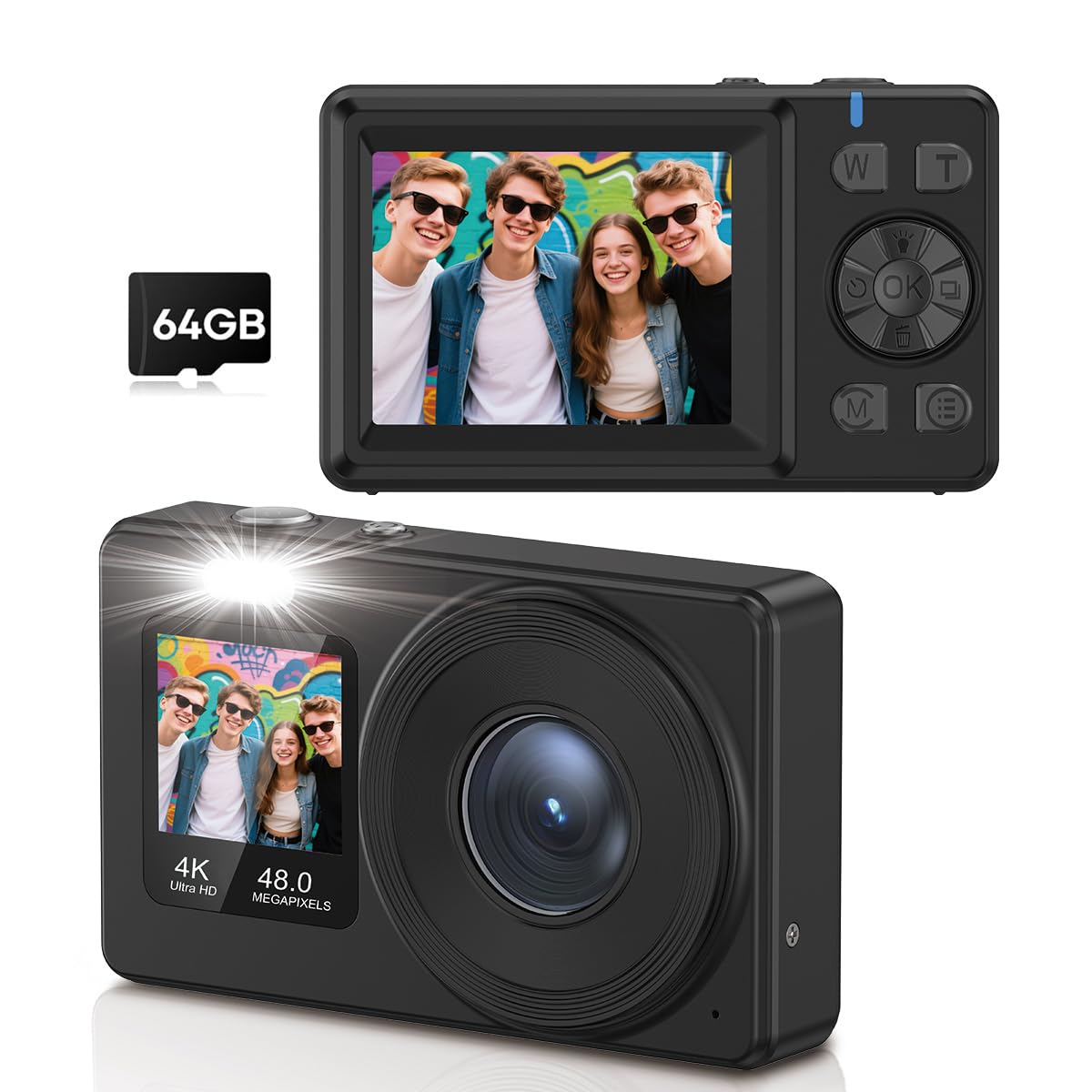
చిత్రం: ముందు మరియు వెనుక view of the AILRINNI X9-M camera, highlighting its compact design and control buttons.
పవర్ బటన్: కెమెరాను ఆన్/ఆఫ్ చేస్తుంది.
షట్టర్ బటన్: Takes photos or starts/stops video recording.
W/T Buttons: Control the 18x digital zoom (Wide/Telephoto).
సరే బటన్: Confirms selections, also used to switch to selfie mode.
M (మోడ్) బటన్: Switches between different shooting modes (e.g., Photo, Video, Playback).
E (Settings) Button: Accesses camera settings and menu options.
1. Taking Photos (48MP)
The camera captures images at 48-megapixel resolution with autofocus.
Image: A user capturing a moment with the AILRINNI X9-M camera, highlighting its 4K video and 48MP photo capabilities.
కెమెరాను ఆన్ చేయండి.
Ensure the camera is in Photo mode (check the display or press the M బటన్).
Frame your shot using the 2.4-inch rear LCD screen.
The camera features one-touch autofocus. Press the Shutter button halfway down to focus, then press fully to capture the image.
2. Recording Videos (4K)
Record high-definition videos at 4K resolution (4320p).
కెమెరాను ఆన్ చేయండి.
Switch to Video mode using the M బటన్.
రికార్డింగ్ ప్రారంభించడానికి షట్టర్ బటన్ నొక్కండి. స్క్రీన్పై రికార్డింగ్ సూచిక కనిపిస్తుంది.
రికార్డింగ్ ఆపడానికి షట్టర్ బటన్ను మళ్లీ నొక్కండి.
3. Using Dual Screens and Selfie Mode
The camera features a 2.4-inch rear screen and a 1.4-inch front screen for versatile shooting.
Image: The AILRINNI X9-M camera displaying its dual screen functionality, with a 2.4-inch rear screen and a 1.4-inch front screen.
Rear Screen (2.4-inch): Used for general framing, reviewing photos/videos, and accessing menus.
Front Screen (1.4-inch): Ideal for selfies and vlogging. To activate selfie mode, press and hold the OK button for 3 seconds. The front screen will activate, allowing you to frame yourself.
4. 18x Digital Zoom
Utilize the 18x digital zoom to capture distant subjects.
Image: Demonstrates the 18x digital zoom capability and various color filters (Regular, B&W, Red, Blue) available on the camera.
ఉపయోగించండి W (వెడల్పు) మరియు T (Telephoto) buttons to adjust the zoom level. Press T జూమ్ ఇన్ చేయడానికి మరియు W జూమ్ అవుట్ చేయడానికి.
5. అధునాతన ఫీచర్లు
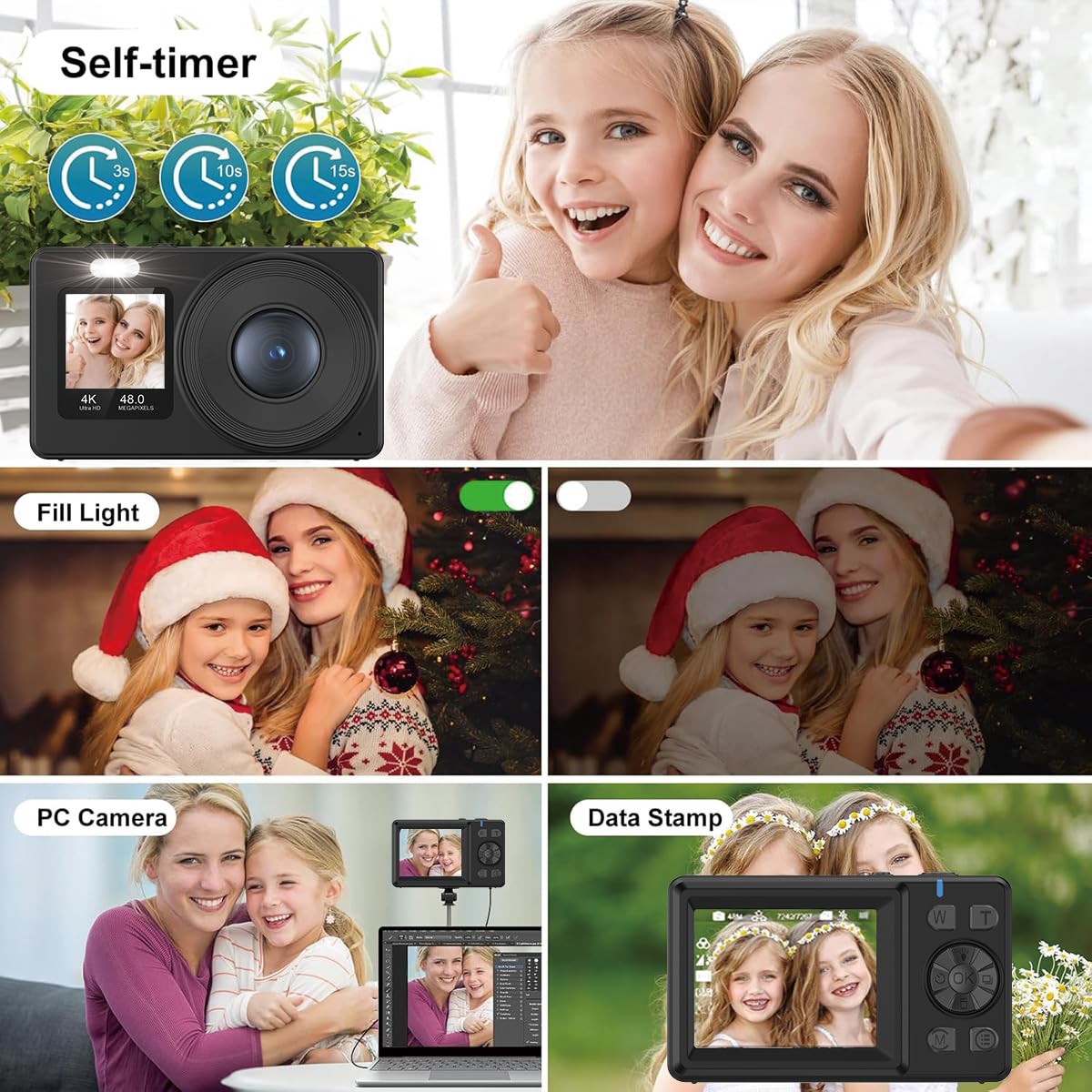
Image: A collage illustrating key features: Self-timer (3s, 10s, 15s options), Fill Light activation, PC Camera function for live streams, and Data Stamp for adding date/time to photos.
Anti-shake and Auto-lighting: These technologies are built-in to ensure sharp photos and videos, even in challenging lighting conditions.
ఆటో-షట్డౌన్: The camera can be set to automatically power off after a period of inactivity to save battery. Adjust this setting in the menu.
చిత్రం భ్రమణం: Rotate images during playback via the menu options.
Auto-shoot & Continuous Shooting: Access these modes through the menu for timed shots or rapid-fire sequences.
ప్రత్యేక ప్రభావాలు: Apply various filters and effects to your photos (e.g., B&W, Red, Blue as shown in the zoom image).
నేనే-టైమర్: Set a delay (e.g., 3s, 10s, 15s) before taking a photo, useful for group shots or selfies.
లైట్ నింపండి: Activate the built-in fill light for better illumination in low-light conditions.
Data Stamp: Add date and time information directly onto your photos.
6. Webకామ్ ఫంక్షన్
The camera can function as a high-quality webcam for live streams and video calls.
అందించిన డేటా కేబుల్ ఉపయోగించి కెమెరాను మీ కంప్యూటర్కు కనెక్ట్ చేయండి.
Select "PC Camera" or "Webcam Mode" on the camera's screen if prompted.
మీ కంప్యూటర్ కెమెరాను గుర్తించాలి a webcam. మీ వీడియో కాన్ఫరెన్సింగ్ లేదా స్ట్రీమింగ్ సాఫ్ట్వేర్లో దాన్ని ఎంచుకోండి.
7. బదిలీ చేయడం Files
Transfer photos and videos to your computer or smartphone using the data cable.
అందించిన డేటా కేబుల్ ఉపయోగించి కెమెరాను మీ కంప్యూటర్కు కనెక్ట్ చేయండి.
Select "Mass Storage" or "Data Transfer" on the camera's screen if prompted.
The camera's memory card will appear as a removable drive on your computer. You can then copy fileమీరు కోరుకున్న స్థానానికి లు.
నిర్వహణ
కెమెరాను శుభ్రపరచడం: కెమెరా బాడీని శుభ్రం చేయడానికి మృదువైన, పొడి వస్త్రాన్ని ఉపయోగించండి. లెన్స్ కోసం, ప్రత్యేకమైన లెన్స్ శుభ్రపరిచే వస్త్రం మరియు ద్రావణాన్ని ఉపయోగించండి. కఠినమైన రసాయనాలను నివారించండి.
బ్యాటరీ సంరక్షణ: Store the battery in a cool, dry place when not in use. Do not expose to extreme temperatures. Recharge regularly even if not used for extended periods to maintain battery health.
నిల్వ: Store the camera in a protective case or bag to prevent scratches and dust accumulation. Avoid storing in humid or dusty environments.
ట్రబుల్షూటింగ్
సమస్య
సాధ్యమైన కారణం
పరిష్కారం
కెమెరా ఆన్ అవ్వదు.
బ్యాటరీ ఖాళీగా ఉంది లేదా తప్పుగా చొప్పించబడింది.
బ్యాటరీ పూర్తిగా ఛార్జ్ చేయబడిందని మరియు సరిగ్గా చొప్పించబడిందని నిర్ధారించుకోండి.
చిత్రాలు అస్పష్టంగా ఉన్నాయి.
కెమెరా షేక్, సరికాని ఫోకస్ లేదా మురికి లెన్స్.
Hold camera steady, ensure autofocus is engaged, clean the lens. Check lighting conditions.
మెమరీ కార్డ్ లోపం.
కార్డు సరిగ్గా చొప్పించబడలేదు, కార్డు నిండిపోయింది లేదా కార్డు పాడైపోయింది.
Reinsert the memory card. Delete unnecessary files or format the card (this will erase all data). Try a different memory card.
బదిలీ చేయలేరు fileకంప్యూటర్ కు.
Incorrect USB mode selected, faulty cable, or driver issue.
Ensure "Mass Storage" mode is selected on the camera. Try a different USB port or cable. Restart both camera and computer.
స్పెసిఫికేషన్లు
ఫీచర్
వివరాలు
బ్రాండ్
ఆయిల్రిన్ని
మోడల్ పేరు
X9-M
ఫోటో సెన్సార్ రిజల్యూషన్
48 ఎంపీ
వీడియో క్యాప్చర్ రిజల్యూషన్
4320p (4K)
జూమ్ చేయండి
18x డిజిటల్ జూమ్
వెనుక స్క్రీన్ పరిమాణం
2.4 అంగుళాలు (LCD)
Front Screen Size
1.4 అంగుళాలు
మెమరీ స్టోరేజ్ కెపాసిటీ
64 GB (చేర్చబడింది)
బ్యాటరీ రకం
లిథియం అయాన్ (1 చేర్చబడింది)
ఆటో ఫోకస్
అవును
చిత్రం స్థిరీకరణ
ఆప్టికల్
Webకామ్ ఫంక్షన్
అవును
మద్దతు ఇచ్చారు File ఫార్మాట్
JPEG (for photos)
సెల్ఫ్-టైమర్ ఉంది
అవును
ఆడియో రికార్డింగ్
అవును
నెట్వర్క్ కనెక్టివిటీ టెక్నాలజీ
Wi-Fi
వారంటీ మరియు మద్దతు
For warranty information or technical support, please refer to the documentation included with your purchase or contact AILRINNI customer service. Keep your proof of purchase for warranty claims.
Ask a question about this manual
Ask about setup, troubleshooting, compatibility, parts, safety, or missing instructions. Manuals+ will review the question and use this page’s manual context to help answer it.