
పరిచయం
This manual provides essential information for the proper use and care of your Nokia C200 N151DL smartphone. Please read these instructions carefully before using your device to ensure optimal performance and longevity.
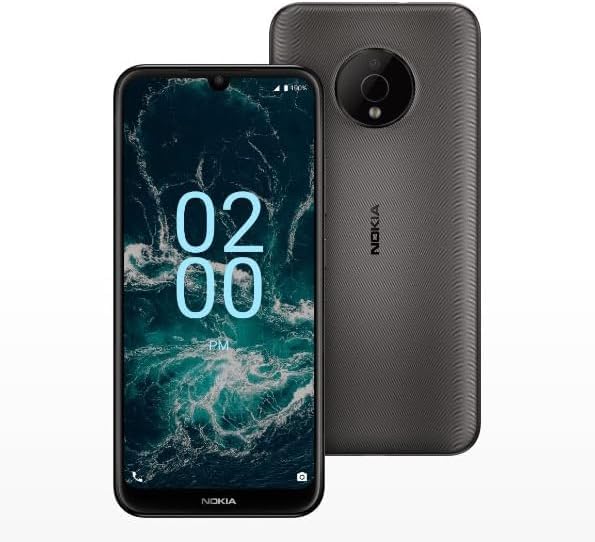
Image: The Nokia C200 N151DL smartphone, featuring its 6.1-inch HD+ display and Space Gray finish.
పెట్టెలో ఏముంది
Upon unboxing your Nokia C200 N151DL, verify that all the following items are included:
- Nokia C200 N151DL Smartphone
- USB-C కేబుల్
- SIM ఎజెక్టర్ సాధనం
సెటప్
1. SIM కార్డ్ని చొప్పించడం
- మీ ఫోన్ పక్కన సిమ్ కార్డ్ ట్రేని గుర్తించండి.
- ట్రేలోని చిన్న రంధ్రం తెరవడానికి దానిలోకి సిమ్ ఎజెక్టర్ సాధనాన్ని చొప్పించండి.
- మీ నానో-సిమ్ కార్డ్ను ట్రేలో బంగారు కాంటాక్ట్లు క్రిందికి ఉండేలా ఉంచండి.
- ట్రే సరైన స్థానంలోకి వచ్చే వరకు జాగ్రత్తగా దాన్ని తిరిగి ఫోన్లోకి నెట్టండి.
2. పరికరాన్ని ఛార్జ్ చేస్తోంది
Before initial use, it is recommended to fully charge your Nokia C200 N151DL.
- USB-C కేబుల్ను ఫోన్ దిగువన ఉన్న ఛార్జింగ్ పోర్ట్కు కనెక్ట్ చేయండి.
- Connect the other end of the USB-C cable to a compatible USB wall adapter (not included) and plug it into a power outlet.
- స్క్రీన్పై ఉన్న బ్యాటరీ సూచిక ఛార్జింగ్ పురోగతిని చూపుతుంది.
3. పవర్ ఆన్ మరియు ఇనిషియల్ కాన్ఫిగరేషన్
- Press and hold the power button (usually on the right side) until the Nokia logo appears.
- మీ భాషను ఎంచుకోవడానికి, Wi-Fiకి కనెక్ట్ అవ్వడానికి మరియు మీ Google ఖాతాను సెటప్ చేయడానికి స్క్రీన్పై కనిపించే ప్రాంప్ట్లను అనుసరించండి.
- Your phone runs on Android 12.0, providing a clean and intuitive user experience.
ఆపరేటింగ్
ప్రాథమిక నావిగేషన్
The Nokia C200 N151DL features a 6.1-inch HD+ touchscreen display. Navigate by tapping, swiping, and pinching gestures. The Android 12.0 operating system offers a user-friendly interface for accessing apps, settings, and notifications.
బ్యాటరీ నిర్వహణ
Your device is equipped with a 5000 mAh battery designed for extended daily use. To optimize battery life:
- స్క్రీన్ ప్రకాశాన్ని సర్దుబాటు చేయండి.
- నేపథ్యంలో నడుస్తున్న ఉపయోగించని అప్లికేషన్లను మూసివేయండి.
- ఉపయోగంలో లేనప్పుడు Wi-Fi, బ్లూటూత్ లేదా GPS ని నిలిపివేయండి.
నిల్వ మరియు పనితీరు
With 32GB of internal storage and 3GB of RAM, the Nokia C200 N151DL provides reliable multitasking capabilities and space for your applications and media. For additional storage, consider using a microSD card (sold separately).
నిర్వహణ
మీ పరికరాన్ని శుభ్రపరచడం
To clean your phone, use a soft, lint-free cloth. Avoid using abrasive materials, alcohol, or chemical cleaners, as these can damage the screen and finish.
సాఫ్ట్వేర్ నవీకరణలు
Periodically check for software updates to ensure your device has the latest features and security enhancements. Navigate to సెట్టింగ్లు > సిస్టమ్ > సిస్టమ్ అప్డేట్ అందుబాటులో ఉన్న నవీకరణలను తనిఖీ చేయడానికి మరియు ఇన్స్టాల్ చేయడానికి.
ట్రబుల్షూటింగ్
If you encounter issues with your Nokia C200 N151DL, try the following common solutions:
- ఫోన్ ఆన్ చేయడం లేదు: బ్యాటరీ ఛార్జ్ అయ్యిందని నిర్ధారించుకోండి. ఫోన్ను ఛార్జర్కు కనీసం 30 నిమిషాలు కనెక్ట్ చేసి, ఆపై దాన్ని మళ్లీ ఆన్ చేయడానికి ప్రయత్నించండి.
- యాప్లు క్రాష్ అవుతున్నాయి లేదా స్తంభించిపోతున్నాయి: Close the problematic app and reopen it. If the issue persists, restart your phone.
- పేలవమైన నెట్వర్క్ సిగ్నల్: Check your SIM card insertion. Move to an area with better network coverage.
- ఛార్జింగ్ సమస్యలు: Verify the USB-C cable and charger are working correctly. Try a different cable or power source.
- నెమ్మది పనితీరు: Clear cache for frequently used apps. Consider uninstalling unused applications to free up storage.
For more complex issues, refer to Nokia's official support webసైట్ లేదా కస్టమర్ సేవను సంప్రదించండి.
స్పెసిఫికేషన్లు
Key technical specifications for the Nokia C200 N151DL:
| ఫీచర్ | స్పెసిఫికేషన్ |
|---|---|
| బ్రాండ్ | నోకియా |
| మోడల్ పేరు | నోకియా C200 |
| ఆపరేటింగ్ సిస్టమ్ | ఆండ్రాయిడ్ 12.0 |
| RAM మెమరీ ఇన్స్టాల్ చేయబడిన పరిమాణం | 3 GB |
| మెమరీ స్టోరేజ్ కెపాసిటీ | 32 GB |
| CPU మోడల్ | Qualcomm Snapdragon S1 QSD8650 |
| CPU వేగం | 1.8 GHz |
| స్క్రీన్ పరిమాణం | 6.1 అంగుళాలు |
| ప్రదర్శన రకం | LCD |
| సెల్యులార్ టెక్నాలజీ | 4G |
| వైర్లెస్ క్యారియర్ | స్ట్రెయిట్ టాక్ |
| బ్యాటరీ పవర్ | 5000 mAh |
| కనెక్టర్ రకం | USB టైప్ C |
| రంగు | స్పేస్ గ్రే |
| తయారీదారు | HMD గ్లోబల్ |
| UPC | 617230227802 |
| ASIN | B0FGG1Y47Z |
వారంటీ మరియు మద్దతు
వారంటీ సమాచారం
ఈ ఉత్పత్తి a ద్వారా కవర్ చేయబడింది 30-రోజుల రిటర్న్ పాలసీ for a full refund or exchange from the date of purchase. Please retain your proof of purchase for warranty claims.
కస్టమర్ మద్దతు
For further assistance, technical support, or warranty inquiries, please visit the official Nokia support website or contact your retailer. Ensure you have your device model number (N151DL) and proof of purchase available when seeking support.