
1. పరిచయం
This manual provides essential instructions for the setup, operation, and maintenance of your SPC Zeus 2 Pro Smartphone. Designed for ease of use, this device features a simplified interface, physical buttons, and dedicated support features for seniors. Please read this manual thoroughly to ensure proper usage and to maximize the benefits of your new smartphone.
2. ప్యాకేజీ విషయాలు
ప్యాకేజీని తెరిచినప్పుడు, కింది అంశాలన్నీ ఉన్నాయని నిర్ధారించుకోండి:
- SPC Zeus 2 Pro Smartphone
- ఛార్జింగ్ బేస్
- USB టైప్-సి కేబుల్
- వాల్ అడాప్టర్
- సిమ్ ట్రే ఎజెక్టర్ సాధనం
- Quick Start Guide (This Manual)
3. పరికరం ముగిసిందిview
The SPC Zeus 2 Pro is equipped with a 6.1-inch display and physical buttons for call management, designed for straightforward interaction.

మూర్తి 3.1: ముందు view of the SPC Zeus 2 Pro Smartphone in its charging base, displaying the simplified "Easy Mode" interface with large, clear icons for essential functions. Physical call answer and end buttons are located at the bottom.
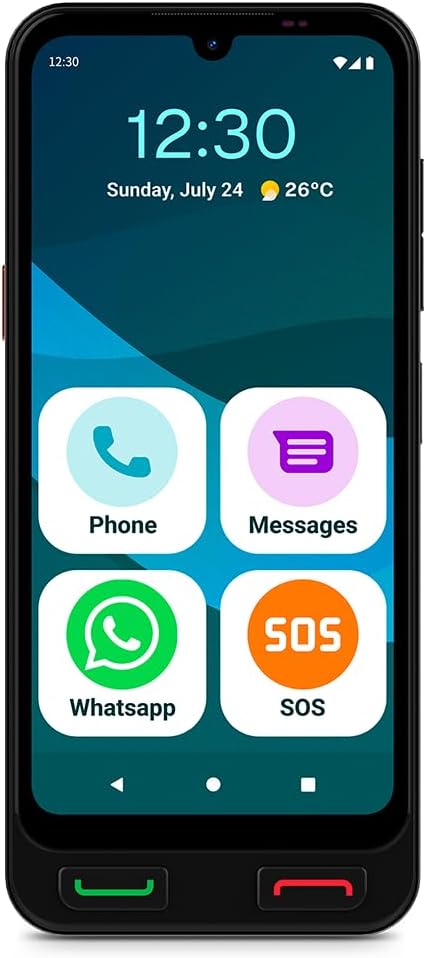
మూర్తి 3.2: ముందు view of the SPC Zeus 2 Pro Smartphone, highlighting the 6.1-inch screen and the "Easy Mode" layout with oversized application icons.
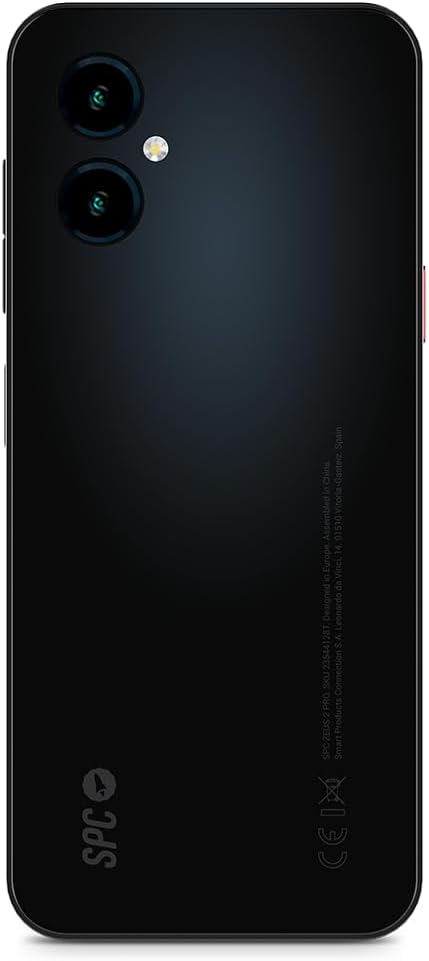
మూర్తి 3.3: వెనుక view of the SPC Zeus 2 Pro Smartphone, featuring the dual camera system and the brand's logo.
3.1. భౌతిక బటన్లు మరియు పోర్ట్లు
- కాల్ ఆన్సర్ బటన్: Green button below the screen to accept incoming calls.
- కాల్ ముగింపు బటన్: Red button below the screen to end calls or return to the home screen.
- SOS బటన్: Located on the side, for emergency contact activation.
- వాల్యూమ్ బటన్లు: On the side, to adjust audio levels.
- పవర్ బటన్: On the side, to turn the device on/off or lock/unlock the screen.
- USB టైప్-సి పోర్ట్: ఛార్జింగ్ మరియు డేటా బదిలీ కోసం.
4. సెటప్
4.1. ప్రారంభ పవర్ ఆన్ మరియు కాన్ఫిగరేషన్
- నొక్కండి మరియు పట్టుకోండి పవర్ బటన్ స్క్రీన్ వెలిగే వరకు.
- Follow the on-screen start-up assistant. This guide will walk you through initial settings.
- During setup, you can choose between Android మోడ్ (standard smartphone interface) or సులభమైన మోడ్ (simplified interface with large icons).
- Adjust icon size and distribution as prompted.
4.2. SIM Card / eSIM Installation
Your SPC Zeus 2 Pro supports Dual SIM functionality and eSIM.
- పరికరం వైపున SIM కార్డ్ ట్రేని గుర్తించండి.
- Insert the provided SIM tray ejector tool into the small hole next to the tray and gently push until the tray pops out.
- Place your Nano-SIM card(s) into the designated slots on the tray.
- ట్రేని జాగ్రత్తగా ఫోన్లోకి తిరిగి చొప్పించండి.
- For eSIM activation, follow the instructions provided by your mobile network operator.
4.3. పరికరాన్ని ఛార్జ్ చేస్తోంది
The smartphone comes with a convenient charging base.
- Connect the USB Type-C cable to the charging base and the wall adapter.
- వాల్ అడాప్టర్ను పవర్ అవుట్లెట్లోకి ప్లగ్ చేయండి.
- Place the SPC Zeus 2 Pro Smartphone into the charging base. Ensure it is seated correctly and the charging indicator appears on the screen.
- Alternatively, you can connect the USB Type-C cable directly to the phone's charging port.

మూర్తి 4.1: The SPC Zeus 2 Pro Smartphone positioned in its charging base, illustrating the ease of charging without direct cable connection to the phone.
5. ఆపరేటింగ్ సూచనలు
5.1. కాల్స్ చేయడం మరియు స్వీకరించడం
- కాల్ చేయడానికి: In Easy Mode, tap the "Phone" icon or a contact photo. Select the desired contact or dial the number. Press the green physical button to initiate the call.
- కాల్ స్వీకరించడానికి: When a call comes in, press the green physical button to answer.
- కాల్ ముగించడానికి: Press the red physical button to terminate the call.
5.2. Messaging (SMS and WhatsApp)
- SMS: Tap the "Messages" icon to send and receive text messages.
- WhatsApp: Tap the "WhatsApp" icon to access the application for instant messaging and calls.
5.3. Using the SOS Button
The dedicated SOS button is designed for emergencies.
- అత్యవసర పరిస్థితిలో, నొక్కి పట్టుకోండి SOS బటన్ ఫోన్ వైపు.
- The phone will automatically initiate a cycle of calls and SMS messages to pre-configured emergency contacts.
- This cycle will repeat up to three times if no response is received from the emergency contacts.
5.4. SPC Care Application
The SPC Care app allows family members to remotely assist with phone settings and monitor the user's safety.
- రిమోట్ సెట్టింగ్లు: Family members can rearrange icons, adjust volume, or increase font size from their own smartphone (Android or iOS) via the SPC Care app.
- నిజ-సమయ స్థానం: The app provides real-time location tracking, allowing authorized family members to know the user's whereabouts.
- Security Notifications: The SPC Care app can send notifications if the phone has been unused for several hours or if the battery level is low, indicating potential issues.
5.5. కెమెరా వినియోగం
The SPC Zeus 2 Pro features a 50 MP rear camera and a 5 MP front camera.
- Tap the Camera icon on the home screen or app drawer to open the camera application.
- Select between the front or rear camera.
- Tap the shutter button to capture photos or record videos.
5.6. భద్రతా లక్షణాలు
The device supports fingerprint and facial recognition for secure unlocking.
- నావిగేట్ చేయండి సెట్టింగ్లు > భద్రత to set up fingerprint or face unlock.
- Follow the on-screen instructions to register your fingerprint or facial data.
5.7. NFC Payments
The SPC Zeus 2 Pro supports NFC for contactless payments.
- Ensure NFC is enabled in సెట్టింగ్లు > కనెక్ట్ చేయబడిన పరికరాలు > కనెక్షన్ ప్రాధాన్యతలు > NFC.
- Set up your preferred payment application (e.g., Google Pay) and add your payment cards.
- To make a payment, hold the back of your phone near a compatible payment terminal.
6. నిర్వహణ
6.1. బ్యాటరీ సంరక్షణ
- బ్యాటరీ జీవితకాలం క్షీణించే తీవ్రమైన ఉష్ణోగ్రతలను నివారించండి.
- Charge the device regularly, preferably using the provided charging base or cable.
- బ్యాటరీని ఎక్కువసేపు పూర్తిగా డిశ్చార్జ్ చేసి ఉంచవద్దు.
6.2. శుభ్రపరచడం
- ఫోన్ స్క్రీన్ మరియు బాడీని శుభ్రం చేయడానికి మృదువైన, మెత్తటి వస్త్రాన్ని ఉపయోగించండి.
- కఠినమైన రసాయనాలు లేదా రాపిడి పదార్థాలను ఉపయోగించడం మానుకోండి.
- పోర్టులను దుమ్ము మరియు చెత్త లేకుండా ఉంచండి.
7. ట్రబుల్షూటింగ్
| సమస్య | సాధ్యమైన కారణం | పరిష్కారం |
|---|---|---|
| ఫోన్ ఆన్ చేయలేదు | తక్కువ లేదా క్షీణించిన బ్యాటరీ | Charge the phone using the provided charger and cable/base for at least 30 minutes. |
| కాల్స్ చేయలేరు లేదా స్వీకరించలేరు | No network signal, SIM card issue, or airplane mode is on. | Check network signal strength. Ensure SIM card is correctly inserted. Turn off airplane mode in settings. Contact your service provider. |
| స్క్రీన్ స్పందించడం లేదు | సాఫ్ట్వేర్ లోపం లేదా తాత్కాలిక స్తంభన. | Restart the phone by holding the power button. If unresponsive, force restart (refer to device specific instructions if available, usually holding power and volume down). |
| SPC Care app notifications not received | App permissions, internet connection, or settings issue. | Ensure the phone has an active internet connection. Check app permissions for notifications. Verify settings within the SPC Care app on both devices. |
8. స్పెసిఫికేషన్లు
| ఫీచర్ | వివరాలు |
|---|---|
| మోడల్ పేరు | ZEUS 2 PRO |
| మోడల్ సంఖ్య | 23544128T |
| బ్రాండ్ | SPC |
| ఆపరేటింగ్ సిస్టమ్ | ఆండ్రాయిడ్ 15 |
| స్క్రీన్ పరిమాణం | 6.1 అంగుళాలు |
| రిజల్యూషన్ | 720 x 1560 |
| రిఫ్రెష్ రేట్ | 60 Hz |
| RAM | 4 GB |
| అంతర్గత నిల్వ | 128 GB (Expandable) |
| CPU వేగం | 2.3 GHz (Octa-core) |
| వెనుక కెమెరా | 50 మెగాపిక్సెల్స్ |
| ఫ్రంట్ కెమెరా | 5 మెగాపిక్సెల్స్ |
| బ్యాటరీ కూర్పు | లిథియం-అయాన్ |
| కనెక్టివిటీ | Bluetooth, USB Type C, NFC |
| ప్రత్యేక లక్షణాలు | Dual SIM, Mobile Hotspot, Integrated GPS, Expandable Memory, Fast Charging Support, Fingerprint Unlock, Face Unlock, SOS Button, Charging Base. |
9. వారంటీ మరియు మద్దతు
Your SPC Zeus 2 Pro Smartphone is covered by a standard manufacturer's warranty. Please refer to the warranty card included in your package for specific terms and conditions.
For technical support, troubleshooting assistance, or further inquiries, please visit the official SPC webసైట్లో లేదా వారి కస్టమర్ సర్వీస్ విభాగాన్ని సంప్రదించండి. సంప్రదింపు సమాచారం సాధారణంగా ఉత్పత్తి ప్యాకేజింగ్ లేదా తయారీదారు యొక్క webసైట్.