
పరిచయం
The Dubstep Flo-F2 Mini Handheld Cooling Fan is designed to provide personal comfort with its portable and versatile features. This innovative device features a sleek design with advanced turbine-powered performance and 5 adjustable speed settings for customized airflow. The built-in LED display provides clear visibility of settings, while the USB Type-C charging port ensures convenient power replenishment. The fan's versatile 90-degree adjustable design allows for optimal positioning, complemented by a durable lanyard clip for easy carrying. It also includes a unique aroma diffuser feature, adding a pleasant sensory dimension to your cooling experience. This manual provides essential information for the safe and efficient use of your device, including setup, operation, maintenance, and troubleshooting.

Image: The Dubstep Flo-F2 Mini Handheld Cooling Fan, highlighting its portable design and key features.
పెట్టెలో ఏముంది
అన్బాక్సింగ్ సమయంలో అన్ని వస్తువులు ఉన్నాయని నిర్ధారించుకోవడానికి దయచేసి ప్యాకేజీ కంటెంట్లను తనిఖీ చేయండి:
- 1 x హ్యాండ్హెల్డ్ ఫ్యాన్
- 1 x USB-C ఛార్జింగ్ కేబుల్
- 1 x లాన్యార్డ్
- 1 x బేస్ స్టాండ్
- 1 x Aroma Diffuser (pre-installed or separate)
- 1 x యూజర్ మాన్యువల్ (ఈ పత్రం)

Image: All components included in the Dubstep Flo-F2 package.
సెటప్
1. Charging the Fan
Before first use, fully charge the fan. Connect the provided USB-C charging cable to the fan's Type-C port and the other end to a compatible USB power source (e.g., computer, wall adapter). The LED display will show charging status, with the power digit flashing during charging.

Image: Detail of the USB Type-C charging port and LED display.
2. లాన్యార్డ్ను అటాచ్ చేయడం
Thread the lanyard through the designated loop on the fan's body for convenient carrying. Ensure it is securely fastened.
3. Using the Base Stand
For desktop use, insert the fan's handle into the provided base stand. This allows the fan to stand upright for hands-free operation.

Image: The fan positioned in its base stand for desktop use.
4. Aroma Diffuser Preparation
To use the aroma diffuser feature, gently rotate the front grille of the fan counter-clockwise to unlock and remove it. Place a few drops of your preferred essential oil onto the aroma pad located inside. Reattach the grille by aligning and twisting clockwise until locked.

Image: Steps to open the fan and add fragrance to the aroma pad.
ఆపరేటింగ్ సూచనలు
1. పవర్ ఆన్/ఆఫ్
Press and hold the power button (usually located on the handle) for a few seconds to turn the fan on or off.
2. ఫ్యాన్ వేగాన్ని సర్దుబాటు చేయడం
Once powered on, short press the power button to cycle through the 5 available speed modes. The LED digital display will indicate the current speed setting (1-5).
- గేర్ 1: Whisper Wind
- గేర్ 2: Smooth Drift
- గేర్ 3: Cruise Cool
- గేర్ 4: Air Rush
- గేర్ 5: Beast Mode (Maximum Airflow)

Image: Visual representation of the five fan speed modes.
3. LED డిజిటల్ డిస్ప్లే
The integrated LED display shows the current fan speed (1-5) and the remaining battery level (1-100%). During charging, the power digit will flash, indicating the current power level.

Image: The LED digital display showing operational information.
4. Multi-Angle Adjustment
The fan head can be adjusted up to 90 degrees. Gently pivot the fan head to direct airflow as needed, whether handheld or placed on its stand.

Image: Demonstrating the 90-degree adjustable fan head.
నిర్వహణ
ఫ్యాన్ను శుభ్రం చేయడం
To maintain optimal performance and hygiene, regularly clean your fan:
- Ensure the fan is powered off and disconnected from any charging cable.
- Gently twist the front grille counter-clockwise to unlock it.
- Carefully pull out the fan blades assembly.
- Wipe the fan blades and the interior of the grille with a soft, dry cloth. Do not use harsh chemicals or abrasive materials.
- Reinsert the fan blades assembly, ensuring it is properly seated.
- Align the grille and twist clockwise to lock it securely in place.

Image: Cleaning procedure for the fan blades and grille.
For the exterior, wipe with a soft, slightly damp లోపలి భాగాలలోకి నీరు రాకుండా చూసుకోండి.
ట్రబుల్షూటింగ్
| సమస్య | సాధ్యమైన కారణం | పరిష్కారం |
|---|---|---|
| ఫ్యాన్ ఆన్ అవ్వదు. | బ్యాటరీ క్షీణించింది. | Charge the fan using the provided USB-C cable. |
| బలహీనమైన గాలి ప్రవాహం. | Fan speed is too low; fan blades are dirty. | Increase fan speed. Clean the fan blades as per maintenance instructions. |
| అనుకోకుండా ఫ్యాన్ ఆగిపోయింది. | Low battery; internal safety mechanism triggered. | Recharge the fan. If issue persists, contact customer support. |
| Aroma diffuser not working. | Aroma pad is dry or incorrectly placed. | Add more essential oil to the aroma pad. Ensure the pad is correctly positioned. |
స్పెసిఫికేషన్లు
- బ్రాండ్: డబ్స్టెప్
- మోడల్ పేరు: Flo-F2
- రంగు: నీలం
- ఎలక్ట్రిక్ ఫ్యాన్ డిజైన్: ధరించగలిగే అభిమాని
- శక్తి మూలం: బ్యాటరీ ఆధారితమైనది
- ఉత్పత్తి కొలతలు (D x W x H): 3.5 x 9 x 19 సెంటీమీటర్లు
- ప్రత్యేక లక్షణాలు: 5 Speed Settings, 8200 RPM, Aroma Diffuser, LED Digital Display, Lightweight and Portable, Multi-Angle Adjustment, Quiet Operation, Long-lasting Battery Life
- స్పీడ్ల సంఖ్య: 5
- శబ్దం స్థాయి: 36 డెసిబెల్స్
- వాట్tage: 5 వాట్స్
- వేగం: 8200 RPM
- వాల్యూమ్tage: 5 వోల్ట్లు
- కనెక్టర్ రకం: USB టైప్ C
- మెటీరియల్ రకం: యాక్రిలోనిట్రైల్ బుటాడిన్ స్టైరీన్ (ABS)
- వస్తువు బరువు: 115 గ్రాములు
- పునర్వినియోగం: పునర్వినియోగపరచదగినది
- మూలం దేశం: చైనా
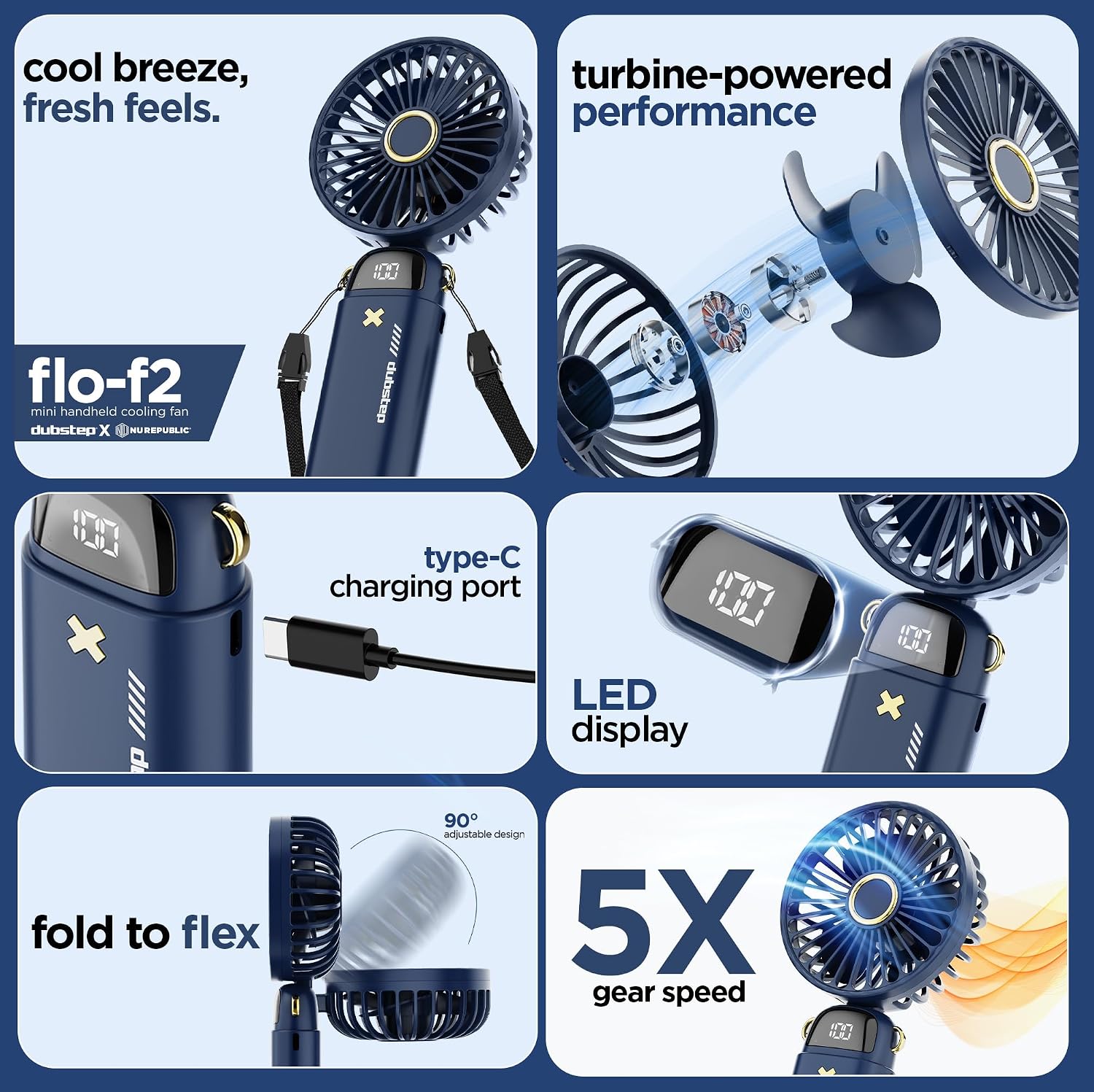
Image: Internal components highlighting turbine-powered performance.

Image: Safety features and battery technology.
వారంటీ సమాచారం
This product comes with a standard manufacturer's warranty. For specific details regarding warranty coverage, duration, and claims, please refer to the warranty card included in your product packaging or contact the manufacturer directly. Extended warranty options may be available from third-party providers.
మద్దతు
For technical assistance, product inquiries, or warranty support, please contact the manufacturer:
తయారీదారు: Nuworld Retail Private Limited
చిరునామా: Plot No.17-18, Pole No.9, PO Dhoolsiras, Dwarka, Sector-28, New Delhi - 110077
Please have your product model number (Flo-F2) and purchase details ready when contacting support.