
1. పరిచయం
Thank you for choosing the VGR 119 Professional Cordless Hair Clippers. This manual provides essential information for the safe and effective use, maintenance, and care of your new hair clippers. Please read these instructions thoroughly before first use and keep them for future reference.
2. ఉత్పత్తి ముగిసిందిview
The VGR 119 hair clippers are designed for professional and home use, featuring a powerful BLDC motor and precision ceramic blades for consistent cutting performance.
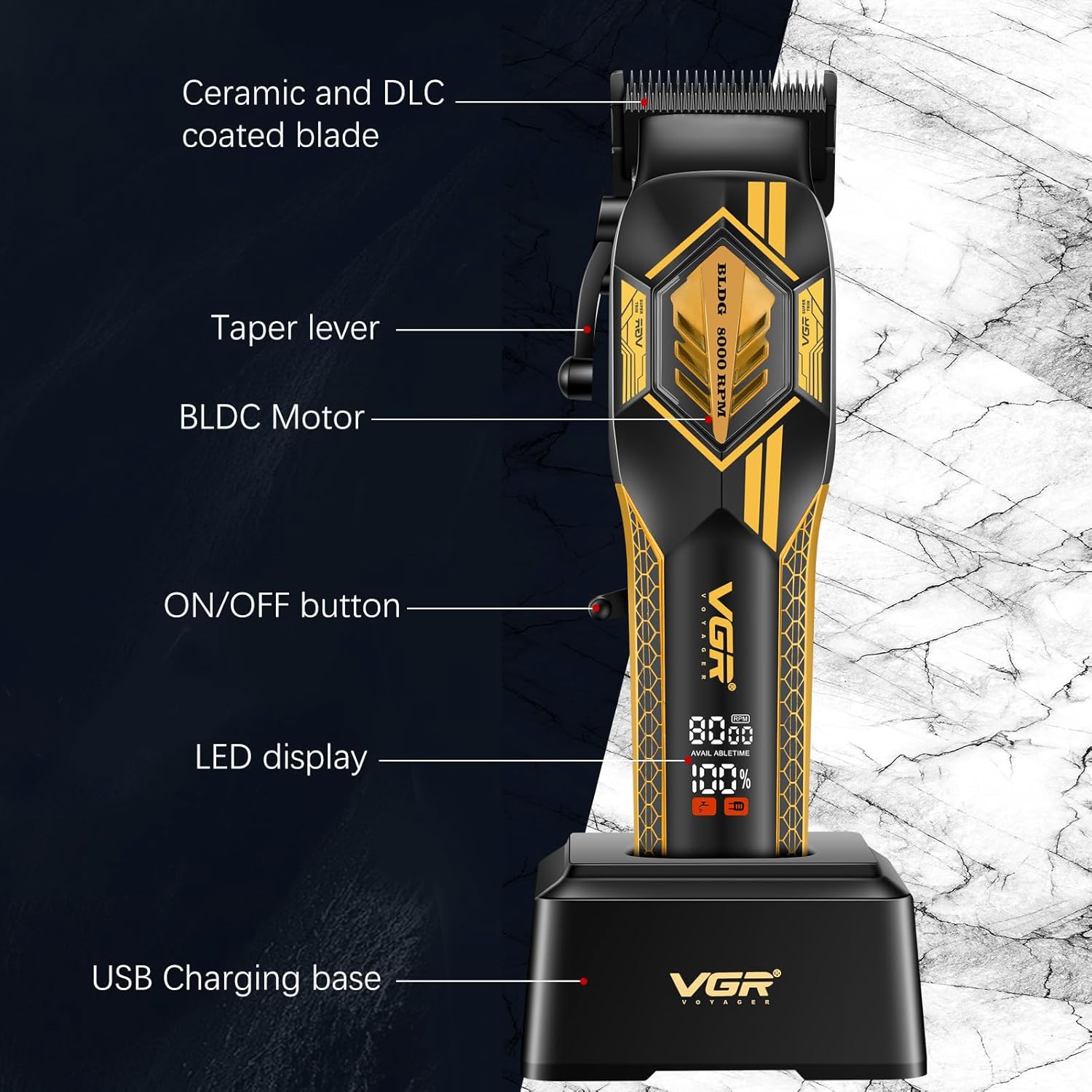
Figure 2.1: Clipper Components. This image shows the VGR 119 hair clipper resting on its charging base, highlighting key components such as the ceramic and DLC coated blade, taper lever, BLDC motor, ON/OFF button, LED display, and USB charging base.
ముఖ్య లక్షణాలు:
- BLDC మోటార్: Equipped with an 8000 RPM brushless DC motor for stable, powerful, and quiet operation.
- Ceramic Blades with DLC Coating: Ensures durability, low heat generation, and precise cutting, suitable for all hair types and sensitive skin.
- సర్దుబాటు చేయగల టేపర్ లివర్: Allows for 5-level precision cutting adjustments from 0.8mm to 2mm.
- దీర్ఘకాలం ఉండే బ్యాటరీ: 2500mAh lithium battery provides up to 180 minutes of use after a 3.5-hour charge.
- డ్యూయల్ ఛార్జింగ్ మోడ్లు: Can be charged via USB cable or the included charging base.
- LED డిస్ప్లే: Shows real-time battery status.
- తక్కువ నాయిస్ ఆపరేషన్: 70dB కంటే తక్కువ వద్ద పనిచేస్తుంది.
ప్యాకేజీ విషయాలు:
- VGR 119 Professional Cordless Hair Clipper
- 6 Guide Combs (1.5mm, 3mm, 4.5mm, 6mm, 9mm, 12mm)
- ఛార్జింగ్ డాక్
- USB ఛార్జింగ్ కేబుల్
- బ్లేడ్ ఆయిల్
- క్లీనింగ్ బ్రష్
3. సెటప్
3.1 ప్రారంభ ఛార్జ్
Before first use, fully charge the clipper. Connect the USB charging cable to the clipper or place the clipper in the charging dock. Connect the other end of the USB cable to a suitable USB power adapter (not included). The LED display will indicate charging status. A full charge takes approximately 3.5 hours.

Figure 3.1: Dual Charging Methods. The clipper can be charged using the included charging base or directly via the USB cable for portable charging.
3.2 గైడ్ దువ్వెనలను అటాచ్ చేయడం
To attach a guide comb, align the comb with the clipper blade and push it firmly until it clicks into place. To remove, gently pull the comb away from the blade.

Figure 3.2: Guide Combs. The kit includes six durable guide combs for various cutting lengths.
4. ఆపరేటింగ్ సూచనలు
4.1 ఆన్/ఆఫ్ చేయడం
Press the ON/OFF button located on the side of the clipper to turn it on or off.
4.2 కట్టింగ్ పొడవును సర్దుబాటు చేయడం (టేపర్ లివర్)
The taper lever on the side of the clipper allows for fine adjustments to the cutting length without a guide comb, ranging from 0.8mm to 2mm. Move the lever up or down to select the desired length.

Figure 4.1: Taper Lever Adjustment. The lever provides precise control over cutting length.
4.3 గైడ్ దువ్వెనలను ఉపయోగించడం
For longer and consistent hair lengths, attach one of the six guide combs. The combs are labeled with their respective cutting lengths (1.5mm, 3mm, 4.5mm, 6mm, 9mm, 12mm). Select the appropriate comb for your desired style.
4.4 జుట్టు కత్తిరించే చిట్కాలు
- కత్తిరించే ముందు జుట్టు శుభ్రంగా మరియు పొడిగా ఉండేలా చూసుకోండి.
- Start with a longer guide comb and gradually reduce length if desired.
- జుట్టు పెరుగుదల దిశకు వ్యతిరేకంగా కత్తిరించండి, తద్వారా జుట్టు సమానంగా ఉంటుంది.
- మృదువైన, అతివ్యాప్తి చెందుతున్న స్ట్రోక్లను ఉపయోగించండి.
5. నిర్వహణ
5.1 బ్లేడ్లను శుభ్రపరచడం
After each use, turn off the clipper and remove any attached guide comb. Use the included cleaning brush to remove loose hairs from the blades. For a more thorough cleaning, the blades can be carefully detached and rinsed under running water, ensuring the clipper body remains dry. Allow blades to air dry completely before reattaching.
5.2 బ్లేడ్లకు నూనె వేయడం
Regular oiling of the blades is crucial for optimal performance and longevity. After cleaning and drying, apply a few drops of the included blade oil to the teeth of the blades. Turn the clipper on for a few seconds to distribute the oil evenly. Wipe off any excess oil.
5.3 నిల్వ
Store the clipper in a dry, cool place, away from direct sunlight and moisture. Keep out of reach of children.
6. భద్రతా సూచనలు
- Do not immerse the clipper body in water.
- పరికరాన్ని నీటి వనరుల నుండి దూరంగా ఉంచండి.
- కళ్ళతో సంబంధాన్ని నివారించండి.
- శిశువులపై ఉపయోగించవద్దు.
- Always ensure the clipper is turned off before cleaning or maintenance.
- Use only the provided charging cable and dock.
- Do not operate the clipper if it is damaged.
7. ట్రబుల్షూటింగ్
7.1 క్లిప్పర్ ఆన్ కావడం లేదు
- Check if the battery is charged. Recharge the clipper if necessary.
- Ensure the ON/OFF button is fully pressed.
7.2 పేలవమైన కట్టింగ్ పనితీరు
- Clean the blades to remove any trapped hair.
- నిర్వహణ విభాగంలో వివరించిన విధంగా బ్లేడ్లకు నూనె వేయండి.
- Ensure the blades are properly aligned and not damaged.
7.3 క్లిప్పర్ ఓవర్ హీటింగ్
- Turn off the clipper and allow it to cool down.
- Ensure blades are clean and oiled to reduce friction.
8. స్పెసిఫికేషన్లు
| ఫీచర్ | వివరాలు |
|---|---|
| మోడల్ సంఖ్య | YS-V119 |
| మోటార్ రకం | BLDC మోటార్ |
| మోటార్ వేగం | 8000 RPM |
| బ్లేడ్ మెటీరియల్ | Ceramic with DLC Coating |
| బ్యాటరీ రకం | లిథియం-అయాన్ |
| బ్యాటరీ కెపాసిటీ | 2500mAh |
| ఛార్జింగ్ సమయం | 3.5 గంటలు |
| ఆపరేటింగ్ సమయం | 180 నిమిషాల వరకు |
| కట్టింగ్ పొడవు సర్దుబాటు | 0.8mm - 2mm (taper lever) |
| గైడ్ దువ్వెనలు చేర్చబడ్డాయి | 1.5mm, 3mm, 4.5mm, 6mm, 9mm, 12mm |
| శబ్దం స్థాయి | < 70dB |
| శక్తి మూలం | బ్యాటరీ ఆధారితమైనది |
| ఉత్పత్తి కొలతలు | 10.94 x 9.33 x 2.36 అంగుళాలు |
| వస్తువు బరువు | 1.04 కిలోలు |
9. వారంటీ మరియు మద్దతు
VGR products are manufactured with quality and reliability in mind. This product comes with a 1-year warranty from the date of purchase. We also offer 24-hour customer support to assist with any inquiries or issues.

చిత్రం 9.1: వారంటీ మరియు మద్దతు సమాచారం. Details on product guarantee and customer service availability.
For support, please contact VGR-DIRECT through our official channels. You can find more information and contact details on our webసైట్ లేదా సోషల్ మీడియా ప్లాట్ఫారమ్లు.

Figure 9.2: VGR-DIRECT Social Media. Connect with us for updates and support.