
పరిచయం
This manual provides detailed instructions for the installation, operation, and maintenance of your GeekTale Smart Door Lock K12 B Mini. Please read this manual thoroughly before installation and use to ensure proper function and safety. Keep this manual for future reference.

Image: GeekTale Smart Door Lock K12 B Mini, featuring the exterior keypad knob and interior knob in a sleek black finish. A smartphone screen next to it displays the lock's companion application, indicating its smart capabilities.
ఉత్పత్తి లక్షణాలు
- Passcode Access: Supports up to 20 unique access codes with anti-peep functionality (4-8 digits).
- యాప్ నియంత్రణ: Unlock the door via Bluetooth using the dedicated app. Manage users, add/delete access, share E-keys, and view access logs.
- Remote Unlock & Voice Control: Requires a separately sold gateway for remote unlocking and integration with Alexa or Google Home via the 'Smart Life' skill.
- Three Lock Modes: Features Auto Lock, Passage Mode, and Secure Mode, selectable via a button on the interior knob.
- అంతర్నిర్మిత పునర్వినియోగపరచదగిన బ్యాటరీ: Long-lasting battery provides approximately 8 months of use on a 3-hour charge. Includes a low battery warning.
ప్యాకేజీ విషయాలు
- Exterior Door Knob with Keypad
- ఇంటీరియర్ డోర్ నాబ్
- గొళ్ళెం మెకానిజం
- మౌంటు ప్లేట్
- స్ట్రైక్ ప్లేట్
- మౌంటు స్క్రూలు
- Backup Keys (2 pcs)
- సంస్థాపన మూస
- వినియోగదారు మాన్యువల్
- లిథియం అయాన్ బ్యాటరీ (ముందుగా ఇన్స్టాల్ చేయబడింది)
స్పెసిఫికేషన్లు
| బ్రాండ్ | గీక్ టేల్ |
| మోడల్ పేరు | K12 B Mini |
| రంగు | నలుపు |
| కంట్రోలర్ రకం | బ్లూటూత్ |
| కనెక్టివిటీ ప్రోటోకాల్ | బ్లూటూత్ |
| వస్తువు బరువు | 1.72 పౌండ్లు |
| ప్యాకేజీ కొలతలు | 8.98 x 5.12 x 4.09 అంగుళాలు |
| బ్యాటరీ రకం | 1 లిథియం అయాన్ బ్యాటరీ (చేర్చబడింది) |
ఇన్స్టాలేషన్ గైడ్
సంస్థాపన ప్రారంభించే ముందు, మీ తలుపు కింది స్పెసిఫికేషన్లకు అనుగుణంగా ఉందని నిర్ధారించుకోండి:
- బ్యాక్సెట్: 2-3/4" లేదా 2-3/8" (70మిమీ లేదా 60మిమీ)
- డోర్ హోల్ వ్యాసం: 2-1/8" (54మి.మీ)
- తలుపు మందం: 1-3/8" నుండి 2-1/8" (35మిమీ నుండి 54మిమీ)

Image: A detailed diagram illustrating the necessary door measurements for installing the GeekTale Smart Door Lock, including backset, door hole diameter, and compatible door thickness. It also provides the lock's dimensions and highlights the correct placement for the latch hole.
గమనిక: Do not close the door until the door lock is fully installed.
- Step 1: Install the exterior door knob. Ensure the exterior knob keyhole and Type-C charge port face downward.
- Step 2: Pull out the interior knob with a pin. This separates the interior knob components for installation.
- దశ 3: కేబుల్లను కనెక్ట్ చేయండి. Carefully connect the cables between the exterior and interior components.
- Step 4: Install the interior door knob. Secure the interior knob to the door using the provided screws. Ensure the 'UP' indicator is correctly oriented.
- Step 5: Close the lid of the interior door knob. Once all connections and screws are secure, attach the cover to the interior knob.

Image: A visual guide detailing the five steps for installing the GeekTale Smart Door Lock. It shows the placement of the exterior knob, cable connections, interior knob assembly, and final cover attachment.
ఆపరేటింగ్ సూచనలు
1. Passcode Access
Enter your 4-8 digit access code on the keypad. The lock supports an anti-peep function, allowing you to enter random digits before or after your actual code to prevent others from guessing it.

Image: This image illustrates the anti-peeping PIN code feature, where a user enters a code on the lock's keypad while a smartphone displays the unlock interface, emphasizing secure access.
2. App Control (Bluetooth Range)
Within Bluetooth range (approximately 10 meters), you can use the dedicated app to:
- Manage Users: Add or delete authorized users.
- Set Passwords: Create or modify access codes.
- Check Unlock Records: View a log of all lock and unlock events.

Image: A user demonstrates app control of the smart door lock from a couch, highlighting the Bluetooth range of 10 meters. Icons represent features like user management, password settings, and access log review.
3. Remote Unlock and Voice Control
For remote unlocking and voice control (via Alexa or Google Home), a GeekTale Gateway (sold separately) is required. Connect the gateway and link it to the 'Smart Life' app using your account credentials.
4. Three Lock Modes
The interior knob features a button to switch between three operational modes:
- తనంతట తానే తాళంవేసుకొను: The door will automatically lock after 5 seconds of being unlocked.
- పాసేజ్ మోడ్: The door remains unlocked after entry. To activate, unlock the door with a passcode or app, then turn the button to Passage Mode. The door will stay unlocked until manually re-locked or switched to another mode.
- భద్రతా మోడ్: Only the app or an administrator passcode can unlock the door.

Image: A visual representation of the three operational modes for the smart door lock: Passage Mode, where the door remains unlocked; Auto Lock, which relocks the door after 5 seconds; and Security Mode, which restricts unlocking to the app or administrator passcode.
బ్యాటరీ నిర్వహణ
The GeekTale Smart Door Lock K12 B Mini is equipped with a built-in rechargeable Lithium Ion battery. It provides approximately 8 months of operation on a single 3-hour charge.
- ఛార్జింగ్: Fully charge the battery before initial installation and use. Use the Type-C power port located on the exterior knob for charging.
- తక్కువ బ్యాటరీ హెచ్చరిక: The lock will provide a low battery alert when power is running low. Recharge promptly to avoid interruption of service.
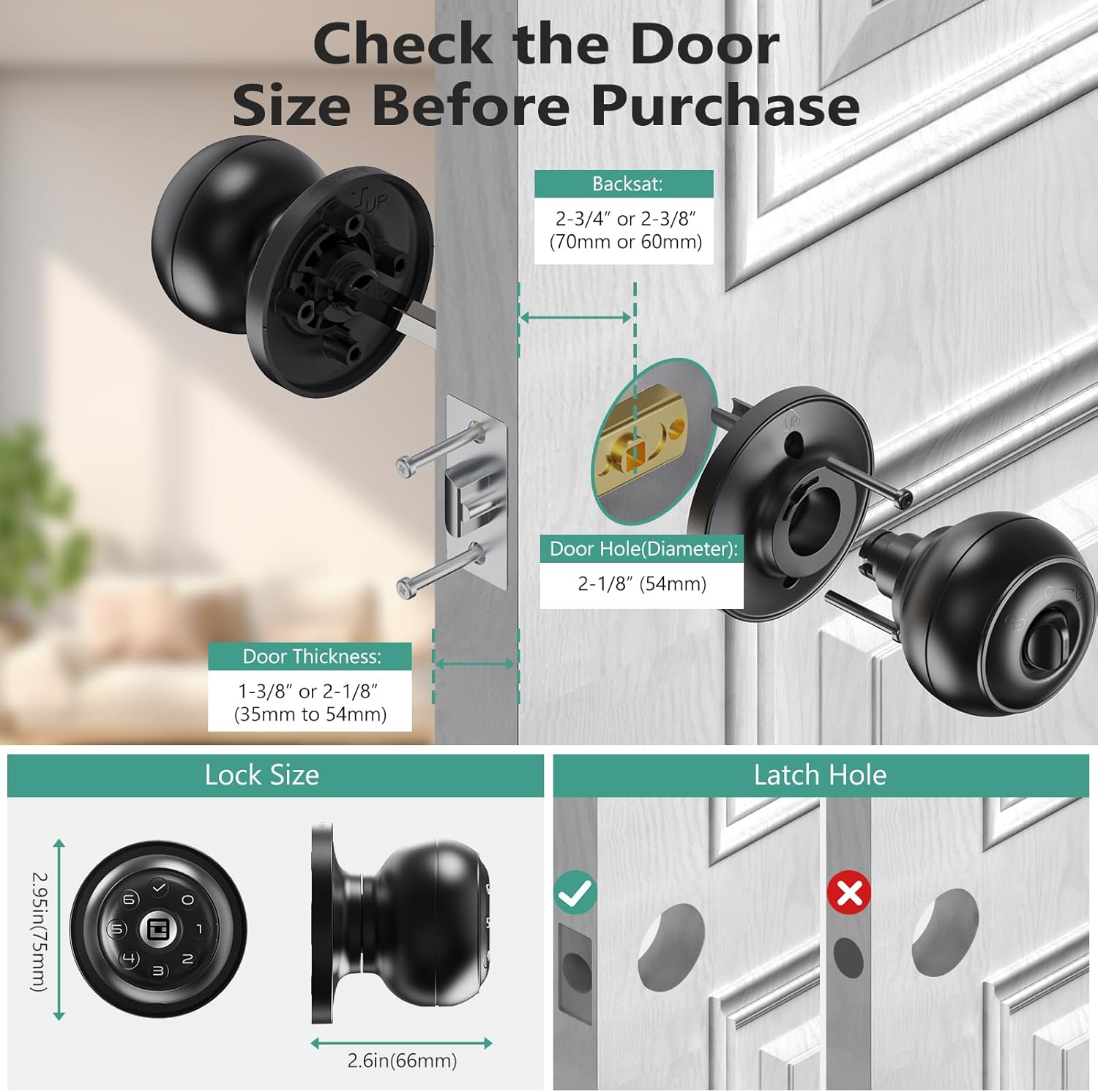
Image: The smart door lock is depicted with a charging cable connected to its Type-C port, illustrating the built-in rechargeable battery feature. A 'Low battery alert' icon is also shown.
నిర్వహణ
To ensure optimal performance and longevity of your smart door lock:
- శుభ్రపరచడం: లాక్ ఉపరితలాన్ని మృదువైన, పొడి గుడ్డతో తుడవండి. రాపిడి క్లీనర్లు, ద్రావకాలు లేదా కఠినమైన రసాయనాలను ఉపయోగించకుండా ఉండండి, ఎందుకంటే ఇవి ముగింపు మరియు ఎలక్ట్రానిక్ భాగాలను దెబ్బతీస్తాయి.
- బ్యాటరీ సంరక్షణ: Recharge the battery as soon as a low battery warning is indicated. Avoid completely draining the battery frequently.
- పర్యావరణ పరిస్థితులు: This lock is designed for indoor use only. Avoid exposure to extreme temperatures, direct sunlight, or moisture.
- ఫర్మ్వేర్ నవీకరణలు: Periodically check the companion app for any available firmware updates to ensure your lock has the latest features and security enhancements.
ట్రబుల్షూటింగ్
If you encounter issues with your GeekTale Smart Door Lock, refer to the following common solutions:
- లాక్ స్పందించడం లేదు: Check the battery level and recharge if necessary. Ensure the lock is properly installed and all cables are securely connected.
- కీప్యాడ్ పనిచేయడం లేదు: Verify that the battery has sufficient charge. If using an anti-peep code, ensure the correct sequence of your actual code is entered.
- యాప్ కనెక్టివిటీ సమస్యలు: Ensure Bluetooth is enabled on your smartphone and you are within the 10-meter range of the lock. Try restarting the app or your phone's Bluetooth.
- Remote Unlock/Voice Control Not Working: Confirm that your GeekTale Gateway is properly set up, connected to the internet, and linked to your 'Smart Life' app account.
- Knob Feels Loose: Recheck the installation screws and ensure they are tightened appropriately. Avoid over-tightening.
- ఆటో-లాక్ పనిచేయకపోవడం: Verify the lock mode setting on the interior knob. If in Passage Mode, it will not auto-lock.
For further assistance, please contact GeekTale customer support.
భద్రతా సమాచారం
దయచేసి క్రింది భద్రతా జాగ్రత్తలను గమనించండి:
- Do not attempt to disassemble or repair the lock yourself. This may void the warranty and could lead to malfunction or injury.
- Keep backup keys in a safe location outside the property, accessible only to trusted individuals.
- Regularly change your access codes for enhanced security.
- Ensure children do not have unauthorized access to the app or administrator passcodes.
- This product is intended for interior door use only.
వారంటీ మరియు మద్దతు
GeekTale products are designed for reliability and performance. For specific warranty details, please refer to the warranty card included with your product or visit the official GeekTale website. For technical support, troubleshooting, or service inquiries, please contact GeekTale customer service through the contact information provided on their webఉత్పత్తి స్థలంలో లేదా ఉత్పత్తి ప్యాకేజింగ్ లోపల.