
1. పరిచయం
This manual provides essential information for the proper installation, operation, and maintenance of the Generic RT638RG 3-Inch Thermal Printer Mechanism. This high-speed thermal print head is designed for integration into various thermal printer devices, including billing machines, kiosks, POS systems, cash registers, handheld printers, parking machines, bus ticketing devices, and Android mobile POS systems.
The RT638RG mechanism is compatible with most 78mm, 79mm, and 80mm thermal printers, offering reliable monochrome printing output.
2. ఉత్పత్తి ముగిసిందిview
The RT638RG is a compact and efficient thermal printer mechanism. It operates within a voltage range of 3.0 - 8.0V and is suitable for applications requiring portable and integrated printing solutions.
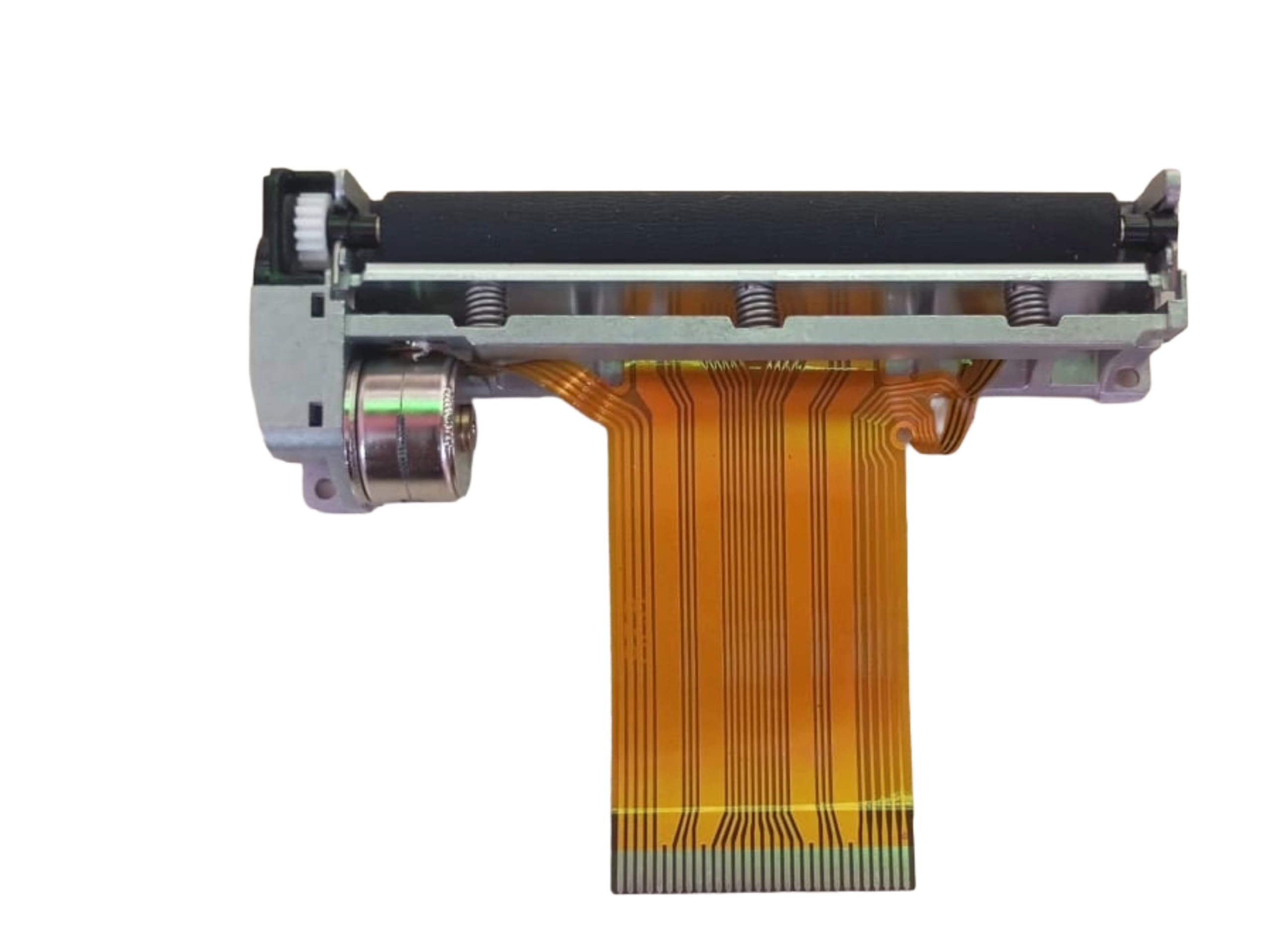
Figure 1: RT638RG Thermal Printer Mechanism. Note the flexible flat cable for data and power connection, and the print head assembly.
ముఖ్య లక్షణాలు ఉన్నాయి:
- 3-inch (80mm) print width capability.
- High-speed monochrome thermal printing.
- Integrated sensor for paper detection (typical for thermal mechanisms).
- సులభమైన ఇంటిగ్రేషన్ కోసం కాంపాక్ట్ డిజైన్.
- విస్తృత ఆపరేటింగ్ వాల్యూమ్tagఇ పరిధి.

Figure 2: Identification label on the RT638RG mechanism, confirming the model number.
3. స్పెసిఫికేషన్లు
| ఫీచర్ | వివరాలు |
|---|---|
| మోడల్ పేరు | RT638RG |
| ప్రింటింగ్ టెక్నాలజీ | థర్మల్ |
| ప్రింటర్ అవుట్పుట్ | మోనోక్రోమ్ |
| గరిష్ట ముద్రణ వేగం | 8 ppm (నిమిషానికి పేజీలు) |
| గరిష్ట ప్రింట్ రిజల్యూషన్ | 203 dpi (అంగుళానికి చుక్కలు) |
| గరిష్ట మీడియా పరిమాణం | 3 అంగుళాలు (80 మిమీ) |
| ఆపరేటింగ్ వాల్యూమ్tagఇ పరిధి | 3.0 - 8.0 వి |
| వస్తువు బరువు | 100 గ్రాములు |
| అంశం కొలతలు (D x W x H) | 10D x 6W x 8H సెంటీమీటర్లు |
| అనుకూల పరికరాలు | Billing machines, kiosks, POS systems, cash registers, handheld printers, parking machines, bus ticketing devices, Android mobile POS, etc. |
4. సెటప్ మరియు ఇన్స్టాలేషన్
The RT638RG is a printer mechanism designed for integration into a larger system. Installation typically involves:
- భౌతిక మౌంటు: Securely mount the printer mechanism within the host device's chassis using appropriate screws and mounting points. Ensure it is stable and aligned correctly with the paper path.
- విద్యుత్ కనెక్షన్: Connect the flexible flat cable (FFC) from the printer mechanism to the corresponding FFC connector on the host device's main board. Ensure the connection is firm and correctly oriented to avoid damage.
- విద్యుత్ సరఫరా: Verify that the host device provides a stable power supply within the mechanism's specified operating voltage range (3.0 - 8.0V). Incorrect voltage యూనిట్ దెబ్బతింటుంది.
- డేటా ఇంటర్ఫేస్: The FFC also carries data signals. Ensure the host device's firmware and hardware are configured to communicate with the RT638RG mechanism's interface protocol.
- Paper Path Integration: Design the paper path within the host device to allow for smooth feeding of thermal paper through the mechanism and proper exit.
- సెన్సార్ ఇంటిగ్రేషన్: The mechanism includes a built-in sensor (e.g., paper end sensor). Ensure the host device's software reads and responds to these sensor signals for proper operation.
గమనిక: Specific integration details, including pin assignments and communication protocols, should be obtained from the host device manufacturer or the mechanism's detailed technical datasheet, which is not included in this general manual.
5. ఆపరేటింగ్ సూచనలు
Once integrated into a host device, the operation of the RT638RG mechanism is controlled by the host system. General operating principles include:
- Loading Thermal Paper:
- Open the paper cover or access panel of the host device.
- Insert a roll of 3-inch (80mm) thermal paper, ensuring the paper feeds from the bottom of the roll and the thermal side (usually smoother, darker when scratched) faces the print head.
- Close the paper cover/panel, leaving a small amount of paper protruding from the exit slot.
- ప్రింటింగ్:
- The host device will send print commands to the mechanism.
- Ensure the host device's software is correctly configured for the RT638RG mechanism.
- The mechanism will feed the paper and apply heat to create the print.
- పేపర్ ఎండ్ డిటెక్షన్: The built-in sensor will notify the host device when the paper roll is nearing its end, prompting a paper replacement message or action.
Refer to your host device's user manual for specific instructions on loading paper and initiating print jobs.
6. నిర్వహణ
Regular maintenance ensures optimal performance and extends the lifespan of your thermal printer mechanism.
- ప్రింట్ హెడ్ క్లీనింగ్:
- Turn off the power to the host device before cleaning.
- Gently wipe the thermal elements of the print head with a lint-free cloth dampఐసోప్రొపైల్ ఆల్కహాల్తో కలుపుతారు.
- Allow the print head to dry completely before restoring power.
- Clean the print head regularly, especially if print quality degrades or after changing many paper rolls.
- Cleaning the Paper Path: కాగితపు మార్గం నుండి ఏదైనా కాగితపు దుమ్ము లేదా శిధిలాలను మృదువైన బ్రష్ లేదా సంపీడన గాలిని ఉపయోగించి తొలగించండి.
- నిర్వహణ: Avoid touching the print head surface directly with bare hands, as oils and dirt can affect print quality.
- నిల్వ: If the mechanism is to be stored for an extended period, keep it in a dry, dust-free environment, away from direct sunlight and extreme temperatures.
7. ట్రబుల్షూటింగ్
This section addresses common issues you might encounter with the thermal printer mechanism.
- ప్రింట్ అవుట్పుట్ లేదు:
- Check if the host device is powered on and the mechanism is receiving power.
- Ensure the FFC cable is securely connected to both the mechanism and the host board.
- Verify that thermal paper is loaded correctly and the thermal side is facing the print head.
- Confirm that the host device is sending print commands and its software/drivers are correctly installed and configured.
- Check for any error indicators on the host device.
- Poor Print Quality (Faint, Streaky, or Incomplete Print):
- నిర్వహణ విభాగంలో వివరించిన విధంగా ప్రింట్ హెడ్ను శుభ్రం చేయండి.
- Ensure you are using high-quality thermal paper. Old or low-quality thermal paper can result in poor print.
- Check the paper roll for any damage or moisture.
- Verify that the print head is not physically damaged.
- ఆపరేటింగ్ వాల్యూమ్ నిర్ధారించుకోండిtage is stable and within the specified range.
- పేపర్ జామ్:
- హోస్ట్ పరికరానికి పవర్ ఆఫ్ చేయండి.
- Carefully open the paper cover and remove any jammed paper. Avoid tearing the paper inside the mechanism.
- Ensure the paper path is clear of debris.
- Reload the paper correctly.
- Mechanism Not Responding:
- Power cycle the host device.
- Check all electrical and data connections.
- Consult the host device's manual for specific error codes or diagnostic procedures.
If problems persist after following these steps, contact the manufacturer or your service provider for further assistance.
8. వారంటీ సమాచారం
The Generic RT638RG Thermal Printer Mechanism comes with a 7-రోజుల భర్తీ వారంటీ from the date of purchase. This warranty covers manufacturing defects. It does not cover damage caused by improper installation, misuse, accidents, unauthorized repairs, or normal wear and tear.
For warranty claims, please retain your proof of purchase and contact your vendor or the manufacturer's support channel within the warranty period.
9. మద్దతు
For technical assistance, detailed integration guides, or further inquiries regarding the Generic RT638RG Thermal Printer Mechanism, please refer to the documentation provided by your host device manufacturer or contact the seller from whom you purchased this product.
మీరు వీటిని కూడా సందర్శించవచ్చు product page on Amazon.in for additional information or to contact the seller.