
1. పరిచయం
The HLTNC YL586K Series Vector VFD Frequency Converter is an advanced industrial control device designed for precise and efficient motor speed regulation. This inverter is suitable for a wide range of applications requiring variable frequency drive, including CNC machinery, 3D printers, textile equipment, and cutting machines. This manual provides essential information for the safe installation, operation, and maintenance of your 1.5KW, 220V unit, ensuring optimal performance and longevity.
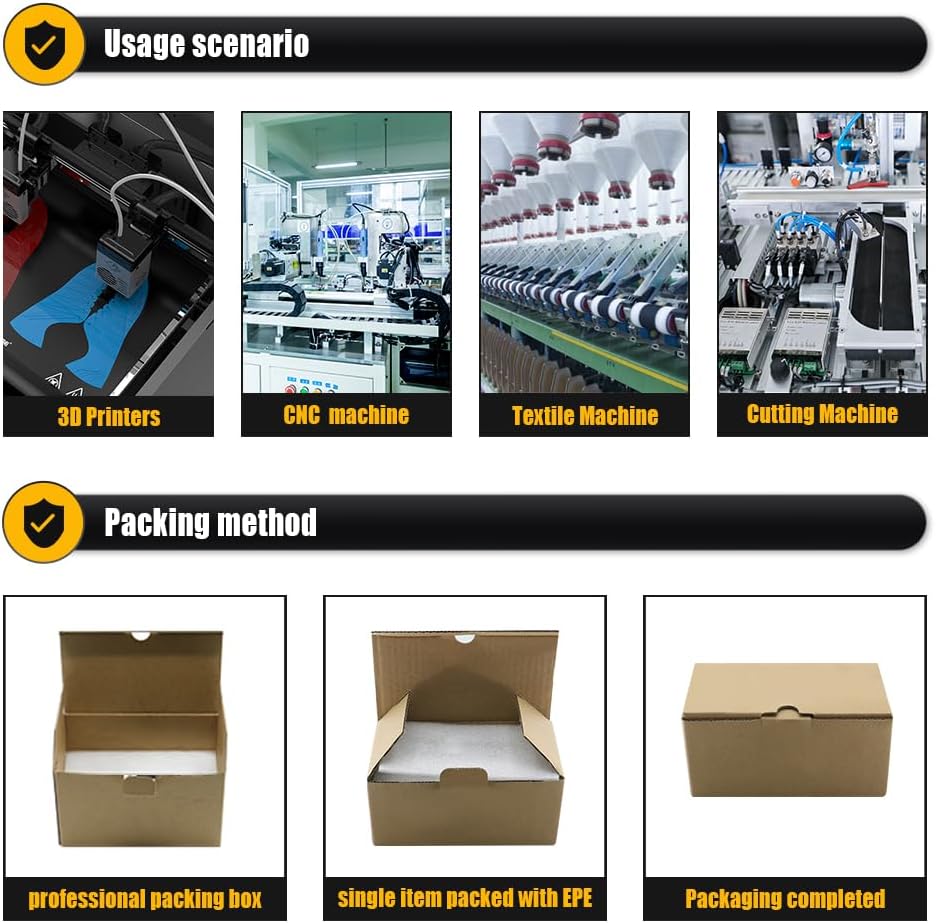
చిత్రం 1.1: The HLTNC YL586K VFD is suitable for various industrial applications such as 3D printers, CNC machines, textile machines, and cutting machines, providing precise motor control.
2. భద్రతా సమాచారం
Read all safety instructions carefully before installation, operation, or maintenance. Failure to comply with these instructions may result in personal injury or equipment damage.
- విద్యుత్ ప్రమాదం: Ensure all power is disconnected before performing any wiring or maintenance. Only qualified personnel should perform electrical work.
- గ్రౌండింగ్: The inverter must be properly grounded to prevent electric shock.
- కెపాసిటర్ డిశ్చార్జ్: Wait at least 5 minutes after disconnecting power for internal capacitors to discharge before touching any components. Verify with a voltmeter.
- పర్యావరణ పరిస్థితులు: Do not operate the inverter in environments with excessive dust, corrosive gases, flammable materials, or direct sunlight.
- ఓవర్లోడ్ రక్షణ: Do not exceed the rated current or power of the inverter and connected motor.
- వెంటిలేషన్: ఇన్వర్టర్ వేడెక్కకుండా నిరోధించడానికి చుట్టూ తగినంత వెంటిలేషన్ ఉండేలా చూసుకోండి.
3. ఉత్పత్తి ముగిసిందిview
The HLTNC YL586K VFD is designed for robust performance and ease of use. It features a compact design with an intuitive digital control panel.

చిత్రం 3.1: వివిధ views of the HLTNC YL586K VFD, illustrating its physical dimensions and design from the front, side, top, and bottom.
3.1 Control Panel and Key Functions
The digital control panel provides access to all operational parameters and settings.
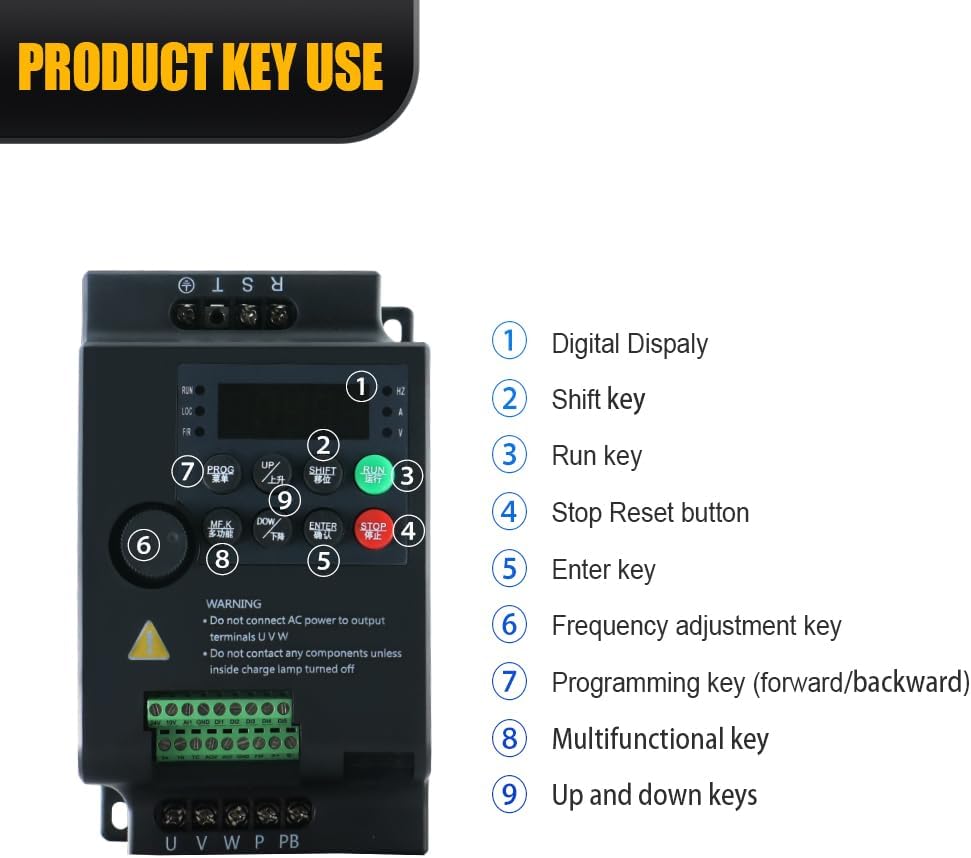
చిత్రం 3.2: వివరంగా view of the HLTNC YL586K VFD control panel, indicating the digital display and the functions of its nine keys for operation and programming.
- డిజిటల్ ప్రదర్శన: Shows operational status, frequency, and parameter values.
- షిఫ్ట్ కీ: Used to move the cursor during parameter setting.
- రన్ కీ: మోటార్ ఆపరేషన్ను ప్రారంభిస్తుంది.
- Stop/Reset Button: Stops motor operation and resets fault conditions.
- కీని నమోదు చేయండి: Confirms parameter selections and settings.
- Frequency Adjustment Key: Adjusts the output frequency.
- Programming Key (Forward/Backward): Accesses and navigates through programming menus.
- Multifunctional Key: Provides additional functions depending on the menu.
- పైకి క్రిందికి కీలు: Adjusts parameter values or navigates menu options.
3.2 Product Display Video
వీడియో 3.1: An official product video demonstrating the physical appearance and components of the HLTNC YL586K Series Inverter.
4. సెటప్ మరియు ఇన్స్టాలేషన్
Proper installation is crucial for the safe and reliable operation of the VFD. Refer to the wiring diagram and follow all local electrical codes.
4.1 మౌంటు
- Mount the inverter vertically on a stable, non-flammable surface.
- Ensure sufficient clearance (at least 10 cm) around the unit for proper airflow and heat dissipation.
- Avoid mounting near heat sources or in direct sunlight.
4.2 విద్యుత్ కనెక్షన్లు
All wiring must be performed by a qualified electrician. Ensure the main power supply is disconnected before making any connections.

చిత్రం 4.1: Comprehensive wiring diagram for the HLTNC YL586K VFD, detailing connections for power input, motor output, control signals, and optional components like braking resistors.
- Power Input (L, N): Connect the single-phase 220V AC power supply to the L and N terminals.
- మోటార్ అవుట్పుట్ (U, V, W): Connect the three-phase motor to the U, V, and W terminals. Ensure correct phase sequence.
- Grounding (PE): Connect the ground wire to the PE terminal. This is critical for safety.
- నియంత్రణ టెర్మినల్స్: Connect external control signals (e.g., start/stop, speed reference, emergency stop) to the designated control terminals as per your application requirements. Refer to the detailed product manual for specific terminal functions and programming.
- Braking Resistor (PB): If a braking resistor is used, connect it to the PB terminals.
5. ఆపరేటింగ్ సూచనలు
Once installed and wired correctly, the inverter can be operated using the control panel.
5.1 ప్రాథమిక ఆపరేషన్
- పవర్ ఆన్: Apply power to the inverter. The digital display will illuminate.
- ఫ్రీక్వెన్సీని సెట్ చేయండి: Use the Frequency Adjustment Key or Up/Down keys to set the desired output frequency.
- మోటారును ప్రారంభించండి: నొక్కండి రన్ key to start the motor. The motor will accelerate to the set frequency.
- మోటార్ ఆపు: నొక్కండి నిలిపివేయండి/రీసెట్ చేయండి మోటారును ఆపడానికి బటన్. మోటారు వేగాన్ని తగ్గించి ఆగిపోతుంది.
5.2 పారామీటర్ ప్రోగ్రామింగ్
The inverter has numerous programmable parameters to customize its operation. Refer to the comprehensive programming guide (usually provided with the product or available online) for detailed instructions on setting specific parameters such as acceleration/deceleration times, motor parameters, and control modes.
- నొక్కండి PROG key to enter the parameter setting mode.
- Use the Up/Down keys to navigate through parameter groups and individual parameters.
- ఉపయోగించండి SHIFT key to move the cursor when editing values.
- నొక్కండి నమోదు చేయండి key to confirm and save changes.
6. నిర్వహణ
Regular maintenance ensures the longevity and reliable operation of your VFD.
- శుభ్రపరచడం: Periodically clean the inverter's exterior and ventilation openings to prevent dust accumulation, which can hinder heat dissipation. Use a soft, dry cloth. Do not use liquid cleaners.
- తనిఖీ: వైరింగ్ కనెక్షన్లను క్రమం తప్పకుండా తనిఖీ చేయండి, బిగుతు మరియు నష్టం లేదా తుప్పు సంకేతాల కోసం. ఆపరేషన్ సమయంలో ఏవైనా అసాధారణ శబ్దాలు లేదా వాసనలు ఉన్నాయా అని తనిఖీ చేయండి.
- పర్యావరణ తనిఖీ: ఆపరేటింగ్ వాతావరణం పేర్కొన్న ఉష్ణోగ్రత మరియు తేమ పరిధిలో ఉండేలా చూసుకోండి.
- ఫ్యాన్ చెక్: Verify that the cooling fan is operating correctly and is free from obstructions.
7. ట్రబుల్షూటింగ్
If you encounter issues, refer to the table below for common problems and their solutions. For complex issues, contact technical support.
| సమస్య | సాధ్యమైన కారణం | పరిష్కారం |
|---|---|---|
| మోటారు ప్రారంభం కాదు | No power supply; Wiring error; Emergency stop active; Parameter settings incorrect. | Check power connections; Verify wiring against diagram; Release emergency stop; Review పారామితి సెట్టింగులు. |
| Inverter displays fault code | Overcurrent; Overvoltage; Overheat; Motor overload. | Refer to the fault code list in the detailed manual for specific actions. Address the underlying cause (e.g., reduce load, improve ventilation). |
| మోటారు వేగం అస్థిరంగా ఉంది | Poor grounding; Interference; Incorrect PID settings. | Check grounding; Ensure proper shielding for control wiring; Adjust PID parameters if applicable. |
| అధిక శబ్దం లేదా కంపనం | Motor imbalance; Mechanical issues; Incorrect carrier frequency. | Inspect motor and load for mechanical issues; Adjust carrier frequency parameter if necessary. |
8. స్పెసిఫికేషన్లు
Key technical specifications for the HLTNC YL586K Series Vector VFD Frequency Converter (1.5KW, 220V model).
| ఫీచర్ | స్పెసిఫికేషన్ |
|---|---|
| మోడల్ పేరు | YL586K |
| వాట్tage | 1.5 KW |
| శక్తి మూలం | ఎసి పవర్డ్ |
| ఇన్పుట్ వాల్యూమ్tage | Single-phase 220V AC (100-120V AC for other variants) |
| అవుట్పుట్ వాల్యూమ్tage | Three-phase 0-220V AC (0-120V AC for other variants) |
| అవుట్పుట్ ఫ్రీక్వెన్సీ | 3200Hz వరకు |
| సిఫార్సు చేసిన ఉపయోగాలు | 3D Printers, CNC Machines, Cutting Machines, Textile Machines |
| బ్రాండ్ | LCRHLCNC |
| వస్తువు బరువు | 2.2 పౌండ్లు (సుమారు 1 కిలోలు) |
| ప్యాకేజీ కొలతలు | 5.91 x 3.94 x 3.94 అంగుళాలు |
| ఆపరేటింగ్ ఉష్ణోగ్రత | -25°C నుండి 55°C (-13°F నుండి 131°F) |
9. వారంటీ మరియు మద్దతు
For warranty information, technical support, or service inquiries, please refer to the documentation included with your product or contact the manufacturer directly. Ensure you have your product model and serial number available when seeking support.