
పరిచయం
Thank you for choosing the VANSING D2 MP3 Player. This device is designed to provide a portable and versatile music experience, featuring Bluetooth 5.2 connectivity, a 1.8-inch display, and multiple functions including FM radio and voice recording. This manual will guide you through the setup, operation, and maintenance of your new MP3 player.
పెట్టెలో ఏముంది
Carefully unpack your VANSING D2 MP3 Player and ensure all items are present. If any items are missing or damaged, please contact customer support.
- VANSING D2 MP3 Player (1)
- Screen Protector Case (1)
- వినియోగదారు మాన్యువల్ (1)
- Screen Protector Film (2, one pre-applied)
- MP3 Lanyard (1)
- Wired Headphones (1)
- ఛార్జింగ్ కేబుల్ (1)
- 32GB Storage Card (1)

ఉత్పత్తి ముగిసిందిview
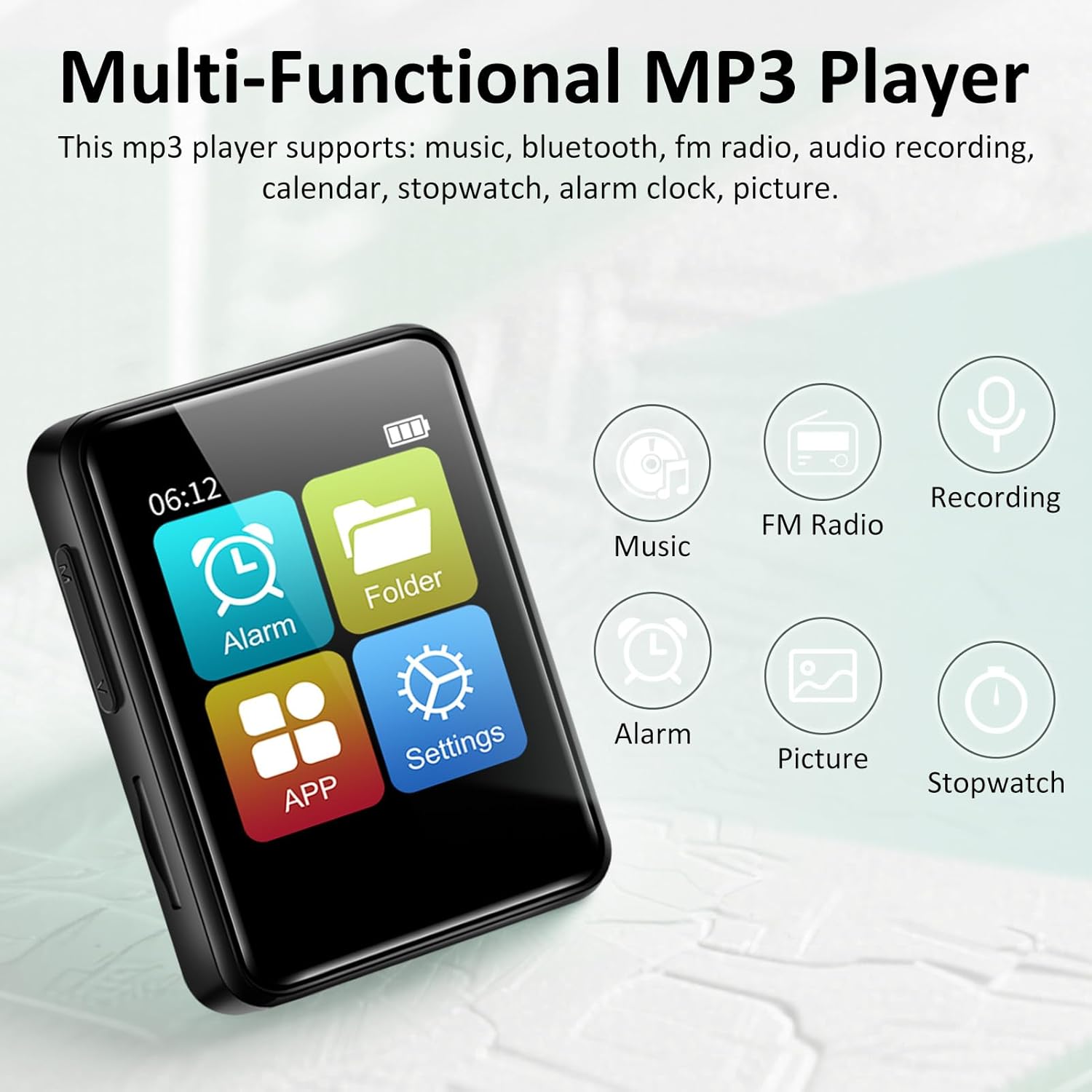
The VANSING D2 MP3 Player is a compact and feature-rich device designed for audio playback and more. It features a clear 1.8-inch display for easy navigation and supports various audio formats.
ముఖ్య లక్షణాలు:
- బ్లూటూత్ 5.2: For stable and efficient wireless connection to headphones or speakers.
- దీర్ఘకాలం ఉండే బ్యాటరీ: Up to 20 hours with headphones, 4 hours with speaker on a 1.5-hour charge.
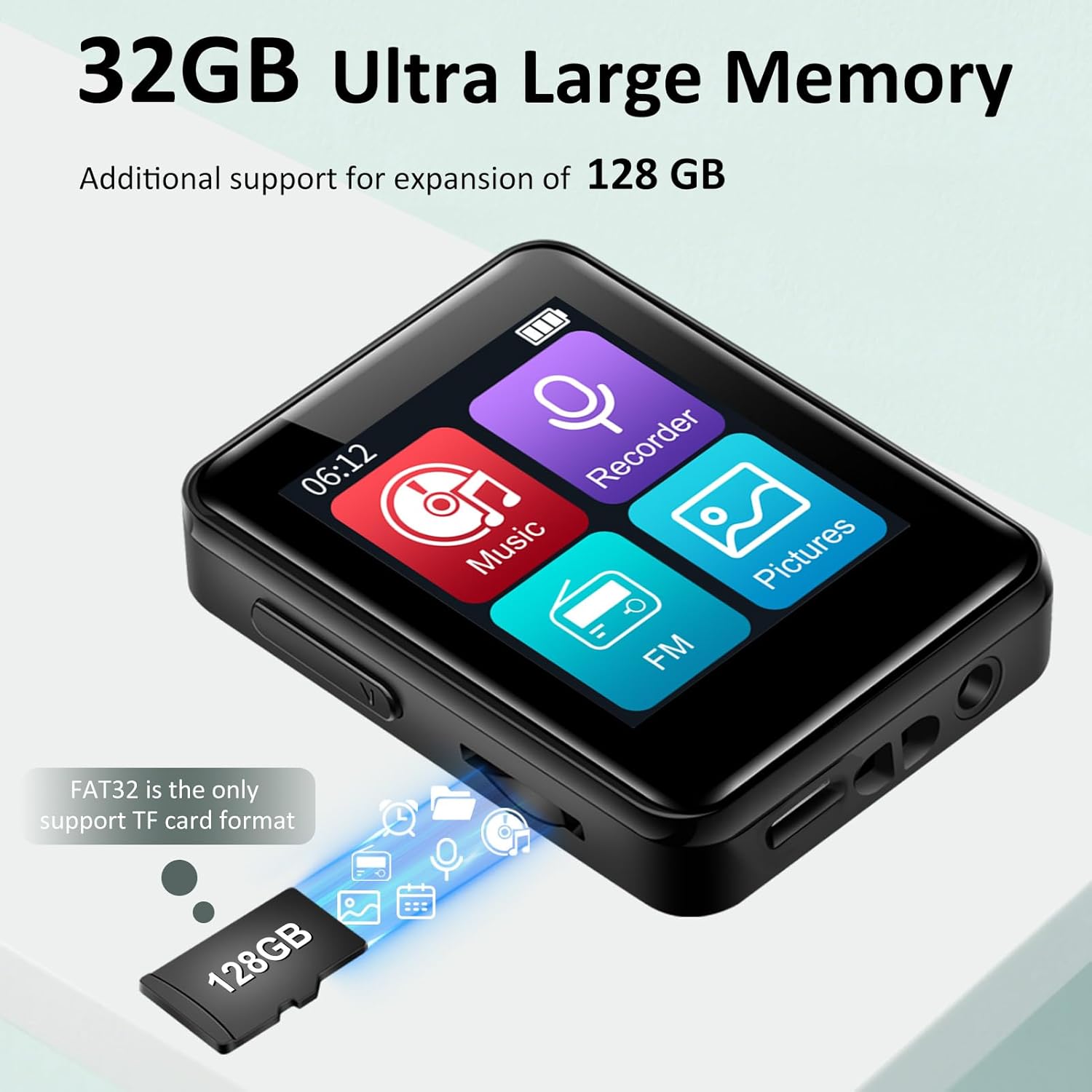
- విస్తరించదగిన నిల్వ: Supports up to 512GB TF card (32GB card included).
- బహుళ-ఫంక్షనల్: Includes music playback, FM radio, voice recorder, alarm clock, stopwatch, and calendar.
- Lossless Sound: Compatible with MP3/OGG/FLAC/AAC/WMA/WAV/APE formats.


సెటప్
1. పరికరాన్ని ఛార్జ్ చేస్తోంది
Before first use, fully charge your MP3 player. Connect the provided USB charging cable to the device's Mini USB port and the other end to a USB power adapter (not included) or a computer's USB port. The battery indicator on the screen will show charging status. A full charge typically takes about 1.5 hours.
2. TF కార్డ్ని చొప్పించడం
The VANSING D2 MP3 Player requires a TF (Micro SD) card for storage. A 32GB card is included. The device supports cards up to 512GB. Ensure the card is formatted to FAT32 for optimal compatibility.
- Locate the TF card slot on the side of the MP3 player.
- TF కార్డ్ స్లాట్లోకి క్లిక్ అయ్యే వరకు సున్నితంగా చొప్పించండి.
- తీసివేయడానికి, కార్డు బయటకు వచ్చే వరకు కొద్దిగా లోపలికి నెట్టండి.
3. పవర్ ఆన్/ఆఫ్
To power on the device, press and hold the power button located on the side until the screen illuminates. To power off, press and hold the power button again until the device shuts down.
ప్రాథమిక ఆపరేషన్
1. ఇంటర్ఫేస్ను నావిగేట్ చేయడం
The VANSING D2 features a touch-sensitive screen for navigation. Swipe left or right to browse through menu options and tap to select. Use the physical buttons on the side for volume control and power.
2. మ్యూజిక్ ప్లేబ్యాక్
సంగీతం ప్లే చేయడానికి:
- ప్రధాన మెనూ నుండి, "సంగీతం" చిహ్నాన్ని నొక్కండి.
- మీ సంగీత లైబ్రరీని కళాకారుడు, ఆల్బమ్, శైలి లేదా ఫోల్డర్ వారీగా బ్రౌజ్ చేయండి.
- ప్లేబ్యాక్ ప్రారంభించడానికి పాటపై నొక్కండి.
- Use the on-screen controls for play/pause, skip tracks, and volume adjustment.
The player supports MP3, OGG, FLAC, AAC, WMA, WAV, and APE audio formats.

3. బ్లూటూత్ కనెక్షన్
బ్లూటూత్ హెడ్ఫోన్లు లేదా స్పీకర్లకు కనెక్ట్ చేయడానికి:
- From the main menu, tap the "Settings" icon.
- "బ్లూటూత్" ఎంచుకోండి.
- Turn Bluetooth ON. The player will scan for nearby devices.
- Select your desired device from the list to pair.
4. FM రేడియో
To use the FM radio function, wired headphones must be connected as they act as the antenna.
- Connect the wired headphones to the 3.5mm audio port.
- From the main menu, tap the "FM" icon.
- Use the on-screen controls to scan for stations or manually tune.
5. వాయిస్ రికార్డర్
ఆడియో రికార్డ్ చేయడానికి:
- From the main menu, tap the "Recorder" icon.
- రికార్డింగ్ ప్రారంభించడానికి రికార్డ్ బటన్ను నొక్కండి.
- రికార్డింగ్ను ముగించి సేవ్ చేయడానికి స్టాప్ బటన్ను నొక్కండి.
6 ఇతర విధులు
The VANSING D2 also includes:
- అలారం గడియారం: రిమైండర్ల కోసం అలారాలను సెట్ చేయండి.
- స్టాప్వాచ్: సమయ కార్యకలాపాల కోసం.
- క్యాలెండర్: View dates and manage schedules.
భాష మరియు సమయ సెట్టింగ్లు
You can easily adjust the device's language, time, and date settings through the menu.
భాషను మార్చడం:
- Go to "Settings" (the gear icon).
- Select "Language Set".
- Choose "English" from the list.

సమయాన్ని మార్చడం:
- Go to "Settings".
- Select "Time & Date".
- Choose "Set the time".
- Adjust the hour, minute, and second selections.

Changing the Date:
- Go to "Settings".
- Select "Time & Date".
- Choose "Set the date".
- Adjust the year, month, and day selections.

File బదిలీ చేయండి
You can transfer music and other files to your MP3 player using a computer or an OTG connection.
1. కంప్యూటర్కు కనెక్ట్ చేస్తోంది
Connect the MP3 player to your computer using the provided USB data cable. The device should appear as a removable disk. You can then drag and drop files directly to the TF card. Ensure the TF card is inserted for file transfer functionality.
2. OTG (On-The-Go) Transfer
The device supports OTG for direct file transfer from compatible smartphones or other devices. An OTG adapter (not included) may be required. Ensure the TF card is inserted for this function.

ట్రబుల్షూటింగ్
- పరికరం ఆన్ చేయడం లేదు: Ensure the battery is charged. Connect to a power source and try again. If unresponsive, perform a hard reset by pressing and holding the power button for 10-15 seconds.
- బ్లూటూత్కి కనెక్ట్ చేయడం సాధ్యపడదు: Ensure Bluetooth is enabled on both the MP3 player and the target device. Make sure both devices are within range and not paired with other devices. Try restarting both devices.
- Files not appearing on the player: Verify that the TF card is properly inserted and formatted to FAT32. Ensure the audio files are in a supported format (MP3/OGG/FLAC/AAC/WMA/WAV/APE). Try re-transferring the files.
- నెమ్మదిగా file బదిలీ వేగం: Transfer speeds can vary depending on the computer's USB port and the TF card's speed. Ensure you are using the provided USB cable.
- FM Radio not working: Ensure wired headphones are securely plugged into the 3.5mm audio jack, as they function as the antenna.
- స్క్రీన్ స్పందించడం లేదు: If the screen is unresponsive, try restarting the device. If the issue persists, ensure the screen protector is applied correctly and not interfering with touch sensitivity.
స్పెసిఫికేషన్లు
| ఉత్పత్తి కొలతలు | 2.13 x 1.65 x 0.5 అంగుళాలు |
| వస్తువు బరువు | 1.23 ఔన్సులు |
| బ్రాండ్ | VANSING |
| మోడల్ పేరు | D2 |
| కనెక్టివిటీ టెక్నాలజీ | యుఎస్బి, బ్లూటూత్ 5.2 |
| మెమరీ స్టోరేజ్ కెపాసిటీ | 32 GB (expandable up to 512GB via Micro SD) |
| స్క్రీన్ పరిమాణం | 1.8 అంగుళాలు |
| అనుకూల పరికరాలు | Headphones, Bluetooth Speakers |
| మీడియా రకం | మైక్రో SD |
| ప్రత్యేక ఫీచర్ | FM Radio, Voice Recorder, Built-in Speaker |
| బ్యాటరీలు | 1 బ్యాటరీ అవసరం (చేర్చబడింది) |
నిర్వహణ
To ensure the longevity and optimal performance of your VANSING D2 MP3 Player, follow these maintenance guidelines:
- శుభ్రపరచడం: పరికరాన్ని శుభ్రం చేయడానికి మృదువైన, పొడి వస్త్రాన్ని ఉపయోగించండి. ద్రవ క్లీనర్లు లేదా రాపిడి పదార్థాలను ఉపయోగించడం మానుకోండి.
- నిల్వ: ప్లేయర్ను ప్రత్యక్ష సూర్యకాంతి మరియు తీవ్రమైన ఉష్ణోగ్రతలకు దూరంగా చల్లని, పొడి ప్రదేశంలో నిల్వ చేయండి.
- రక్షణ: Use the provided protective case and screen protector film to prevent scratches and minor damage.
- బ్యాటరీ సంరక్షణ: Avoid fully discharging the battery frequently. Charge the device regularly, even if not in use for extended periods, to maintain battery health.
- నీటి బహిర్గతం: ఈ పరికరం నీటి నిరోధకం కాదు. నీటికి లేదా అధిక తేమకు గురికాకుండా ఉండండి.
వారంటీ మరియు మద్దతు
For warranty information or technical support, please refer to the documentation included with your purchase or contact VANSING customer service directly. Keep your purchase receipt as proof of purchase.