
పరిచయం
Thank you for choosing the ROUNY R-T2-SA Smart Air Purifier with Humidifier. This manual provides essential information for the safe and efficient operation, maintenance, and troubleshooting of your new appliance. Please read it thoroughly before use and retain it for future reference.
ఉత్పత్తి ముగిసిందిview
The ROUNY R-T2-SA is an advanced 2-in-1 appliance designed to improve your indoor air quality. It combines a powerful 3-stage air purification system with an integrated, fog-free humidification function. Its smart sensing capabilities and user-friendly touch controls make it an ideal solution for various living spaces.

Image: The ROUNY R-T2-SA unit, highlighting its air purification and humidification capabilities.
ముఖ్య లక్షణాలు:
- Detachable Humidifier: The humidifier unit can be attached to the air purifier or removed for standalone air purification. Note: The humidifier unit cannot operate independently.
- Smart Air Quality Sensing: High-precision semiconductor smoke sensor automatically detects air quality and adjusts fan speed accordingly in auto mode.
- Color-Coded Air Quality Indicator: Provides real-time air quality feedback via color changes.
- 3-Stagఇ వడపోత వ్యవస్థ: Includes a pre-filter, True HEPA filter, and activated carbon filter for comprehensive air cleaning.
- Fog-Free Humidification: Natural evaporative humidification without mist, preventing white dust and protecting furniture.
- User-Friendly Touch Control: Simple touch panel for power, mode selection, fan speed, and timer settings (1, 4, 8 hours).
- నిశ్శబ్ద ఆపరేషన్: Low noise level suitable for bedrooms and offices.
ముఖ్యమైన భద్రతా సూచనలు
అగ్ని ప్రమాదం, విద్యుత్ షాక్ లేదా గాయం ప్రమాదాన్ని తగ్గించడానికి, దయచేసి ఈ క్రింది భద్రతా జాగ్రత్తలను గమనించండి:
- ఉపకరణాన్ని శుభ్రపరిచే ముందు, నిర్వహణ చేసే ముందు లేదా ఉపయోగంలో లేనప్పుడు ఎల్లప్పుడూ అన్ప్లగ్ చేయండి.
- దెబ్బతిన్న త్రాడు లేదా ప్లగ్తో ఉపకరణాన్ని ఆపరేట్ చేయవద్దు.
- వేడిచేసిన ఉపరితలాల నుండి పవర్ కార్డ్ను దూరంగా ఉంచండి.
- పరికరాన్ని ఆరుబయట లేదా తడి ఉపరితలాలపై ఉపయోగించవద్దు.
- పర్యవేక్షణ లేకుండా పిల్లలు ఉపకరణాన్ని ఆపరేట్ చేయడానికి అనుమతించవద్దు.
- ఉపకరణం స్థిరమైన, స్థాయి ఉపరితలంపై ఉంచబడిందని నిర్ధారించుకోండి.
- ఎయిర్ ఇన్లెట్లు లేదా అవుట్లెట్లను నిరోధించవద్దు.
- Only use ROUNY genuine replacement filters.
- పరికరాన్ని నీటిలో లేదా ఇతర ద్రవాలలో ముంచవద్దు.
- For humidification, use distilled or demineralized water to prevent mineral buildup.
సెటప్
- యూనిట్ను అన్ప్యాక్ చేయండి: ప్యాకేజింగ్ నుండి ఎయిర్ ప్యూరిఫైయర్ మరియు అన్ని ఉపకరణాలను జాగ్రత్తగా తొలగించండి.
- ఫిల్టర్ ప్యాకేజింగ్ తొలగించండి: Open the filter compartment (usually at the bottom or back) and remove the plastic packaging from the HEPA and activated carbon filters. Reinsert the filters securely.
- యూనిట్ను ఉంచండి: Place the air purifier on a firm, level surface. Ensure there is at least 20 cm (8 inches) of space around all sides for optimal air circulation.
- Attach Humidifier (Optional): If using the humidification function, align the humidifier unit with the top of the air purifier and secure it according to the markings. Ensure it clicks into place.
- Fill Humidifier Water Tank: If the humidifier is attached, remove the water tank, fill it with clean, distilled, or demineralized water, and replace it securely.
- పవర్ కనెక్ట్ చేయండి: పవర్ కార్డ్ను తగిన ఎలక్ట్రికల్ అవుట్లెట్ (240V) లోకి ప్లగ్ చేయండి.
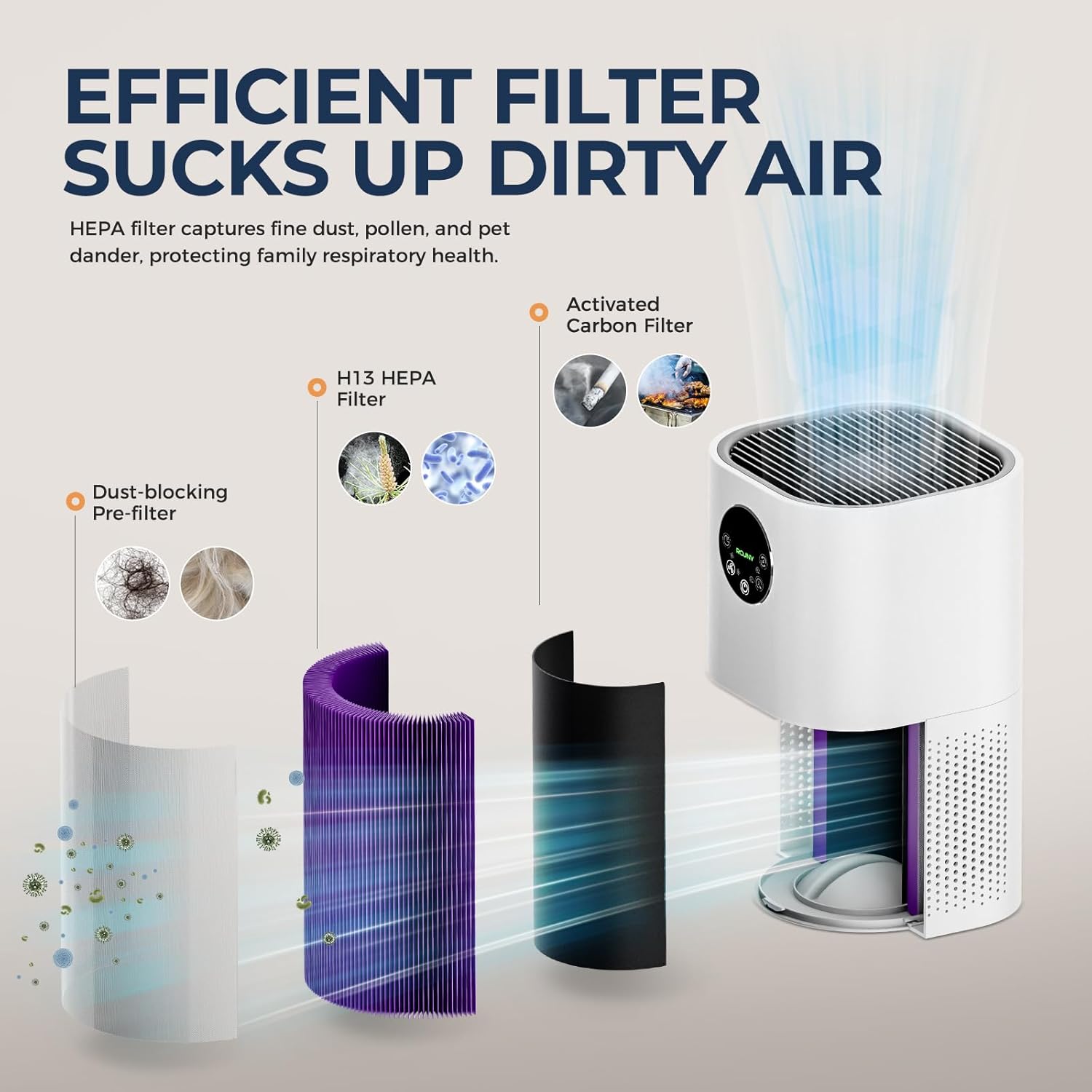
Image: Illustration of the 3-stage filtration system, including the dust-blocking pre-filter, H13 HEPA filter, and activated carbon filter.
ఆపరేటింగ్ సూచనలు
The ROUNY R-T2-SA features a touch control panel for easy operation.

చిత్రం: వివరణాత్మకం view of the touch control panel, indicating functions such as Auto mode, Night mode, Fan speed, Power, and Timer.
నియంత్రణ ప్యానెల్ విధులు:
- పవర్ బటన్ (⏻ ⏻ తెలుగు): యూనిట్ని ఆన్ లేదా ఆఫ్ చేయడానికి నొక్కండి.
- Auto Mode Button (Ⓐ Ⓐ అనువాదకులు): Activates automatic mode. The unit will detect air quality and adjust fan speed accordingly.
- రాత్రి మోడ్ బటన్ (🌙): Sets the unit to operate at the lowest fan speed with dimmed lights for quiet operation during sleep.
- Fan Speed Adjustment Button (💨 💨 💨): Cycles through different fan speed settings (Low, Medium, High).
- టైమర్ బటన్ (⏲): Sets the operating time for 1, 4, or 8 hours. The unit will automatically turn off after the set time.
- Humidifier Button (💧): Activates or deactivates the humidification function. (Only available when the humidifier unit is attached and filled with water).
గాలి నాణ్యత సూచిక:
The unit features an indicator light that changes color based on detected air quality:
- ఆకుపచ్చ: మంచి గాలి నాణ్యత
- పసుపు: Moderate Air Quality / Poor Air Quality
- ఎరుపు: Severe Air Pollution

Image: Visual representation of the smart sensing feature, showing how the indicator light changes color to reflect air quality levels.
నిర్వహణ
క్రమం తప్పకుండా నిర్వహణ సరైన పనితీరును నిర్ధారిస్తుంది మరియు మీ ఎయిర్ ప్యూరిఫైయర్ యొక్క జీవితకాలాన్ని పొడిగిస్తుంది.
ఫిల్టర్ భర్తీ:
- The filter indicator light will illuminate when it's time to replace the filter.
- The standard filter replacement interval is 3-6 months, depending on usage and air quality.
- భర్తీ చేయడానికి:
- ఎయిర్ ప్యూరిఫైయర్ను అన్ప్లగ్ చేయండి.
- ఫిల్టర్ కంపార్ట్మెంట్ కవర్ను తెరవండి.
- పాత ఫిల్టర్ను తీసివేయండి.
- Insert a new ROUNY genuine replacement filter, ensuring it is correctly oriented.
- ఫిల్టర్ కంపార్ట్మెంట్ కవర్ను మూసివేయండి.
- Plug in the unit and reset the filter indicator (refer to the control panel section for specific reset instructions, if any, or consult the manufacturer's webసైట్).
ఫిల్టర్ క్లీనింగ్:
- The pre-filter can be cleaned periodically using a vacuum cleaner to remove large dust particles and pet dander.
- The HEPA and activated carbon filters are not washable and should not be cleaned with water. They must be replaced.
హ్యూమిడిఫైయర్ క్లీనింగ్:
- Regularly clean the water tank and humidifier base to prevent mineral buildup and bacterial growth.
- శుభ్రపరిచే ముందు యూనిట్ను అన్ప్లగ్ చేయండి.
- వాటర్ ట్యాంక్ తొలగించి, మిగిలిన నీటిని ఖాళీ చేయండి.
- Wipe the inside of the tank and base with a soft cloth. For mineral deposits, use a descaling solution or a mixture of white vinegar and water. Rinse thoroughly.
- తిరిగి కలపడానికి ముందు అన్ని భాగాలు పొడిగా ఉన్నాయని నిర్ధారించుకోండి.
ట్రబుల్షూటింగ్
| సమస్య | సాధ్యమైన కారణం | పరిష్కారం |
|---|---|---|
| యూనిట్ ఆన్ చేయబడలేదు. | ప్లగిన్ చేయబడలేదు; పవర్ లేదాtage; పవర్ బటన్ నొక్కబడలేదు. | Ensure unit is securely plugged in. Check power supply. Press the power button. |
| బలహీనమైన గాలి ప్రవాహం. | Filters are dirty or clogged; air inlets/outlets blocked. | Clean or replace filters. Ensure no obstructions around the unit. |
| Humidifier not producing mist/humidity. | Water tank empty; humidifier unit not properly attached; mineral buildup. | Refill water tank. Ensure humidifier is correctly installed. Clean humidifier unit. |
| అసాధారణ శబ్దం. | Loose filter; foreign object inside; unit not on a level surface. | Check and secure filters. Unplug and inspect for foreign objects. Place on a stable surface. |
| గాలి నాణ్యత సూచిక ఎల్లప్పుడూ ఎరుపు/పసుపు రంగులో ఉంటుంది. | High pollution in the environment; sensor dirty. | Ensure proper ventilation. Clean the air quality sensor (refer to maintenance section for sensor cleaning, if applicable). |
ఈ పరిష్కారాలను ప్రయత్నించిన తర్వాత కూడా సమస్య కొనసాగితే, దయచేసి కస్టమర్ మద్దతును సంప్రదించండి.
స్పెసిఫికేషన్లు

చిత్రం: వివరణాత్మక ఉత్పత్తి పారామితులు మరియు స్పెసిఫికేషన్లు.
| ఫీచర్ | వివరాలు |
|---|---|
| బ్రాండ్ | ROUNY |
| మోడల్ సంఖ్య | R-T2-SA |
| రంగు | తెలుపు |
| ఉత్పత్తి కొలతలు (L x W x H) | 27 x 27 x 56 సెం.మీ (సుమారుగా 10.6 x 10.6 x 22 అంగుళాలు) |
| శక్తి | 24 వాట్స్ |
| వాల్యూమ్tage | 240 వోల్ట్లు |
| మెటీరియల్ | ప్లాస్టిక్ |
| ఆటో షటాఫ్ | అవును |
| శబ్దం స్థాయి | 25 డిబి |
| నియంత్రణ పద్ధతి | టచ్ కంట్రోల్ |
| ఫిల్టర్ రకం | HEPA |
| వర్తించే ప్రాంతం | 20-50 m² |
| నికర బరువు | 2.6 కిలోలు (సుమారు 5.73 పౌండ్లు) |
వారంటీ మరియు మద్దతు
For warranty information or technical support, please refer to the warranty card included with your product or visit the official ROUNY webవారంటీ క్లెయిమ్ల కోసం కొనుగోలు రుజువుగా మీ కొనుగోలు రసీదును ఉంచండి.
సంప్రదింపు సమాచారం: Please refer to the product packaging or the manufacturer's webఅత్యంత తాజా కస్టమర్ సర్వీస్ సంప్రదింపు వివరాల కోసం సైట్.