
1. పరిచయం
This manual provides essential information for the safe and efficient use of your Xiaomi 80 cm (32 inches) A Pro QLED Series Smart TV, model L32MB-APIN. Please read this manual thoroughly before operating the television and retain it for future reference.
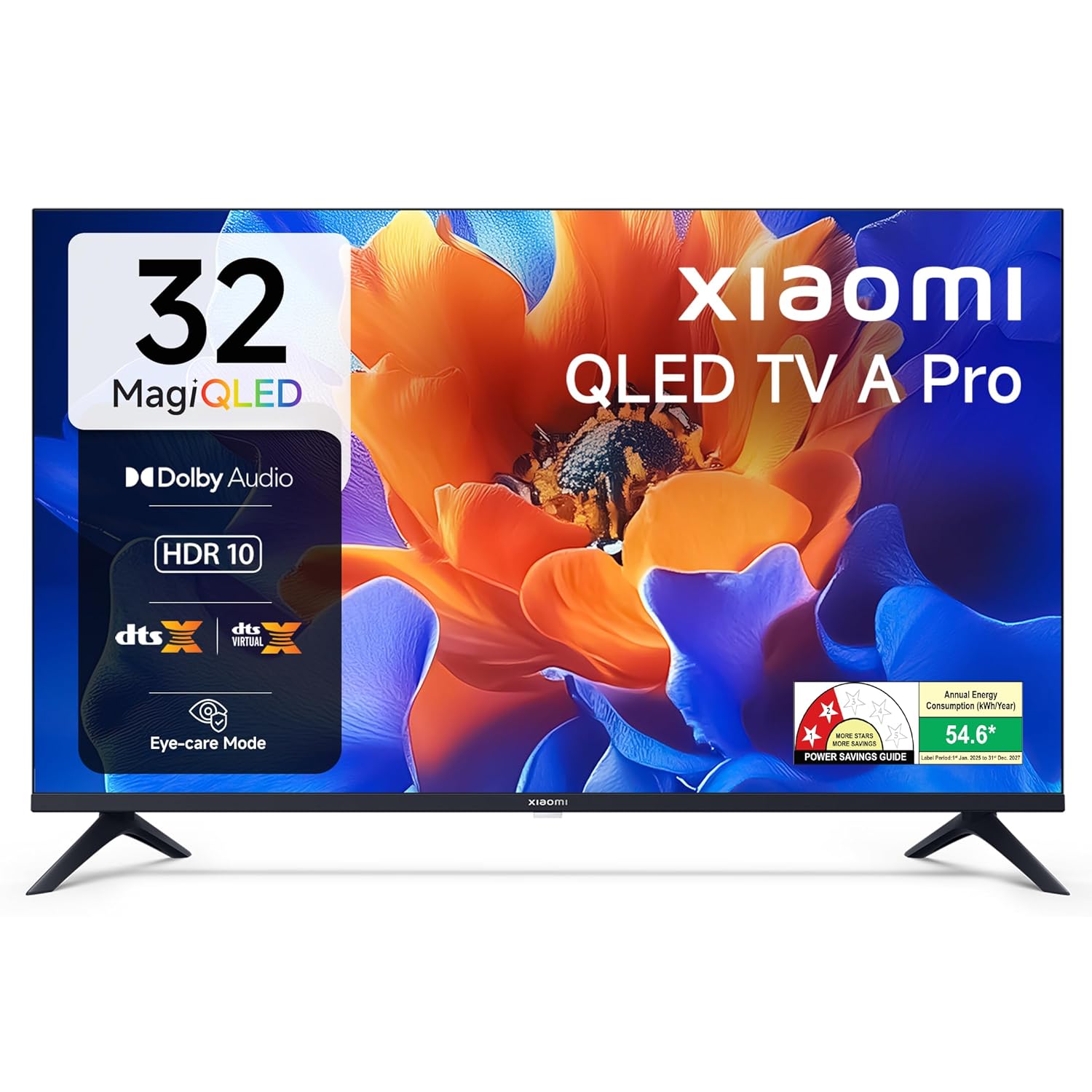
చిత్రం 1.1: ముందు view of the Xiaomi 32-inch A Pro QLED Smart TV.
2. భద్రతా సమాచారం
అగ్ని ప్రమాదం, విద్యుత్ షాక్ లేదా గాయాన్ని నివారించడానికి ఈ క్రింది భద్రతా జాగ్రత్తలను గమనించండి:
- వర్షం లేదా తేమకు టీవీని బహిర్గతం చేయవద్దు.
- టీవీ తెరవవద్దు casing; అన్ని సర్వీసింగ్లను అర్హత కలిగిన సిబ్బందికి సూచించండి.
- టీవీ చుట్టూ సరైన వెంటిలేషన్ ఉండేలా చూసుకోండి.
- టీవీని స్థిరమైన, సమతల ఉపరితలంపై ఉంచండి లేదా గోడకు సురక్షితంగా అమర్చండి.
- టీవీని వేడి వనరుల నుండి మరియు ప్రత్యక్ష సూర్యకాంతి నుండి దూరంగా ఉంచండి.
- మెరుపు తుఫానుల సమయంలో లేదా ఎక్కువసేపు ఉపయోగించనప్పుడు టీవీని అన్ప్లగ్ చేయండి.
3. ప్యాకేజీ విషయాలు
ప్యాకేజింగ్లో అన్ని వస్తువులు ఉన్నాయని నిర్ధారించుకోండి:
- 1 x Xiaomi LED TV (L32MB-APIN)
- 1 x రిమోట్ కంట్రోల్
- 1 x యూజర్ మాన్యువల్ (ఈ పత్రం)
- 2 x TV Stands Unit
- 4 x Screws for stand installation
- 2 x AAA Batteries for remote control
- 1 x పవర్ కార్డ్

Image 3.1: Illustration of the items included in the TV package.
4. ఉత్పత్తి ముగిసిందిview
4.1 ముఖ్య లక్షణాలు
The Xiaomi A Pro QLED Series Smart TV offers a range of features for an enhanced viewఅనుభవం:
- ప్రదర్శన: 32-inch HD Ready (1366 x 768) QLED panel with HDR 10, HLG, Vivid Picture Engine 2, and Eye Comfort Mode.
- ఆడియో: 20 Watts output with Dolby Audio, DTS-X, and DTS Virtual:X for immersive sound.
- స్మార్ట్ టీవీ: Powered by Android 14 OS and Google TV, featuring built-in Wi-Fi, screen mirroring, 1 GB RAM, 8 GB ROM, and support for popular streaming apps.
- కనెక్టివిటీ: Dual Band Wi-Fi, 2 HDMI ports, 2 USB ports, Bluetooth, and Ethernet.

చిత్రం 4.1: ముగిసిందిview of the TV's main features.
4.2 కనెక్టివిటీ పోర్ట్లు
The TV provides various ports for connecting external devices:
- HDMI (x2): For connecting gaming consoles, set-top boxes, Blu-ray players.
- USB (x2): For connecting hard drives and other USB devices.
- ఈథర్నెట్: వైర్డు నెట్వర్క్ కనెక్షన్ కోసం.
- యాంటెన్నా: టెరెస్ట్రియల్ లేదా కేబుల్ యాంటెన్నాను కనెక్ట్ చేయడానికి.
- AV ఇన్పుట్: For older audio/video devices.
- 3.5mm ఇయర్ఫోన్ జాక్: హెడ్ఫోన్లు లేదా బాహ్య ఆడియో సిస్టమ్లను కనెక్ట్ చేయడానికి.

చిత్రం 4.2: వెనుక view showing the TV's connectivity ports.
4.3 రిమోట్ కంట్రోల్
The included remote control allows for easy navigation and access to smart features:
- Dedicated buttons for popular streaming services like Netflix, Prime Video, YouTube, JioHotstar, and SonyLiv.
- Integrated Google Voice Assistant for voice commands.
- Dedicated Mute button for quick audio control.

Image 4.3: The TV's remote control with quick access buttons.
5. సెటప్
5.1 స్టాండ్ ఇన్స్టాలేషన్
- దెబ్బతినకుండా ఉండటానికి టీవీ స్క్రీన్-డౌన్ను మృదువైన, చదునైన ఉపరితలంపై జాగ్రత్తగా ఉంచండి.
- Align the two stand units with the corresponding slots on the bottom of the TV.
- అందించిన స్క్రూలతో ప్రతి స్టాండ్ను భద్రపరచండి.
- టీవీని స్థిరమైన ఉపరితలంపై నిటారుగా ఉంచి జాగ్రత్తగా ఎత్తండి.
5.2 వాల్ మౌంటు
The TV supports wall mounting. Refer to the wall mount kit instructions for proper installation. Ensure the wall mount is compatible with VESA standards for 32-inch TVs and can support the TV's weight (3.2 kg without stand).
5.3 కనెక్ట్ పెరిఫెరల్స్
- HDMI పరికరాలు: Connect HDMI cables from your devices (e.g., set-top box, gaming console) to the HDMI ports on the TV.
- USB పరికరాలు: Insert USB drives or other USB devices into the USB ports.
- నెట్వర్క్: వైర్డు ఇంటర్నెట్ కనెక్షన్ కోసం, LAN పోర్ట్కి ఈథర్నెట్ కేబుల్ను కనెక్ట్ చేయండి.
5.4 ప్రారంభ పవర్ ఆన్ మరియు సెటప్
- పవర్ కార్డ్ను టీవీకి, ఆపై పవర్ అవుట్లెట్కి కనెక్ట్ చేయండి.
- రిమోట్ కంట్రోల్ లేదా టీవీలోని పవర్ బటన్ను నొక్కండి.
- భాష ఎంపిక, నెట్వర్క్ కనెక్షన్ (Wi-Fi లేదా ఈథర్నెట్) మరియు Google ఖాతా సైన్-ఇన్తో సహా ప్రారంభ సెటప్ను పూర్తి చేయడానికి స్క్రీన్పై సూచనలను అనుసరించండి.
- The Google TV interface will guide you through setting up your preferences and installing desired applications.
6. ఆపరేటింగ్ సూచనలు
6.1 ప్రాథమిక ఆపరేషన్
- పవర్ ఆన్/ఆఫ్: రిమోట్లోని పవర్ బటన్ను నొక్కండి.
- వాల్యూమ్ నియంత్రణ: వాల్యూమ్ అప్/డౌన్ బటన్లను ఉపయోగించండి.
- ఇన్పుట్ మూలం: Press the 'Input' button to select HDMI, AV, or other sources.
- నావిగేషన్: Use the directional pad and 'OK' button to navigate menus.
6.2 స్మార్ట్ టీవీ ఫీచర్లు (గూగుల్ టీవీ)
Your Xiaomi Smart TV runs on Google TV, providing access to a wide range of content and smart functionalities.
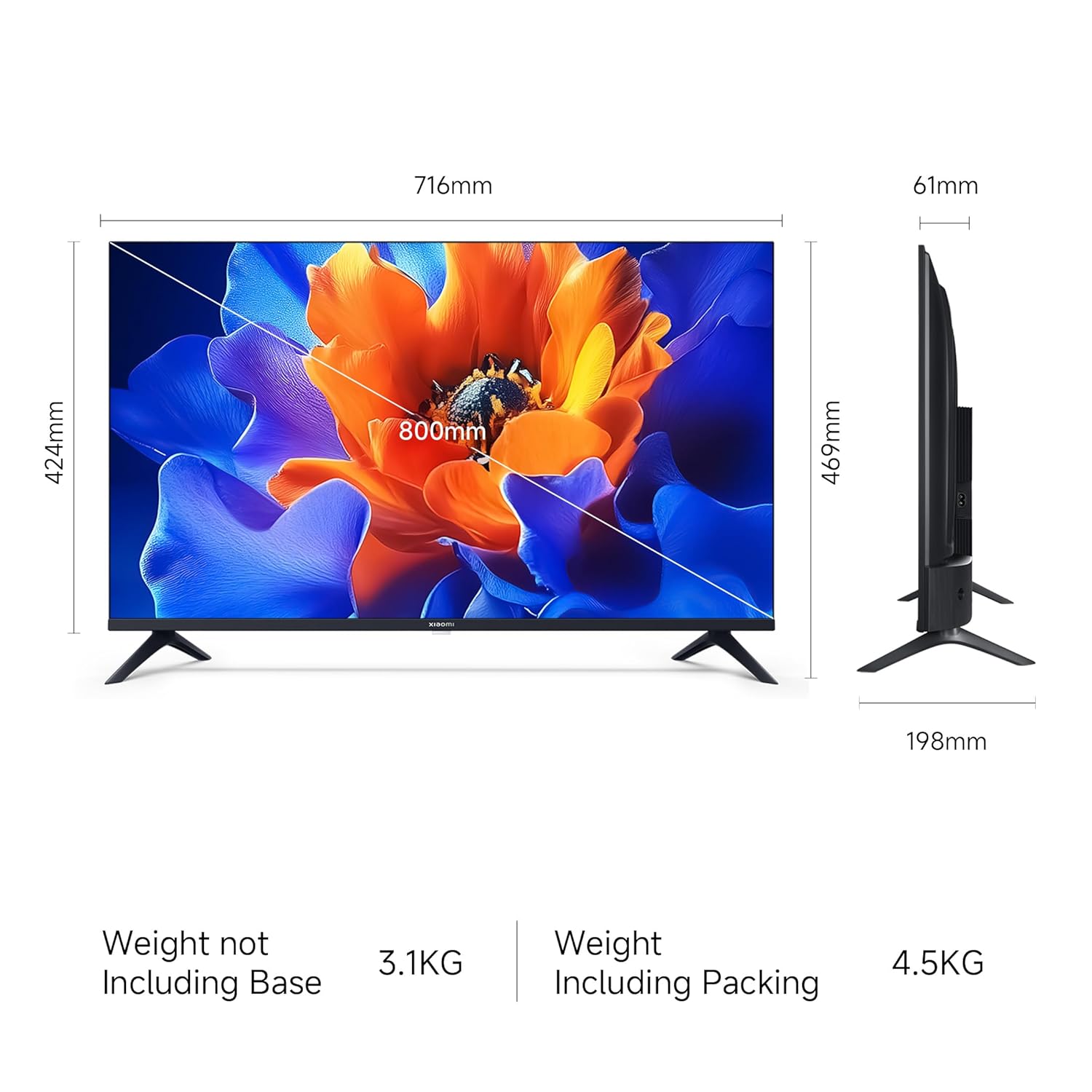
Image 6.1: Google TV interface and features.
- యాప్ యాక్సెస్: Launch pre-installed apps like Netflix, Prime Video, YouTube, and download more from the Google Play Store.
- Google అసిస్టెంట్: కంటెంట్ కోసం శోధించడానికి, స్మార్ట్ హోమ్ పరికరాలను నియంత్రించడానికి లేదా సమాచారాన్ని పొందడానికి మీ రిమోట్లోని Google అసిస్టెంట్ బటన్ను నొక్కి, మీ ఆదేశాలను చెప్పండి.
- Screen Mirroring (Google Cast): Cast content from your compatible smartphone or tablet directly to the TV.
- వ్యక్తిగత ప్రోfiles: వ్యక్తిగత ప్రోని సృష్టించండిfiles for personalized recommendations and watchlists.
6.3 డిస్ప్లే మరియు ఆడియో సెట్టింగ్లు
- చిత్ర రీతులు: Adjust picture settings (e.g., Standard, Vivid, Movie) to suit your viewing preference. The TV supports HDR 10 for enhanced contrast and color.
- కంటి కంఫర్ట్ మోడ్: Activate this feature to reduce blue light emission, which can be beneficial during long viewing సెషన్లు.
- సౌండ్ మోడ్లు: Select from various sound modes (e.g., Standard, Music, Movie) to optimize audio output. The TV features Dolby Audio and DTS-X for a cinematic sound experience.

Image 6.2: MagiQLED technology for vibrant colors.

Image 6.3: Vivid Picture Engine 2 in action.
Image 6.4: Eye Care Mode for comfortable viewing.

Image 6.5: Cinematic Audio features.
7. నిర్వహణ
7.1 టీవీని శుభ్రపరచడం
- శుభ్రం చేసే ముందు టీవీని ఎల్లప్పుడూ అన్ప్లగ్ చేయండి.
- స్క్రీన్ మరియు క్యాబినెట్ను తుడవడానికి మృదువైన, పొడి, మెత్తటి బట్టను ఉపయోగించండి.
- మొండి గుర్తులకు, తేలికగా dampనీటితో లేదా తేలికపాటి, రాపిడి లేని స్క్రీన్ క్లీనర్తో వస్త్రాన్ని తుడవండి. క్లీనర్ను నేరుగా స్క్రీన్పై స్ప్రే చేయవద్దు.
- రాపిడి క్లీనర్లు, మైనపులు లేదా ద్రావణాలను ఉపయోగించడం మానుకోండి.
7.2 సాధారణ సంరక్షణ
- వెంటిలేషన్ ఓపెనింగ్స్ను నిరోధించవద్దు.
- టీవీలో బరువైన వస్తువులను ఉంచడం మానుకోండి.
- పవర్ కార్డ్ను నడవకుండా లేదా పించ్ చేయకుండా రక్షించండి.
8. ట్రబుల్షూటింగ్
మద్దతును సంప్రదించే ముందు, ఈ సాధారణ పరిష్కారాలను ప్రయత్నించండి:
| సమస్య | సాధ్యమైన పరిష్కారం |
|---|---|
| శక్తి లేదు | Ensure the power cord is securely connected and the power outlet is working. Try a different outlet. |
| చిత్రం లేదు, కానీ ధ్వని ఉంది | ఇన్పుట్ సోర్స్ను తనిఖీ చేయండి. బాహ్య పరికరాలు ఆన్ చేయబడి, సరిగ్గా కనెక్ట్ చేయబడ్డాయని నిర్ధారించుకోండి. |
| శబ్దం లేదు, కానీ చిత్రం ఉంది | Check volume levels and mute status. Verify audio settings and external speaker connections. |
| రిమోట్ కంట్రోల్ పనిచేయడం లేదు | Replace batteries. Ensure no obstructions between the remote and TV. Re-pair Bluetooth remote if necessary. |
| స్మార్ట్ టీవీ ఫీచర్లు నెమ్మదిగా లేదా స్పందించడం లేదు. | Check internet connection. Restart the TV by unplugging it for a few minutes. Clear app caches or factory reset if issues persist (data will be lost). |
9. స్పెసిఫికేషన్లు
| ఫీచర్ | వివరాలు |
|---|---|
| బ్రాండ్ | XIAOMI |
| మోడల్ | L32MB-APIN పరిచయం |
| స్క్రీన్ పరిమాణం | 32 అంగుళాలు (80 సెం.మీ.) |
| ప్రదర్శన సాంకేతికత | QLED |
| రిజల్యూషన్ | HD రెడీ (1366 x 768 పిక్సెల్స్) |
| రిఫ్రెష్ రేట్ | 60 Hz |
| ఆపరేటింగ్ సిస్టమ్ | Google TV (Android 14 OS) |
| RAM మెమరీ | 1 GB |
| అంతర్గత నిల్వ | 8 GB |
| ఆడియో అవుట్పుట్ | 20 వాట్స్ |
| ఆడియో ఫీచర్లు | డాల్బీ ఆడియో, DTS-X, DTS వర్చువల్:X |
| కనెక్టివిటీ | Dual Band Wi-Fi, Bluetooth, Ethernet, 2 HDMI, 2 USB, AV Input, 3.5mm Audio |
| ప్రత్యేక లక్షణాలు | Eye Comfort Mode, HDR 10, HLG, Vivid Picture Engine 2, Google Assistant |
| ఉత్పత్తి కొలతలు (LxWxH) | 71.6 x 19.8 x 46.9 సెం.మీ (స్టాండ్తో) |
| వస్తువు బరువు | 3.2 కిలోలు |
| శక్తి మూలం | AC 240 వోల్ట్లు |

Image 9.1: TV dimensions.
10. వారంటీ మరియు మద్దతు
10.1 వారంటీ సమాచారం
Your Xiaomi A Pro QLED Series Smart TV comes with a 1 సంవత్సరం సమగ్ర వారంటీ from the date of purchase. To avail warranty services, please retain your purchase invoice. The user manual can also be accessed from the official Xiaomi brand webసైట్.
10.2 కస్టమర్ మద్దతు
For any assistance, service requests, or technical queries, please contact Xiaomi Support. Our team aims to provide swift solutions:
- Expect a call back from our team within 60 నిమిషాల for any service request.
- Our experts strive to arrive at your home within 24 గంటలు of your service request, 99% of the time.
- 99% of new TV installations are completed within 3 గంటలు of your appointment.
For the most up-to-date contact information, please visit the official Xiaomi India support website or refer to the contact details provided with your product documentation.