
1. పరిచయం
Thank you for choosing the THOMSON WS902DUO Cosy Bookshelf Speakers. These active stereo speakers deliver a powerful 150W audio experience with deep bass from two 10 cm woofers. They offer versatile connectivity options including Bluetooth 5.3, Optical, HDMI (ARC), RCA, and USB playback. The included remote control and side panel adjustments provide precise control over your audio. Please read this manual carefully before use to ensure proper operation and to maximize your listening experience.

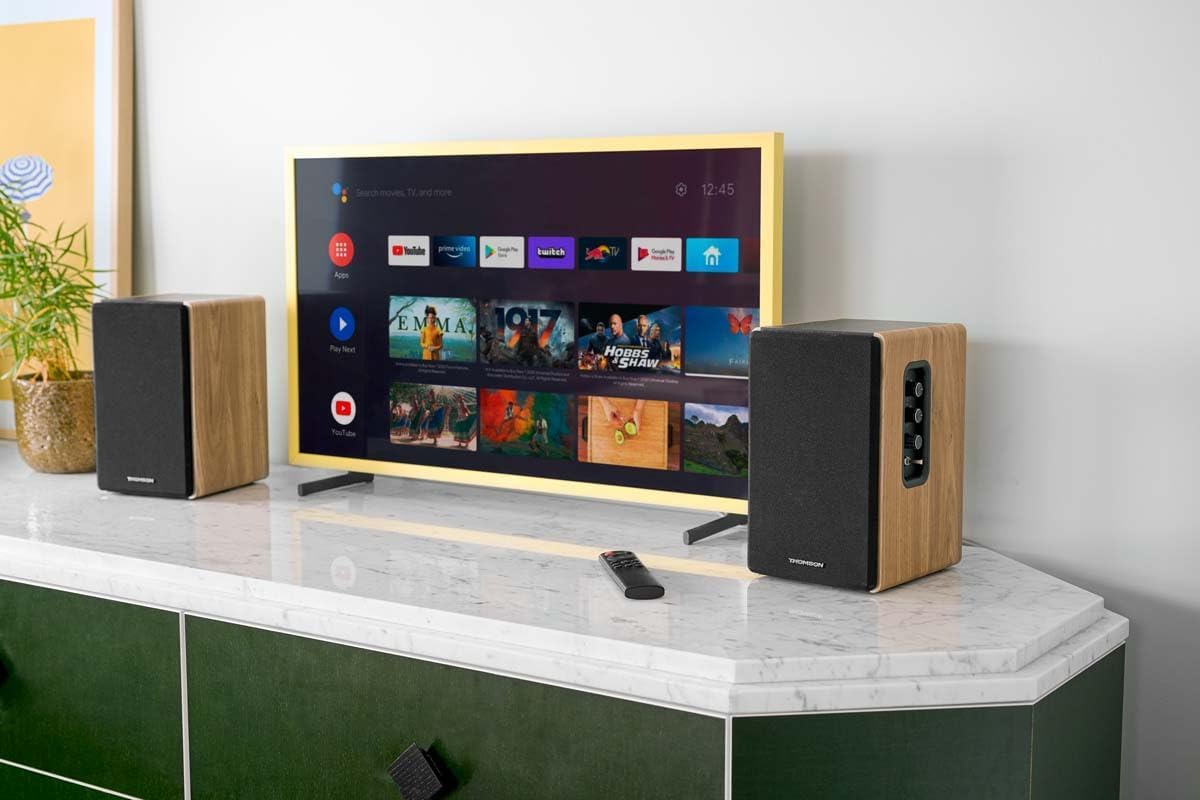
Image 1.1: THOMSON WS902DUO Bookshelf Speakers in a living space, showcasing their elegant wood finish.
2. ముఖ్యమైన భద్రతా సూచనలు
- Read these instructions thoroughly before operating the product.
- భవిష్యత్ సూచన కోసం ఈ సూచనలను ఉంచండి.
- ఉత్పత్తిపై మరియు ఆపరేటింగ్ సూచనలలోని అన్ని హెచ్చరికలను గమనించండి.
- అన్ని సూచనలను అనుసరించండి.
- నీటి దగ్గర ఈ ఉపకరణాన్ని ఉపయోగించవద్దు.
- పొడి గుడ్డతో మాత్రమే శుభ్రం చేయండి.
- వెంటిలేషన్ ఓపెనింగ్లను బ్లాక్ చేయవద్దు. తయారీదారు సూచనలకు అనుగుణంగా ఇన్స్టాల్ చేయండి.
- రేడియేటర్లు, హీట్ రిజిస్టర్లు, స్టవ్లు లేదా ఇతర ఉపకరణాలు (సహా ampలిఫైయర్లు) వేడిని ఉత్పత్తి చేస్తాయి.
- ధ్రువణ లేదా గ్రౌండింగ్-రకం ప్లగ్ యొక్క భద్రతా ప్రయోజనాన్ని ఓడించవద్దు. పోలరైజ్డ్ ప్లగ్ రెండు బ్లేడ్లను కలిగి ఉంటుంది, ఒకటి మరొకదాని కంటే వెడల్పుగా ఉంటుంది. గ్రౌండింగ్ రకం ప్లగ్లో రెండు బ్లేడ్లు మరియు మూడవ గ్రౌండింగ్ ప్రాంగ్ ఉన్నాయి. మీ భద్రత కోసం విస్తృత బ్లేడ్ లేదా మూడవ ప్రాంగ్ అందించబడ్డాయి. అందించిన ప్లగ్ మీ అవుట్లెట్కి సరిపోకపోతే, వాడుకలో లేని అవుట్లెట్ను భర్తీ చేయడానికి ఎలక్ట్రీషియన్ను సంప్రదించండి.
- ప్రత్యేకించి ప్లగ్లు, కన్వీనియన్స్ రెసెప్టాకిల్స్ మరియు అవి ఉపకరణం నుండి నిష్క్రమించే ప్రదేశంలో నడవడం లేదా పించ్ చేయడం నుండి పవర్ కార్డ్ను రక్షించండి.
- తయారీదారు పేర్కొన్న జోడింపులు/యాక్సెసరీలను మాత్రమే ఉపయోగించండి.
- తయారీదారు పేర్కొన్న కార్ట్, స్టాండ్, త్రిపాద, బ్రాకెట్ లేదా టేబుల్తో మాత్రమే ఉపయోగించండి లేదా ఉపకరణంతో విక్రయించబడుతుంది. కార్ట్ను ఉపయోగించినప్పుడు, టిప్-ఓవర్ నుండి గాయం కాకుండా ఉండటానికి కార్ట్/ఉపకరణ కలయికను తరలించేటప్పుడు జాగ్రత్త వహించండి.
- మెరుపు తుఫానుల సమయంలో లేదా ఎక్కువ కాలం ఉపయోగించనప్పుడు ఈ ఉపకరణాన్ని అన్ప్లగ్ చేయండి.
- అన్ని సేవలను అర్హత కలిగిన సేవా సిబ్బందికి సూచించండి. విద్యుత్ సరఫరా త్రాడు లేదా ప్లగ్ పాడైపోయినప్పుడు, ద్రవం చిందినప్పుడు లేదా ఉపకరణంలో వస్తువులు పడిపోయినప్పుడు, ఉపకరణం వర్షం లేదా తేమకు గురైనప్పుడు, సాధారణంగా పని చేయనప్పుడు, ఉపకరణం ఏదైనా విధంగా దెబ్బతిన్నప్పుడు సర్వీసింగ్ అవసరం. , లేదా తొలగించబడింది.
3. ప్యాకేజీ విషయాలు
క్రింద జాబితా చేయబడిన అన్ని వస్తువులు మీ ప్యాకేజీలో చేర్చబడ్డాయో లేదో తనిఖీ చేయండి:
- THOMSON WS902DUO Bookshelf Speakers (2 units)
- రిమోట్ కంట్రోల్
- పవర్ కేబుల్
- స్పీకర్ కనెక్షన్ కేబుల్
- 3.5mm Jack to RCA Adapter Cable
- వినియోగదారు మాన్యువల్ (ఈ పత్రం)

Image 3.1: Packaging of the THOMSON WS902DUO Bookshelf Speakers.
4. ఉత్పత్తి ముగిసిందిview
4.1. Side Control Panel (Active Speaker)
The active speaker features a side control panel for easy access to essential functions.

Image 4.1: Side control panel.
- బాస్ నియంత్రణ: తక్కువ-ఫ్రీక్వెన్సీ అవుట్పుట్ను సర్దుబాటు చేస్తుంది.
- ట్రిబుల్ నియంత్రణ: అధిక-ఫ్రీక్వెన్సీ అవుట్పుట్ను సర్దుబాటు చేస్తుంది.
- వాల్యూమ్ నియంత్రణ: మొత్తం ధ్వని వాల్యూమ్ను సర్దుబాటు చేస్తుంది.
- పవర్ స్విచ్: స్పీకర్లను ఆన్ లేదా ఆఫ్ చేస్తుంది.
- LED సూచిక: Shows the current status or selected input.
4.2. Rear Panel (Active Speaker)
The rear panel of the active speaker provides all necessary input and output connections.
చిత్రం 4.2: వెనుక ప్యానెల్ కనెక్షన్లు.
- ఆప్టికల్ ఇన్పుట్: For connecting digital audio sources like TVs, game consoles, or Blu-ray players.
- ఆక్స్ ఇన్ (RCA): For connecting analog audio sources such as turntables, CD players, or PCs. A 3.5mm jack adapter is provided.
- TV Audio (HDMI ARC): For connecting to a TV's HDMI ARC port, allowing TV remote control of the speaker volume.
- USB ప్లే: MP3 ప్లే చేయడానికి files నేరుగా USB ఫ్లాష్ డ్రైవ్ నుండి.
- సబ్ అవుట్: For connecting an external active subwoofer for enhanced bass.
- స్పీకర్ అవుట్పుట్: నిష్క్రియ స్పీకర్కు కనెక్ట్ అవుతుంది.
- పవర్ ఇన్పుట్: ప్రధాన విద్యుత్ సరఫరాకు కనెక్ట్ అవుతుంది.
4.3. రిమోట్ కంట్రోల్
The remote control provides convenient access to all speaker functions from a distance.

Image 4.3: Remote control.
- పవర్ బటన్: Turns the speakers on/off.
- మ్యూట్ బటన్: ధ్వనిని మ్యూట్ చేస్తుంది/అన్మ్యూట్ చేస్తుంది.
- వాల్యూమ్ +/-: వాల్యూమ్ స్థాయిని సర్దుబాటు చేస్తుంది.
- Playback Controls (Play/Pause, Skip): USB ప్లేబ్యాక్ కోసం.
- Source Selection Buttons (OPT, BT, ARC, USB, LINE): ఆడియో ఇన్పుట్ మూలాన్ని ఎంచుకుంటుంది.
- EQ Mode Buttons (MOVIE, MUSIC, DIALOG): Selects preset equalization modes.
5. సెటప్
5.1. స్పీకర్ ప్లేస్మెంట్
Place the speakers on a stable, flat surface such as a bookshelf, desk, or speaker stands. For optimal stereo imaging, position the speakers equidistant from your listening position and at ear level. Ensure there is adequate space around the speakers for ventilation.
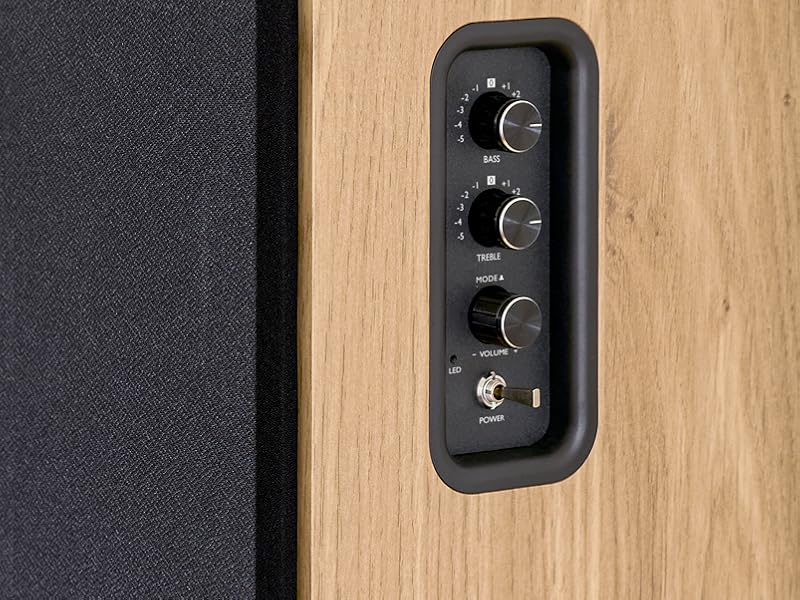
Image 5.1: Recommended speaker placement on a desk.
5.2. స్పీకర్లను కనెక్ట్ చేస్తోంది
- Identify the active speaker (with controls and inputs) and the passive speaker.
- Connect the included speaker cable from the speaker output terminals on the active speaker to the input terminals on the passive speaker. Ensure correct polarity (+ to + and - to -).
5.3. ఆడియో మూలాలను కనెక్ట్ చేయడం
Connect your desired audio sources to the active speaker using the appropriate cables.
- ఆప్టికల్ ఇన్పుట్: Use an optical cable to connect your TV, game console, or Blu-ray player to the OPTICAL IN port.
- HDMI (ARC) ఇన్పుట్: Use an HDMI cable to connect your TV's HDMI ARC port to the TV AUDIO (HDMI) port on the speaker. This allows your TV remote to control the speaker volume.
- RCA (AUX) ఇన్పుట్: Use an RCA cable (or the provided 3.5mm jack to RCA adapter) to connect devices like a turntable, CD player, or PC to the AUX IN (RCA) ports.
- USB ఇన్పుట్: MP3ని కలిగి ఉన్న USB ఫ్లాష్ డ్రైవ్ను చొప్పించండి files into the USB PLAY port.

Image 5.2: Speakers connected to a television via HDMI ARC.
5.4. బ్లూటూత్ పెయిరింగ్
- స్పీకర్లు ఆన్ చేయబడ్డాయని నిర్ధారించుకోండి.
- Press the 'BT' button on the remote control or the side panel to select Bluetooth input. The LED indicator will flash, indicating pairing mode.
- మీ స్మార్ట్ఫోన్, టాబ్లెట్ లేదా కంప్యూటర్లో, బ్లూటూత్ను ప్రారంభించి, అందుబాటులో ఉన్న పరికరాల కోసం శోధించండి.
- Select "THOMSON WS902DUO" from the list of devices.
- Once paired, the LED indicator will stop flashing and remain solid. You can now stream audio wirelessly.
5.5. సబ్ వూఫర్ కనెక్షన్ (ఐచ్ఛికం)
If you wish to enhance bass further, connect an active subwoofer to the 'Sub Out' port on the rear panel of the active speaker using an RCA cable.
6. ఆపరేటింగ్ సూచనలు
6.1. పవర్ ఆన్/ఆఫ్
Use the power switch on the side control panel or the power button on the remote control to turn the speakers on or off.
6.2. మూలం ఎంపిక
Press the corresponding source button on the remote control (OPT, BT, ARC, USB, LINE) to switch between connected audio inputs. The LED indicator will change to reflect the selected source.
6.3. వాల్యూమ్ నియంత్రణ
Adjust the volume using the 'Volume' knob on the side control panel or the 'VOL+/-' buttons on the remote control.
6.4. ఆడియో సర్దుబాట్లు
Fine-tune the sound to your preference:
- బాస్/ట్రిబుల్: Use the 'Bass' and 'Treble' knobs on the side control panel to adjust the low and high frequencies.
- EQ మోడ్లు: Press the 'MOVIE', 'MUSIC', or 'DIALOG' buttons on the remote control to select preset equalization settings optimized for different content types.
6.5. USB ప్లేబ్యాక్
When a USB flash drive with MP3 files is inserted and USB source is selected, the speakers will automatically begin playing. Use the playback control buttons on the remote control (Play/Pause, Skip) to manage your music.
6.6. బ్లూటూత్ ఆపరేషన్
After successful pairing (see Section 5.4), you can stream audio from your Bluetooth device. Use your device's controls or the speaker's remote control for playback and volume adjustments.
7. నిర్వహణ
సరైన నిర్వహణ మీ స్పీకర్ల దీర్ఘాయువు మరియు పనితీరును నిర్ధారిస్తుంది.
- శుభ్రపరచడం: Wipe the speaker surfaces with a soft, dry cloth. Do not use liquid cleaners or abrasive materials.
- వెంటిలేషన్: వేడెక్కకుండా నిరోధించడానికి వెంటిలేషన్ ఓపెనింగ్స్ నిరోధించబడలేదని నిర్ధారించుకోండి.
- నిల్వ: If storing the speakers for an extended period, unplug them from the power outlet and store them in a cool, dry place.
- తేమను నివారించండి: Keep the speakers away from water and high humidity.
8. ట్రబుల్షూటింగ్
మీరు ఏవైనా సమస్యలను ఎదుర్కొంటే, కింది ట్రబుల్షూటింగ్ గైడ్ని చూడండి:
| సమస్య | సాధ్యమైన కారణం | పరిష్కారం |
|---|---|---|
| శక్తి లేదు | Power cable not connected; Power switch off; Wall outlet not working. | Ensure power cable is securely connected. Turn on the power switch. Test the wall outlet with another device. |
| శబ్దం లేదు | Incorrect input source selected; Volume too low; Mute function active; Audio cable not connected properly. | Select the correct input source. Increase volume. Press Mute button on remote. Check all audio cable connections. |
| బ్లూటూత్ జత చేయడం విఫలమైంది | Speakers not in pairing mode; Device too far; Bluetooth disabled on source device. | Ensure speakers are in Bluetooth pairing mode (flashing LED). Move device closer to speakers. Enable Bluetooth on your source device. |
| USB ప్లేబ్యాక్ పని చేయడం లేదు | USB drive not formatted correctly; Files not MP3; USB drive not inserted properly. | Ensure USB drive is FAT32 formatted. Verify files are in MP3 format. Re-insert USB drive firmly. |
| ధ్వని వక్రీకరణ | Volume too high; Source audio quality poor; Bass/Treble settings too extreme. | Lower the volume. Test with a different audio source. Adjust Bass and Treble controls. |
9. స్పెసిఫికేషన్లు
| ఫీచర్ | స్పెసిఫికేషన్ |
|---|---|
| బ్రాండ్ | థామ్సన్ |
| మోడల్ సంఖ్య | WS902DUO |
| గరిష్ట స్పీకర్ అవుట్పుట్ పవర్ | 150 వాట్స్ |
| ఫ్రీక్వెన్సీ రెస్పాన్స్ | 60 Hz |
| కనెక్టివిటీ టెక్నాలజీ | Bluetooth, HDMI (ARC), Optical, RCA, USB |
| బ్లూటూత్ వెర్షన్ | 5.3 |
| ఆడియో అవుట్పుట్ మోడ్ | స్టీరియో (2.0 ఛానెల్లు) |
| ఇన్పుట్ వాల్యూమ్tage | 230 వోల్ట్లు (AC) |
| మౌంటు రకం | షెల్ఫ్ మౌంట్ |
| స్పీకర్ రకం | Multimedia Bookshelf |
| ప్రత్యేక లక్షణాలు | Stereo Pairing, USB Port, Sub-Out, Remote Control, EQ Modes |
| సిఫార్సు చేసిన ఉపయోగాలు | Smartphone, Tablet, PC, TV, Game Console, DVD Player, Turntable |
| రంగు | సహజ చెక్క ముగింపు |
| నియంత్రణ పద్ధతి | Remote Control, Side Panel Knobs |
| వూఫర్ సైజు | 10 సెంటీమీటర్లు |
| కొలతలు (H x W x D) | 28 cm x 24 cm x 47 cm (approximate, per speaker) |
| బరువు | 5048 Grams (total for pair) |
| అంశాల సంఖ్య | 2 |
| మూలం దేశం | చైనా |
10. వారంటీ సమాచారం
This THOMSON WS902DUO product comes with a 1-సంవత్సరం పరిమిత వారంటీ కొనుగోలు చేసిన తేదీ నుండి. ఈ వారంటీ సాధారణ ఉపయోగంలో తయారీ లోపాలు మరియు పనితనాన్ని కవర్ చేస్తుంది. దుర్వినియోగం, ప్రమాదాలు, అనధికార మార్పులు లేదా సాధారణ దుస్తులు ధరించడం వల్ల కలిగే నష్టాన్ని ఇది కవర్ చేయదు. వారంటీ క్లెయిమ్ల కోసం దయచేసి మీ కొనుగోలు రుజువును ఉంచుకోండి.
11. కస్టమర్ మద్దతు
For technical assistance, warranty claims, or any questions regarding your THOMSON WS902DUO speakers, please contact your retailer or visit the official THOMSON support website. Please have your model number (WS902DUO) and proof of purchase ready when contacting support.
ఆన్లైన్ మద్దతు: www.thomsonconsumer.com (దయచేసి ప్రాంతీయ మద్దతు పరిచయాల కోసం తనిఖీ చేయండి)