
1. పరిచయం
Thank you for choosing the Fohil AI Voice Recorder. This advanced device integrates AI technology, including GPT-4o, to provide seamless recording, automatic transcription, summarization, and mind mapping capabilities. Designed for professionals, students, and anyone needing efficient audio capture and processing, it features a compact design, long battery life, and intelligent noise cancellation. This manual will guide you through the setup, operation, and maintenance of your new device.
2. ఉత్పత్తి ముగిసిందిview
Familiarize yourself with the components and controls of your Fohil AI Voice Recorder.

Figure 2.1: Fohil AI Voice Recorder in a business meeting setting, demonstrating its use with a smartphone app for real-time transcription.

Figure 2.2: The Fohil AI Voice Recorder and its companion 'Doway' application, highlighting the GPT-4o integration for advanced audio processing.
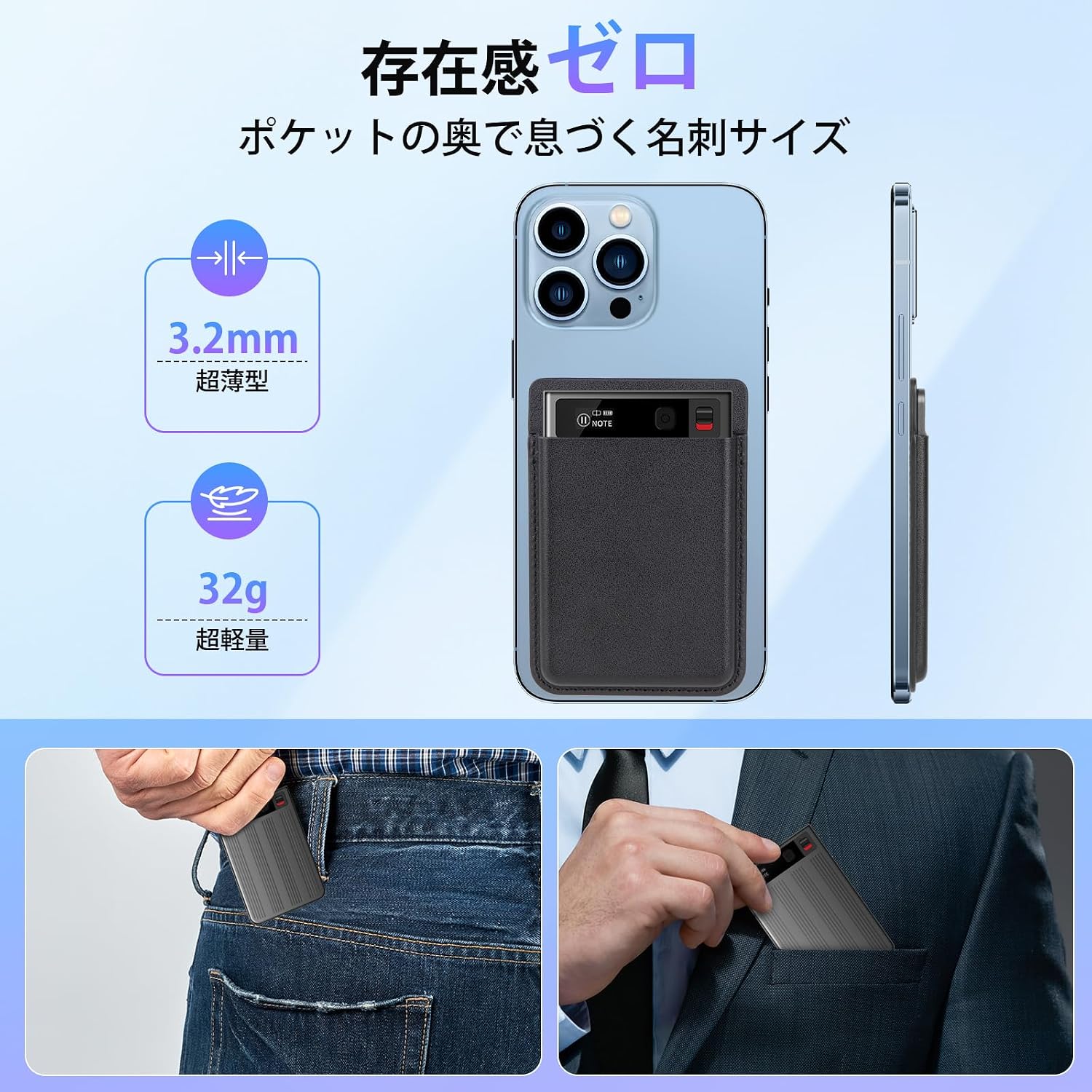
Figure 2.3: The compact and lightweight design of the Fohil AI Voice Recorder, demonstrating its MagSafe compatibility for easy attachment to smartphones.
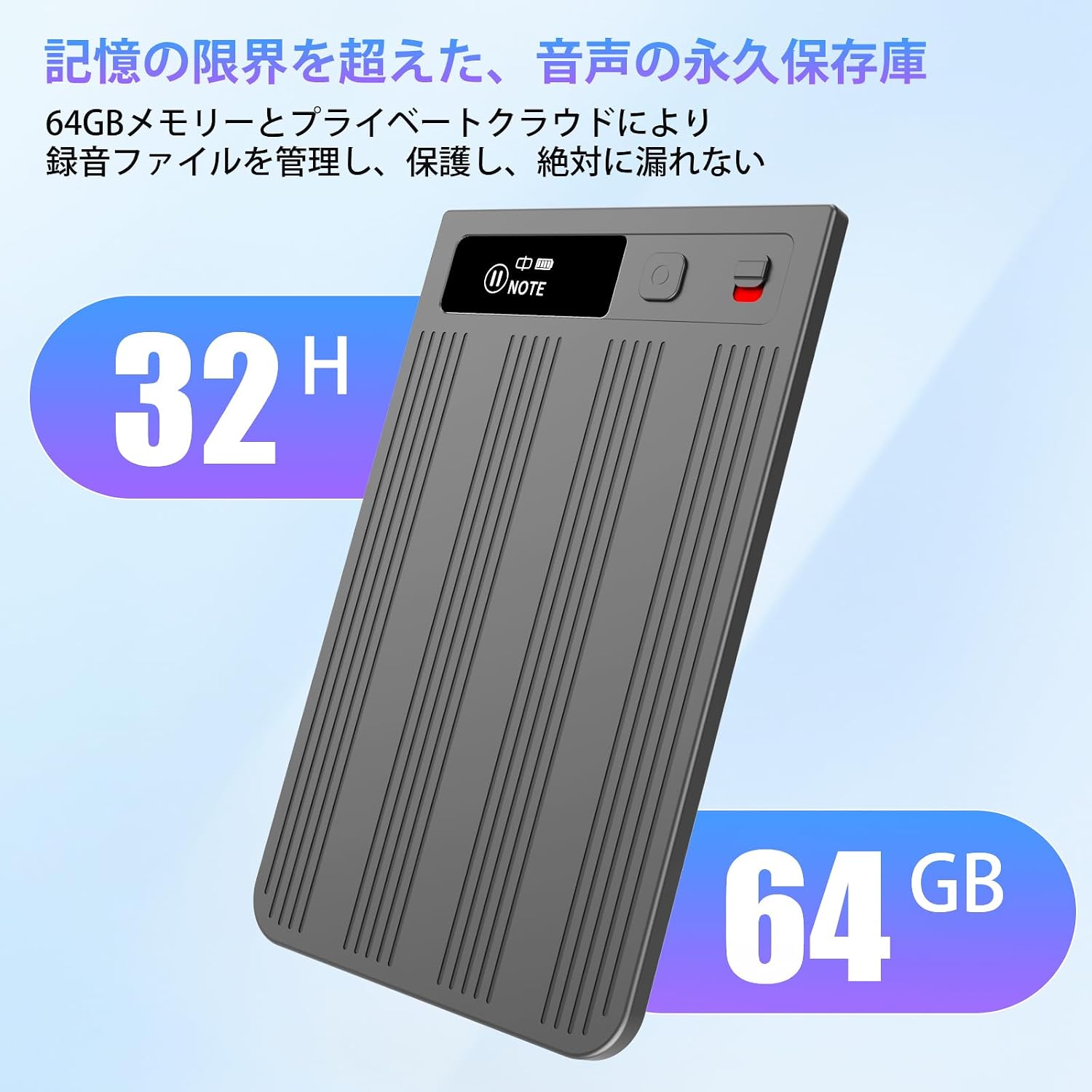
Figure 2.4: The Fohil AI Voice Recorder's impressive battery life of 32 hours and 64GB of internal storage, capable of storing approximately 500 hours of recordings.
ప్యాకేజీ విషయాలు
- Fohil AI Voice Recorder
- Magsafe Case (if included)
- Magsafe Ring (if included)
- ఛార్జింగ్ కేబుల్
- వినియోగదారు మాన్యువల్

Figure 2.5: All items included in the Fohil AI Voice Recorder package.
3. సెటప్
3.1 పరికరాన్ని ఛార్జ్ చేస్తోంది
Before first use, fully charge your Fohil AI Voice Recorder using the provided USB charging cable. Connect the cable to the device's charging port and a standard USB power adapter (not included). The indicator light will show charging status.
3.2 Connecting to the 'Doway' App
- Download the 'Doway' app from your smartphone's app store (compatible with iPhone and Android).
- మీ స్మార్ట్ఫోన్లో బ్లూటూత్ ప్రారంభించబడిందని నిర్ధారించుకోండి.
- Turn on the Fohil AI Voice Recorder.
- Open the 'Doway' app and follow the on-screen instructions to pair your device via Bluetooth.
- Once paired, the app will display the device status and allow access to advanced features.
4. ఆపరేటింగ్ సూచనలు
4.1 One-Button Recording
The Fohil AI Voice Recorder features a simple slide switch for quick recording:
- రికార్డింగ్ ప్రారంభించడానికి: Slide the recording button upwards. The device will vibrate briefly to confirm recording has started.
- To Stop and Save: Slide the recording button downwards. The device will automatically save the recording.
4.2 Switching Recording Modes
The device supports two main recording modes: Normal Mode and Call Recording Mode.

Figure 4.1: Double-click the power button to switch between Call Recording Mode and Normal Recording Mode.
- సాధారణ మోడ్: Ideal for lectures, meetings, and interviews. This mode utilizes AI voice enhancement to capture clear audio from the environment.
- కాల్ రికార్డింగ్ మోడ్: Designed for phone calls. When attached to your smartphone (e.g., via MagSafe), this mode minimizes electrical noise and amplifies the speaker's voice up to 3 times for clear call recording.
To switch between modes, double-tap the power button. The device's small 0.5-inch display will indicate the current mode.
4.3 AI Features via 'Doway' App
Once recordings are synced with the 'Doway' app, you can access powerful AI features:
- ఆటోమేటిక్ ట్రాన్స్క్రిప్షన్: Converts recorded audio into text using GPT-4o technology.
- సారాంశం: Generates concise summaries of long recordings.
- Mind Map Creation: Automatically creates visual mind maps from your meeting notes or lecture recordings.
- స్పీకర్ గుర్తింపు: Distinguishes between different speakers in a conversation.
- Smart Audio Trimming: Helps in editing and refining your audio files.
The app also allows for seamless editing of meeting minutes and templates on your PC while simultaneously generating and adjusting mind maps on your smartphone.
4.4 Cloud Storage and Data Management
The Fohil AI Voice Recorder offers a dual-layer storage system:
- 64GB ఇంటర్నల్ స్టోరేజ్: అందిస్తుంది ample space for up to 500 hours of recordings.
- Private Cloud Service: Recording data is automatically backed up and permanently stored in a dedicated private cloud, ensuring data security and preventing loss. This allows for quick retrieval of past recordings.
Each device is linked to a single account, enhancing privacy and making information leakage difficult.
5. నిర్వహణ
5.1 శుభ్రపరచడం
Wipe the device with a soft, dry cloth. Do not use liquid cleaners or solvents, as they may damage the device.
5.2 బ్యాటరీ సంరక్షణ
To prolong battery life, avoid fully discharging the device frequently. Charge it regularly, even if not in constant use. Store the device in a cool, dry place when not in use for extended periods.
5.3 సాఫ్ట్వేర్ నవీకరణలు
Periodically check the 'Doway' app for any available firmware or software updates for your recorder. Updates can improve performance, add new features, and fix bugs.
6. ట్రబుల్షూటింగ్
If you encounter issues with your Fohil AI Voice Recorder, please refer to the following common problems and solutions:
| సమస్య | సాధ్యమైన కారణం | పరిష్కారం |
|---|---|---|
| పరికరం ఆన్ చేయదు. | తక్కువ బ్యాటరీ. | పరికరాన్ని కనీసం 30 నిమిషాలు ఛార్జ్ చేయండి. |
| రికార్డింగ్ అనుకోకుండా ఆగిపోతుంది. | Internal error or low battery. | Ensure the device is fully charged. Restart the device. If the issue persists, contact support. |
| My voice is too quiet in recordings. | Microphone placement or recording mode. | Ensure the microphone is not obstructed. For calls, use Call Recording Mode. Speak clearly and at a reasonable distance from the device. |
| Transcription accuracy is low. | Background noise, unclear speech, or language settings. | Record in a quiet environment. Speak clearly. Check language settings in the 'Doway' app. |
| Cannot connect to the 'Doway' app. | Bluetooth off, app error, or device not discoverable. | Ensure Bluetooth is on. Restart the app and the recorder. Try re-pairing the device in the app settings. |
7. స్పెసిఫికేషన్లు
| ఫీచర్ | వివరాలు |
|---|---|
| బ్రాండ్ | Fohil |
| మోడల్ | AI Voice Recorder 64GB GPT-4o |
| అంతర్గత నిల్వ | 64 GB (approx. 500 hours digital recording) |
| బ్యాటరీ లైఫ్ (రికార్డింగ్) | 32 గంటల వరకు |
| స్టాండ్బై సమయం | 200 రోజుల వరకు |
| కనెక్టివిటీ | బ్లూటూత్ 5.3 |
| మైక్రోఫోన్ రకం | Built-in, 360-degree omnidirectional |
| రికార్డింగ్ ఫార్మాట్ | WAV |
| నాయిస్ రద్దు | AI Smart Noise Cancelling |
| అనుకూల పరికరాలు | Smartphones (iPhone & Android), PCs |
| హెడ్ఫోన్ జాక్ | 3.5 మి.మీ |
| కొలతలు | Ultra-thin (3.2mm) |
| బరువు | అల్ట్రా-లైట్ (32గ్రా) |
8. వారంటీ & సపోర్ట్
8.1 వారంటీ సమాచారం
The Fohil AI Voice Recorder comes with a tiered warranty policy for natural malfunctions:
- Within 1 Month: Free exchange or full refund.
- 1 నుండి 3 నెలలు: Free exchange or 70% refund of the payment amount.
- 3 నుండి 6 నెలలు: 50% refund of the payment amount.
- 6 నుండి 12 నెలలు: 20% refund of the payment amount.
వారంటీ క్లెయిమ్ల కోసం దయచేసి మీ కొనుగోలు రుజువును ఉంచుకోండి.
8.2 కస్టమర్ మద్దతు
For further assistance, technical support, or warranty claims, please contact Fohil customer service through the contact information provided on your purchase platform or the official Fohil website. Please have your product model and purchase date ready when contacting support.