
Ulefone Armor X16 Pro & Mount Pro AM02
Ulefone Armor X16 Pro & Mount Pro AM02 5G Rugged Smartphone User Manual
Model: Armor X16 Pro & Mount Pro AM02
బ్రాండ్: ఉలేఫోన్
1. పరిచయం
This manual provides comprehensive instructions for the safe and effective use of your Ulefone Armor X16 Pro 5G Rugged Smartphone and the accompanying Mount Pro AM02. Please read this manual thoroughly before operating the device to ensure optimal performance and longevity.

Image 1.1: The Ulefone Armor X16 Pro smartphone alongside the Mount Pro AM02. The phone features a rugged design with a gold-colored back panel, and the mount is a black, adjustable holder designed for secure attachment.
2. ప్రారంభించడం (సెటప్)
2.1. పరికరాన్ని ఛార్జ్ చేస్తోంది
Before first use, fully charge your Ulefone Armor X16 Pro. Connect the provided USB cable to the phone's charging port and the other end to a compatible 33W fast charger. The battery indicator on the screen will show charging progress. A full charge provides approximately 555 hours of standby time or 56 hours of talk time.
2.2. SIM కార్డ్ మరియు నిల్వ సంస్థాపన
Locate the SIM card tray on the side of the phone. Use the SIM ejector tool to open the tray. Insert your Nano-SIM card(s) and/or a TF card (up to 2TB) into the designated slots. Ensure the tray is securely reinserted to maintain the phone's waterproof integrity.
2.3. పవర్ చేయడం ఆన్/ఆఫ్
To power on, press and hold the Power button until the Ulefone logo appears. To power off, press and hold the Power button, then select 'Power off' from the options. A short press of the Power button will lock/unlock the screen.
3. Core Functionality (Operating)
3.1. ప్రదర్శన మరియు పరస్పర చర్య
The device features a 6.56-inch FHD+ display with a 720 x 1612 resolution and a 120Hz refresh rate for smooth visuals. With 910 nits brightness, it ensures visibility even under bright sunlight. The screen is protected by Corning Gorilla Glass 5, offering enhanced durability.

Image 3.1: Visual representation of the 6.56-inch 120Hz FHD+ display, highlighting its 720x1612 resolution, 910 nits brightness, Corning Gorilla Glass 5 protection, and Widevine L1 certification for HD video streaming.
3.2. Performance and System
Powered by a MediaTek Dimensity 6300 5G 2.4GHz 8-core CPU and a 6nm chipset, the Armor X16 Pro delivers robust performance. It comes with 16GB RAM (8GB physical + 8GB virtual) and 256GB internal storage, expandable up to 2TB with a TF card. The device runs on Android 15, providing a seamless and secure user experience.

Image 3.2: Infographic detailing the MediaTek Dimensity 6300 5G processor, memory configuration (up to 16GB RAM and 256GB ROM with 2TB expansion), integration with Google Gemini, and dual 5G connectivity.
3.3. కెమెరా వ్యవస్థ
The Ulefone Armor X16 Pro features a versatile camera setup:
- 64MP ప్రధాన కెమెరా: Equipped with a Sony IMX682 sensor for high-resolution photos.
- 25MP నైట్ విజన్ కెమెరా: Enables clear navigation and capture in low-light conditions.
- 2MP Macro Lens: For detailed close-up shots of small objects.
- 16MP ఫ్రంట్ కెమెరా: For enhanced selfies and video calls.
- Underwater Mode: Allows taking photos and videos while submerged.

చిత్రం 3.3: ముగిసిందిview of the phone's camera system, showing the 64MP main camera, 25MP night vision camera, 2MP macro camera, and 16MP front camera, along with examples of photos taken with each mode, including an underwater shot.
3.4. బ్యాటరీ నిర్వహణ
The device is powered by a massive 10360mAh battery, offering extended usage times. It supports 33W fast charging for quick power-ups. Additionally, the reverse charging feature allows the phone to act as a portable power bank for other devices.

Image 3.4: Visual representation of the 10360mAh battery capacity and 33W fast charging capability, with estimated usage times for standby, music playback, talk time, and video playback.
3.5. Mount Pro AM02 Usage
The Mount Pro AM02 is designed for secure attachment of your smartphone, even during high-speed activities. It features a safety lock to keep the phone in place and a theft-resistant screw on the double socket arm base. Once tightened, the bracket cannot be disassembled, but the angle can still be adjusted by loosening the knob.

Image 3.5: The Ulefone Armor X16 Pro smartphone securely mounted on the Mount Pro AM02, demonstrating its robust grip and adjustable positioning on a bar.
3.6. అధునాతన ఫీచర్లు
- AI Recorder: Effortlessly record phone calls and third-party voice audio.
- ఫేస్ అన్లాక్ & ఫింగర్ప్రింట్ ID: Secure and convenient methods for unlocking your device.
- గ్లోవ్స్ మోడ్: Allows for touch screen operation even when wearing gloves.
- అంతర్నిర్మిత ఫ్లాష్లైట్: A 133 lumens glare flashlight with adjustable brightness and one-key lighting.

Image 3.6: Depiction of the AI Recorder feature for call recording and the Android 15 operating system, showcasing its protected, powerful, and seamless interface with various settings and notification options.

Image 3.7: Illustration of the built-in 133 lumens glare flashlight with adjustable brightness, along with the Face Unlock, Fingerprint ID, and Gloves Mode functionalities for enhanced usability and security.
4. మన్నిక మరియు రక్షణ
The Ulefone Armor X16 Pro is built to withstand harsh environments, featuring IP68/IP69K ratings and MIL-STD-810H certification. This means it is waterproof (up to 2 meters for 30 minutes), dustproof, and resistant to drops (up to 2 meters).
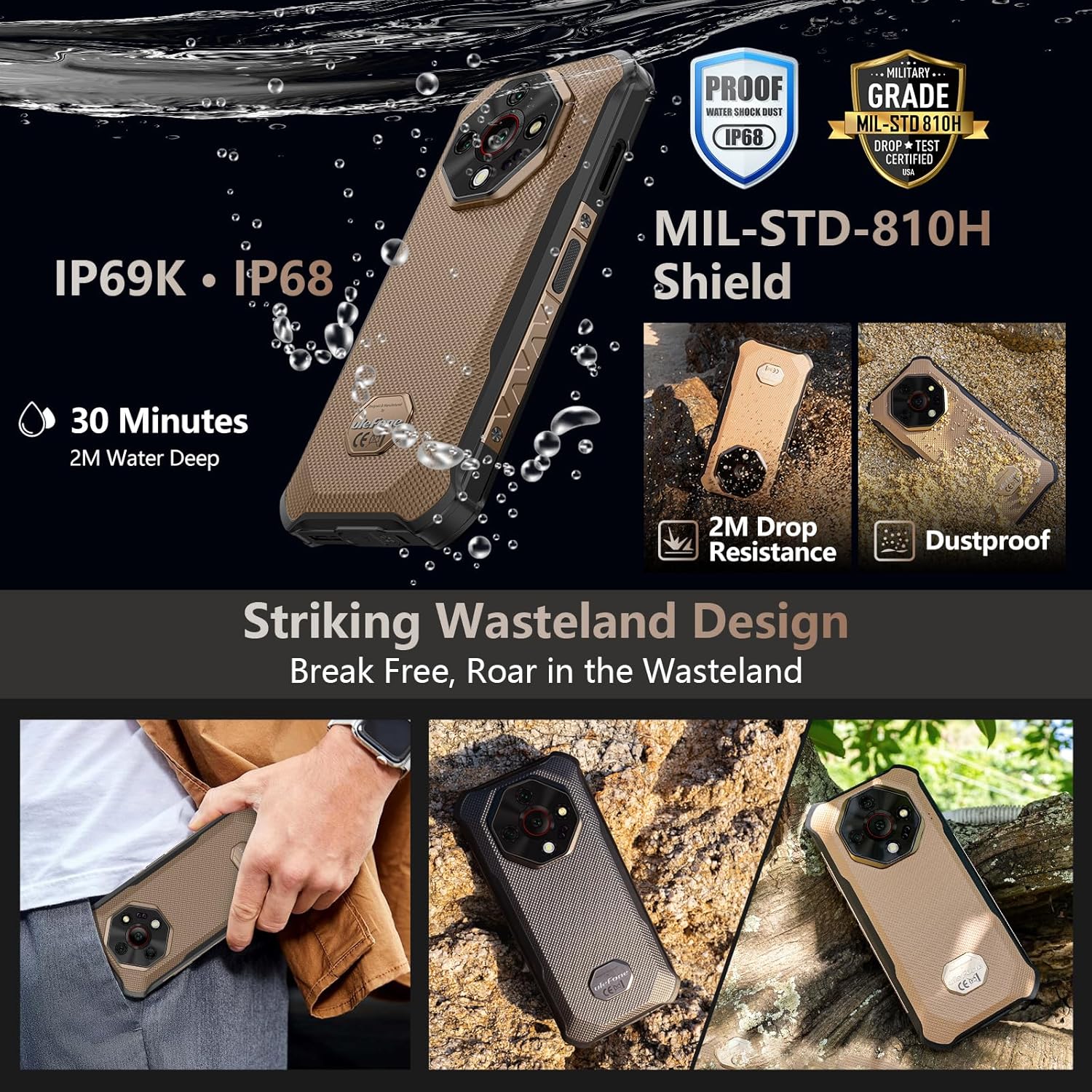
Image 4.1: Visual representation of the Ulefone Armor X16 Pro's rugged features, including IP69K and IP68 water and dust resistance, MIL-STD-810H military-grade certification, and demonstrated resistance to 2-meter drops and dust.
4.1. సంరక్షణ మరియు శుభ్రపరచడం
To maintain the phone's rugged features, ensure all port covers are securely closed before exposing it to water or dust. Clean the device with a soft, damp cloth. Avoid using harsh chemicals or abrasive materials. If the phone gets wet, dry it thoroughly before charging.
5. ట్రబుల్షూటింగ్
This section addresses common issues you might encounter. For more complex problems, please refer to the support section.
- పరికరం ఆన్ చేయడం లేదు: బ్యాటరీ ఛార్జ్ అయ్యిందని నిర్ధారించుకోండి. ఛార్జర్కు కనెక్ట్ చేసి, మళ్లీ పవర్ ఆన్ చేయడానికి ప్రయత్నించే ముందు కొన్ని నిమిషాలు వేచి ఉండండి.
- స్క్రీన్ స్పందించడం లేదు: Try restarting the device by holding the Power button for an extended period (e.g., 10-15 seconds) until it reboots.
- పేలవమైన నెట్వర్క్ సిగ్నల్: మీ సిమ్ కార్డ్ సరిగ్గా చొప్పించబడిందో లేదో తనిఖీ చేయండి. మెరుగైన నెట్వర్క్ కవరేజ్ ఉన్న ప్రాంతానికి వెళ్లండి.
- నీటి నష్ట ఆందోళనలు: If the phone has been submerged, ensure all ports are sealed. If issues arise after water exposure, contact support.
6. సాంకేతిక లక్షణాలు
| ఫీచర్ | స్పెసిఫికేషన్ |
|---|---|
| మోడల్ | Ulefone Armor X16 Pro & Mount Pro AM02 |
| ప్రాసెసర్ | MediaTek Dimensity 6300 5G, 2.4GHz 8-core CPU, 6nm |
| RAM | 16GB (8GB భౌతిక + 8GB వర్చువల్) |
| అంతర్గత నిల్వ | 256GB (expandable up to 2TB via TF card) |
| ఆపరేటింగ్ సిస్టమ్ | ఆండ్రాయిడ్ 15 |
| ప్రదర్శించు | 6.56-inch FHD+, 720 x 1612 resolution, 120Hz refresh rate, 910 nits brightness, Corning Gorilla Glass 5 |
| ప్రధాన కెమెరా | 64MP (Sony IMX682 sensor) |
| నైట్ విజన్ కెమెరా | 25MP |
| మాక్రో కెమెరా | 2MP |
| ఫ్రంట్ కెమెరా | 16MP |
| బ్యాటరీ కెపాసిటీ | 10360mAh |
| ఛార్జింగ్ | 33W Fast Charging, Reverse Charging |
| మన్నిక | IP68/IP69K Waterproof & Dustproof, MIL-STD-810H Certified, 2M Drop Resistance |
| కనెక్టివిటీ | 5G, Wireless (Other display features) |
| ప్రత్యేక లక్షణాలు | AI Recorder, Face Unlock, Fingerprint ID, Gloves Mode, 133 Lumens Flashlight, Underwater Mode |
| మొదటి తేదీ అందుబాటులో ఉంది | జూలై 7, 2025 |
| ASIN | B0FKBCMC6X |
7. వారంటీ మరియు మద్దతు
For warranty information and technical support, please refer to the official Ulefone webసైట్ లేదా వారి కస్టమర్ సర్వీస్ను సంప్రదించండి. ఏవైనా వారంటీ క్లెయిమ్లకు కొనుగోలు రుజువుగా మీ కొనుగోలు రసీదును ఉంచండి.
Visit the official Ulefone Store for more information: అమెజాన్లో ఉలేఫోన్ స్టోర్
Ask a question about this manual
Ask about setup, troubleshooting, compatibility, parts, safety, or missing instructions. Manuals+ will review the question and use this page’s manual context to help answer it.