
1. పరిచయం
Thank you for choosing the AODSK 88-Key Weighted Hammer Action Digital Piano and Storage Bench. This manual provides essential information for the safe and efficient use of your new instrument. Please read it thoroughly before assembly and operation, and retain it for future reference.

Image 1.1: The AODSK 88-Key Digital Piano and accompanying white storage bench.
2. భద్రతా సూచనలు
- విద్యుత్ సరఫరా: పేర్కొన్న పవర్ అడాప్టర్ను మాత్రమే ఉపయోగించండి. వాల్యూమ్ను నిర్ధారించుకోండిtagఇ మీ ప్రాంతం యొక్క అవసరాలకు సరిపోలుతుంది.
- నీరు మరియు తేమ: Do not expose the instrument to rain, moisture, or excessive humidity. Avoid placing objects filled with liquids on or near the piano.
- వెంటిలేషన్: సరైన వెంటిలేషన్ ఉండేలా చూసుకోండి. వెంటిలేషన్ ఓపెనింగ్లను బ్లాక్ చేయవద్దు.
- ఉష్ణ మూలాలు: Keep the instrument away from heat sources such as radiators, heat registers, stoves, or other heat-producing appliances.
- శుభ్రపరచడం: పొడి గుడ్డతో మాత్రమే శుభ్రం చేయండి. లిక్విడ్ క్లీనర్లు లేదా ఏరోసోల్లను ఉపయోగించవద్దు.
- పిల్లలు: Supervise children when they are near the instrument. Small parts could be a choking hazard.
- Moving the Instrument: When moving the piano, ensure it is unplugged and handled carefully to prevent damage or injury.
3. ప్యాకేజీ విషయాలు
క్రింద జాబితా చేయబడిన అన్ని వస్తువులు మీ ప్యాకేజీలో చేర్చబడ్డాయని దయచేసి ధృవీకరించండి:
- AODSK 88-Key Digital Piano Unit
- White Storage Bench
- ట్రిపుల్ పెడల్ యూనిట్
- Furniture Stand Components
- స్లైడింగ్ కీ కవర్
- పవర్ అడాప్టర్
- హెడ్ఫోన్లు
- డస్ట్ కవర్
- అసెంబ్లీ హార్డ్వేర్ మరియు సాధనాలు
- వినియోగదారు మాన్యువల్ (ఈ పత్రం)
- Online Lesson Access Information
4. సెటప్
4.1. Digital Piano Assembly
Follow these steps to assemble the digital piano and its stand:
- అన్ని భాగాలను విప్పి, గీతలు పడకుండా ఉండటానికి వాటిని మృదువైన, శుభ్రమైన ఉపరితలంపై వేయండి.
- Attach the side panels of the furniture stand to the main piano body using the provided screws and tools. Ensure all connections are secure.
- Install the triple pedal unit into its designated slot on the stand. Connect the pedal cable to the corresponding port on the piano.
- Carefully place the assembled piano unit in its desired location.
- Slide the key cover into its tracks above the keyboard.
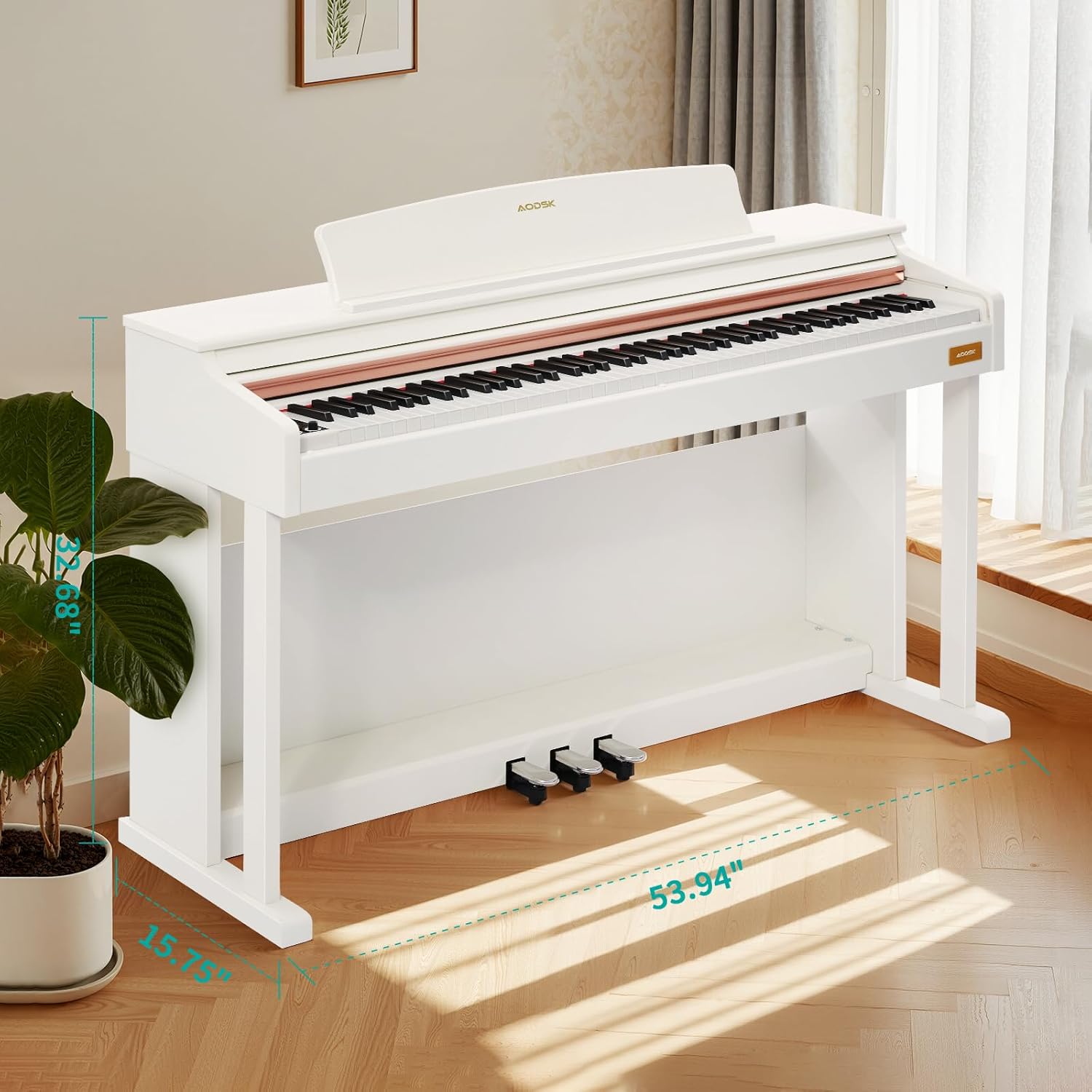
Image 4.1: Digital piano dimensions for placement planning. (Approx. 53.94" W x 15.75" D x 32.68" H)
4.2. Storage Bench Assembly
The storage bench is designed for quick, tool-free assembly:
- Remove the bench legs and hardware from the storage compartment under the seat.
- Screw each leg firmly into the designated corner mounts on the underside of the bench seat. No tools are typically required for this step.
- Ensure all legs are stable and the bench is level before use.

Image 4.2: The storage bench with its lid open, revealing the internal compartment.
5. భాగాలు ఓవర్view
5.1. నియంత్రణ ప్యానెల్
The control panel provides access to various functions and settings of the digital piano.

చిత్రం 5.1: క్లోజప్ view of the digital piano's control panel, showing buttons for tone, rhythm, demo, volume, and other features.
- పవర్ బటన్: Turns the piano on or off.
- వాల్యూమ్ నాబ్స్: మాస్టర్ వాల్యూమ్ను సర్దుబాటు చేయండి.
- టోన్ బటన్: Selects from 680 available tones.
- రిథమ్ బటన్: అందుబాటులో ఉన్న 600 లయల నుండి ఎంచుకుంటుంది.
- డెమో బటన్: Plays demonstration songs (80 available).
- స్ప్లిట్ బటన్: Activates dual keyboard split tone function.
- MP3 Play/Pause: Controls MP3 playback via USB.
- రికార్డ్/ప్లే: Initiates and plays back two-track recordings.
- Numerical Select: Used to input specific tone, rhythm, or demo numbers.
- USB సాకెట్: For MP3 playback and potentially other data transfer.
5.2. Triple Pedal System
The piano features a standard triple pedal system for expressive playing.
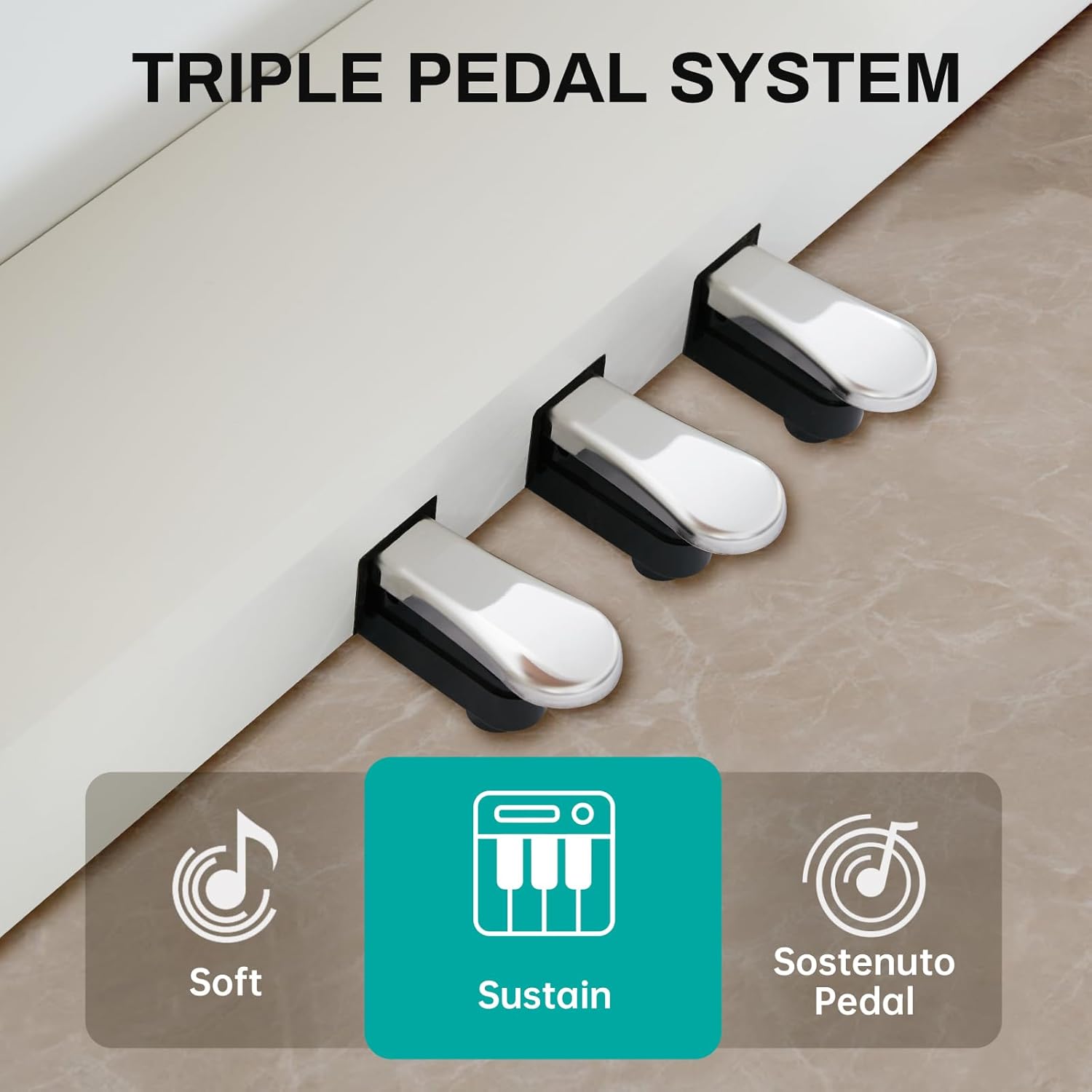
Image 5.2: Close-up of the three pedals: Soft, Sustain, and Sostenuto.
- Soft Pedal (Left): Reduces the volume and changes the timbre of the notes.
- Sustain Pedal (Middle): Sustains the notes, allowing them to ring out after the keys are released.
- Sostenuto Pedal (Right): Sustains only the notes that are held down at the moment the pedal is pressed, while subsequent notes remain unaffected.
5.3. 88-Key Weighted Hammer Action Keyboard
The 88-key keyboard is designed to replicate the feel of an acoustic grand piano, providing a realistic playing experience.
- Weighted Hammer Action: Provides a heavier touch in the lower register and a lighter touch in the higher register, similar to an acoustic piano.
- స్పర్శ సున్నితత్వం: The piano responds to the force with which keys are played, allowing for dynamic expression.
6. ఆపరేటింగ్ సూచనలు
6.1. పవర్ ఆన్/ఆఫ్
నొక్కండి పవర్ బటన్ on the control panel to turn the piano on. Press it again to turn the piano off.
6.2. వాల్యూమ్ నియంత్రణ
ఉపయోగించండి వాల్యూమ్ నాబ్స్ on the control panel to adjust the overall output volume of the piano.
6.3. టోన్ ఎంపిక
నొక్కండి టోన్ బటన్, then use the numerical keys or navigation buttons to select from the 680 available instrument tones.
6.4. రిథమ్ ఎంపిక
నొక్కండి రిథమ్ బటన్, then use the numerical keys or navigation buttons to select from the 600 available rhythm patterns.
6.5. Demonstration Songs
నొక్కండి డెమో బటన్ to cycle through or select one of the 80 built-in demonstration songs.
6.6. Dual Keyboard Split Tone
సక్రియం చేయండి స్ప్లిట్ బటన్ to divide the keyboard into two sections, allowing two different tones to be played simultaneously or for two players to use the keyboard independently.
6.7. MP3 Playback
MP3తో USB డ్రైవ్ను చొప్పించండి fileలోకి లు USB సాకెట్. ఉపయోగించండి MP3 Play/Pause and navigation buttons to control playback.
6.8. Two-Track Recording
నొక్కండి రికార్డ్ బటన్ to start recording your performance. Press it again to stop. Use the ప్లే బటన్ to listen to your recorded tracks.
6.9. Pedal Functions
వినియోగించుకోండి Soft, Sustain, and Sostenuto Pedals as described in Section 5.2 to add expression to your playing.
7. నిర్వహణ
Proper maintenance ensures the longevity and performance of your digital piano.
- శుభ్రపరచడం: Wipe the piano and bench surfaces with a soft, dry cloth. For stubborn dirt, slightly dampనీరు మరియు తేలికపాటి సబ్బుతో గుడ్డను తుడిచి, వెంటనే ఆరబెట్టండి. రాపిడి క్లీనర్లు లేదా ద్రావకాలను నివారించండి.
- దుమ్ము కవర్: Use the provided dust cover when the piano is not in use to protect it from dust and debris.
- కీలక సంరక్షణ: Keep the keys clean. If they become dirty, wipe them gently with a soft, slightly damp గుడ్డ.
- పర్యావరణ పరిస్థితులు: Store the piano in a stable environment, away from direct sunlight, extreme temperatures, and high humidity, which can affect electronic components and wood finishes.
8. ట్రబుల్షూటింగ్
If you encounter any issues, please refer to the table below for common problems and solutions.
| సమస్య | సాధ్యమైన కారణం | పరిష్కారం |
|---|---|---|
| శబ్దం లేదు | Power off; Volume too low; Headphones connected; Pedal issue. | Ensure power is on. Increase volume. Disconnect headphones. Check pedal connections. |
| కీలు స్పందించడం లేదు | Instrument off; Specific setting activated (e.g., local control off). | Turn piano on. Check manual for advanced settings like local control. |
| పెడల్స్ పనిచేయడం లేదు | Pedal cable loose; Pedal unit faulty. | Ensure pedal cable is securely connected to the piano. |
| MP3 ప్లేబ్యాక్ సమస్యలు | USB డ్రైవ్ సరిగ్గా ఫార్మాట్ చేయబడలేదు; అనుకూలంగా లేదు. file type; USB drive loose. | Ensure USB drive is FAT32 formatted. Use MP3 files. Reinsert USB drive. |
| వక్రీకరించిన ధ్వని | Volume too high; Speaker interference. | Reduce volume. Ensure no objects are blocking speakers. |
ఈ పరిష్కారాలను ప్రయత్నించిన తర్వాత కూడా సమస్య కొనసాగితే, దయచేసి కస్టమర్ మద్దతును సంప్రదించండి.
9. స్పెసిఫికేషన్లు
- కీబోర్డ్: 88-Key Weighted Hammer Action
- బహుధ్వని: 128-గమనిక
- టోన్లు: 680 అంతర్నిర్మిత టోన్లు
- లయలు: 600 అంతర్నిర్మిత లయలు
- ప్రదర్శన పాటలు: 80
- పెడల్స్: Triple Pedal System (Soft, Sustain, Sostenuto)
- విధులు: Dual Keyboard Split, MP3 Playback, Two-Track Recording
- బెంచ్ కొలతలు: 29-inch width, 2.68-inch deep storage bin
- బెంచ్ బరువు సామర్థ్యం: 300 పౌండ్లు
- కనెక్టివిటీ: USB సాకెట్
10. వారంటీ మరియు మద్దతు
This AODSK product is covered by a standard manufacturer's warranty against defects in materials and workmanship. Please refer to the warranty card included in your package for specific terms and conditions, including the warranty period and how to make a claim.
For technical support, troubleshooting assistance, or warranty inquiries, please contact AODSK customer service through the retailer where you purchased the product or visit the official AODSK webసంప్రదింపు సమాచారం కోసం సైట్.