
1. ముఖ్యమైన భద్రతా సూచనలు
Please read all instructions carefully before using the Defy DBF300 Bladeless Fan. Retain this manual for future reference.
- ఫ్యాన్ వంగిపోకుండా ఉండటానికి ఎల్లప్పుడూ స్థిరమైన, సమతల ఉపరితలంపై ఉంచబడిందని నిర్ధారించుకోండి.
- దెబ్బతిన్న త్రాడు లేదా ప్లగ్తో ఫ్యాన్ను ఆపరేట్ చేయవద్దు. త్రాడు దెబ్బతిన్నట్లయితే, ప్రమాదాన్ని నివారించడానికి తయారీదారు, దాని సేవా ఏజెంట్ లేదా అదే అర్హత కలిగిన వ్యక్తులు దానిని మార్చాలి.
- Keep hands, fingers, hair, and loose clothing away from the fan's air inlet and outlet openings.
- ఫ్యాన్, త్రాడు లేదా ప్లగ్ను నీటిలో లేదా ఇతర ద్రవాలలో ముంచవద్దు.
- ఉపయోగంలో లేనప్పుడు, శుభ్రం చేయడానికి ముందు లేదా తరలించే ముందు ఫ్యాన్ను పవర్ అవుట్లెట్ నుండి అన్ప్లగ్ చేయండి.
- ఈ ఉపకరణం వారి భద్రతకు బాధ్యత వహించే వ్యక్తి ద్వారా ఉపకరణాన్ని ఉపయోగించడం గురించి పర్యవేక్షణ లేదా సూచనలను అందిస్తే తప్ప, శారీరక, ఇంద్రియ లేదా మానసిక సామర్థ్యాలు తగ్గిన వ్యక్తులు (పిల్లలతో సహా) లేదా అనుభవం మరియు జ్ఞానం లేకపోవడం కోసం ఉద్దేశించబడలేదు.
- పిల్లలు ఉపకరణంతో ఆడకుండా ఉండేలా పర్యవేక్షించాలి.
- Do not use the fan outdoors or in wet conditions.
- Do not block air openings or operate near curtains or other objects that could block airflow.
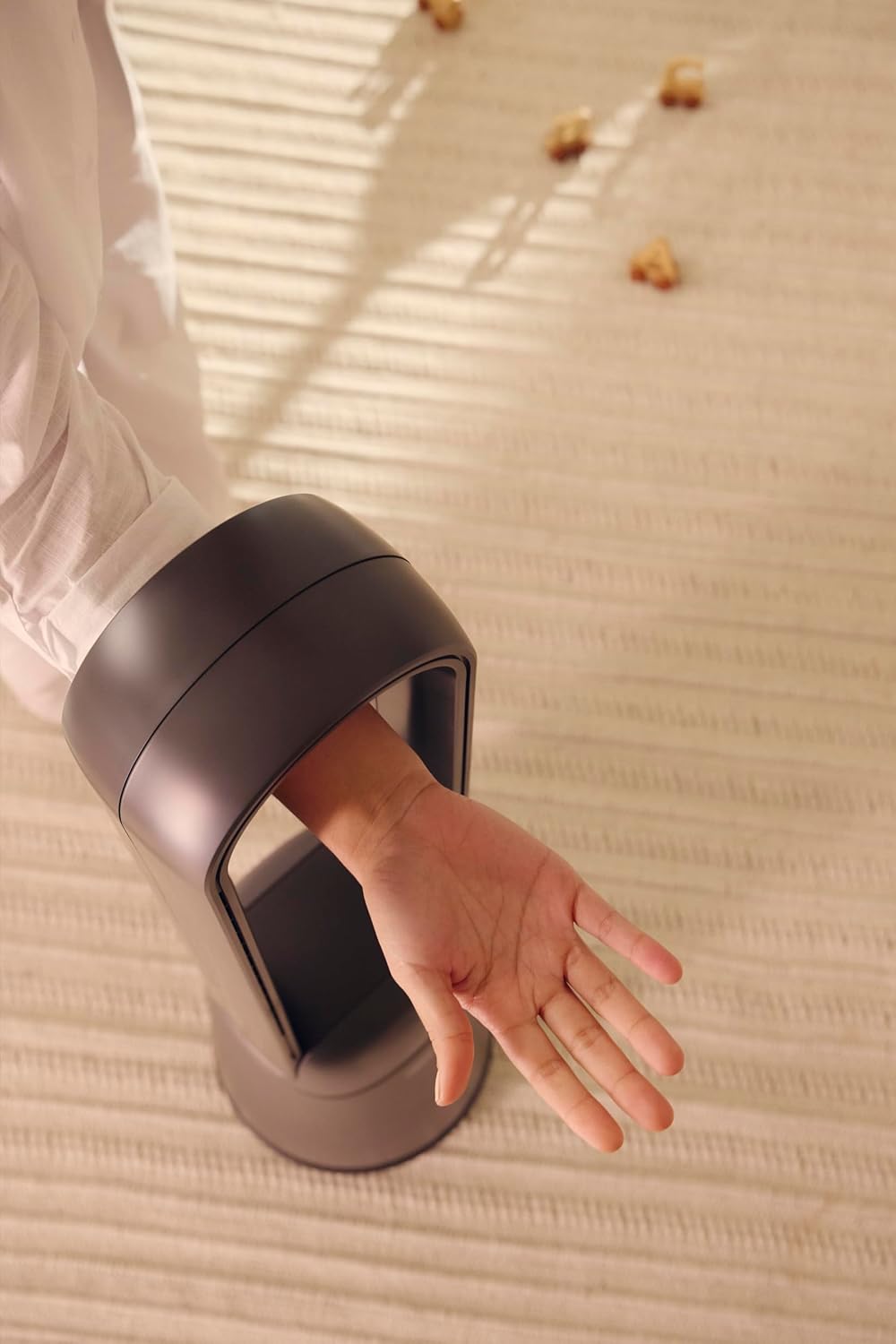
Figure 1: The bladeless design ensures safety, allowing a hand to pass through the air loop without obstruction.
2. ఉత్పత్తి ముగిసిందిview
The Defy DBF300 is a bladeless fan designed for efficient and quiet air circulation. It features multiple speed settings, various wind modes, and convenient remote control operation.

మూర్తి 2: ముందు view of the Defy DBF300 Bladeless Fan.
ముఖ్య లక్షణాలు:
- మెరుగైన భద్రత మరియు సులభమైన శుభ్రపరచడం కోసం బ్లేడ్లెస్ డిజైన్.
- Up to 20 wind speed settings for precise airflow control.
- Multiple wind modes: Strong, Natural, Sleep, and Smart adaptive wind.
- Oscillation function with 4 modes for wide area coverage.
- అనుకూలమైన ఆపరేషన్ కోసం వైర్లెస్ రిమోట్ కంట్రోల్.
- Integrated touch-sensitive control panel on the unit.
- Timer function for automatic shut-off, adjustable up to 8 hours.
- విష్పర్-నిశ్శబ్ద ఆపరేషన్.
3. సెటప్
3.1 అన్ప్యాకింగ్
- ఫ్యాన్ను దాని ప్యాకేజింగ్ నుండి జాగ్రత్తగా తొలగించండి.
- రవాణా సమయంలో ఏవైనా నష్టం సంకేతాలు ఉన్నాయా అని తనిఖీ చేయండి. దెబ్బతిన్నట్లయితే, ఆపరేట్ చేయవద్దు మరియు కస్టమర్ సపోర్ట్ను సంప్రదించండి.
- Ensure all components are present: the main fan unit and the remote control.
3.2 ప్లేస్మెంట్
- Place the fan on a firm, level, and stable surface.
- Ensure there is adequate space around the fan for optimal airflow, avoiding obstructions like walls, furniture, or curtains.
- Do not place the fan in direct sunlight or near heat sources.
- Keep the fan away from areas where it might be exposed to water or high humidity.
3.3 పవర్ కనెక్షన్
- Before plugging in, ensure the power supply voltage అనేది ఫ్యాన్పై ఉన్న రేటింగ్ లేబుల్తో సరిపోలుతుంది.
- Insert the power plug firmly into a suitable electrical outlet.
4. ఆపరేటింగ్ సూచనలు
The Defy DBF300 Bladeless Fan can be operated using the touch control panel on the unit or the provided remote control.
4.1 కంట్రోల్ ప్యానెల్ ఓవర్view

Figure 3: The fan's touch control panel and digital display.
- పవర్ బటన్ (①): Turns the fan On or Off.
- Speed Adjustment (②): Increases or decreases wind speed.
- Mode Selection (③): Cycles through Strong, Natural, Sleep, and Smart adaptive wind modes.
- Oscillation (④): Activates or deactivates the oscillation function.
- Timer (⑤): Sets the auto shut-off timer.
- డిజిటల్ డిస్ప్లే: Shows current speed, mode, or timer setting.
4.2 రిమోట్ కంట్రోల్

Figure 4: The remote control for the Defy DBF300 Bladeless Fan.
The remote control duplicates all functions available on the fan's control panel. Ensure the remote has working batteries (typically 2x AAA, not included) and is pointed towards the fan's receiver for optimal operation.
- పవర్ బటన్: Turns the fan On or Off.
- వేగం +/- బటన్లు: Adjusts the wind speed (1-20).
- మోడ్ బటన్: Cycles through Strong, Natural, Sleep, and Smart modes.
- డోలనం బటన్: Toggles oscillation On/Off.
- టైమర్ బటన్: Sets the auto shut-off timer (1-8 hours).
4.3 సాధారణ ఆపరేషన్
- పవర్ ఆన్/ఆఫ్: Press the Power button on the control panel or remote. The digital display will illuminate.
- గాలి వేగాన్ని సర్దుబాటు చేయడం: Use the Speed adjustment buttons on the control panel or the +/- buttons on the remote. The display will show the current speed level (1-20).
- Selecting Wind Mode: Press the Mode button to cycle through the available modes:
- బలమైన మోడ్: Provides a consistent, powerful airflow.
- సహజ మోడ్: Simulates natural breezes by varying wind speed.
- స్లీప్ మోడ్: Operates at a lower, quieter speed, gradually decreasing over time for comfortable sleep.
- Smart Adaptive Wind: Adjusts airflow based on ambient conditions (if sensor equipped, otherwise maintains a gentle flow).
- Activating Oscillation: Press the Oscillation button. The fan will begin to rotate horizontally. Press again to stop oscillation. There are 4 oscillation modes, which can be cycled through by repeatedly pressing the oscillation button.
- టైమర్ని సెట్ చేస్తోంది: Press the Timer button. Each press will increase the timer setting by 1 hour, up to a maximum of 8 hours. The fan will automatically turn off after the set time. To cancel the timer, cycle through until '00' or 'OFF' is displayed, or turn the fan off.
5. నిర్వహణ
Regular cleaning and proper storage will ensure the longevity and optimal performance of your Defy DBF300 Bladeless Fan.
5.1 శుభ్రపరచడం
- ఎల్లప్పుడూ ఫ్యాన్ను అన్ప్లగ్ చేయండి శుభ్రం చేయడానికి ముందు పవర్ అవుట్లెట్ నుండి.
- ఫ్యాన్ బయటి ఉపరితలాలను మృదువైన, d శుభ్రముపరచుతో తుడవండి.amp గుడ్డ. రాపిడి క్లీనర్లు లేదా ద్రావకాలు ఉపయోగించవద్దు.
- For the air inlet and outlet, use a soft brush or a vacuum cleaner with a brush attachment to remove dust and debris. The bladeless design makes these areas easily accessible for cleaning.
- Ensure no water or liquid enters the internal components of the fan.
- ఫ్యాన్ను తిరిగి ప్లగ్ చేసి ఆపరేట్ చేసే ముందు పూర్తిగా ఆరనివ్వండి.
5.2 నిల్వ
- If storing the fan for an extended period, clean it thoroughly as per the instructions above.
- ఫ్యాన్ను దాని అసలు ప్యాకేజింగ్లో నిల్వ చేయండి లేదా దుమ్ము నుండి రక్షించడానికి దానిని కప్పి ఉంచండి.
- Keep the fan in a cool, dry place, away from direct sunlight and extreme temperatures.
6. ట్రబుల్షూటింగ్
కస్టమర్ సపోర్ట్ను సంప్రదించే ముందు, సాధారణ సమస్యల కోసం దయచేసి కింది ట్రబుల్షూటింగ్ గైడ్ను చూడండి.
| సమస్య | సాధ్యమైన కారణం | పరిష్కారం |
|---|---|---|
| ఫ్యాన్ ఆన్ అవ్వదు. | విద్యుత్ సరఫరా లేదు. పవర్ కార్డ్ సరిగ్గా ప్లగ్ ఇన్ చేయబడలేదు. | ఫ్యాన్ లైవ్ ఎలక్ట్రికల్ అవుట్లెట్కి ప్లగ్ చేయబడిందని నిర్ధారించుకోండి. పవర్ కార్డ్ కనెక్షన్ని తనిఖీ చేయండి. |
| గాలి ప్రసరణ బలహీనంగా లేదా లేకపోవడం. | గాలి ప్రవేశ ద్వారం/నిష్క్రమణ ద్వారం మూసుకుపోయింది. ఫ్యాన్ వేగం చాలా తక్కువగా సెట్ చేయబడింది. | అడ్డంకుల కోసం తనిఖీ చేసి వాటిని తొలగించండి. ఫ్యాన్ స్పీడ్ సెట్టింగ్ను పెంచండి. |
| రిమోట్ కంట్రోల్ పనిచేయడం లేదు. | బ్యాటరీలు డెడ్ అయ్యాయి లేదా తప్పుగా చొప్పించబడ్డాయి. రిమోట్ మరియు ఫ్యాన్ మధ్య అడ్డంకి. | Replace batteries (2x AAA). Ensure correct polarity. Remove any objects blocking the signal path. Point remote directly at the fan. |
| ఫ్యాన్ అసాధారణ శబ్దం చేస్తుంది. | ఫ్యాన్ సమతల ఉపరితలంపై లేదు. Internal obstruction or damage. | స్థిరమైన, స్థాయి ఉపరితలంపై అభిమానిని ఉంచండి. శబ్దం కొనసాగితే, వాడకాన్ని ఆపివేసి, కస్టమర్ సపోర్ట్ను సంప్రదించండి. |
7. స్పెసిఫికేషన్లు
| మోడల్ | DBF300 |
| బ్రాండ్ | Defy |
| రంగు | మెటాలిక్ గ్రే |
| పవర్ / వాట్tage | 36 వాట్స్ |
| ఉత్పత్తి కొలతలు (D x W x H) | 28D x 25W x 97H సెంటీమీటర్లు |
| వస్తువు బరువు | 6.7 కిలోలు |
| ప్రత్యేక ఫీచర్ | Bladeless, Oscillation, Remote Control, Timer |
| శక్తి మూలం | కార్డెడ్ ఎలక్ట్రిక్ |
8. వారంటీ మరియు మద్దతు
For detailed warranty information, please refer to the warranty card included with your product or visit the official Defy webసైట్. ఏవైనా వారంటీ క్లెయిమ్ల కోసం మీ కొనుగోలు రుజువును ఉంచుకోండి.
If you encounter any issues not covered in this manual or require further assistance, please contact Defy customer support. Contact details can typically be found on the Defy webసైట్ లేదా మీ ఉత్పత్తి ప్యాకేజింగ్.
You can visit the Defy Store for more information: Defy Store on Amazon.