
1. ఉత్పత్తి ముగిసిందిview
The DEVO G1 Video Smart Lock offers a comprehensive security solution with multiple access methods and integrated video capabilities. This manual provides detailed instructions for installation, operation, and maintenance to ensure optimal performance and security.
- 6-in-1 Unlocking Methods: Fingerprint, app remote control, IC card, passcode, traditional key, and voice control (compatible with Alexa and Google Voice Assistant).
- Integrated Camera & Doorbell: Features an HD camera for real-time monitoring and two-way audio communication.
- రిమోట్ మేనేజ్మెంట్: Control your lock, generate temporary passwords, and receive real-time notifications via the TUYA APP.
- దీర్ఘకాలం ఉండే బ్యాటరీ: Equipped with a 10,000 mAh rechargeable battery for extended operation.
- మెరుగైన మన్నిక: IP65 water resistance and operational in temperatures from 5°F to 122°F.

Image: The DEVO G1 Video Smart Lock highlighting its six unlocking methods and integrated camera/doorbell features.
2. సెటప్ మరియు ఇన్స్టాలేషన్
2.1 తలుపు అనుకూలత
The DEVO G1 Smart Lock is designed to fit most standard US doors. Ensure your door meets the following specifications:
- తలుపు మందం: 1" to 2¾" (35mm to 55mm)
- Cross Bore Diameter: 2⅛" or 1½" (38mm or 54mm)
- డోర్ హోల్ వ్యాసం: 1" (25మి.మీ)
- బ్యాక్సెట్: 2⅜" or 2¾" (60mm or 70mm)

Image: Diagram illustrating the required door dimensions for installing the DEVO G1 Smart Lock.
2.2 భౌతిక సంస్థాపన
Installation typically takes about 15 minutes with a screwdriver and requires no drilling for most standard setups. Refer to the included measuring cardboard for precise alignment.

Image: A person installing the DEVO G1 Smart Lock on a door using a screwdriver, demonstrating the ease of DIY installation.
2.3 App Connection (TUYA APP)
To utilize the smart features of your DEVO G1 lock, connect it to the TUYA APP. Ensure your phone's Bluetooth and Wi-Fi are enabled.
- Download the "Tuya Smart" APP from your device's app store.
- Wake the lock screen, press the confirm button (usually '0' or a house icon) to enter settings.
- Enter the admin password (default is 123456, or your custom password) and press confirm.
- Follow voice prompts: press '3' for network settings, then '1' for network configuration.
- When the '0' key flashes on the lock, open the Tuya app, tap the add device icon (usually a '+' in the top right corner), and wait for the lock to be detected.
- Tap to connect and follow the on-screen instructions to complete the setup.
Video: A tutorial demonstrating how to connect the DEVO G1 Smart Lock to Wi-Fi and the Tuya Smart APP for remote control and management.
3. ఆపరేటింగ్ సూచనలు
3.1 అన్లాకింగ్ పద్ధతులు
The DEVO G1 Smart Lock offers six convenient ways to unlock your door:
- వేలిముద్ర: మీ నమోదిత వేలిముద్రను సెన్సార్పై ఉంచండి.
- పాస్కోడ్: Enter your numerical passcode on the keypad.
- IC కార్డ్: Tap the provided IC card on the designated area.
- సాంప్రదాయ కీ: భౌతిక కీని బ్యాకప్గా ఉపయోగించండి.
- యాప్ రిమోట్ కంట్రోల్: Unlock remotely via the Tuya Smart APP.
- వాయిస్ నియంత్రణ: Integrate with Alexa or Google Voice Assistant for hands-free unlocking.

Image: Visual representation of the six different unlocking methods available for the DEVO G1 Smart Lock, including fingerprint, passcode, IC card, key, app, and voice.
Video: Demonstration of various unlocking methods for the DEVO G1 Video Smart Lock, including physical key, passcode, IC card, fingerprint, and remote app control.
3.2 రిమోట్ కంట్రోల్ మరియు పర్యవేక్షణ
Through the Tuya Smart APP, you can:
- Remotely lock/unlock your door.
- Generate one-time or temporary passwords for guests.
- Manage user access and permissions.
- Receive real-time notifications for door activity.
- Monitor your doorstep with the HD camera and two-way audio.
- Access video storage (free for the first month, then subscription-based).

Image: Screenshot of the Tuya Smart App showing various control options for the DEVO G1 Smart Lock, including remote unlock, passcode generation, and user management.

Image: Illustration of the DEVO G1 Smart Lock's HD camera with motion detection and night vision capabilities, showing both day and night views.
3.3 Anti-Peeping Keypad
To enhance security, the anti-peeping feature allows you to enter random digits before or after your actual passcode. This prevents others from observing your correct entry sequence.
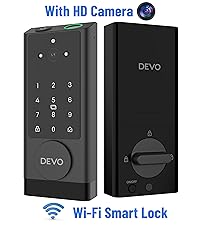
Image: Diagram explaining the anti-peeping function, where random digits can be entered before or after the real passcode to obscure it.
4. నిర్వహణ
4.1 బ్యాటరీ నిర్వహణ
The DEVO G1 is powered by a 10,000 mAh rechargeable battery. For optimal performance, fully charge the battery before first use. The Tuya Smart APP provides real-time battery status and low battery alerts.

Image: The DEVO G1 Smart Lock showing its 10,000mAh rechargeable battery and emergency Type-C power port.
4.2 వాతావరణ నిరోధకత
The lock has an IP65 water resistance rating, making it suitable for outdoor use. It is designed to withstand temperatures from 5°F to 122°F (-15°C to 50°C).

Image: Graphic illustrating the DEVO G1 Smart Lock's IP65 water resistance and its ability to operate in extreme temperatures.
5. ట్రబుల్షూటింగ్
If you encounter any issues with your DEVO G1 Smart Lock, consider the following general troubleshooting steps:
- లాక్ స్పందించడం లేదు: Ensure the battery is charged. If the battery is low, use the emergency Type-C power port.
- యాప్ కనెక్షన్ సమస్యలు: Verify your phone's Bluetooth and Wi-Fi are active. Ensure the lock is within range of your Wi-Fi router. Restart the Tuya Smart APP and try reconnecting.
- Fingerprint/Passcode Not Working: Ensure your fingerprint is clean and properly placed on the sensor. Double-check the passcode entry. If issues persist, re-register your fingerprint or reset the passcode via the app.
- తలుపు సరిగ్గా లాక్ అవ్వకపోవడం/అన్లాక్ చేయడం లేదు: Check for any obstructions in the door frame or deadbolt mechanism. Ensure the lock is correctly calibrated (refer to app settings for lock calibration).
- వాయిస్ అసిస్టెంట్ సమస్యలు: Confirm proper integration with Alexa or Google Voice Assistant through the Tuya Smart APP settings. Ensure your voice assistant device is online and connected.
For persistent problems, refer to the detailed troubleshooting section in the Tuya Smart APP or contact customer support.
6. స్పెసిఫికేషన్లు
| ఫీచర్ | వివరాలు |
|---|---|
| బ్రాండ్ | దేవో |
| మోడల్ సంఖ్య | G1 |
| లాక్ రకం | బయోమెట్రిక్, కాంబినేషన్ లాక్, డెడ్బోల్ట్, కీప్యాడ్ |
| ప్రత్యేక లక్షణాలు | Auto-Lock, Fingerprint, Fob Unlock, Touchscreen, Weather Resistant |
| మెటీరియల్ | అల్యూమినియం |
| అంశం కొలతలు (L x W x H) | 2.99 x 1.19 x 7.24 అంగుళాలు |
| బ్యాటరీ కెపాసిటీ | 10,000 mAh |
| నీటి నిరోధకత రేటింగ్ | IP65 |
| ఆపరేటింగ్ ఉష్ణోగ్రత | 5°F నుండి 122°F (-15°C నుండి 50°C) |
| చేర్చబడిన భాగాలు | Smart Lock X 1, Keys X 2, IC Card X 2, Manual X 1, Measuring Cardboard X 1 |
7. వారంటీ మరియు మద్దతు
DEVO is committed to providing top-notch service and support for your G1 Video Smart Lock. If you have any questions, require assistance with installation, or encounter any issues, please contact our customer support team promptly.
Refer to the product packaging or the official DEVO webనిర్దిష్ట వారంటీ వివరాలు మరియు సంప్రదింపు సమాచారం కోసం సైట్.