
1. పరిచయం
This manual provides essential information for the safe and efficient operation of your Tornado 65UA5300E 65-inch 4K Frameless Android Smart TV. Please read it thoroughly before using the product and retain it for future reference.

చిత్రం 1.1: ముందు view of the Tornado 65UA5300E Smart TV, showcasing its frameless design and included stand.
2. భద్రతా సమాచారం
అగ్ని ప్రమాదం, విద్యుత్ షాక్ మరియు గాయం ప్రమాదాన్ని తగ్గించడానికి ఈ టెలివిజన్ను ఉపయోగిస్తున్నప్పుడు ఎల్లప్పుడూ ప్రాథమిక భద్రతా జాగ్రత్తలను అనుసరించండి.
- వర్షం లేదా తేమకు టీవీని బహిర్గతం చేయవద్దు.
- సరైన వెంటిలేషన్ ఉండేలా చూసుకోండి; వెంటిలేషన్ ఓపెనింగ్లను అడ్డుకోకండి.
- టీవీని అస్థిరమైన కార్ట్, స్టాండ్, త్రిపాద, బ్రాకెట్ లేదా టేబుల్పై ఉంచవద్దు.
- మెరుపు తుఫానుల సమయంలో లేదా ఎక్కువసేపు ఉపయోగించనప్పుడు టీవీని అన్ప్లగ్ చేయండి.
- అన్ని సేవలను అర్హత కలిగిన సేవా సిబ్బందికి సూచించండి.
3. ప్యాకేజీ విషయాలు
ప్యాకేజీలో అన్ని అంశాలు ఉన్నాయని నిర్ధారించుకోండి:
- Tornado 65UA5300E 65-inch 4K Frameless Android Smart TV
- రిమోట్ కంట్రోల్
- పవర్ కేబుల్
- టీవీ స్టాండ్ (2 ముక్కలు)
- స్టాండ్ అసెంబ్లీ కోసం స్క్రూలు
- వినియోగదారు మాన్యువల్ (ఈ పత్రం)
4. సెటప్
4.1 అన్ప్యాకింగ్
Carefully remove the TV from its packaging. It is recommended to keep the original packaging for potential future transport or servicing.
4.2 స్టాండ్ అటాచ్ చేయడం
If you are not wall-mounting the TV, attach the included stand pieces. Place the TV face down on a soft, flat surface to prevent screen damage. Align each stand piece with the corresponding slots on the bottom of the TV and secure them with the provided screws.
చిత్రం 4.1: దిగువన view of the TV, illustrating the designated areas for stand attachment.
4.3 వాల్ మౌంటు
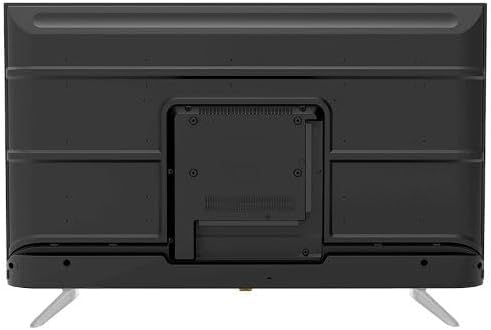
For wall mounting, remove the stand (if attached). Use a VESA-compatible wall mount (not included) that supports the TV's weight and dimensions. Consult a professional for wall mounting to ensure safety and proper installation.

చిత్రం 4.2: వెనుక view of the TV, highlighting the VESA mounting pattern and various input/output ports.
4.4 కనెక్ట్ పెరిఫెరల్స్
తగిన పోర్ట్లను ఉపయోగించి మీ బాహ్య పరికరాలను టీవీకి కనెక్ట్ చేయండి:
- HDMI: For high-definition devices like Blu-ray players, gaming consoles, or set-top boxes. The TV has 3 HDMI ports, one with ARC support.
- USB: For connecting USB storage devices to play media (video, photos, music). The TV has 2 USB ports.
- LAN: వైర్డు ఇంటర్నెట్ కనెక్షన్ కోసం.
- RF ఇన్పుట్: For connecting an antenna or satellite dish for the built-in digital receiver.
- డిజిటల్ ఆడియో అవుట్పుట్ (ఆప్టికల్): బాహ్య ఆడియో సిస్టమ్కు కనెక్ట్ చేయడానికి.
- హెడ్ఫోన్ జాక్ (3.5 మిమీ): హెడ్ఫోన్లను కనెక్ట్ చేయడానికి.

చిత్రం 4.3: వైపు view of the TV, illustrating the accessible side input ports.
4.5 ప్రారంభ పవర్ ఆన్ మరియు సెటప్ విజార్డ్
After connecting the power cable, press the power button on the remote control or TV. The TV will guide you through an initial setup wizard, including language selection, network connection (Wi-Fi or LAN), channel scanning, and Google account setup for Android TV features.
5. టీవీని ఆపరేట్ చేయడం
5.1 రిమోట్ కంట్రోల్ ఓవర్view
The included remote control allows you to navigate the TV's functions. It features dedicated buttons for power, volume, channel, input selection, smart TV apps (Netflix, YouTube, Prime Video, Disney+), Google Assistant voice search, and menu navigation.
5.2 ప్రాథమిక విధులు
- పవర్ ఆన్/ఆఫ్: పవర్ బటన్ను నొక్కండి.
- వాల్యూమ్ నియంత్రణ: వాల్యూమ్ అప్/డౌన్ బటన్లను ఉపయోగించండి.
- ఛానెల్ ఎంపిక: ఛానల్ అప్/డౌన్ బటన్లు లేదా సంఖ్యా కీప్యాడ్ను ఉపయోగించండి.
- ఇన్పుట్ మూలం: Press the 'Input' button to select between HDMI, AV, TV, etc.
5.3 స్మార్ట్ టీవీ ఫీచర్లు (ఆండ్రాయిడ్ 11)
Your TV runs on Android 11, providing access to a wide range of smart features:
- అప్లికేషన్లు: Access pre-installed apps like Netflix, YouTube, Prime Video, Disney+, Shahid VIP, and download more from the Google Play Store.
- Google అసిస్టెంట్: శోధన, నియంత్రణ మరియు సమాచారం కోసం రిమోట్ కంట్రోల్ ద్వారా వాయిస్ ఆదేశాలను ఉపయోగించండి.
- Chromecast అంతర్నిర్మిత: మీ స్మార్ట్ఫోన్ లేదా టాబ్లెట్ నుండి కంటెంట్ను నేరుగా టీవీకి ప్రసారం చేయండి.
- Web బ్రౌజర్: మీ టీవీలో నేరుగా ఇంటర్నెట్ బ్రౌజ్ చేయండి.
- బ్లూటూత్ 5.0: వైర్లెస్ హెడ్ఫోన్లు, స్పీకర్లు లేదా ఇతర బ్లూటూత్ పరికరాలను కనెక్ట్ చేయండి.
5.4 చిత్రం మరియు ధ్వని సెట్టింగ్లు
మీ అనుకూలీకరించండి viewటీవీ సెట్టింగ్ల మెనూ ద్వారా డౌన్లోడ్ మరియు శ్రవణ అనుభవాన్ని పొందండి:
- చిత్ర రీతులు: Select from Dynamic, Game, Sports, Cinema, or User-defined modes.
- రంగు ఉష్ణోగ్రత: Adjust to Normal, Cool, or Warm.
- సౌండ్ మోడ్లు: Choose from Smart, User, Game, Movie, Music, or News.
- డాల్బీ డిజిటల్ ప్లస్: Enhanced audio processing for compatible content.
6. నిర్వహణ
6.1 టీవీని శుభ్రపరచడం
- స్క్రీన్: స్క్రీన్ను మృదువైన, మెత్తటి బట్టతో సున్నితంగా తుడవండి. మొండి మరకల కోసం, టీవీల కోసం ప్రత్యేకంగా రూపొందించిన స్క్రీన్ క్లీనర్ను ఉపయోగించండి, నేరుగా స్క్రీన్కు కాకుండా వస్త్రానికి వర్తించండి.
- శరీరం: Wipe the TV's frame and back panel with a soft, dry cloth. Do not use abrasive cleaners or solvents.
6.2 సాఫ్ట్వేర్ నవీకరణలు
Ensure your TV's software is up to date for optimal performance and security. Connect the TV to the internet and check for updates periodically through the settings menu.
7. ట్రబుల్షూటింగ్
మీరు సమస్యలను ఎదుర్కొంటే, ఈ క్రింది సాధారణ పరిష్కారాలను చూడండి:
| సమస్య | సాధ్యమైన పరిష్కారం |
|---|---|
| శక్తి లేదు | Check if the power cable is securely plugged into the TV and the wall outlet. Ensure the outlet is functional. |
| చిత్రం లేదు, కానీ ధ్వని ఉంది | ఇన్పుట్ సోర్స్ను తనిఖీ చేయండి. బాహ్య పరికరాలు ఆన్ చేయబడి, సరిగ్గా కనెక్ట్ చేయబడ్డాయని నిర్ధారించుకోండి. |
| శబ్దం లేదు, కానీ చిత్రం ఉంది | Check the volume level and mute status. Verify audio settings and external audio connections. |
| రిమోట్ కంట్రోల్ పనిచేయడం లేదు | బ్యాటరీలను మార్చండి. రిమోట్ మరియు టీవీ యొక్క IR సెన్సార్ మధ్య ఎటువంటి అడ్డంకులు లేకుండా చూసుకోండి. |
| Wi-Fiకి కనెక్ట్ చేయడం సాధ్యపడదు | మీ రూటర్ మరియు మోడెమ్ను తనిఖీ చేయండి. Wi-Fi పాస్వర్డ్ను తిరిగి నమోదు చేయండి. టీవీ మరియు రూటర్ను పునఃప్రారంభించడానికి ప్రయత్నించండి. |
సమస్య కొనసాగితే, కస్టమర్ సపోర్ట్ని సంప్రదించండి.
8. స్పెసిఫికేషన్లు
| ఫీచర్ | వివరాలు |
|---|---|
| మోడల్ సంఖ్య | 65UA5300E |
| స్క్రీన్ పరిమాణం | 65 అంగుళాలు |
| ప్రదర్శన సాంకేతికత | LED |
| రిజల్యూషన్ | 4 కె యుహెచ్డి (3840 x 2160) |
| కారక నిష్పత్తి | 16:9 |
| Viewing యాంగిల్ | 178 డిగ్రీలు |
| ప్రకాశం | 250 cd/m² |
| రిఫ్రెష్ రేట్ | 50/60 Hz |
| HDR మద్దతు | HDR10, HLG |
| ఆడియో టెక్నాలజీ | Dolby Digital Plus, Surround Sound |
| ఆడియో అవుట్పుట్ పవర్ | 10W x 2 |
| ఆపరేటింగ్ సిస్టమ్ | ఆండ్రాయిడ్ 11 |
| అంతర్గత మెమరీ | 16 GB |
| కనెక్టివిటీ | Wi-Fi, Bluetooth 5.0, LAN |
| ఇన్పుట్లు | RF Input (Digital) x1, Video Input x1, HDMI x3 (ARC), USB x2, LAN x1 |
| అవుట్పుట్లు | Digital Audio Output (Optical) x1, Headphone Jack (3.5mm) x1 |
| విద్యుత్ సరఫరా | AC 90-240V / 50Hz |
| స్టాండ్బై పవర్ | 0.5W |
| స్టాండ్ లేకుండా కొలతలు (W x H x D). | 1446 x 832 x 84 మిమీ |
| స్టాండ్తో కొలతలు (W x H x D). | 1446 x 892 x 305 మిమీ |
| నికర బరువు | 15.32 కిలోలు |
| స్థూల బరువు | 21.32 కిలోలు |
| మూలం దేశం | ఈజిప్ట్ |
9. వారంటీ
This Tornado TV comes with a 3-year full free warranty. Please retain your proof of purchase for warranty claims. For specific terms and conditions, refer to the warranty card included with your product or contact Tornado customer service.
10. మద్దతు
For further assistance, technical support, or service inquiries, please contact Tornado customer service. Contact details can typically be found on the manufacturer's official webసైట్ లేదా వారంటీ కార్డులో.