
పరిచయం
Welcome to your Reflex Active SeaVenture Smartwatch. This device is designed to enhance your active lifestyle with advanced features including 50m water resistance for swimming, built-in GPS for precise activity tracking, and an ultra-high-definition AMOLED display. This manual provides essential information for setting up, operating, maintaining, and troubleshooting your smartwatch to ensure optimal performance.
1. సెటప్
1.1 అన్బాక్సింగ్
ప్యాకేజింగ్ నుండి అన్ని భాగాలను జాగ్రత్తగా తొలగించండి. పెట్టెలో ఇవి ఉండాలి:
- Reflex Active SeaVenture Smartwatch with Watch Band
- ఛార్జింగ్ కేబుల్
- ఇన్స్ట్రక్షన్ మాన్యువల్

Image: The smartwatch packaging, an instruction manual, and the charging cable. This illustrates the contents typically found in the product box.
1.2 స్మార్ట్వాచ్ను ఛార్జ్ చేయడం
Before first use, fully charge your smartwatch. Connect the magnetic charging cable to the charging points on the back of the watch and plug the USB end into a compatible power adapter (not included) or computer USB port. The watch display will indicate charging status.

Image: A close-up of the smartwatch display showing a green battery icon with a lightning bolt, indicating that the device is charging.
1.3 అనువర్తన సంస్థాపన
To unlock the full potential of your smartwatch, download the Reflex Active App on your smartphone. The app is compatible with iOS 12.0+ and Android 9.0+ devices.
- కోసం వెతకండి "Reflex Active" in the Apple App Store or Google Play Store.
- Alternatively, scan the QR code provided in the packaging or on the support webసైట్.
For more information and support, visit the official Reflex Active webసైట్: రిఫ్లెక్స్ యాక్టివ్ AMOLED సమాచారం
1.4 మీ స్మార్ట్ఫోన్తో జత చేయడం
After installing the app, open it and follow the on-screen instructions to pair your smartwatch via Bluetooth. Ensure Bluetooth is enabled on your smartphone and the watch is sufficiently charged.
2. స్మార్ట్వాచ్ను ఆపరేట్ చేయడం
2.1 ప్రాథమిక నావిగేషన్
The SeaVenture smartwatch features a 1.43-inch AMOLED touchscreen and physical buttons for navigation. Swipe across the screen to access different functions and menus. Use the side buttons for quick access to specific features or to return to the home screen.
2.2 డిస్ప్లే ఫీచర్లు
The ultra-high-definition AMOLED display offers vibrant colors and clear visibility. The ఎల్లప్పుడూ-ఆన్ డిస్ప్లే feature ensures that the time and essential information are visible without needing to activate the screen.

Image: A collage showing the smartwatch's AMOLED display, a screen indicating GPS positioning success, and the watch on a wrist underwater with altimeter, barometer, and compass readings.
2.3 కమ్యూనికేషన్ లక్షణాలు
- కాల్స్ చేయండి మరియు స్వీకరించండి: Connect your smartwatch to your phone to make and receive calls directly from your wrist.
- నోటిఫికేషన్లు: Receive alerts for messages, social media, and other app notifications.
Image: A collage showing a person wearing the smartwatch, the watch displaying an incoming call, and a screen showing various app notifications.
2.4 Fitness and Health Tracking
The SeaVenture smartwatch offers comprehensive tracking for your fitness and health:
- అంతర్నిర్మిత GPS: Tracks your training routine and routes precisely using satellite navigation.
- స్పోర్ట్స్ మోడ్లు: Over 100 sports modes available via the Reflex Active App, including running, hiking, cycling, and treadmills.
- హార్ట్ రేట్ మానిటర్: మీ హృదయ స్పందన రేటును నిరంతరం పర్యవేక్షిస్తుంది.
- దశల లెక్కింపు: మీ రోజువారీ అడుగులను ట్రాక్ చేస్తుంది.
- నిద్ర విశ్లేషణ: మీ నిద్ర విధానాలను మరియు నాణ్యతను పర్యవేక్షిస్తుంది.
- కేలరీల ట్రాకింగ్: Estimates calories burned during activities.
- హైడ్రేషన్ రిమైండర్లు: Prompts you to drink water.
- శ్వాస వ్యాయామాలు: Guides you through relaxation exercises.
- సెడెంటరీ రిమైండర్లు: నిష్క్రియాత్మక కాలాల తర్వాత కదలమని మిమ్మల్ని హెచ్చరిస్తుంది.
- మహిళల ఆరోగ్యం: Provides tracking features relevant to women's health.
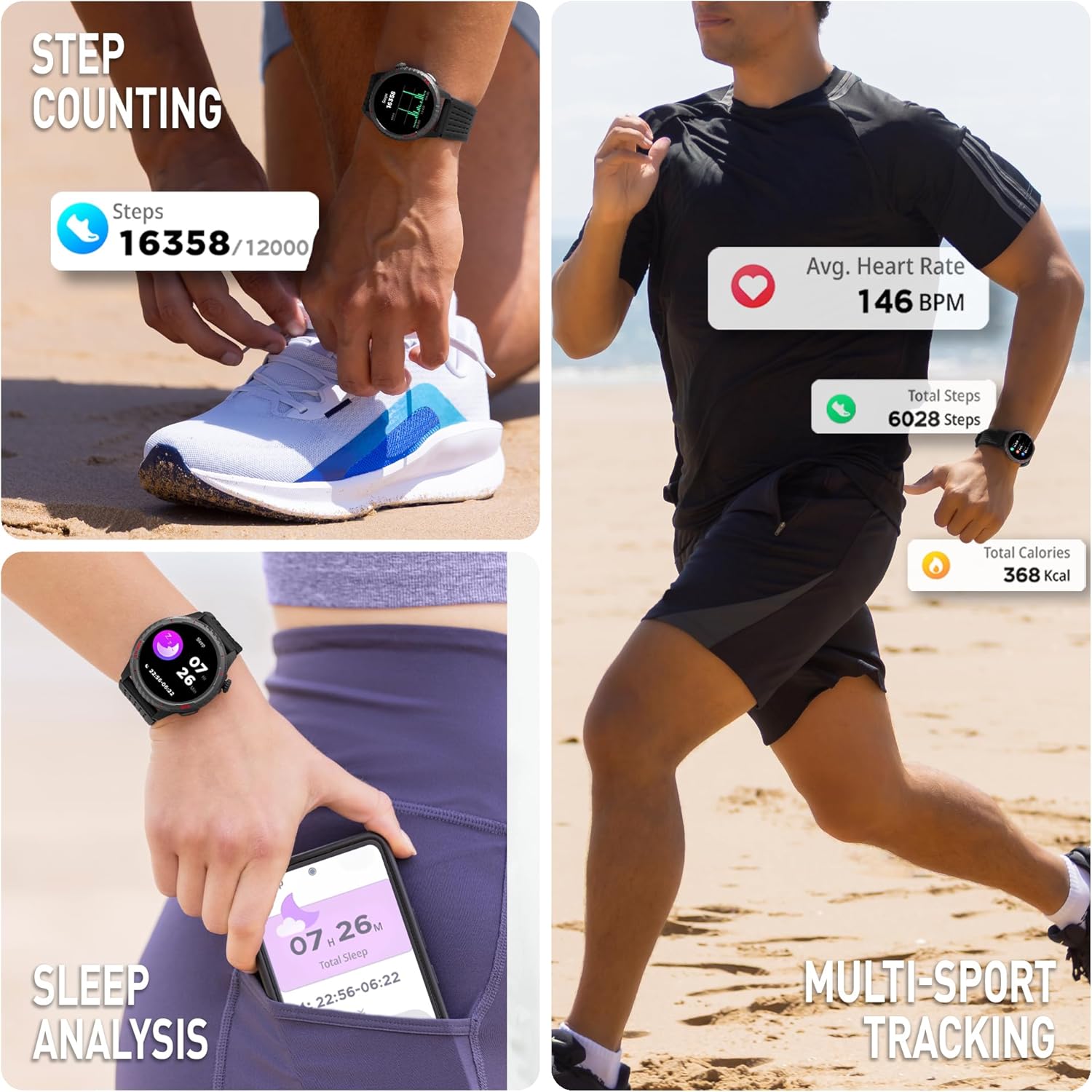
Image: A collage illustrating the smartwatch's fitness tracking capabilities, including step counting, average heart rate display, and sleep analysis.
2.5 Environmental Sensors
The smartwatch includes an altimeter, barometer, and compass for environmental data, useful for outdoor activities.
2.6 అదనపు ఫీచర్లు
- Dual Time Zones: Shows time at home and away, ideal for travelers.
- ముఖాలను చూడండి: Customize your watch face from the extensive Reflex Active Dialing Library via the app, or create your own with personal photos.
- సంగీత నియంత్రణ: మీ స్మార్ట్ఫోన్లో మ్యూజిక్ ప్లేబ్యాక్ని నియంత్రించండి.
- వాతావరణ నవీకరణలు: Access current weather information.
- వాయిస్ అసిస్టెంట్: Utilize your phone's voice assistant directly from the watch.
- కెమెరా నియంత్రణ: Remotely control your smartphone camera.
- వాచ్ లొకేటర్: Helps locate your watch if misplaced.
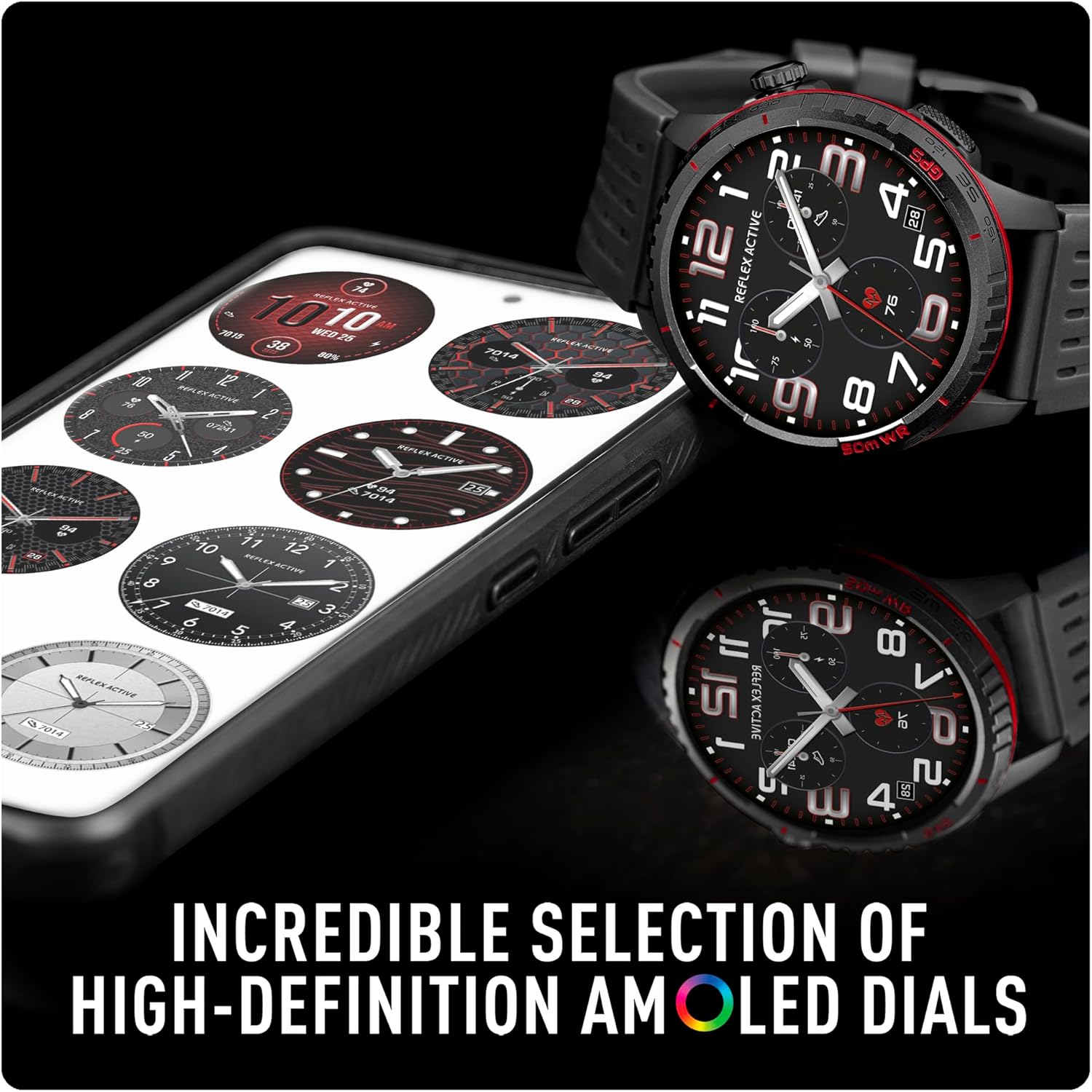
Image: A smartphone screen displaying a selection of high-definition AMOLED watch faces available for the Reflex Active SeaVenture smartwatch, alongside the watch itself showing a customized dial.

Image: An infographic displaying a comprehensive list of SeaVenture features, each represented by a small icon, including 5ATM water resistance, built-in GPS, dual time zones, always-on dial, call functions, altimeter, barometer, compass, messages, sports modes, calorie tracking, step counter, heart rate, sleep tracking, breathing exercises, hydration reminders, camera control, voice assistant, weather updates, music control, watch locator, sedentary reminders, and women's health.
3. నిర్వహణ
3.1 నీటి నిరోధకత
The Reflex Active SeaVenture smartwatch is 50మీ నీటి నిరోధకత, making it suitable for pool and sea swimming. Ensure the watch is clean and dry after exposure to saltwater to prevent corrosion.

Image: A person swimming freestyle in the ocean, wearing the Reflex Active SeaVenture smartwatch on their left wrist. The image highlights the 50m water resistance feature.
3.2 శుభ్రపరచడం
To clean your smartwatch, gently wipe the screen and body with a soft, damp, lint-free cloth. Avoid using harsh chemicals or abrasive materials. Ensure the charging contacts are clean and dry before charging.
3.3 స్ట్రాప్ కేర్
The silicone strap is designed for durability and comfort. Clean it regularly with mild soap and water. The straps are interchangeable, allowing for customization.
4. ట్రబుల్షూటింగ్
If you encounter issues with your Reflex Active SeaVenture smartwatch, try the following steps:
- వాచ్ ఆన్ కావడం లేదు: వాచ్ పూర్తిగా ఛార్జ్ అయ్యిందని నిర్ధారించుకోండి. దానిని ఛార్జింగ్ కేబుల్కు కనెక్ట్ చేసి, కనీసం 30 నిమిషాలు ఛార్జ్ చేయడానికి అనుమతించండి.
- కనెక్టివిటీ సమస్యలు: Check that Bluetooth is enabled on your smartphone and the watch is within range. Try restarting both your watch and smartphone.
- యాప్ సమకాలీకరణ సమస్యలు: Ensure the Reflex Active App is updated to the latest version. Close and reopen the app, or restart your phone.
- సరికాని రీడింగ్లు: For heart rate or step tracking, ensure the watch is worn snugly on your wrist, not too tight or too loose. For GPS, ensure you have a clear view ఆకాశం యొక్క.
- స్క్రీన్ స్పందించడం లేదు: Try restarting the watch by pressing and holding the power button (if applicable) or performing a soft reset through the app settings.
For further assistance, please refer to the support section of the Reflex Active webసైట్.
5. స్పెసిఫికేషన్లు
| ఫీచర్ | స్పెసిఫికేషన్ |
|---|---|
| మోడల్ పేరు | Reflex Active SeaVenture 50m Swim-Safe AMOLED GPS Smart Watch |
| మోడల్ సంఖ్య | RA-VE-400R-5ATM-03 |
| స్క్రీన్ పరిమాణం | 1.43 అంగుళాలు |
| ప్రదర్శన రకం | AMOLED |
| రిజల్యూషన్ | 454 x 454 |
| నీటి నిరోధక స్థాయి | 50 మీటర్లు (5ATM) |
| GPS | అంతర్నిర్మిత GPS |
| కనెక్టివిటీ టెక్నాలజీ | బ్లూటూత్ |
| బ్యాటరీ సెల్ కంపోజిషన్ | లిథియం పాలిమర్ |
| అనుకూల పరికరాలు | స్మార్ట్ఫోన్ |
| అనుకూల ఫోన్ మోడల్లు | iOS 12.0+ and Android 9.0+ devices |
| మానవ ఇంటర్ఫేస్ ఇన్పుట్ | బటన్లు, టచ్స్క్రీన్ |
| వస్తువు బరువు | 42 గ్రాములు |
| బ్యాండ్ మెటీరియల్ రకం | సిలికాన్ |
| Case Material Type | ప్లాస్టిక్ |
| కొలవబడిన కొలమానాలు | Heart Rate Monitor, Distance, Step Count |
| ప్రత్యేక లక్షణాలు | Barometric Altimeter, Compass, Always-On Display, Dual Time Zones, Call Functionality |
6. వారంటీ మరియు మద్దతు
For detailed warranty information, product support, and frequently asked questions, please visit the official Reflex Active support webసైట్:
You can also find additional resources and contact customer service through the website for any technical issues or inquiries.