
1. పరిచయం
Welcome to the user manual for your new HP 15.6 Touchscreen Laptop, Model 15-fc0047wm. This guide provides essential information to help you set up, operate, maintain, and troubleshoot your device. Your laptop is equipped with an AMD Ryzen 7 7730U processor, a vibrant 15.6-inch Full HD IPS Touch Display, AMD Radeon Graphics, and runs on Windows 11 Pro, offering a powerful and intuitive computing experience.
పెట్టెలో ఏముంది
- HP 15.6 inch Laptop (Model 15-fc0047wm)
- పవర్ అడాప్టర్ మరియు కేబుల్
- అనుబంధ కిట్

చిత్రం 1.1: పైగాview of HP 15.6 Laptop features and specifications.
2. సెటప్
2.1 ప్రారంభ పవర్ ఆన్
- మీ ల్యాప్టాప్ మరియు అన్ని ఉపకరణాలను పెట్టె నుండి అన్ప్యాక్ చేయండి.
- Connect the power adapter to the laptop's power port and then plug it into a wall outlet. Ensure the battery is sufficiently charged before first use.
- Open the laptop lid and press the power button, typically located on the keyboard deck, to turn on the device.
2.2 First-Time Windows 11 Pro Setup
Upon initial startup, you will be guided through the Windows 11 Pro setup process. Follow the on-screen prompts to:
- మీ ప్రాంతం మరియు కీబోర్డ్ లేఅవుట్ను ఎంచుకోండి.
- Wi-Fi నెట్వర్క్కి కనెక్ట్ చేయండి.
- మీ Microsoft ఖాతాతో సైన్ ఇన్ చేయండి లేదా కొత్తదాన్ని సృష్టించండి.
- పిన్ లేదా పాస్వర్డ్ వంటి భద్రతా లక్షణాలను సెటప్ చేయండి.
2.3 కనెక్ట్ పెరిఫెరల్స్
మీ HP ల్యాప్టాప్ బాహ్య పరికరాలను కనెక్ట్ చేయడానికి వివిధ పోర్ట్లను అందిస్తుంది:

Figure 2.1: Left side ports (USB-A, HDMI, USB-C)

Figure 2.2: Right side ports (USB-A, Power Input)
- USB టైప్-ఎ పోర్ట్లు: Connect USB devices such as mice, keyboards, and external storage drives.
- USB టైప్-సి పోర్ట్: For data transfer and connecting compatible USB-C accessories.
- HDMI 1.4b పోర్ట్: Connect an external monitor or TV for extended display.
- హెడ్ఫోన్/మైక్రోఫోన్ కాంబో జాక్: హెడ్ఫోన్లు లేదా హెడ్సెట్ను మైక్రోఫోన్తో కనెక్ట్ చేయండి.
3. మీ ల్యాప్టాప్ను ఆపరేట్ చేయడం
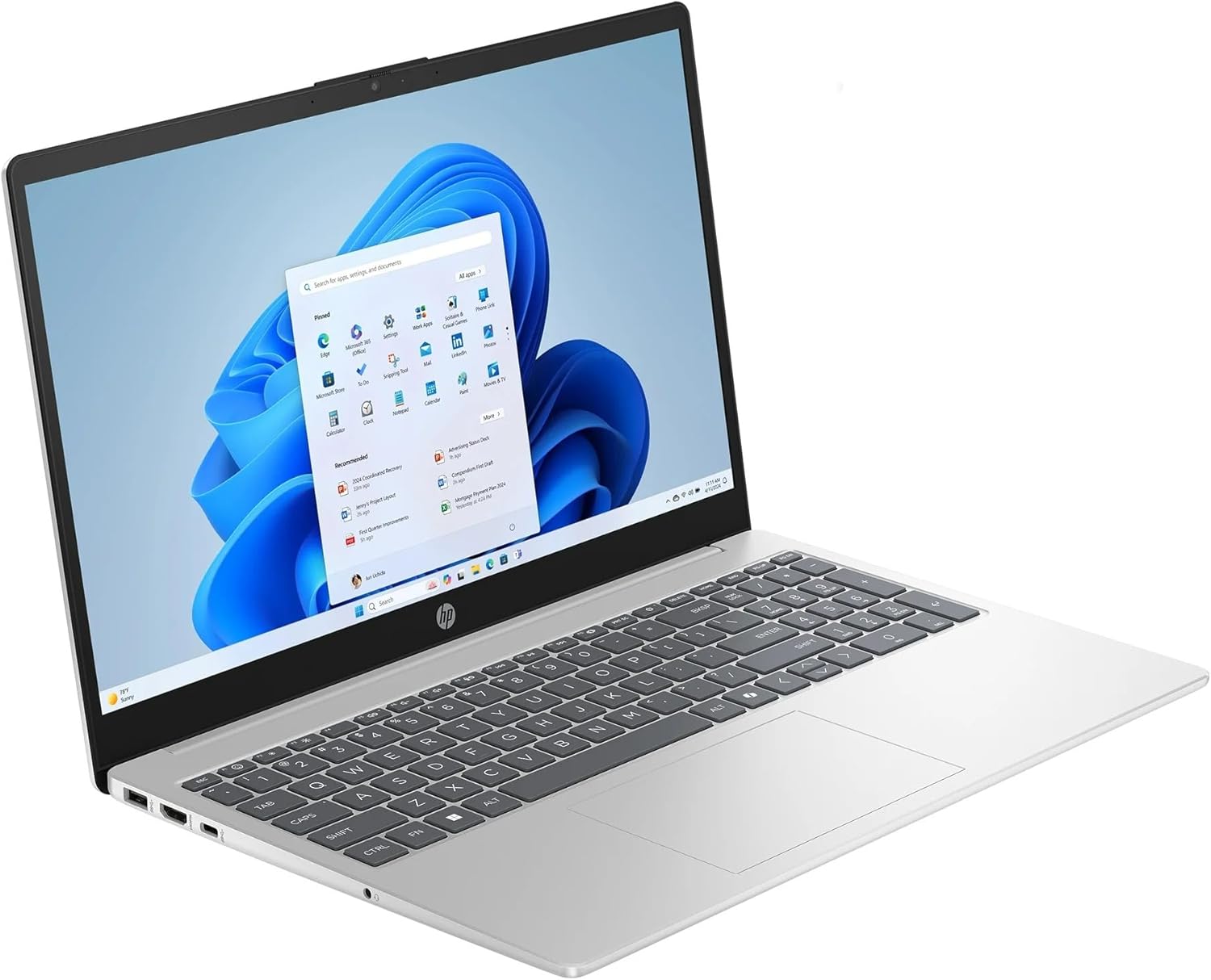
Figure 3.1: HP 15.6 Touchscreen Laptop in use.
3.1 Touchscreen Functions
Your laptop features a 15.6" FHD IPS touchscreen. You can interact with Windows 11 Pro directly on the screen using gestures:
- నొక్కండి: మౌస్ క్లిక్తో సమానం.
- నొక్కండి మరియు పట్టుకోండి: కుడి-క్లిక్తో సమానం.
- Pinch/Stretch: కంటెంట్ను జూమ్ ఇన్ లేదా అవుట్ చేయండి.
- స్వైప్: Navigate through pages or scroll.
3.2 Keyboard and Numeric Keypad
The full-size keyboard includes a dedicated numeric keypad for efficient data entry. Function keys (F1-F12) provide quick access to system controls when pressed in combination with the Fn కీ.
3.3 మైక్రోసాఫ్ట్ కోపైలట్
Your laptop comes with Microsoft Copilot, an AI assistant integrated into Windows 11 Pro. Access Copilot by pressing the dedicated కోపైలట్ కీ on your keyboard or clicking its icon on the taskbar. Copilot can assist with tasks, answer questions, and generate content.
3.4 వైర్లెస్ కనెక్టివిటీ
- Wi-Fi 6: Connect to wireless networks for internet access. To connect, click the Wi-Fi icon in the taskbar, select your network, and enter the password.
- బ్లూటూత్: Pair with Bluetooth-enabled devices such as headphones, speakers, or mice. Enable Bluetooth from the Windows Settings menu.
3.5 బ్యాటరీ నిర్వహణ
The laptop's battery provides up to 10 hours and 45 minutes of video playback. To optimize battery life:
- స్క్రీన్ ప్రకాశాన్ని సర్దుబాటు చేయండి.
- ఉపయోగించని అప్లికేషన్లను మూసివేయండి.
- విండోస్ పవర్-సేవింగ్ మోడ్లను ఉపయోగించండి.
4. నిర్వహణ
4.1 ల్యాప్టాప్ను శుభ్రపరచడం
- కొద్దిగా మెత్తని, మెత్తని బట్టను ఉపయోగించండి dampడిస్ప్లేను తుడవడానికి నీరు లేదా స్క్రీన్ క్లీనర్తో నింపండి.
- కీబోర్డ్ మరియు ఛాసిస్ కోసం, మృదువైన వస్త్రాన్ని ఉపయోగించండి. కఠినమైన రసాయనాలు లేదా రాపిడి పదార్థాలను నివారించండి.
- వెంట్లు మరియు పోర్టుల నుండి దుమ్మును తొలగించడానికి కాలానుగుణంగా సంపీడన గాలిని ఉపయోగించండి.
4.2 సాఫ్ట్వేర్ నవీకరణలు
Regularly check for and install Windows updates and HP driver updates to ensure optimal performance and security. Access Windows updates via సెట్టింగులు > విండోస్ అప్డేట్.
4.3 నిల్వ నిర్వహణ
Your laptop includes a 1TB SSD. To maintain performance:
- అనవసరమైన వాటిని క్రమం తప్పకుండా తొలగించండి fileలు మరియు అప్లికేషన్లు.
- పెద్ద మొత్తంలో క్లౌడ్ నిల్వను ఉపయోగించండి files.
- Empty the Recycle Bin periodically.
5. ట్రబుల్షూటింగ్
ఈ విభాగం మీ HP ల్యాప్టాప్తో మీరు ఎదుర్కొనే సాధారణ సమస్యలను పరిష్కరిస్తుంది.
5.1 ల్యాప్టాప్ ఆన్ కావడం లేదు
- పవర్ అడాప్టర్ ల్యాప్టాప్ మరియు పనిచేసే పవర్ అవుట్లెట్ రెండింటికీ సురక్షితంగా కనెక్ట్ చేయబడిందని నిర్ధారించుకోండి.
- మరొక పరికరాన్ని ప్లగ్ చేయడం ద్వారా పవర్ అవుట్లెట్ పనిచేస్తుందో లేదో ధృవీకరించండి.
- బ్యాటరీ పూర్తిగా ఖాళీ అయిపోతే, పవర్ ఆన్ చేయడానికి ప్రయత్నించే ముందు కనీసం 30 నిమిషాలు ఛార్జ్ అవ్వనివ్వండి.
5.2 ప్రదర్శన సమస్యలు
- తెరపై చిత్రం లేదు: ల్యాప్టాప్ అంతర్గత డిస్ప్లేతో సమస్య ఉందో లేదో తనిఖీ చేయడానికి HDMI పోర్ట్కు బాహ్య మానిటర్ను కనెక్ట్ చేయండి.
- మసక స్క్రీన్: Adjust screen brightness using the function keys (usually F2/F3 or similar icons).
- టచ్స్క్రీన్ స్పందించడం లేదు: Restart the laptop. If the issue persists, check for driver updates in Device Manager.
5.3 కనెక్టివిటీ సమస్యలు (Wi-Fi/బ్లూటూత్)
- Wi-Fi కనెక్ట్ కావడం లేదు: Ensure Wi-Fi is enabled in Windows settings. Restart your router and modem.
- బ్లూటూత్ పరికరం జత కావడం లేదు: ల్యాప్టాప్ మరియు పరికరం రెండింటిలోనూ బ్లూటూత్ ప్రారంభించబడిందని నిర్ధారించుకోండి. పరికరాలను ఒకదానికొకటి దగ్గరగా ఉంచండి మరియు అవి జత చేసే మోడ్లో ఉన్నాయని నిర్ధారించుకోండి.
5.4 నెమ్మది పనితీరు
- నేపథ్యంలో నడుస్తున్న అనవసరమైన అప్లికేషన్లను మూసివేయండి.
- ఏవైనా పెండింగ్ విండోస్ అప్డేట్ల కోసం తనిఖీ చేసి, ఇన్స్టాల్ చేయండి.
- నిల్వ స్థలాన్ని ఖాళీ చేయడానికి డిస్క్ క్లీనప్ను అమలు చేయండి.
- మాల్వేర్ లేదా వైరస్ల కోసం స్కాన్ చేయండి.
6. స్పెసిఫికేషన్లు
| బ్రాండ్ | HP |
| మోడల్ పేరు | HP ల్యాప్టాప్ |
| మోడల్ సంఖ్య | 15-fc0047wm |
| స్క్రీన్ పరిమాణం | 15.6 అంగుళాలు |
| ప్రదర్శన రకం | LED, FHD IPS Touchscreen |
| రిజల్యూషన్ | 1920 x 1080 పిక్సెల్లు |
| ప్రాసెసర్ | AMD రైజెన్ 7 7730U (4.5 GHz వరకు) |
| గ్రాఫిక్స్ | AMD రేడియన్ గ్రాఫిక్స్ (ఇంటిగ్రేటెడ్) |
| RAM మెమరీ | 32 GB DDR4 SDRAM (Max 64 GB) |
| హార్డ్ డిస్క్ పరిమాణం | 1 టిబి ఎస్ఎస్డి |
| ఆపరేటింగ్ సిస్టమ్ | Windows 11 ప్రో |
| వైర్లెస్ కనెక్టివిటీ | వై-ఫై 6 (802.11ax), బ్లూటూత్ |
| ఓడరేవులు | 1x HDMI 1.4b, 1x USB Type-C, 2x USB Type-A, 1x Headphone/Microphone combo, 1x AC Smart Pin |
| ప్రత్యేక లక్షణాలు | Microsoft Copilot, Numeric Keypad, Touchscreen |
| బ్యాటరీ లైఫ్ | Up to 10 hours and 45 minutes (video playback) |
| కొలతలు (L x W x H) | 14.17" x 9.29" x 0.73" |
| బరువు | 3.52 పౌండ్లు |
7. వారంటీ మరియు మద్దతు
7.1 వారంటీ సమాచారం
Your HP 15.6 Touchscreen Laptop is covered by a standard manufacturer's warranty. Please refer to the warranty documentation included with your product for specific terms, conditions, and duration. Keep your proof of purchase for warranty claims.
7.2 కస్టమర్ మద్దతు
For technical assistance, service, or additional information, please visit the official HP Support website or contact HP customer service. You can find contact details and support resources at support.hp.com.