
1. పరిచయం
The AdaLov AX3000 Outdoor Wireless Access Point is designed to provide high-speed, stable Wi-Fi 6 connectivity in outdoor environments. Featuring dual-band operation (2.4GHz and 5.8GHz), Power over Ethernet (PoE) support, and an IP67-rated weatherproof enclosure, this device is suitable for extending network coverage to large outdoor areas such as yards, farms, and campసైట్లు.
This manual provides detailed instructions for the installation, operation, and maintenance of your AX3000 Outdoor Wireless Access Point.
వీడియో 1: ముగిసిందిview of the AdaLov AX3000 Outdoor Wireless Access Point, highlighting its long-range, dual-band Wi-Fi 6 capabilities.
2. ప్యాకేజీ విషయాలు
క్రింద జాబితా చేయబడిన అన్ని అంశాలు మీ ప్యాకేజీలో చేర్చబడ్డాయని ధృవీకరించండి. ఏవైనా అంశాలు తప్పిపోయినా లేదా దెబ్బతిన్నా, దయచేసి కస్టమర్ మద్దతును సంప్రదించండి.
- 1x Wi-Fi Access Point (APM6-AX3000)
- 5x External Antennas (3x 5.8GHz, 2x 2.4GHz)
- 1x నెట్వర్క్ కేబుల్
- 1x PoE Power Adapter
- 1x RJ45 Waterproof Head
- 2x Silicone Pads
- 2x Stainless Steel Cable Ties
- 1x స్క్రూ కిట్
- 1x రెంచ్
- 1x ఇన్స్ట్రక్షన్ మాన్యువల్
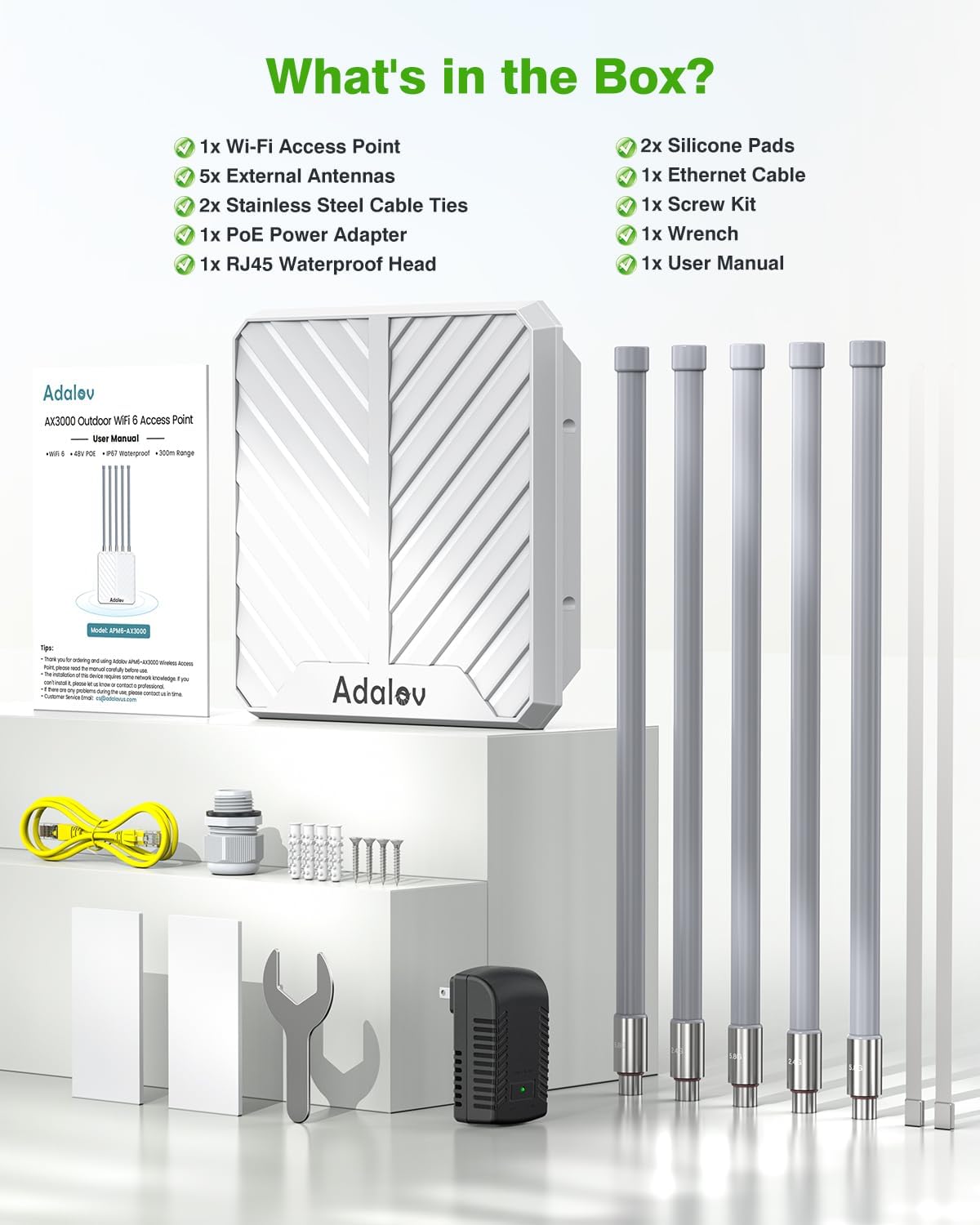
Image 1: All components included in the AdaLov AX3000 Outdoor Wireless Access Point package.
3. సెటప్ మరియు ఇన్స్టాలేషన్
Follow these steps to set up your AdaLov AX3000 Outdoor Wireless Access Point.
Video 2: Unboxing and setup guide for the Wireless Access Point, demonstrating antenna installation and initial connections.
3.1 యాంటెన్నా ఇన్స్టాలేషన్
- Identify the 2.4GHz and 5.8GHz antennas. The antennas are labeled at their base.
- Carefully screw the 2.4GHz antennas into the ports marked "2.4G" on the access point.
- Carefully screw the 5.8GHz antennas into the ports marked "5.8G" on the access point.
- Ensure all antennas are securely tightened to prevent signal loss and moisture ingress.

Image 2: Correct installation of the 2.4GHz and 5.8GHz antennas onto the access point.
3.2 పవర్ ఓవర్ ఈథర్నెట్ (PoE) కనెక్షన్
The AX3000 supports IEEE 802.3af/at PoE and passive 48V PoE, allowing power and data transmission over a single Ethernet cable.
- Connect one end of the Ethernet cable to the LAN/WAN port on the access point.
- Attach the RJ45 Waterproof Head to the Ethernet cable and the access point's port to ensure weather protection.
- Connect the other end of the Ethernet cable to the PoE port on the included PoE Power Adapter or a compatible PoE switch.
- Plug the PoE Power Adapter into a power outlet. The access point will power on automatically.

Image 3: Illustration of the PoE connection process, including the waterproof RJ45 head.
3.3 మౌంటు ఐచ్ఛికాలు
The access point can be mounted on a pole or a wall using the provided accessories.
- పోల్ మౌంటు: Use the stainless steel cable ties to secure the access point to a pole.
- వాల్ మౌంటు: Use the screw kit to attach the access point to a wall.

చిత్రం 4: ఉదాamples of pole mounting and wall mounting for the access point.
3.4 ప్రారంభ కాన్ఫిగరేషన్
After physical installation and power-up, access the device's web interface for initial configuration. Refer to the Quick Start Guide for default IP address and login credentials.
4. ఆపరేటింగ్ మోడ్లు
The AdaLov AX3000 supports multiple operating modes to suit various network requirements.

చిత్రం 5: ముగిసిందిview of the 3-in-1 working modes supported by the access point.
4.1 AP Mode (Access Point)
In AP mode, the device converts a wired network connection into a wireless one, acting as a central hub for Wi-Fi devices. This is ideal for creating a new wireless network or adding Wi-Fi capabilities to an existing wired network.

Image 6: AP Mode configuration, converting a wired network to wireless.
4.2 రిపీటర్ మోడ్
In Repeater mode, the device extends the coverage of an existing wireless network. It receives the Wi-Fi signal from your main router and re-broadcasts it, effectively eliminating dead zones and expanding the signal range.

Image 7: Repeater Mode configuration, extending existing Wi-Fi coverage.
4.3 AP + Repeater Mode
This mode combines the functionalities of both AP and Repeater modes, allowing for flexible network expansion and dead zone elimination over long distances.

Image 8: AP + Repeater Mode configuration for extended range.
5. స్పెసిఫికేషన్లు మరియు ఫీచర్లు
The AdaLov AX3000 Outdoor Wireless Access Point offers advanced features for robust outdoor connectivity.
- అల్ట్రా-ఫాస్ట్ Wi-Fi 6 స్పీడ్లు: AX3000 dual-band technology with speeds up to 2402Mbps (5GHz) and 573Mbps (2.4GHz).
- విస్తరించిన కవరేజ్: 5x 8dBi high-gain omnidirectional antennas and Beamforming technology provide 200–300m long-range coverage.
- అధిక పరికర సామర్థ్యం: Supports connectivity for over 200 devices simultaneously.
- ఆల్-వెదర్ పనితీరు: IP67-rated waterproof, dustproof, and corrosion-resistant housing. Built-in 15kV ESD and 6kV lightning protection.
- Flexible PoE: Supports IEEE 802.3af/at/48V PoE and passive PoE for simplified installation up to 100 meters.
- అధునాతన వైర్లెస్ టెక్నాలజీ: Features MU-MIMO, Band Steering, and seamless roaming for optimized network performance.
- గిగాబిట్ కనెక్టివిటీ: Dual Gigabit LAN/WAN ports (backward compatible with 10/1000 Mbps).
- భద్రత: Supports WPA/WPA2/WPA3 wireless security protocols.
- ఆపరేటింగ్ ఉష్ణోగ్రత: -10 ° C నుండి 70 ° C (14 ° F నుండి 158 ° F).
- కొలతలు: 17 x 12.8 x 3.4 అంగుళాలు.
- వస్తువు బరువు: 4.85 పౌండ్లు.
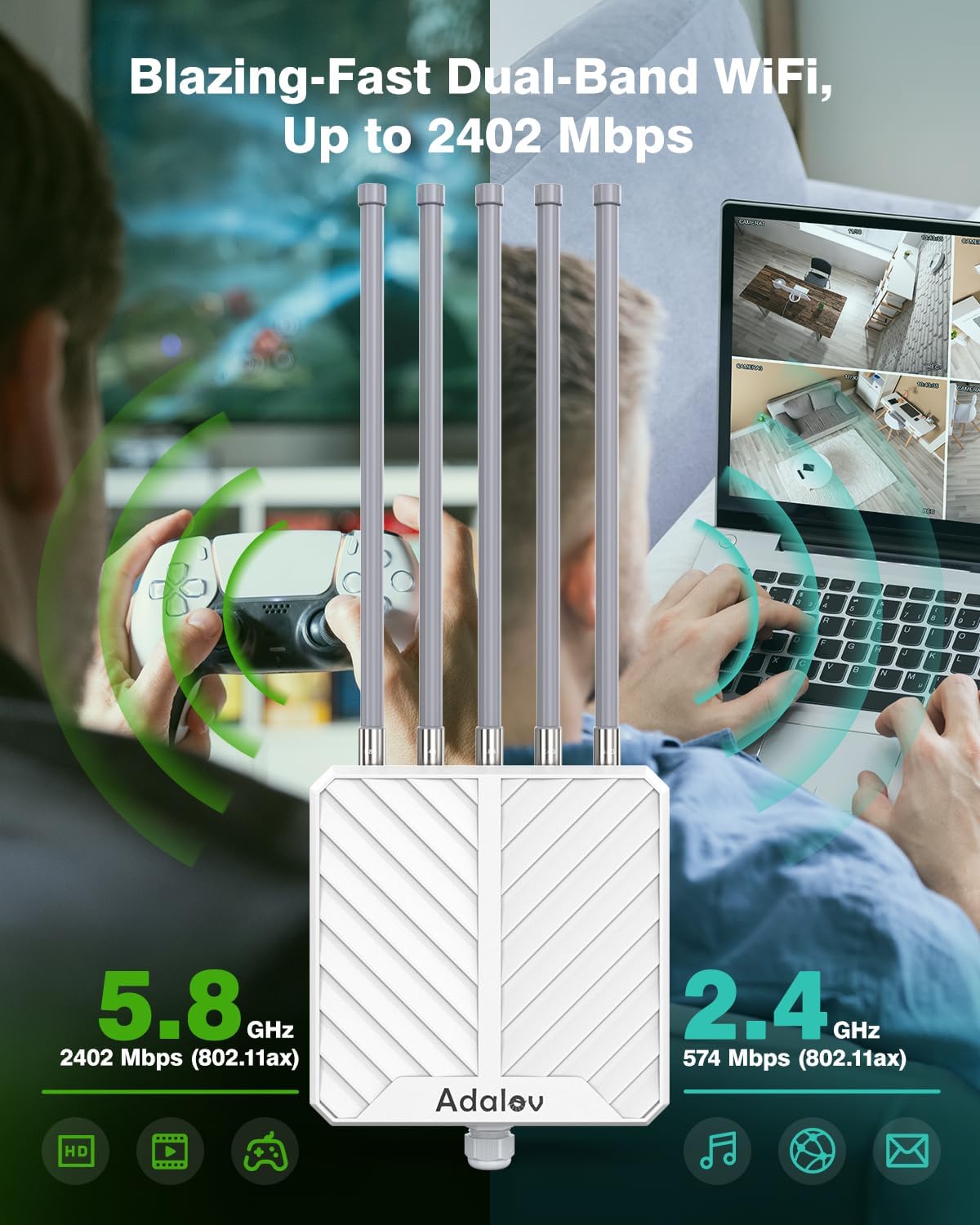
Image 9: Visual representation of the dual-band Wi-Fi 6 speeds.

Image 10: Features of the professional outdoor design, including weather resistance and protection.
6. నిర్వహణ
క్రమం తప్పకుండా నిర్వహణ మీ యాక్సెస్ పాయింట్ యొక్క ఉత్తమ పనితీరు మరియు దీర్ఘాయువును నిర్ధారిస్తుంది.
- శుభ్రపరచడం: కాలానుగుణంగా పరికరం యొక్క బాహ్య భాగాన్ని మృదువైన, d శుభ్రముపరచుతో తుడవండి.amp వస్త్రం. కఠినమైన రసాయనాలు లేదా రాపిడి క్లీనర్లను ఉపయోగించవద్దు.
- కేబుల్ తనిఖీ: Regularly check all cable connections, especially the Ethernet cable with the waterproof head, for any signs of wear, damage, or loose connections.
- యాంటెన్నా తనిఖీ: Ensure antennas remain securely tightened and are not obstructed.
- ఫర్మ్వేర్ నవీకరణలు: తయారీదారుని తనిఖీ చేయండి website periodically for firmware updates. Updating the firmware can improve performance, add new features, and enhance security.
7. ట్రబుల్షూటింగ్
If you encounter issues with your AdaLov AX3000, refer to the following troubleshooting tips:
- శక్తి లేదు: Ensure the PoE adapter is correctly plugged into a working power outlet and the Ethernet cable is securely connected to both the adapter and the access point. Check the LED indicators on the PoE adapter.
- ఇంటర్నెట్ కనెక్షన్ లేదు: Verify that your main router has an active internet connection. Check the Ethernet cable connection between the access point and your router/PoE switch. Ensure the access point is configured correctly for its operating mode (AP or Repeater).
- Weak Wi-Fi Signal or Limited Range: Ensure antennas are correctly installed and tightened. Check for physical obstructions between the access point and client devices. Consider repositioning the access point for better line-of-sight. Verify that the access point is operating in the correct mode.
- యాక్సెస్ చేయలేరు Web ఇంటర్ఫేస్: Ensure your computer is connected to the network provided by the access point or your main router. Verify the IP address and login credentials. Try resetting the device to factory defaults (refer to the Quick Start Guide for reset instructions).
- పరికర రీసెట్: To perform a factory reset, locate the reset button on the device (often a small pinhole). With the device powered on, press and hold the reset button for approximately 10 seconds until the indicator lights change, then release. The device will restart with factory default settings.
8. వారంటీ మరియు మద్దతు
Your AdaLov AX3000 Outdoor Wireless Access Point comes with a 12 నెలల వారంటీ కొనుగోలు తేదీ నుండి. ఈ వారంటీ తయారీ లోపాలను కవర్ చేస్తుంది మరియు సాధారణ ఉపయోగంలో వివరించిన విధంగా ఉత్పత్తి పనితీరును నిర్ధారిస్తుంది.
AdaLov also provides జీవితకాల సాంకేతిక మద్దతు ఉత్పత్తి జీవితకాలంలో మీరు ఎదుర్కొనే ఏవైనా ప్రశ్నలు లేదా సమస్యలతో మీకు సహాయం చేయడానికి.
For warranty claims, technical assistance, or any other inquiries, please contact AdaLov customer support through the retailer where you purchased the product or visit the official AdaLov webసంప్రదింపు సమాచారం కోసం సైట్.