
Geek AiroCook Torix
గీక్ ఐరోకూక్ టోరిక్స్ 25 లీటర్ స్మార్ట్ ఎయిర్ ఫ్రైయర్ ఓవెన్ ఇన్స్ట్రక్షన్ మాన్యువల్
Model: AiroCook Torix
పరిచయం
Thank you for choosing the Geek AiroCook Torix 25 Litre Smart Air Fryer Oven. This appliance combines the functions of an air fryer and an OTG (Oven Toaster Griller), allowing you to air fry, grill, bake, roast, and toast with ease. This manual provides essential information for safe operation, proper use, and maintenance of your new appliance. Please read it thoroughly before first use and keep it for future reference.
ముఖ్యమైన భద్రతా సూచనలు
ఎలక్ట్రికల్ ఉపకరణాలను ఉపయోగిస్తున్నప్పుడు, అగ్ని ప్రమాదాలు, విద్యుత్ షాక్ మరియు వ్యక్తులకు గాయాలయ్యే ప్రమాదాన్ని తగ్గించడానికి ప్రాథమిక భద్రతా జాగ్రత్తలు ఎల్లప్పుడూ అనుసరించాలి.
- ఉపకరణాన్ని ఉపయోగించే ముందు అన్ని సూచనలను చదవండి.
- వేడి ఉపరితలాలను తాకవద్దు. హ్యాండిల్స్ లేదా నాబ్లను ఉపయోగించండి. వేడి పదార్థాలను నిర్వహించేటప్పుడు ఎల్లప్పుడూ ఓవెన్ మిట్స్ లేదా గ్లౌజులను ఉపయోగించండి.
- విద్యుత్ షాక్ నుండి రక్షించడానికి, త్రాడు, ప్లగ్లు లేదా ఉపకరణ బాడీని నీటిలో లేదా ఇతర ద్రవంలో ముంచవద్దు.
- ఏదైనా ఉపకరణాన్ని పిల్లలు లేదా సమీపంలో ఉపయోగించినప్పుడు నిశిత పర్యవేక్షణ అవసరం.
- ఉపయోగంలో లేనప్పుడు మరియు శుభ్రపరిచే ముందు అవుట్లెట్ నుండి అన్ప్లగ్ చేయండి. భాగాలను ఉంచడానికి లేదా తీయడానికి ముందు చల్లబరచడానికి అనుమతించండి.
- పాడైపోయిన త్రాడు లేదా ప్లగ్తో లేదా ఉపకరణం పనిచేయకపోవడం లేదా ఏ పద్ధతిలో పాడైపోయిన తర్వాత ఏ పరికరాన్ని ఆపరేట్ చేయవద్దు. సహాయం కోసం కస్టమర్ సపోర్ట్ని సంప్రదించండి.
- ఉపకరణాల తయారీదారు సిఫార్సు చేయని అనుబంధ జోడింపులను ఉపయోగించడం వల్ల గాయాలు సంభవించవచ్చు.
- ఆరుబయట ఉపయోగించవద్దు.
- త్రాడు టేబుల్ లేదా కౌంటర్ అంచుపై వేలాడదీయవద్దు లేదా వేడి ఉపరితలాలను తాకవద్దు.
- వేడి గ్యాస్ లేదా ఎలక్ట్రిక్ బర్నర్ లేదా వేడిచేసిన ఓవెన్లో ఉంచవద్దు.
- వేడి నూనె లేదా ఇతర వేడి ద్రవాలు ఉన్న ఉపకరణాన్ని తరలించేటప్పుడు చాలా జాగ్రత్తగా ఉండాలి.
- ఎల్లప్పుడూ ముందుగా ఉపకరణానికి ప్లగ్ను అటాచ్ చేయండి, తర్వాత గోడ అవుట్లెట్లోకి త్రాడును ప్లగ్ చేయండి. డిస్కనెక్ట్ చేయడానికి, ఏదైనా నియంత్రణను "ఆఫ్"కి తిప్పండి, ఆపై గోడ అవుట్లెట్ నుండి ప్లగ్ను తీసివేయండి.
- ఉపకరణాన్ని ఉద్దేశించిన ఉపయోగం కాకుండా ఇతర వాటి కోసం ఉపయోగించవద్దు.
- టోస్టర్ ఓవెన్లో భారీ పరిమాణంలో ఉన్న ఆహారాలు లేదా లోహ పాత్రలను తప్పనిసరిగా చొప్పించకూడదు, ఎందుకంటే అవి అగ్నిని సృష్టించవచ్చు లేదా విద్యుత్ షాక్కు గురయ్యే ప్రమాదం ఉంది.
- ఓవెన్ పనిచేస్తున్నప్పుడు కర్టెన్లు, కర్టెన్లు, కర్టెన్లు, గోడలు మరియు వంటి మండే పదార్థాలను కప్పి ఉంచినా లేదా తాకినా మంటలు సంభవించవచ్చు.
- Do not place any materials other than manufacturer's recommended accessories in the oven.
- ఓవెన్లో కార్డ్బోర్డ్, ప్లాస్టిక్, కాగితం లేదా సారూప్య పదార్థాలను ఉంచవద్దు.
- తయారీదారు సిఫార్సు చేసిన ఉపకరణాలు తప్ప మరే ఇతర పదార్థాలను ఈ ఓవెన్లో ఉపయోగంలో లేనప్పుడు నిల్వ చేయవద్దు.
- మెటల్ స్కౌరింగ్ ప్యాడ్లతో శుభ్రం చేయవద్దు. ముక్కలు ప్యాడ్ను విచ్ఛిన్నం చేస్తాయి మరియు విద్యుత్ భాగాలను తాకవచ్చు, విద్యుత్ షాక్ ప్రమాదాన్ని సృష్టిస్తుంది.
- ఎలక్ట్రికల్ అవుట్లెట్లో ఉపకరణం ప్లగ్ చేయబడినప్పుడు ఆహారాన్ని తీసివేయడానికి ప్రయత్నించవద్దు.
- Always ensure the appliance is placed on a stable, heat-resistant surface with adequate ventilation around it.
ప్యాకేజీ విషయాలు
Carefully unpack your Geek AiroCook Torix and check that all items are present and in good condition.
- 1x Geek AiroCook Torix 25 Litre Smart Air Fryer Oven
- చిన్న ముక్క ట్రే
- తిరిగే బాస్కెట్
- ఓవెన్ రాక్
- వేడి-నిరోధక గ్లోవ్
- రెసిపీ బుక్
- రోటిస్సేరీ రాడ్
- Fetch Tool (for rotisserie and hot trays)
- బేకింగ్ ట్రే
- ఎయిర్ ఫ్రైయర్ బాస్కెట్

చిత్రం 1: చేర్చబడిన ఉపకరణాలు. This image displays the nine smart accessories that come with the Geek AiroCook Torix oven: a crumb tray, rotating basket, oven rack, heat-resistant glove, recipe book, rotisserie rod, fetch tool, baking tray, and airfryer basket.
ఉత్పత్తి ముగిసిందిview
Familiarize yourself with the components and control panel of your Geek AiroCook Torix oven.
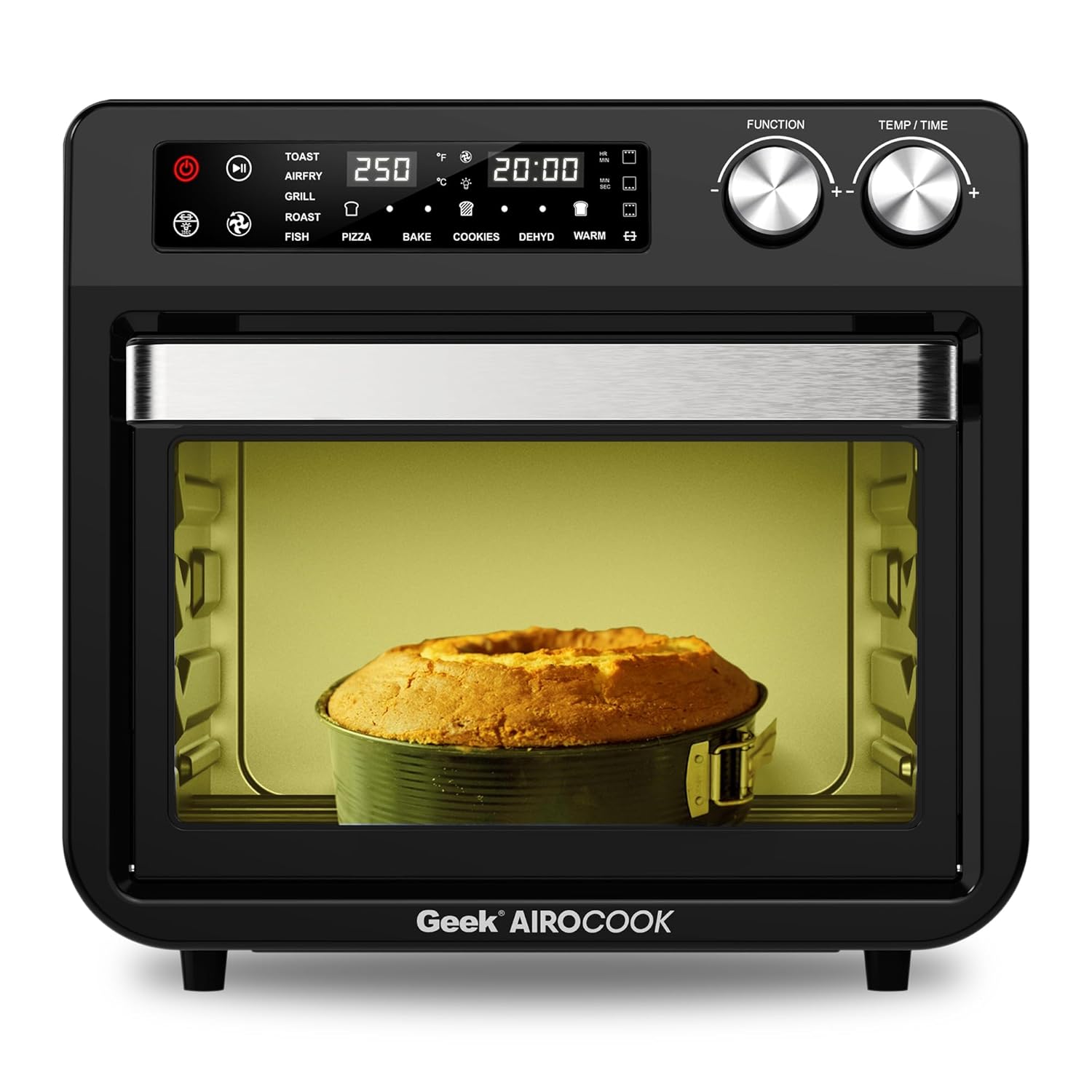
మూర్తి 2: ముందు View of the Geek AiroCook Torix. This image shows the overall design of the air fryer oven, featuring the digital display, control knobs, and the transparent glass door with an internal light.
నియంత్రణ ప్యానెల్

చిత్రం 3: డిజిటల్ కంట్రోల్ ప్యానెల్. This image highlights the "Smart Touch" control panel with its various buttons and digital display.
- పవర్ బటన్: ఉపకరణాన్ని ఆన్/ఆఫ్ చేస్తుంది.
- ప్రారంభ/పాజ్ బటన్: వంట చక్రాన్ని ప్రారంభిస్తుంది లేదా పాజ్ చేస్తుంది.
- లైట్ బటన్: Controls the internal oven light.
- రోటిస్సేరీ బటన్: రోటిస్సేరీ ఫంక్షన్ను యాక్టివేట్ చేస్తుంది/క్రియారహితం చేస్తుంది.
- ఫ్యాన్ బటన్: Controls the convection fan.
- మెనూ బటన్: Cycles through preset cooking functions.
- Time/Temperature Knobs: వంట సమయం మరియు ఉష్ణోగ్రతను సర్దుబాటు చేస్తుంది.
- డిజిటల్ LCD డిస్ప్లే: Shows current settings, time, and temperature.
సెటప్
- అన్ప్యాకింగ్: Remove all packaging materials, stickers, and labels from the appliance and accessories.
- ప్రారంభ శుభ్రపరచడం: డితో ఓవెన్ వెలుపలి భాగాన్ని తుడవండిamp cloth. Wash all removable accessories (baking tray, airfryer basket, rotating basket, rotisserie kit, oven rack, crumb tray) with warm soapy water, rinse thoroughly, and dry completely.
- ప్లేస్మెంట్: Place the oven on a stable, level, heat-resistant surface. Ensure there is at least 10-15 cm (4-6 inches) of clear space on all sides and above the oven for proper ventilation. Do not place it near flammable materials.
- మొదటి ఉపయోగం (బర్న్-ఇన్): Before cooking food, it is recommended to run the oven empty for about 15-20 minutes at 200°C (390°F) to burn off any manufacturing residues. A slight odor or smoke may be present during this process; this is normal. Ensure the area is well-ventilated.
ఆపరేటింగ్ సూచనలు
ప్రాథమిక ఆపరేషన్
- పవర్ ఆన్: Plug the appliance into a grounded electrical outlet. Press the Power Button to turn on the oven. The digital display will illuminate.
- ఫంక్షన్ ఎంచుకోండి: Use the Menu Button to cycle through the available cooking functions (e.g., Toast, Air Fry, Grill, Roast, Fish, Pizza, Bake, Cookies, Dehydrate, Warm).
- Adjust Time and Temperature: Once a function is selected, use the Time/Temperature knobs to adjust the desired cooking time and temperature. The display will show the current settings.
- వంట ప్రారంభించండి: Press the Start/Pause Button to begin the cooking process. The oven light may turn on, and the fan will activate depending on the selected function.
- పాజ్/ఆపు: Press the Start/Pause Button again to pause cooking. Press the Power Button to stop the cooking cycle and turn off the oven.
Using Preset Menus
The Geek AiroCook Torix features 10 precise preset menus for common dishes.

Figure 4: 10 Preset Menu Options. This image illustrates the various preset cooking functions available, including Toast, Air Fry, Roast, Pizza, Cookies, Fish, Grill, Cake, Dehydrate, and Warm, along with their default temperature and time settings.
- టోస్ట్: 250°C / 5 నిమి
- ఎయిర్ ఫ్రై: 204°C / 25 నిమి
- కాల్చు: 204°C / 1 hr
- పిజ్జా: 232°C / 15 నిమి
- కుక్కీలు: 170°C / 12 నిమి
- చేప: 210°C / 16 నిమి
- గ్రిల్: 230°C / 18 నిమి
- కేక్: 177°C / 30 నిమి
- డీహైడ్రేట్: 66°C / 5 నిమి
- వెచ్చగా: 82°C / 1 hr
To use a preset, simply select it using the Menu Button. The oven will automatically set the recommended time and temperature. You can then adjust these settings manually if desired before pressing Start/Pause.
Rotisserie ఫంక్షన్
The rotisserie function is ideal for roasting whole chickens or other large cuts of meat.
- Prepare your food and secure it onto the rotisserie rod using the forks. Ensure the food is centered and balanced.
- రోటిస్సేరీ రాడ్ను ఓవెన్ లోపల నియమించబడిన స్లాట్లలోకి చొప్పించండి.
- Select a cooking function (e.g., Roast, Grill) and set the desired time and temperature.
- Press the Rotisserie Button to activate the rotation.
- వంట ప్రారంభించడానికి స్టార్ట్/పాజ్ నొక్కండి.
- Once cooking is complete, use the Fetch Tool to safely remove the hot rotisserie rod and food from the oven.
నిర్వహణ మరియు శుభ్రపరచడం
క్రమం తప్పకుండా శుభ్రపరచడం వల్ల మీ ఉపకరణం యొక్క సరైన పనితీరు లభిస్తుంది మరియు దాని జీవితకాలం పెరుగుతుంది.
- ఎల్లప్పుడూ అన్ప్లగ్ చేయండి: శుభ్రపరిచే ముందు, ఎల్లప్పుడూ ఓవెన్ను పవర్ అవుట్లెట్ నుండి తీసివేసి, పూర్తిగా చల్లబరచడానికి అనుమతించండి.
- బాహ్య: ప్రకటనతో బాహ్య భాగాన్ని తుడవండిamp వస్త్రం మరియు తేలికపాటి డిటర్జెంట్. రాపిడి క్లీనర్లు లేదా మెటల్ స్కౌరింగ్ ప్యాడ్లను ఉపయోగించవద్దు.
- అంతర్గత: ప్రకటనతో లోపలి గోడలను తుడవండిamp cloth. For stubborn food residue, use a non-abrasive sponge with mild soap. Ensure the interior is dry before next use.
- ఉపకరణాలు: Wash the baking tray, airfryer basket, rotating basket, rotisserie kit, oven rack, and crumb tray with warm soapy water. Rinse thoroughly and dry completely. గమనిక: These accessories are not dishwasher safe.
- చిన్న ముక్క: Regularly remove and empty the crumb tray located at the bottom of the oven to prevent grease buildup and potential fire hazards.
- మునిగిపోవద్దు: ప్రధాన యూనిట్, త్రాడు లేదా ప్లగ్ను నీటిలో లేదా మరే ఇతర ద్రవంలో ముంచవద్దు.
ట్రబుల్షూటింగ్
| సమస్య | సాధ్యమైన కారణం | పరిష్కారం |
|---|---|---|
| ఉపకరణం ఆన్ చేయబడలేదు. | ప్లగ్ ఇన్ చేయబడలేదు; పవర్ అవుట్లెట్ సమస్య; పవర్ బటన్ నొక్కలేదు. | Ensure the power cord is securely plugged into a working outlet. Press the Power Button. |
| ఆహారం సమానంగా ఉడకదు. | రద్దీ; సరికాని ఉష్ణోగ్రత/సమయం; ఆహారాన్ని తిప్పకపోవడం. | Do not overcrowd the basket/tray. Adjust temperature/time. For best results, flip or shake food halfway through cooking. |
| పొయ్యి నుండి తెల్లటి పొగ వస్తోంది. | Grease/oil residue; fatty food cooking. | Clean the oven and accessories thoroughly. For fatty foods, ensure the crumb tray is clean and consider using less oil. |
| రోటిస్సేరీ ఫంక్షన్ పనిచేయడం లేదు. | Rotisserie rod not properly installed; Rotisserie button not pressed. | Ensure the rotisserie rod is correctly seated in its slots. Press the Rotisserie Button to activate. |
స్పెసిఫికేషన్లు
| మోడల్ పేరు | AiroCook Torix |
| కెపాసిటీ | 25 లీటర్లు |
| పవర్ అవుట్పుట్ | 1800 వాట్స్ |
| వాల్యూమ్tage | 220 వోల్ట్లు |
| ఉత్పత్తి కొలతలు (D x W x H) | 39.5D x 37.5W x 43.5H సెంటీమీటర్లు |
| వస్తువు బరువు | 10 కిలోలు |
| మెటీరియల్ | స్టెయిన్లెస్ స్టీల్ |
| ప్రత్యేక ఫీచర్ | Air Fryer oven + OTG |
వారంటీ మరియు మద్దతు
Your Geek AiroCook Torix 25 Litre Smart Air Fryer Oven comes with a 1 సంవత్సరాల వారంటీ from the date of purchase. This warranty covers manufacturing defects under normal use. Please retain your purchase receipt as proof of purchase.
For warranty claims, technical support, or any other inquiries, please contact Geek Customer Care:
- కస్టమర్ కేర్ నంబర్: 1800 121 922922
You can also refer to the included recipe book and access the Geek Recipe App for additional cooking inspiration and tips.
Ask a question about this manual
Ask about setup, troubleshooting, compatibility, parts, safety, or missing instructions. Manuals+ will review the question and use this page’s manual context to help answer it.