
పరిచయం
The Magcubic Mini Portable Projector HY300GT is designed to provide a versatile and immersive home theater experience. Featuring Google TV, instant autofocus, automatic vertical keystone correction, and a 180-degree rotatable stand, this projector offers ease of use and high-quality visuals. This manual provides essential information for setting up, operating, maintaining, and troubleshooting your projector.

Image: The Magcubic Mini Portable Projector HY300GT, a compact white device with a lens on the front and ventilation on the sides.
పెట్టెలో ఏముంది
అన్ని అంశాలు ఉన్నాయని నిర్ధారించుకోవడానికి దయచేసి ప్యాకేజీలోని విషయాలను తనిఖీ చేయండి:
- Magcubic Mini Portable Projector HY300GT
- రిమోట్ కంట్రోల్
- పవర్ అడాప్టర్
- వినియోగదారు మాన్యువల్ (ఈ పత్రం)
ఉత్పత్తి ముగిసిందిview
ప్రొజెక్టర్ యొక్క భాగాలు మరియు పోర్టులతో మిమ్మల్ని మీరు పరిచయం చేసుకోండి.

చిత్రం: వెనుక view of the Magcubic HY300GT projector, indicating the Power input, Ventilation, USB port, HDMI port, and Power button.
పోర్టులు మరియు నియంత్రణలు:
- పవర్ ఇన్పుట్: చేర్చబడిన పవర్ అడాప్టర్ను ఇక్కడ కనెక్ట్ చేయండి.
- USB పోర్ట్: USB నిల్వ పరికరాలు లేదా ఇతర పరిధీయ పరికరాలను కనెక్ట్ చేయడానికి.
- HDMI పోర్ట్: For connecting external video sources such as laptops, game consoles, or TV sticks.
- పవర్ బటన్: To turn the projector on or off.
- వెంటిలేషన్: Ensures proper airflow to prevent overheating.
- లెన్స్: చిత్రాన్ని తెరపైకి ప్రొజెక్ట్ చేస్తుంది.
- 180° తిప్పగలిగే స్టాండ్: Allows for flexible projection angles, including ceiling projection.
సెటప్
1. పవర్ చేయడం
- పవర్ అడాప్టర్ను ప్రొజెక్టర్ పవర్ ఇన్పుట్ పోర్ట్కు కనెక్ట్ చేయండి.
- పవర్ అడాప్టర్ను వాల్ అవుట్లెట్లోకి ప్లగ్ చేయండి.
- దీన్ని ఆన్ చేయడానికి ప్రొజెక్టర్ లేదా రిమోట్ కంట్రోల్లోని పవర్ బటన్ను నొక్కండి.
2. ప్రారంభ ఆకృతీకరణ
Upon first use, the projector will guide you through the initial setup process, including language selection and network connection.
3. ఫోకస్ మరియు కీస్టోన్ కరెక్షన్
The HY300GT features instant autofocus and automatic vertical keystone correction for a clear, rectangular image.
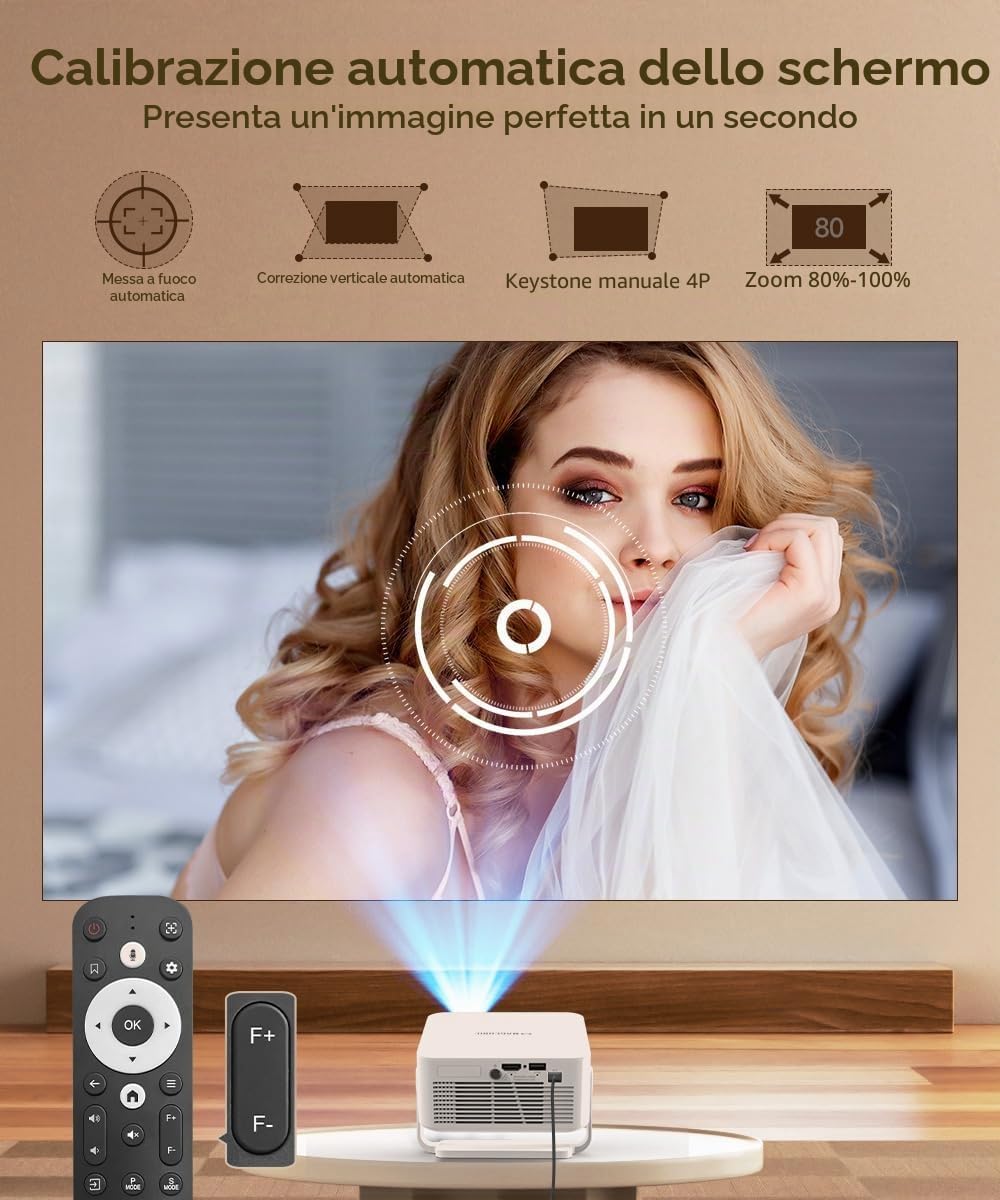
Image: The projector automatically adjusts focus and corrects vertical distortion for a perfect image.
- ఆటో ఫోకస్: ప్రొజెక్టర్ స్వయంచాలకంగా చిత్రం స్పష్టతను సర్దుబాటు చేస్తుంది.
- Automatic Vertical Correction: The projector will automatically correct vertical image distortion.
- Manual Keystone (4P) & Zoom (80-100%): For fine-tuning, these options are available in the settings menu.
4. ప్రొజెక్టర్ను ఉంచడం
The 180° rotatable stand allows for flexible placement.

Image: The compact projector with its 180-degree flexible stand, demonstrating its ability to project onto walls or ceilings.
- ప్రొజెక్టర్ను స్థిరమైన ఉపరితలంపై ఉంచండి.
- Adjust the stand to achieve the desired projection angle (wall, ceiling, floor).
- Ensure the projection surface is flat and clear for optimal image quality.

Image: A diagram showing various projection distances and corresponding screen sizes (e.g., 2.5m for 355.6cm, 2m for 254cm, 1.6m for 203.2cm).
ఆపరేటింగ్ సూచనలు
1. గూగుల్ టీవీ ఇంటర్ఫేస్
The projector comes with Google TV, consolidating your favorite content and offering personalized recommendations.

Image: The Google TV home screen on the projector, showing various streaming applications like Netflix, YouTube, Disney+, and more.
- Navigate the interface using the remote control.
- Access streaming apps, movies, shows, and personalized content.
2. Google అసిస్టెంట్ని ఉపయోగించడం
Control your projector and find content using voice commands.

Image: The Google Assistant interface on the projector, demonstrating voice commands for searching movies, apps, music, and weather.
- Press the Google Assistant button on your remote control.
- Speak your command, such as "Find action movies," "Open Netflix," or "Play music."
3. Casting Content (Google Cast)
Stream content wirelessly from your smartphone or tablet.

Image: A smartphone screen being cast wirelessly to the projector, displaying the Google TV interface.
- Ensure your mobile device and projector are connected to the same Wi-Fi network.
- Open a compatible app on your phone/tablet and tap the Cast icon.
- Select your HY300GT projector from the list of devices.
4. బాహ్య పరికరాలను కనెక్ట్ చేస్తోంది
- HDMI: Connect a laptop, game console, or other HDMI-enabled device using an HDMI cable. Select the HDMI input source from the projector's menu.
- USB: మీడియాను ప్లే చేయడానికి USB పోర్ట్లోకి USB ఫ్లాష్ డ్రైవ్ లేదా బాహ్య హార్డ్ డ్రైవ్ను చొప్పించండి. fileనేరుగా లు.
5. ఆడియో అవుట్పుట్
The projector has an integrated speaker. For enhanced audio, you can connect external Bluetooth speakers.
- Go to the projector's settings menu.
- Navigate to Bluetooth settings and pair with your desired Bluetooth audio device.
నిర్వహణ
1. లెన్స్ శుభ్రపరచడం
- ఆప్టికల్ లెన్స్ల కోసం ప్రత్యేకంగా రూపొందించిన మృదువైన, మెత్తటి రహిత వస్త్రాన్ని ఉపయోగించండి.
- లెన్స్ను వృత్తాకార కదలికలో సున్నితంగా తుడవండి. రాపిడి క్లీనర్లను లేదా అధిక శక్తిని ఉపయోగించకుండా ఉండండి.
2. Cleaning the Vents
- Regularly check the ventilation openings for dust accumulation.
- Use a soft brush or compressed air to carefully remove any dust from the vents. Ensure the projector is turned off and unplugged before cleaning.
3. నిల్వ
- ఉపయోగంలో లేనప్పుడు, ప్రొజెక్టర్ను చల్లని, పొడి ప్రదేశంలో నిల్వ చేయండి.
- Protect the lens from dust and scratches by using a lens cap or storing it in its original packaging.
ట్రబుల్షూటింగ్
| సమస్య | సాధ్యమైన కారణం | పరిష్కారం |
|---|---|---|
| ఏ చిత్రం ప్రదర్శించబడలేదు | పవర్ కనెక్ట్ కాలేదు; తప్పు ఇన్పుట్ సోర్స్; లెన్స్ క్యాప్ ఆన్లో ఉంది. | పవర్ కనెక్షన్ను తనిఖీ చేయండి; సరైన HDMI/USB ఇన్పుట్ను ఎంచుకోండి; లెన్స్ క్యాప్ను తీసివేయండి. |
| చిత్రం అస్పష్టంగా ఉంది | దృష్టి మళ్లింది; తప్పు ప్రొజెక్షన్ దూరం. | Allow autofocus to adjust; Manually adjust focus if needed; Ensure projector is within optimal projection distance. |
| చిత్రం వక్రీకరించబడింది (ట్రాపెజాయిడ్ ఆకారం) | ప్రొజెక్టర్ స్క్రీన్కు లంబంగా లేదు. | Allow automatic keystone correction to adjust; Manually adjust 4P keystone in settings if necessary. |
| శబ్దం లేదు | వాల్యూమ్ చాలా తక్కువగా ఉంది; మ్యూట్ చేయబడింది; తప్పు ఆడియో అవుట్పుట్ ఎంచుకోబడింది; బాహ్య పరికర ఆడియో సమస్య. | Increase volume; Unmute; Check audio output settings (internal speaker/Bluetooth); Verify audio on source device. |
| Wi-Fi/బ్లూటూత్ కనెక్టివిటీ సమస్యలు | Incorrect password; Out of range; Interference. | Re-enter password; Move projector closer to router/device; Reduce interference from other devices. |
స్పెసిఫికేషన్లు
| బ్రాండ్ | మాగ్క్యూబిక్ |
| మోడల్ సంఖ్య | HY300GT |
| సిఫార్సు చేసిన ఉపయోగాలు | Educational, Home Cinema, Video Games |
| ప్రత్యేక లక్షణాలు | Autofocus, Automatic Keystone, Google TV, Google Assistant, Google Cast, 180° Rotation, 1080P Full HD LED Support, Dual 2.4/5G WiFi, Bluetooth |
| కనెక్టివిటీ టెక్నాలజీ | బ్లూటూత్, HDMI, USB, Wi-Fi |
| Native Screen Resolution | 1280 x 720 పిక్సెల్లు |
| గరిష్ట డిస్ప్లే రిజల్యూషన్ | 3840 x 2160 pixels (2K Support) |
| ప్రదర్శన రకం | LED |
| ఉత్పత్తి కొలతలు | 14.9L x 14.7W x 6.8H సెం.మీ |
| ఫారమ్ ఫ్యాక్టర్ | పోర్టబుల్ ప్రొజెక్టర్ |
| మౌంటు రకం | Ceiling Mount, Tabletop Stand |
| ప్రకాశం | 260 ANSI లుమెన్స్ |
| రంగు | తెలుపు |
| అనుకూల పరికరాలు | Laptop, Game Console, Smartphone, Tablet, Television |
| కాంట్రాస్ట్ రేషియో | 2000:1 |
| Maximum Projection Distance | 2.5 మీటర్లు |
| కాంతి మూలం జీవితకాలం | 20000 గంటలు |
| గరిష్ట చిత్ర పరిమాణం | 135 అంగుళాలు |
| హార్డ్వేర్ ఇంటర్ఫేస్ | 802.11 ac/b/g/n, Bluetooth 5, HDMI, USB |
| కనిష్ట చిత్ర పరిమాణం | 35 అంగుళాలు |
| వీడియో ఎన్కోడింగ్ | H.264, H.265 |
| బరువు | 575 గ్రాములు |
వారంటీ మరియు మద్దతు
Magcubic products are designed for reliability and performance. For warranty information, please refer to the documentation included with your purchase or contact Magcubic customer support.
కస్టమర్ మద్దతు:
If you encounter any issues or have questions not covered in this manual, please contact Magcubic customer support through the retailer's platform or the official Magcubic website. Please have your model number (HY300GT) and purchase details ready.