
1. పరిచయం
This manual provides essential instructions for the safe and effective use of your ATsafepro 1/4 inch pound torque screwdriver set. This precision tool is designed for accurate fastening across a range of applications, including electronics, bicycle components, scope mounting, and small engines. Please read this manual thoroughly before operation and retain it for future reference.
2. భద్రతా సమాచారం
- Always wear appropriate personal protective equipment, such as safety glasses, when using tools.
- వర్క్పీస్ సురక్షితంగా cl అని నిర్ధారించుకోండిamped before applying torque.
- Do not exceed the maximum torque capacity of 80 in.lb (9 Nm). Over-torquing can damage the tool or the fastener.
- Do not use the torque screwdriver as a standard screwdriver for loosening fasteners unless specifically designed for that purpose.
- Keep the tool clean and dry. Store it in its protective case when not in use.
- పిల్లలకు దూరంగా ఉంచండి.
3. ప్యాకేజీ విషయాలు
The ATsafepro Torque Screwdriver set includes the following components:
- 1/4" Torque Screwdriver (10-80 in.lb / 1.1-9 Nm)
- 1/4" Elastic Bit Holder
- 1/4" Bit Holder
- Buckle Clamp
- Variety of Bits:
- ఫ్లాట్: SL3, SL4, SL6
- హెక్స్: H2, H3, H4, H5, H6, H8, H3/32, H7/64, H5/32
- టోర్క్స్: T8, T10, T15, T20, T25
- ఫిలిప్స్: PH0, PH1, PH2
- నిల్వ కేసు
- కాలిబ్రేషన్ సర్టిఫికేట్

Image 3.1: Complete ATsafepro Torque Screwdriver Set components.
4. ఉత్పత్తి ముగిసిందిview
The ATsafepro torque screwdriver features a durable construction with a high-strength Cr-Mo Steel drive shaft and an anodized aluminum handle. It is designed for precise torque application with a 1/4" drive for compatibility with the included bits and holders.
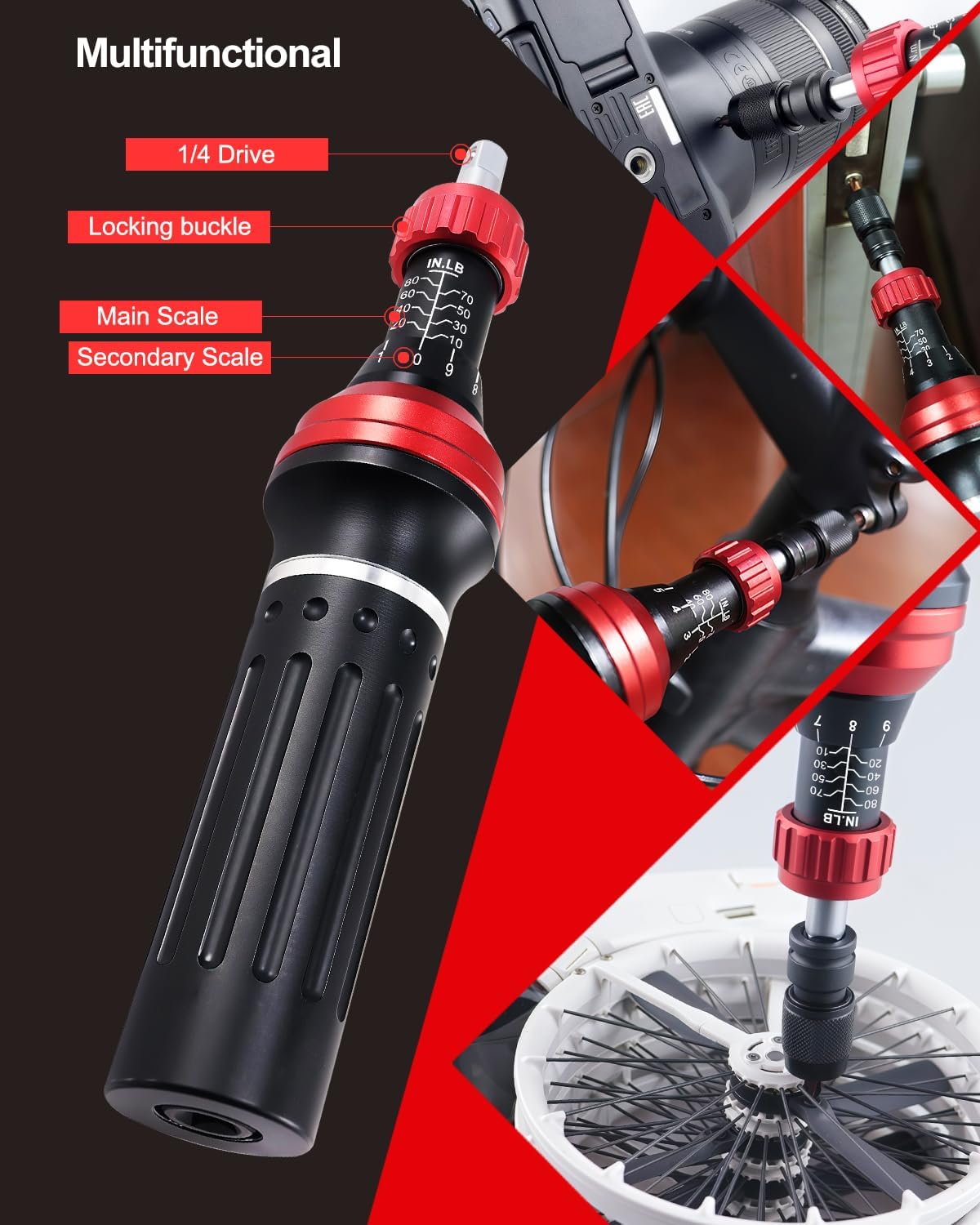
Image 4.1: Torque Screwdriver components and scales.
- 1/4" Drive: Standard drive for interchangeable bits.
- Locking Buckle: Secures the torque setting.
- Main Scale: Displays primary torque values (e.g., 10, 20, 30 in.lb).
- Secondary Scale: Displays finer torque adjustments (e.g., 0-9 in.lb).
5. సెటప్
5.1. Inserting Bits
Select the appropriate bit for your application. Insert the bit into the 1/4" elastic bit holder or the standard 1/4" bit holder, then insert the holder into the screwdriver's 1/4" drive.
5.2. Setting the Torque Value
To set the desired torque value:
- Pull down and hold the adjustment ring (lock buckle). This disengages the locking mechanism.
- హ్యాండిల్ను తిప్పండి to align the desired torque value on the main scale with the zero mark on the secondary scale. For finer adjustments, continue rotating the handle until the desired value on the secondary scale aligns with the main scale line.
- Release the adjustment ring (lock buckle). Ensure it snaps back into place to lock the setting. This prevents accidental changes during use.

Image 5.1: Torque adjustment steps.
6. ఆపరేటింగ్ సూచనలు
6.1. టార్క్ వర్తింపజేయడం
Once the torque value is set and locked:
- Place the bit securely into the fastener head.
- Apply steady, continuous pressure to the handle in a clockwise direction.
- Continue turning until you feel and hear a distinct "click." This indicates that the preset torque has been reached.
- Stop applying force immediately after the click. Further tightening will result in over-torquing.
6.2. Using the Buckle Clamp for Higher Torque
For torque settings of 10 in.lb and above, it is recommended to use the included buckle clamp. This accessory provides additional leverage and stability, making it easier to reach higher torque values accurately.

Image 6.1: Using the buckle clamp for increased leverage.
7. Dimensional Conversion and Scale Reading
The torque screwdriver features both a main scale and a secondary scale for precise readings. The secondary scale is used for inch-pound readings. To determine the actual torque value, add the main scale value to the minimum scale value indicated by the secondary scale.
ఉదాహరణకుample, if the main scale reads 10 in.lb and the secondary scale reads 5 in.lb, the actual torque value is 10 + 5 = 15 in.lb.
The following table provides common dimensional conversions:
| in.lb | Nm | in.lb | Nm |
|---|---|---|---|
| 9.7 | 1.1 | 50.4 | 5.7 |
| 20.3 | 2.3 | 60.1 | 6.8 |
| 30 | 3.4 | 69.8 | 7.9 |
| 39.8 | 4.5 | 79.6 | 9.0 |
Warm reminder: 1 in.lb = 0.113 N·m

Image 7.1: Scale reading and dimensional conversion guide.
8. నిర్వహణ
- శుభ్రపరచడం: Wipe the tool with a clean, dry cloth after each use. Do not use abrasive cleaners or solvents.
- నిల్వ: Store the torque screwdriver in its original protective case in a dry, clean environment. Avoid extreme temperatures and humidity.
- క్రమాంకనం: Precision torque tools require periodic calibration to maintain accuracy. It is recommended to verify the calibration of this torque wrench after approximately 12 months or 5000 uses, whichever comes first. Refer to the included calibration certificate for initial accuracy details.

Image 8.1: Calibration Certificate and storage case.
9. ట్రబుల్షూటింగ్
- Tool does not click: Ensure the torque value is set correctly and the locking buckle is released. If the issue persists, the tool may require recalibration or service.
- సరికాని రీడింగ్లు: Verify the torque setting. If the tool has been dropped or subjected to impact, its calibration may be affected. Recalibration is recommended.
- Bits slipping: Ensure the correct bit size is used for the fastener. Check if the bit or fastener head is worn.
10. స్పెసిఫికేషన్లు
| ఫీచర్ | వివరాలు |
|---|---|
| మోడల్ సంఖ్య | ATTS1080IN-24-US |
| టార్క్ రేంజ్ | 10-80 in.lb (1.1-9 Nm) |
| ఖచ్చితత్వం | ±3% |
| డ్రైవ్ పరిమాణం | 1/4 అంగుళం |
| మెటీరియల్ | అల్యూమినియం, క్రోమ్ వెనాడియం స్టీల్ |
| హెడ్ స్టైల్ | స్థిర చతురస్రం |
| ముగింపు రకం | పౌడర్ కోటెడ్ |
| చేర్చబడిన భాగాలు | Torque Screwdriver, 1/4" elastic bit holder, 1/4" bit holder, buckle clamp, various bits (Flat, Hex, Torx, Phillips) |
11. వారంటీ మరియు మద్దతు
This product is subject to a 30-day return/replacement policy from the date of purchase. For specific warranty details beyond this period, please refer to the manufacturer's official website or contact ATsafepro customer support directly. For technical assistance or inquiries, please visit the ATsafepro Store on Amazon లేదా వారి కస్టమర్ సేవను సంప్రదించండి.