
పరిచయం
This manual provides instructions for the setup, operation, and maintenance of your Smiling Shark G-WKL-US Wake Up Light. This device integrates an alarm clock, ambient lighting, a Bluetooth speaker, and a 15W wireless charger into a single unit. Please read these instructions carefully before use and retain them for future reference.
ప్యాకేజీ విషయాలు
ప్యాకేజీలో అన్ని అంశాలు ఉన్నాయని నిర్ధారించుకోండి:
- 1 x Smiling Shark G-WKL-US Wake Up Light
- 1 x టైప్-సి ఛార్జింగ్ కేబుల్
- 1 x యూజర్ మాన్యువల్ (ఈ పత్రం)
- 1 x పవర్ అడాప్టర్
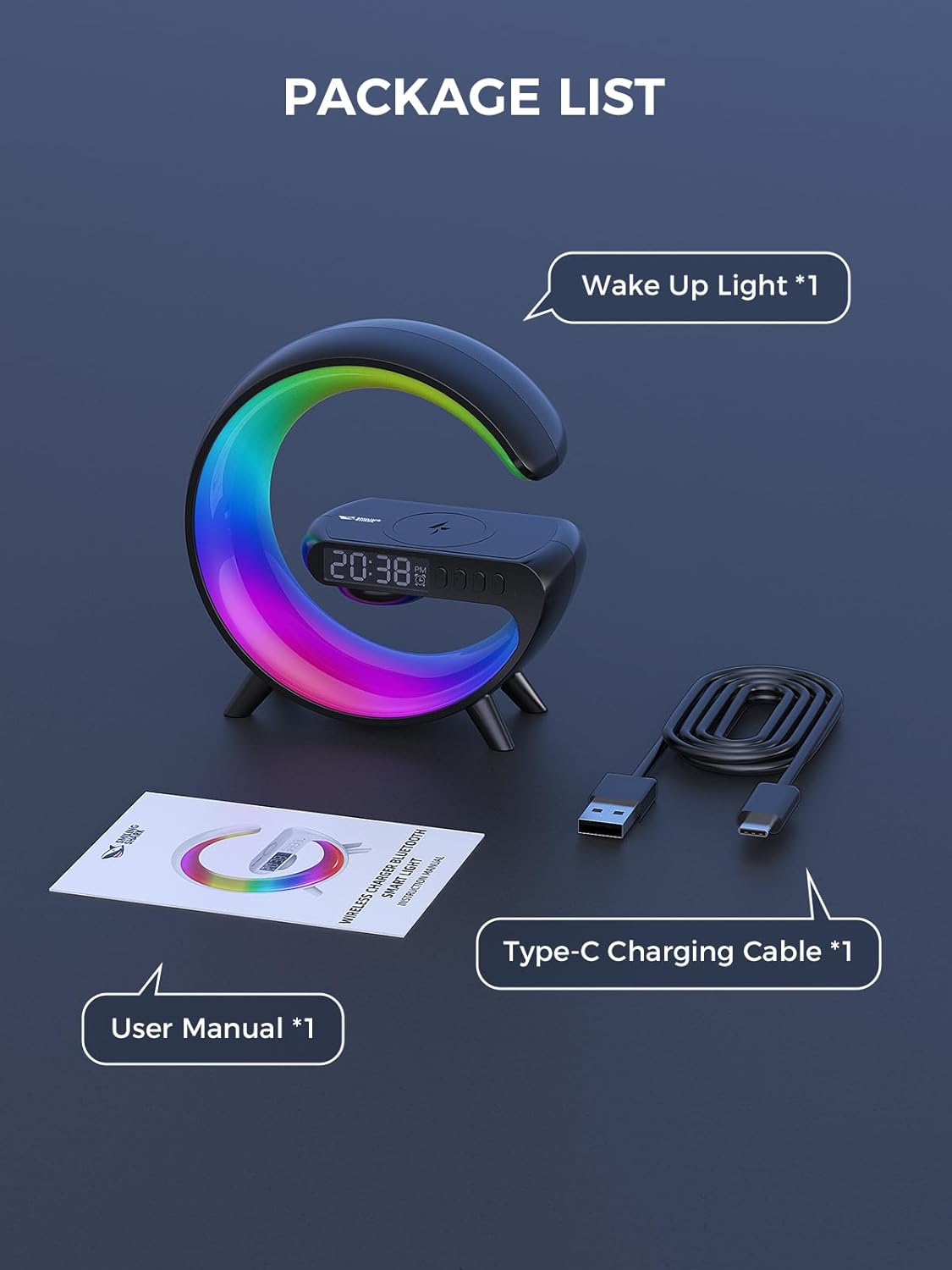
మూర్తి 1: ప్యాకేజీ కంటెంట్లు
ఉత్పత్తి ముగిసిందిview
The Smiling Shark G-WKL-US is a versatile device designed to enhance your bedroom or living space. Key features include:
- Wake Up Light Alarm Clock: Features sunrise simulation and customizable alarm settings for a gentle awakening.
- Sleep Aid Function: Offers night light effects and soothing sounds to promote restful sleep.
- పరిసర లైటింగ్: Provides 10 distinct light effects and adjustable brightness to create various atmospheres.
- బ్లూటూత్ స్పీకర్: Connects wirelessly to your devices for audio playback. Includes a sound-reactive light feature.
- 15W వైర్లెస్ ఛార్జర్: Conveniently charges Qi-compatible smartphones and headphone cases.
- AUX ఇన్పుట్: Allows connection to external audio sources via a 3.5mm audio cable.

Figure 2: G-Series Smart Light Features
సెటప్
- పవర్ కనెక్షన్: Connect the provided Type-C charging cable to the device's DC IN port and plug the adapter into a standard wall outlet. The device will power on automatically.
- ప్రారంభ సమయ సెట్టింగ్: Upon first power-on, the clock display may flash. Use the control buttons (refer to the ఆపరేటింగ్ సూచనలు section for button layout) to set the current time. Press the 'Time Set' button to enter time setting mode, then use the '+' and '-' buttons to adjust hours and minutes. Press 'Time Set' again to confirm.
ఆపరేటింగ్ సూచనలు
బటన్ విధులు
The device features several buttons for control. Specific button labels and functions are typically indicated on the device itself or in a detailed diagram within the printed manual. Common functions include:
- పవర్ బటన్: పరికరాన్ని ఆన్/ఆఫ్ చేస్తుంది.
- లైట్ మోడ్ బటన్: వివిధ కాంతి ప్రభావాల ద్వారా తిరుగుతుంది.
- ప్రకాశం సర్దుబాటు: Increases or decreases light intensity.
- అలారం సెట్ బటన్: అలారం సెట్టింగ్ మోడ్లోకి ప్రవేశిస్తుంది.
- వాల్యూమ్ నియంత్రణ: స్పీకర్ వాల్యూమ్ను సర్దుబాటు చేస్తుంది.
- ప్లే/పాజ్ బటన్: Controls media playback via Bluetooth.
Setting Alarm & Sleep Timer
- అలారం సెట్టింగ్: Press the 'Alarm Set' button. Use '+' and '-' to set the desired alarm time. Press 'Alarm Set' again to confirm. You may also select an alarm sound or sunrise simulation duration if available.
- స్లీప్ టైమర్: To activate the sleep aid function, select a night light effect and choose soothing music or white noise. The light can mimic a sunset to help you fall asleep. Refer to the device's specific controls for activating and setting the duration of the sleep timer.

Figure 3: Wake-up and Sleep Aid Functions
Adjusting Light Modes & Brightness
- లైట్ మోడ్లను మార్చడం: Press the 'Light Mode' button to cycle through the 10 available light effects. These include various solid colors and dynamic color-changing patterns.
- ప్రకాశం సర్దుబాటు: Use the dedicated brightness control buttons (often '+' and '-') to increase or decrease the light intensity for any selected mode.

Figure 4: 10 Light Effects Atmosphere Light
Bluetooth Speaker Pairing
- బ్లూటూత్ని యాక్టివేట్ చేయండి: Ensure the device is powered on. The Bluetooth indicator light will typically flash, indicating it is in pairing mode.
- పరికరంతో జత చేయండి: On your smartphone or other Bluetooth-enabled device, go to Bluetooth settings and search for available devices. Select 'G-WKL-US' (or similar name) from the list to pair.
- ఆడియో ప్లేబ్యాక్: Once paired, you can play audio through the integrated speaker. The light can also synchronize with the sound, changing colors in response to music.
Wireless Charging Usage
- ప్లేస్మెంట్: Place your Qi-compatible smartphone or headphone case on the designated wireless charging pad located on top of the device.
- ఛార్జింగ్ సూచిక: The device will typically show an indicator (e.g., a light or icon on the display) when charging is active.
- ముఖ్యమైన గమనిక: For optimal charging performance, remove any thick phone cases before placing your device on the charging pad.

Figure 5: 15W Fast Wireless Charging
AUX ఇన్పుట్ వినియోగం
- కేబుల్ కనెక్ట్ చేయండి: Insert a 3.5mm audio cable into the AUX port on the back of the device.
- Connect External Device: Connect the other end of the audio cable to the headphone jack or audio output of your external device (e.g., TV, computer, MP3 player).
- ఆడియో ప్లేబ్యాక్: The device will now function as an external speaker for the connected audio source.

Figure 6: Bluetooth Speaker and AUX Input
నిర్వహణ
- శుభ్రపరచడం: Use a soft, dry cloth to wipe the surface of the device. Do not use abrasive cleaners or solvents.
- నిల్వ: ఎక్కువసేపు ఉపయోగంలో లేనప్పుడు, పరికరాన్ని ప్రత్యక్ష సూర్యకాంతి నుండి దూరంగా చల్లని, పొడి ప్రదేశంలో నిల్వ చేయండి.
- నీటిని నివారించండి: This device is not waterproof. Keep it away from water and high humidity.
ట్రబుల్షూటింగ్
| సమస్య | సాధ్యమైన కారణం | పరిష్కారం |
|---|---|---|
| పరికరం పవర్ ఆన్ చేయదు. | Power cable not connected properly or power outlet issue. | Ensure the Type-C cable is securely connected to the device and the adapter is plugged into a working power outlet. |
| వైర్లెస్ ఛార్జింగ్ పనిచేయడం లేదు. | Phone case is too thick; device not Qi-compatible; incorrect placement. | Remove phone case. Ensure your device supports Qi wireless charging. Reposition the device on the charging pad to align with the charging coil. |
| Bluetooth cannot connect or audio is distorted. | పరికరం జత చేసే మోడ్లో లేదు; మూలం నుండి చాలా దూరంలో ఉంది; జోక్యం. | Ensure the device is in Bluetooth pairing mode. Move your audio source closer to the Wake Up Light. Disconnect other Bluetooth devices to reduce interference. |
| అలారం మోగడం లేదు లేదా వెలిగించడం లేదు. | అలారం సరిగ్గా సెట్ చేయబడలేదు; వాల్యూమ్ చాలా తక్కువగా ఉంది. | Verify alarm time and settings. Increase alarm volume. |
స్పెసిఫికేషన్లు
| ఫీచర్ | వివరాలు |
|---|---|
| బ్రాండ్ | Smiling Shark |
| మోడల్ పేరు | G-WKL-US |
| వస్తువు బరువు | 7.8 ఔన్సులు (0.49 పౌండ్లు) |
| శక్తి మూలం | కార్డెడ్ ఎలక్ట్రిక్ |
| వైర్లెస్ ఛార్జింగ్ అవుట్పుట్ | 15 వాట్స్ |
| కాంతి మూలం రకం | LED |
| లైట్ మోడ్ల సంఖ్య | 10 |
| కనెక్టివిటీ | Bluetooth, AUX Input |
| మెటీరియల్ | Acrylonitrile Butadiene Styrene, Plastic, Acrylic (Shade) |
| చేర్చబడిన భాగాలు | Adapter, Type-C Charging Cable |
భద్రతా సమాచారం
- పరికరాన్ని విడదీయవద్దు లేదా మరమ్మత్తు చేయడానికి ప్రయత్నించవద్దు.
- పరికరాన్ని తీవ్రమైన ఉష్ణోగ్రతలు, ప్రత్యక్ష సూర్యకాంతి మరియు తెరిచిన మంటల నుండి దూరంగా ఉంచండి.
- Use only the provided power adapter and cable.
- పిల్లలకు దూరంగా ఉంచండి.
వారంటీ మరియు మద్దతు
Specific warranty details and customer support contact information are not provided in this manual. Please refer to the product packaging or the retailer's website for warranty claims and support inquiries.