
Laxasfit LF-01
Laxasfit LF-01 Smart Watch User Manual
Model: LF-01
1. పరిచయం
Welcome to the user manual for your Laxasfit LF-01 Smart Watch. This guide provides essential information on setting up, operating, and maintaining your device to ensure optimal performance and a seamless user experience. Please read this manual thoroughly before using your smart watch.
1.1 పెట్టెలో ఏముంది
- స్మార్ట్ వాచ్
- ఛార్జింగ్ కేబుల్
- వినియోగదారు మాన్యువల్
2. సెటప్
2.1 పరికరాన్ని ఛార్జ్ చేస్తోంది
Before initial use, fully charge your Laxasfit LF-01 Smart Watch. Connect the provided charging cable to the charging port on the back of the watch and plug the USB end into a standard USB power adapter (not included) or a computer's USB port. The watch display will indicate charging status. A full charge typically takes approximately 2 hours.
2.2 అనువర్తన సంస్థాపన
To unlock the full potential of your smart watch, download and install the companion application on your smartphone. The application allows for data synchronization, notification management, and watch face customization.
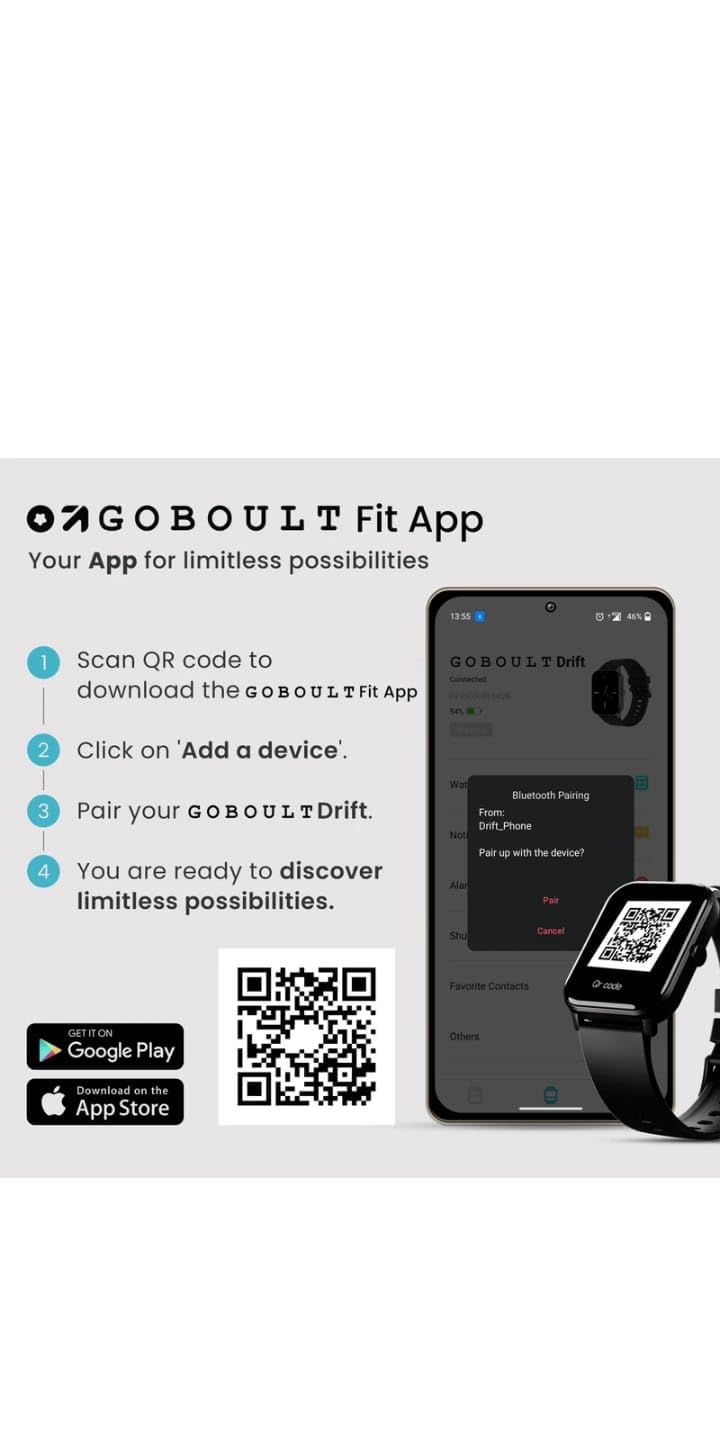
- Scan the QR code provided in the image below or search for "Boult Fit App" in your smartphone's app store (Google Play Store for Android, Apple App Store for iOS).
- అప్లికేషన్ను ఇన్స్టాల్ చేయండి.
- Open the application and follow the on-screen instructions to create an account or log in.

చిత్ర వివరణ: This image displays a smartphone screen with instructions for downloading and pairing the companion app. It shows four steps: "Scan QR code to download the Boult Fit App", "Click on 'Add a device'", "Pair your Boult Drift", and "You are ready to discover limitless possibilities." Below these steps are QR codes for both Google Play and the App Store, along with their respective logos. The right side of the image shows a smartwatch display and a phone screen demonstrating the Bluetooth pairing process within the app.
Download the Boult Fit App: https://app.moyoung.com/app-download/BoultFit
2.3 మీ స్మార్ట్ఫోన్తో జత చేయడం
After installing the app, follow these steps to pair your smart watch:
- మీ స్మార్ట్ఫోన్లో బ్లూటూత్ ప్రారంభించబడిందని నిర్ధారించుకోండి.
- Open the companion app and navigate to the "Add Device" or "Pair Device" section.
- The app will search for available devices. Select "Laxasfit LF-01" or a similar device name from the list.
- Confirm the pairing request on both your smartphone and the smart watch if prompted.
- జత చేసిన తర్వాత, వాచ్ మీ ఫోన్తో డేటాను సమకాలీకరిస్తుంది.
3 కీ ఫీచర్లు
The Laxasfit LF-01 Smart Watch offers a range of features designed to enhance your daily life and fitness tracking.
3.1 ఆరోగ్య పర్యవేక్షణ
Monitor your vital health parameters directly from your wrist.
- హార్ట్ రేట్ మానిటర్: రోజంతా మీ హృదయ స్పందన రేటును ట్రాక్ చేస్తుంది.
- నిద్ర ట్రాకింగ్: గాఢ నిద్ర, తేలికపాటి నిద్ర మరియు మేల్కొనే సమయాలతో సహా మీ నిద్ర విధానాలను విశ్లేషిస్తుంది.
- కార్యాచరణ ట్రాకింగ్: నడిచిన అడుగులు, దూరం మరియు ఖర్చైన కేలరీలను నమోదు చేస్తుంది.

చిత్ర వివరణ: This image shows a collage of smartwatch features. Prominently featured is a smartwatch display showing a heart rate monitor with a graph and current heart rate (108 bpm). Other elements include icons for 7-day battery life, IP68 water resistance, 60 sports modes, mini games, 1.69" HD display, Bluetooth calling, and multiple watch faces.
3.2 స్పోర్ట్స్ మోడ్లు
The watch supports over 60 workout modes to accurately track various physical activities.
- Track specific metrics for activities like running, cycling, walking, and more.
- View real-time data such as duration, calories burned, and heart rate during workouts.

చిత్ర వివరణ: A man is shown performing an exercise with a battle rope, wearing a smartwatch on his wrist. The image highlights the watch's capability to track over 60 workout modes. An overlay shows a smartwatch display with fitness metrics: "Steps 25969", "Distance 10.56 km", and "Calories 2982 Kcal".
3.3 బ్లూటూత్ కాలింగ్
With its built-in speaker and microphone, the Laxasfit LF-01 allows you to manage calls directly from your wrist when connected to your smartphone via Bluetooth.
- ఇన్కమింగ్ కాల్ నోటిఫికేషన్లను స్వీకరించండి.
- Answer or reject calls.
- Make calls using the watch's interface (requires phone connection).
చిత్ర వివరణ: This image shows a smartwatch worn on a wrist, displaying an incoming call notification. The screen shows "Mom" as the caller, along with green (answer) and red (decline) call icons. Text above the watch states "Manage calls, the smart way." and "Bluetooth calling" with "Dedicated Speaker & Microphone" below.
3.4 డిస్ప్లే మరియు వాచ్ ఫేస్లు
- ప్రదర్శన రకం: LCD touchscreen for clear visibility and easy interaction.
- అనుకూలీకరించదగిన వాచ్ ముఖాలు: Choose from over 140 watch faces via the companion app to personalize your device.
4. ఆపరేషన్
4.1 ప్రాథమిక నావిగేషన్
- టచ్స్క్రీన్: మెనూలు మరియు ఫీచర్ల ద్వారా నావిగేట్ చేయడానికి ఎడమ/కుడి, పైకి/క్రిందికి స్వైప్ చేయండి. ఎంచుకోవడానికి నొక్కండి.
- సైడ్ బటన్: Typically used to wake the screen, return to the home screen, or access the app menu. Refer to the on-screen prompts for specific functions.
4.2 Using Fitness Tracking
వ్యాయామం ప్రారంభించడానికి:
- Swipe on the watch face to find the "Workout" or "Sports Modes" icon.
- Tap to select your desired activity (e.g., Running, Cycling).
- Tap "Start" to begin tracking.
- వ్యాయామం సమయంలో, మీరు view నిజ-సమయ డేటా.
- Tap "Pause" or "End" to stop the workout. Data will sync with the app.
4.3 Managing Notifications
Once paired with your smartphone, the watch will display notifications for calls, messages, and other app alerts.
- Swipe down from the watch face to view ఇటీవలి నోటిఫికేషన్లు.
- Tap on a notification to read the full message (if supported).
- Notifications can be managed and filtered through the companion app settings.
5. నిర్వహణ
5.1 మీ స్మార్ట్ వాచ్ను శుభ్రపరచడం
- వాచ్ స్క్రీన్ మరియు స్ట్రాప్ను మృదువైన, d తో క్రమం తప్పకుండా తుడవండిamp గుడ్డ.
- కఠినమైన రసాయనాలు లేదా రాపిడి పదార్థాలను ఉపయోగించడం మానుకోండి, ఎందుకంటే ఇవి పరికరాన్ని దెబ్బతీస్తాయి.
- ఛార్జింగ్ చేసే ముందు ఛార్జింగ్ కాంటాక్ట్లు శుభ్రంగా మరియు పొడిగా ఉన్నాయని నిర్ధారించుకోండి.
5.2 బ్యాటరీ సంరక్షణ
- గడియారాన్ని విపరీతమైన ఉష్ణోగ్రతలకు బహిర్గతం చేయకుండా ఉండండి.
- గడియారాన్ని ఎక్కువసేపు పూర్తిగా డిస్చార్జ్ చేసి ఉంచవద్దు.
- For optimal battery life, charge the device before it completely runs out of power.
6. ట్రబుల్షూటింగ్
If you encounter issues with your Laxasfit LF-01 Smart Watch, refer to the following common solutions:
- గడియారం ఆన్ కావడం లేదు: వాచ్ పూర్తిగా ఛార్జ్ అయ్యిందని నిర్ధారించుకోండి. కనీసం 30 నిమిషాలు దానిని ఛార్జర్కి కనెక్ట్ చేయండి.
- స్మార్ట్ఫోన్తో జత చేయలేము:
- మీ ఫోన్లో బ్లూటూత్ ప్రారంభించబడిందని నిర్ధారించుకోండి.
- వాచ్ మీ ఫోన్ పరిధిలో ఉందని నిర్ధారించుకోండి.
- Restart both your phone and the smart watch.
- యాప్ ద్వారా పరికరాన్ని అన్పెయిర్ చేసి, తిరిగి పెయిర్ చేయడానికి ప్రయత్నించండి.
- సరికాని ఫిట్నెస్ డేటా:
- మీ మణికట్టు మీద వాచ్ చక్కగా ధరించేలా చూసుకోండి, మణికట్టు ఎముక కంటే ఒక వేలు వెడల్పు పైన ఉంచండి.
- Calibrate the device through the app if an option is available.
- నోటిఫికేషన్లు కనిపించడం లేదు:
- మీ ఫోన్లో మరియు సహచర యాప్లో యాప్ నోటిఫికేషన్ సెట్టింగ్లను తనిఖీ చేయండి.
- వాచ్ బ్లూటూత్ ద్వారా సరిగ్గా కనెక్ట్ చేయబడిందని నిర్ధారించుకోండి.
- స్క్రీన్ స్పందించడం లేదు: Restart the watch by pressing and holding the side button (if applicable) or by connecting it to the charger.
If problems persist, consult the companion app's help section or contact customer support.
7. సాంకేతిక లక్షణాలు
| ఫీచర్ | స్పెసిఫికేషన్ |
|---|---|
| మోడల్ | LF-01 |
| ప్రదర్శన రకం | LCD |
| కనెక్టివిటీ | బ్లూటూత్ |
| ఆపరేటింగ్ సిస్టమ్ | యాజమాన్య OS |
| మెమరీ స్టోరేజ్ కెపాసిటీ | 32 GB |
| ప్రత్యేక లక్షణాలు | Fitness Tracking, Heart Rate Monitor, Notifications, Sleep Tracking |
| అనుకూల పరికరాలు | స్మార్ట్ఫోన్, టాబ్లెట్ |
| ఛార్జింగ్ సమయం | 2 గంటలు |
| మెటీరియల్ | ప్లాస్టిక్, సిలికాన్ |
| వస్తువు బరువు | 200 గ్రా |
| మూలం దేశం | చైనా |
8. వారంటీ మరియు మద్దతు
8.1 వారంటీ సమాచారం
Your Laxasfit LF-01 Smart Watch typically comes with a standard warranty. Please refer to your purchase documentation for specific warranty terms and conditions. A 10-day replacement policy may apply, and extended warranty options might be available for purchase.
8.2 కస్టమర్ మద్దతు
For further assistance, technical support, or warranty claims, please refer to the contact information provided with your product packaging or visit the official Laxasfit website (if available). You may also contact the seller directly for support.
Ask a question about this manual
Ask about setup, troubleshooting, compatibility, parts, safety, or missing instructions. Manuals+ will review the question and use this page’s manual context to help answer it.