
పరిచయం
This manual provides detailed instructions for setting up, operating, and maintaining your Formuler Z12 Ultra 4K Streaming Media Player. The Z12 Ultra is designed to deliver a premium streaming experience with advanced features such as 4K resolution, Dolby Vision, Dolby Atmos, and high-speed connectivity. Please read this manual thoroughly before using your device to ensure optimal performance and safety.
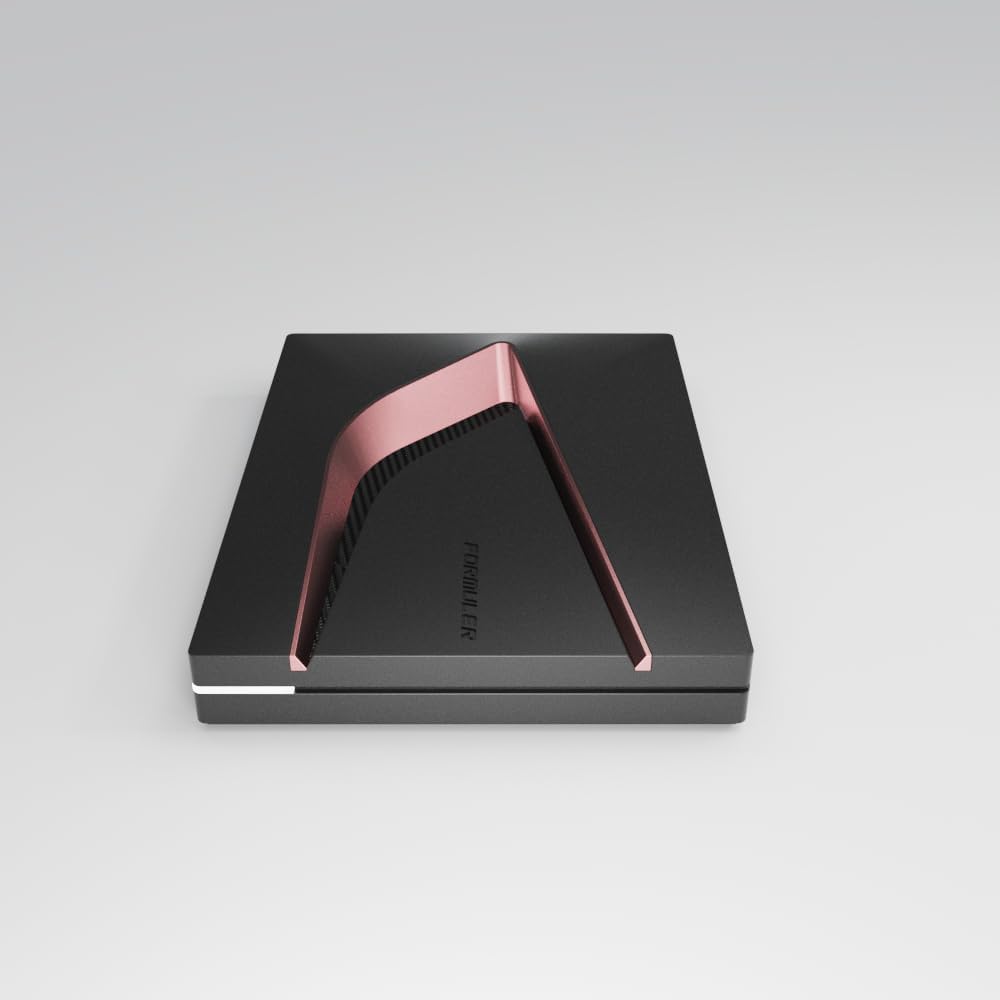
చిత్రం: పైన view of the Formuler Z12 Ultra streaming media player, showcasing its sleek design with a rose gold accent.
పెట్టెలో ఏముంది
సెటప్తో కొనసాగడానికి ముందు అన్ని అంశాలు ప్యాకేజీలో ఉన్నాయని నిర్ధారించుకోండి.
- Formuler Z12 Ultra Media Receiver
- Bluetooth Backlight Voice Remote Control (GTV-BT3)
- HDMI కేబుల్
- పవర్ అడాప్టర్
- Quick Setup Guide (this manual serves as a comprehensive guide)
సెటప్
1. పరికరాన్ని కనెక్ట్ చేస్తోంది
- టీవీకి కనెక్ట్ అవ్వండి: Use the provided HDMI cable to connect the HDMI OUT port on the Formuler Z12 Ultra to an HDMI IN port on your television or display.
- నెట్వర్క్కు కనెక్ట్ అవ్వండి (ఐచ్ఛికం):
- వైర్డు కనెక్షన్: For optimal performance, connect an Ethernet cable from your router to the LAN port on the Z12 Ultra.
- వైర్లెస్ కనెక్షన్: If using Wi-Fi, ensure your Wi-Fi network is active. You will configure the Wi-Fi connection during the initial setup process.
- పవర్ కనెక్ట్ చేయండి: Plug the power adapter into the DC IN port on the Z12 Ultra, then plug the other end into a wall outlet.

చిత్రం: వెనుక view of the Formuler Z12 Ultra, illustrating the various connectivity ports including HDMI, LAN, USB, and power input.
2. Initial Power On and Remote Control Pairing
- పవర్ ఆన్: The device will automatically power on once connected to power. Your TV should display the Formuler boot screen.
- బ్యాటరీలను చొప్పించండి: Open the battery compartment on the back of the Bluetooth Backlight Voice Remote Control and insert two AAA batteries (not included).
- రిమోట్ను జత చేయండి: The remote control should automatically pair with the Z12 Ultra. If it does not, press and hold the OK మరియు వెనుకకు buttons simultaneously for 3-5 seconds until the LED indicator on the remote flashes, indicating pairing mode. Follow any on-screen prompts.

Image: The Formuler Z12 Ultra media player alongside its Bluetooth Backlight Voice Remote Control, ready for use.
3. On-Screen Setup Wizard
ప్రారంభ సెటప్ను పూర్తి చేయడానికి స్క్రీన్పై సూచనలను అనుసరించండి, ఇందులో సాధారణంగా ఇవి ఉంటాయి:
- భాష ఎంపిక
- Network configuration (Wi-Fi setup if not using Ethernet)
- Google account sign-in (optional, but recommended for full Android features)
- తేదీ మరియు సమయ సెట్టింగ్లు
ఆపరేటింగ్ సూచనలు
ప్రాథమిక నావిగేషన్
డైరెక్షనల్ ప్యాడ్ ఉపయోగించండి మరియు OK button on your remote control to navigate the user interface. The వెనుకకు బటన్ మునుపటి స్క్రీన్కు తిరిగి వస్తుంది మరియు హోమ్ button takes you to the main home screen.
MYTVOnline3 Application
The Formuler Z12 Ultra features the MYTVOnline3 application for an optimized streaming experience.
- Accessing MYTVOnline3: Locate and select the MYTVOnline3 icon on your home screen.
- కాన్ఫిగరేషన్: Follow the in-app instructions to add your streaming services or content sources.
- ఫీచర్లు: Explore features like Electronic Program Guide (EPG), Video On Demand (VOD), and Catch-up TV, depending on your service provider.
4K, Dolby Vision, and Dolby Atmos Playback
The Z12 Ultra supports 4K 60fps 10-bit video playback with AV1, H.265 (HEVC), H.264 codecs, and HDR formats including HDR10+ and HLG. It also supports Dolby Vision and Dolby Atmos for enhanced visual and audio experiences.
- అవసరాలు: To experience these features, ensure your television and audio system are compatible with 4K, Dolby Vision, and Dolby Atmos.
- సెట్టింగ్లు: Verify that the video and audio output settings on your Z12 Ultra are configured correctly for your display and sound system. These settings are typically found in the Android system settings under "Display & Sound".
Network Connectivity (Gigabit LAN & WiFi 6E)
The device offers robust network options for stable streaming.
- Gigabit LAN: Provides the most stable and fastest connection for high-bandwidth streaming.
- WiFi 6E (AX): Offers high-speed wireless connectivity. To connect or change Wi-Fi networks, go to సెట్టింగ్లు> నెట్వర్క్ & ఇంటర్నెట్ and select your desired Wi-Fi network.
వాయిస్ కంట్రోల్
The Bluetooth Backlight Voice Remote Control allows for convenient voice commands.
- వాయిస్ కంట్రోల్ని యాక్టివేట్ చేస్తోంది: Press the dedicated Voice Assistant button on your remote (usually a microphone icon).
- ఆదేశాలు: Speak clearly into the remote to search for content, open applications, or control playback.
నిర్వహణ
సాఫ్ట్వేర్ నవీకరణలు
Regular software updates are released to improve performance, add features, and enhance security.
- నవీకరణల కోసం తనిఖీ చేస్తోంది: వెళ్ళండి సెట్టింగ్లు > పరికర ప్రాధాన్యతలు > గురించి > సిస్టమ్ అప్డేట్.
- సంస్థాపన: If an update is available, follow the on-screen prompts to download and install it. Ensure the device remains powered during the update process.
క్లీనింగ్
To maintain the appearance and functionality of your device:
- పరికరం: Use a soft, dry, lint-free cloth to wipe the exterior. Avoid abrasive cleaners or solvents.
- రిమోట్ కంట్రోల్: మృదువైన, కొద్దిగా d తో శుభ్రం చేయండిamp గుడ్డ. నీటిలో ముంచవద్దు.
ట్రబుల్షూటింగ్
If you encounter issues with your Formuler Z12 Ultra, refer to the following common solutions.
| సమస్య | సాధ్యమైన కారణం | పరిష్కారం |
|---|---|---|
| పవర్ లేదు / పరికరం ఆన్ కావడం లేదు | పవర్ అడాప్టర్ కనెక్ట్ కాలేదు లేదా తప్పుగా ఉంది. | పవర్ అడాప్టర్ పరికరానికి మరియు పనిచేసే పవర్ అవుట్లెట్కు సురక్షితంగా కనెక్ట్ చేయబడిందని నిర్ధారించుకోండి. వేరే అవుట్లెట్ను ప్రయత్నించండి. |
| No signal on TV / Blank screen | తప్పు HDMI కనెక్షన్ లేదా టీవీ ఇన్పుట్. | Verify the HDMI cable is securely connected to both the Z12 Ultra and the TV. Select the correct HDMI input on your TV. Try a different HDMI port or cable. |
| రిమోట్ కంట్రోల్ స్పందించడం లేదు | Low batteries or remote not paired. | Replace batteries. Re-pair the remote by holding OK మరియు వెనుకకు 3-5 సెకన్ల పాటు ఒకేసారి బటన్లను నొక్కండి. |
| నెట్వర్క్ కనెక్షన్ సమస్యలు | Incorrect Wi-Fi password, router issue, or Ethernet cable disconnected. | Check Wi-Fi password. Restart your router. For Ethernet, ensure the cable is properly connected. Go to సెట్టింగ్లు> నెట్వర్క్ & ఇంటర్నెట్ to reconfigure. |
| Video playback issues (stuttering, low quality) | Insufficient network bandwidth or content source issue. | Ensure a stable and fast internet connection. Use a wired Ethernet connection if possible. Check the quality settings within your streaming application. |
స్పెసిఫికేషన్లు
Key technical specifications for the Formuler Z12 Ultra:
- ప్రాసెసర్: High-performance Quad-core
- RAM: 4 GB DDR4
- నిల్వ: 128 GB
- ఆపరేటింగ్ సిస్టమ్: ఆండ్రాయిడ్ 12
- వీడియో అవుట్పుట్ రిజల్యూషన్: Up to 3840x2160 pixels (4K) at 60fps 10-bit
- వీడియో కోడెక్లు: AV1, H.265 (HEVC), H.264
- HDR మద్దతు: HDR10+, HLG, Dolby Vision
- ఆడియో మద్దతు: డాల్బీ అట్మోస్
- కనెక్టివిటీ:
- Gigabit LAN (Ethernet)
- WiFi 6E (AX)
- బ్లూటూత్
- HDMI
- USB
- IR
- రిమోట్ కంట్రోల్: Bluetooth Backlight Voice Remote Control (GTV-BT3)
- కొలతలు (L x W x H): 13.5 x 10 x 2.4 సెం.మీ
- బరువు: 464.4 గ్రాములు
- రంగు: Black/Rose Gold
- విద్యుత్ వినియోగం (స్టాండ్బై): 0.5 W
వారంటీ మరియు మద్దతు
Formuler products are designed for reliability and performance.
- విడిభాగాల లభ్యత: విడిభాగాలు 2 సంవత్సరాలు అందుబాటులో ఉన్నాయి.
- ఉత్పత్తి మద్దతు: For technical assistance, troubleshooting beyond this manual, or warranty inquiries, please visit the official Formuler support webసైట్లో లేదా మీ రిటైలర్ను సంప్రదించండి. కొనుగోలు రుజువుగా మీ కొనుగోలు రసీదును ఉంచండి.
- ఆన్లైన్ వనరులు: Additional support, FAQs, and software updates may be available on the official Formuler webసైట్.