పరిచయం
This manual provides detailed instructions for the setup, operation, and maintenance of your Generic G96 Max Android Smart TV Box. This device is designed to transform your television into a smart entertainment hub, offering 4K Ultra HD streaming with HDR10 support, powered by Android 13. Please read this manual thoroughly before using the product to ensure optimal performance and longevity.
ప్యాకేజీ విషయాలు
ప్యాకేజీలో అన్ని అంశాలు ఉన్నాయని నిర్ధారించుకోండి:
- 1 x Generic G96 Max Smart TV Box
- 1 x వాయిస్ రిమోట్ కంట్రోల్
- 1 x HDMI కేబుల్
- 1 x పవర్ అడాప్టర్
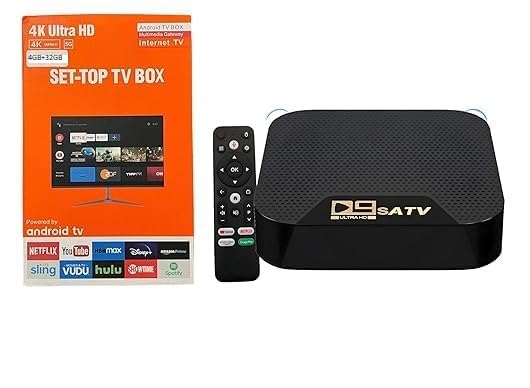
Image: The Generic G96 Max Smart TV Box, its voice remote control, HDMI cable, and power adapter, along with the product packaging.
సెటప్ సూచనలు
- Connect the TV Box to your Television: Use the provided HDMI cable to connect the HDMI OUT port on the Smart TV Box to an available HDMI IN port on your television.
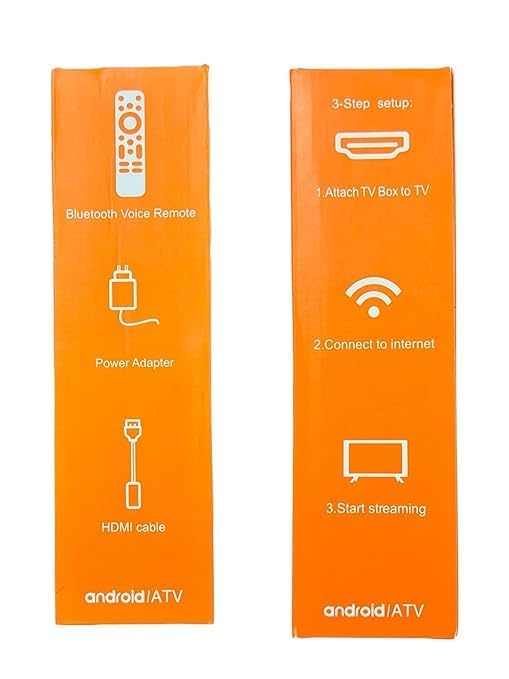
Image: A visual guide illustrating the three-step setup process: connecting the TV box to the television, establishing an internet connection, and initiating streaming.
- పవర్ కనెక్ట్ చేయండి: Plug the power adapter into the DC IN port on the Smart TV Box, then plug the adapter into a wall outlet. The device will automatically power on.
- ఇన్పుట్ మూలాన్ని ఎంచుకోండి: On your television, select the correct HDMI input source that corresponds to the port where the TV Box is connected.
- ప్రారంభ సెటప్ విజార్డ్: Follow the on-screen instructions to complete the initial setup, including language selection, network connection (Wi-Fi or Ethernet), and Google account login.
- ఇంటర్నెట్కు కనెక్ట్ అవ్వండి: During the setup wizard, select your Wi-Fi network and enter the password, or connect an Ethernet cable to the LAN port for a wired connection. The device supports WiFi 2.4G.
ఆపరేటింగ్ సూచనలు
Using the Voice Remote Control
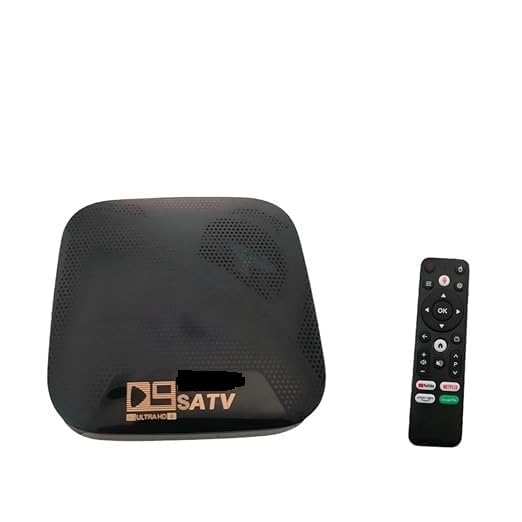
Image: The Generic G96 Max Smart TV Box positioned next to its voice-enabled remote control.
- పవర్ బటన్: Press to turn the device on or off, or to put it into standby mode.
- నావిగేషన్ ప్యాడ్: Use the directional buttons to navigate through menus and select items.
- సరే బటన్: ఎంపికలను నిర్ధారిస్తుంది.
- వెనుక బటన్: మునుపటి స్క్రీన్కి తిరిగి వస్తుంది.
- హోమ్ బటన్: ప్రధాన హోమ్ స్క్రీన్కు తిరిగి వస్తుంది.
- వాయిస్ అసిస్టెంట్ బటన్: Press and hold to activate the voice assistant for search and commands.
- వాల్యూమ్ బటన్లు: ఆడియో వాల్యూమ్ను సర్దుబాటు చేయండి.
- యాప్ షార్ట్కట్ బటన్లు: Dedicated buttons for popular streaming applications (e.g., Netflix, YouTube).
Navigating the Android TV Interface
The G96 Max runs on Android 13, providing a user-friendly interface.
- హోమ్ స్క్రీన్: Displays recommended content, installed apps, and system settings.
- యాప్లు: Access all installed applications. You can download more apps from the Google Play Store.
- సెట్టింగ్లు: Configure network, display, sound, applications, device preferences, and more.
నిర్వహణ
- శుభ్రపరచడం: పరికరాన్ని శుభ్రం చేయడానికి మృదువైన, పొడి వస్త్రాన్ని ఉపయోగించండి. ద్రవ క్లీనర్లను లేదా రాపిడి పదార్థాలను ఉపయోగించవద్దు.
- వెంటిలేషన్: Ensure the TV Box is placed in a well-ventilated area to prevent overheating. Do not cover ventilation openings.
- సాఫ్ట్వేర్ అప్డేట్లు: Periodically check for system updates in the settings menu to ensure optimal performance and security.
- నిల్వ నిర్వహణ: Regularly clear cache from applications to free up storage space and improve performance.
ట్రబుల్షూటింగ్
| సమస్య | సాధ్యమైన పరిష్కారం |
|---|---|
| శక్తి లేదు |
|
| టీవీలో చిత్రం లేదు |
|
| ఇంటర్నెట్ కనెక్షన్ లేదు |
|
| రిమోట్ కంట్రోల్ స్పందించడం లేదు |
|
| నెమ్మదిగా పనితీరు లేదా గడ్డకట్టడం |
|
స్పెసిఫికేషన్లు
- మోడల్: G96 Max (G96-4k)
- ఆపరేటింగ్ సిస్టమ్: ఆండ్రాయిడ్ 13
- RAM: 4GB
- నిల్వ: 32GB
- రిజల్యూషన్: 4K Ultra HD (HDR10 support)
- కనెక్టివిటీ: WiFi 2.4G, HDMI
- వీడియో కోడెక్: H.265
- కొలతలు: 12 cm x 8 cm x 2 cm
- బరువు: 300 గ్రాములు
- తయారీదారు: Adam Enterprises
- మూలం దేశం: భారతదేశం
వారంటీ మరియు మద్దతు
The Generic G96 Max Android Smart TV Box comes with a 6 నెలల వారంటీ from the date of purchase. This warranty covers manufacturing defects. For warranty claims or technical support, please contact your retailer or the manufacturer, Adam Enterprises.
దయచేసి వారంటీ ప్రయోజనాల కోసం కొనుగోలు రుజువుగా మీ కొనుగోలు రసీదును ఉంచుకోండి.


