
1. పరిచయం
This manual provides detailed instructions for the VILTROX AF 9mm F2.8 Z-Mount APS-C Wide Angle Lens. Please read this manual thoroughly before using the lens to ensure proper operation and to maximize its performance. This lens is designed for Nikon Z-Mount APS-C mirrorless cameras, offering a wide field of view and reliable autofocus capabilities.
2. ప్యాకేజీ విషయాలు
ప్యాకేజీలో అన్ని అంశాలు ఉన్నాయని నిర్ధారించుకోండి:
- 1 x AF 9/2.8 Pro Lens
- 1 x లెన్స్ హుడ్
- 1 x Lens Pouch
- 2 x Lens Caps (Front and Rear)
- 1 x వినియోగదారు మాన్యువల్
- 1 x ప్యాకేజీ బాక్స్

3. సెటప్ మరియు ఇన్స్టాలేషన్
3.1 లెన్స్ను అటాచ్ చేయడం
- మీ కెమెరా పవర్ ఆఫ్ చేయబడిందని నిర్ధారించుకోండి.
- Remove the rear lens cap from the VILTROX AF 9mm F2.8 Z lens and the body cap from your Nikon Z-Mount camera.
- Align the mounting index (white dot) on the lens with the corresponding index on the camera body.
- కెమెరా మౌంట్లోకి లెన్స్ను చొప్పించి, అది స్థానంలో క్లిక్ అయ్యే వరకు దాన్ని సవ్యదిశలో తిప్పండి.
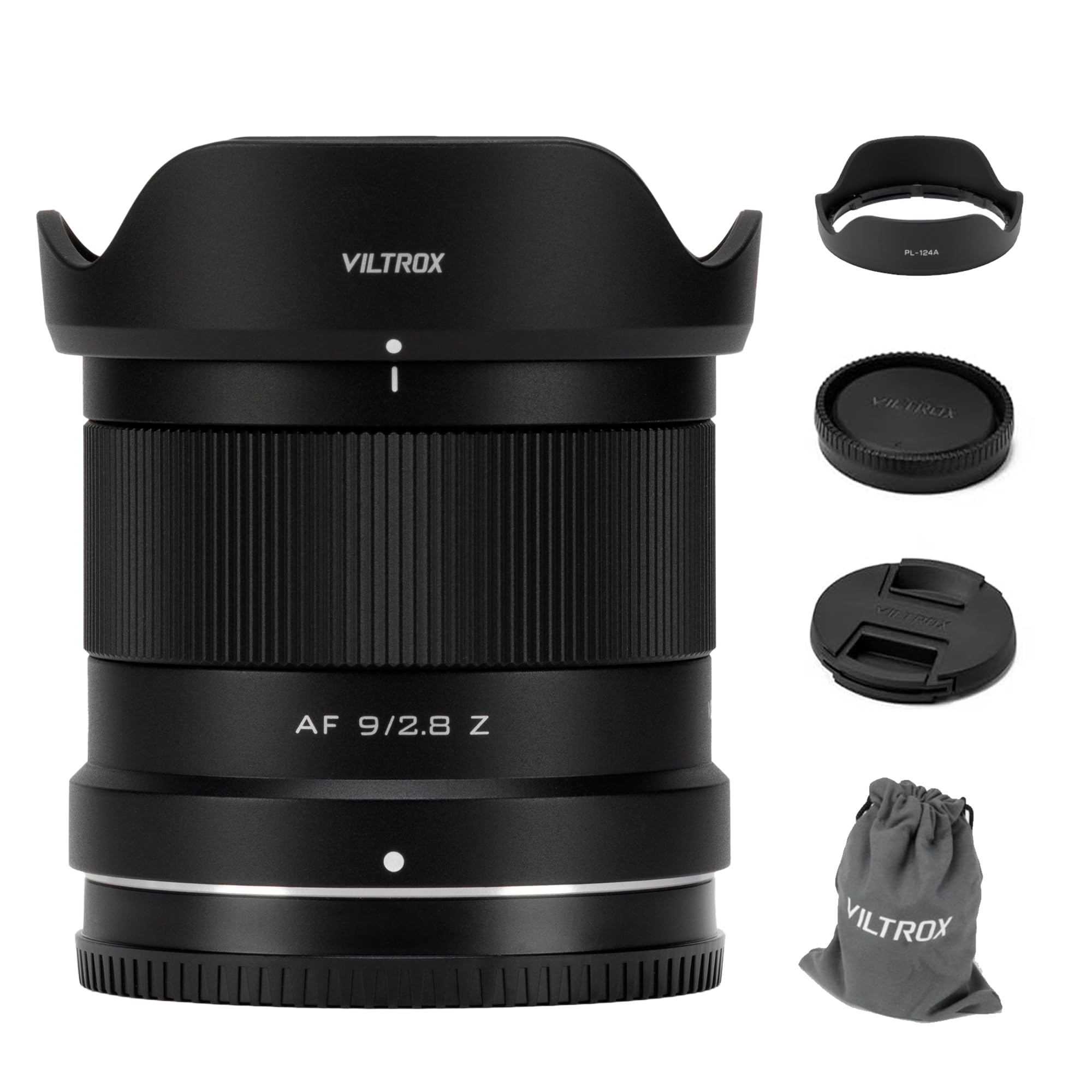
3.2 లెన్స్ హుడ్ను అటాచ్ చేయడం
Align the lens hood with the front of the lens and rotate it until it locks securely. The lens hood helps to prevent flare and protect the front element of the lens.

4. లెన్స్ను ఆపరేట్ చేయడం
4.1 ఆటో ఫోకస్ (AF) మరియు మాన్యువల్ ఫోకస్ (MF)
This lens supports both autofocus and manual focus. The built-in STM stepping motor provides precise and quiet autofocus. To switch between AF and MF, use the camera's settings or the switch on the lens barrel if available.

4.2 ఎపర్చరు నియంత్రణ
The lens features a bright F2.8 maximum aperture, allowing for excellent low-light performance and shallow depth of field. The aperture can be adjusted via the camera's controls.

4.3 Wide Angle Perspective
With an equivalent full-frame focal length of approximately 13.5mm and a 113.8° ultra-wide field of view, this lens is ideal for capturing expansive landscapes, architectural interiors, and creative perspectives.

4.4 Close-Up Shooting
The lens offers an excellent close-up shooting capability with a minimum focusing distance of 0.13m, allowing for creative shots with a sense of depth even in small spaces.

4.5 వీడియో షూటింగ్
The lens is designed for reliable video shooting with imperceptible focus breathing, ensuring natural and smooth focus transitions. This makes it suitable for video creation and achieving desired depth of field effects.
5. నిర్వహణ మరియు సంరక్షణ
- Keep the lens caps on when not in use to protect the front and rear elements.
- Clean the lens surfaces with a soft, lint-free cloth specifically designed for optical lenses. Avoid using abrasive materials.
- For stubborn smudges, use a small amount of lens cleaning solution applied to a cleaning cloth, not directly to the lens.
- Store the lens in a dry, dust-free environment, preferably in its pouch or a camera bag.
- Avoid exposing the lens to extreme temperatures, humidity, or direct sunlight for prolonged periods.
- The front lens features a waterproof and anti-fouling coating for easier cleaning.

6. ట్రబుల్షూటింగ్
| సమస్య | సాధ్యమైన కారణం | పరిష్కారం |
|---|---|---|
| కెమెరా ద్వారా లెన్స్ గుర్తించబడలేదు | Improper mounting; dirty contacts; camera firmware outdated. | Ensure lens is securely mounted. Clean lens and camera contacts with a dry cloth. Check VILTROX website for lens firmware updates. |
| ఆటో ఫోకస్ నెమ్మదిగా లేదా తప్పుగా ఉంది | Low light conditions; low contrast subject; camera AF settings. | Use a brighter light source. Focus on a high-contrast area. Adjust camera's AF mode or assist lamp సెట్టింగులు. |
| చిత్రాలు అస్పష్టంగా ఉన్నాయి | సరికాని ఫోకస్; కెమెరా షేక్; మురికి లెన్స్. | ఫోకస్ను ధృవీకరించండి. వేగవంతమైన షట్టర్ స్పీడ్ లేదా ట్రైపాడ్ను ఉపయోగించండి. లెన్స్ ఎలిమెంట్లను శుభ్రం చేయండి. |
7. స్పెసిఫికేషన్లు
| ఫీచర్ | వివరాలు |
|---|---|
| బ్రాండ్ | VILTROX |
| మోడల్ పేరు | FV-Viltrox AF 9mm F2.8 |
| ఫోకల్ లెంగ్త్ | 9మి.మీ |
| లెన్స్ రకం | Wide Angle, Prime |
| అనుకూలమైన మౌంటులు | నికాన్ Z |
| గరిష్ట ఎపర్చరు | F2.8 |
| కనిష్ట ఎపర్చరు | F16.0 |
| డయాఫ్రాగమ్ బ్లేడ్ల సంఖ్య | 7 |
| ఫోకస్ రకం | ఆటో/మాన్యువల్ |
| చిత్రం స్థిరీకరణ | No image stabilization |
| Real Angle Of View | 113.8 డిగ్రీలు |
| Minimum Focal Distance | 0.13మీ (0.43 అడుగులు) |
| ఫిల్టర్ పరిమాణం | 58మి.మీ |
| ఆప్టికల్ డిజైన్ | 13 Elements in 11 Groups (2 aspherical, 3 ultra-low dispersion, 3 high refractive index) |
| నీటి నిరోధక స్థాయి | వాటర్ రెసిస్టెంట్ కాదు |
8. వారంటీ మరియు మద్దతు
8.1 వారంటీ సమాచారం
This VILTROX lens comes with a 1-year manufacturer's warranty. Please retain your proof of purchase for warranty claims. The warranty covers defects in materials and workmanship under normal use. It does not cover damage caused by misuse, accidents, unauthorized repairs, or modifications.
8.2 కస్టమర్ మద్దతు
For technical assistance, service, or warranty inquiries, please visit the official VILTROX website or contact their customer support. You can find more information and resources at VILTROX అధికారిక స్టోర్.


