
పరిచయం
This manual provides essential information for the setup, operation, maintenance, and troubleshooting of your AWOW Mini PC, Model BA7. Please read these instructions carefully before using the device.

చిత్రం: పైగాview of the AWOW BA7 Mini PC, highlighting its compact design and key features.
ప్యాకేజీ విషయాలు
ప్యాకేజీలో అన్ని అంశాలు ఉన్నాయని నిర్ధారించుకోండి:
- AWOW BA7 Mini PC
- పవర్ అడాప్టర్
- మౌంటు స్క్రూలు
- VESA మౌంట్ బ్రాకెట్
- HDMI కేబుల్
- వినియోగదారు మాన్యువల్ (ఈ పత్రం)

Image: Illustration of the AWOW BA7 Mini PC and its included accessories: power adapter, screws, VESA mount, HDMI cable, and user manual.
సెటప్ సూచనలు
- పెరిఫెరల్స్ కనెక్ట్ చేయండి: Connect your keyboard, mouse, and monitor(s) to the appropriate ports on the Mini PC.
చిత్రం: ముందు భాగం view of the Mini PC showing the Power Button, Type-C port, USB 3.2 ports, and 3.5mm Audio Jack.

చిత్రం: వెనుక view of the Mini PC showing the DC IN, DP1.2, HDMI2.0, USB 2.0 ports, and RJ45 LAN port.
- పవర్ కనెక్షన్: Connect the power adapter to the DC IN port on the Mini PC, then plug the adapter into a power outlet.
- పవర్ ఆన్: మినీ PC ముందు భాగంలో ఉన్న పవర్ బటన్ను నొక్కండి. సిస్టమ్ బూట్ అవుతుంది.
- మొదటి ఏర్పాటు: భాష, ప్రాంతం, నెట్వర్క్ కనెక్షన్ మరియు వినియోగదారు ఖాతా సృష్టితో సహా Windows 11 Pro ప్రారంభ సెటప్ను పూర్తి చేయడానికి స్క్రీన్పై ఉన్న సూచనలను అనుసరించండి.
- నెట్వర్క్ కనెక్షన్:
- వైర్డ్: Connect an Ethernet cable to the RJ45 LAN port for a stable wired connection.
- వైర్లెస్: During Windows setup or via Windows settings, connect to your Wi-Fi network using the built-in WiFi 6.
ఆపరేటింగ్ సూచనలు
ప్రాథమిక ఆపరేషన్
- పవర్ ఆన్/ఆఫ్: Press the power button to turn on the PC. To shut down, use the Windows Start menu options (Shut down, Restart, Sleep). A short press on the power button can put the PC to sleep. A long press (approx. 5 seconds) will force a shutdown.
- ప్రదర్శన అవుట్పుట్: The Mini PC supports up to three 4K displays simultaneously via DP, HDMI, and USB-C. Connect your monitors and configure display settings in Windows.

Image: A user working with a triple monitor setup, demonstrating the Mini PC's multi-display capability.
- USB కనెక్టివిటీ: Utilize the USB 2.0 and USB 3.0 ports for connecting external devices such as external hard drives, USB flash drives, printers, and other peripherals. The Type-C port also supports data transfer and display output.
- ఆడియో: హెడ్ఫోన్లు లేదా స్పీకర్లను 3.5mm ఆడియో జాక్కి కనెక్ట్ చేయండి.
అధునాతన వినియోగం
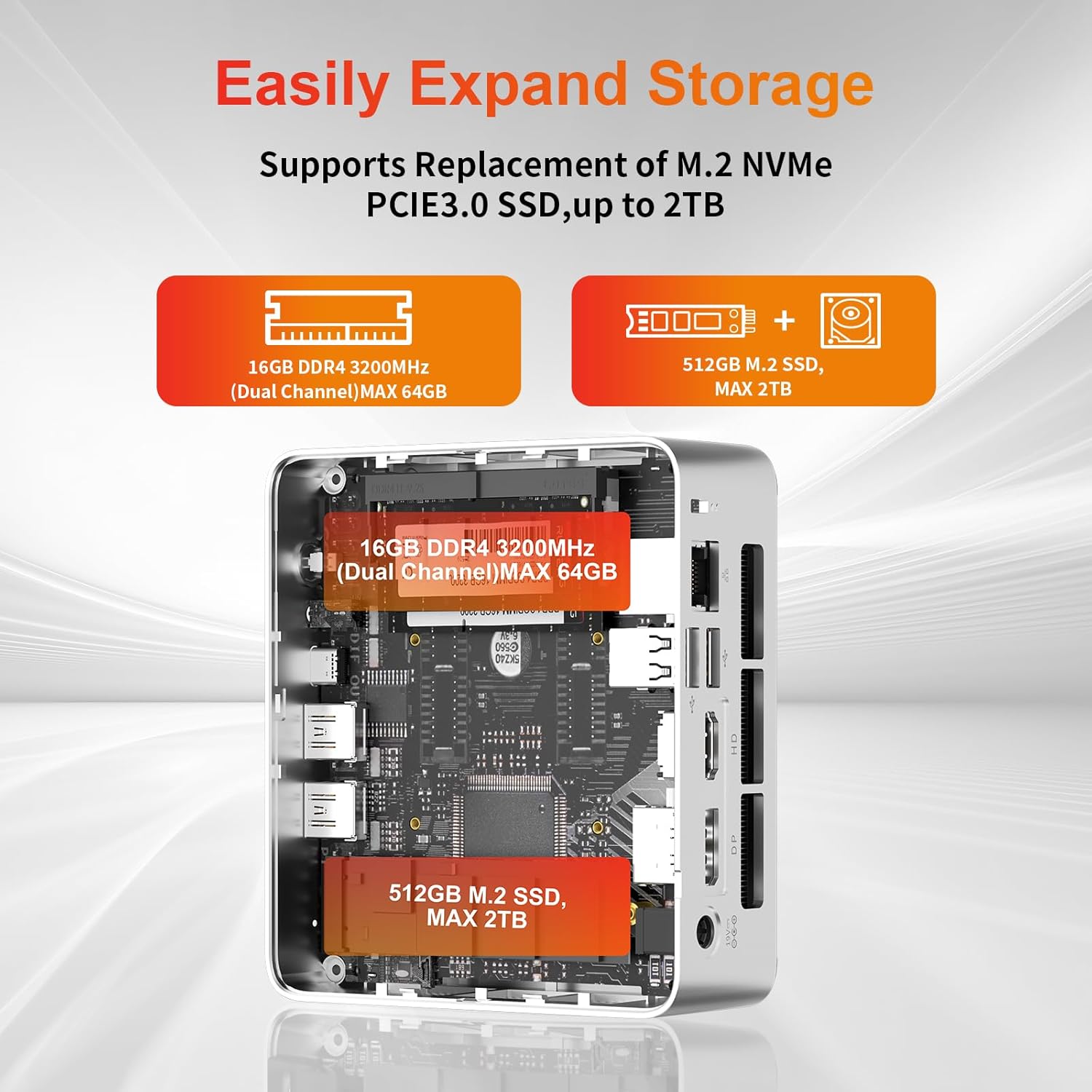
- నిల్వ విస్తరణ: The Mini PC supports replacement of the M.2 NVMe PCIe 3.0 SSD up to 2TB. It also supports memory expansion up to 64GB DDR4.

Image: Diagram illustrating the internal components and options for expanding storage (M.2 SSD up to 2TB) and RAM (DDR4 up to 64GB).
- వెసా మౌంటు: Use the included VESA mount bracket to attach the Mini PC to the back of a compatible monitor or to a wall mount, saving desk space.
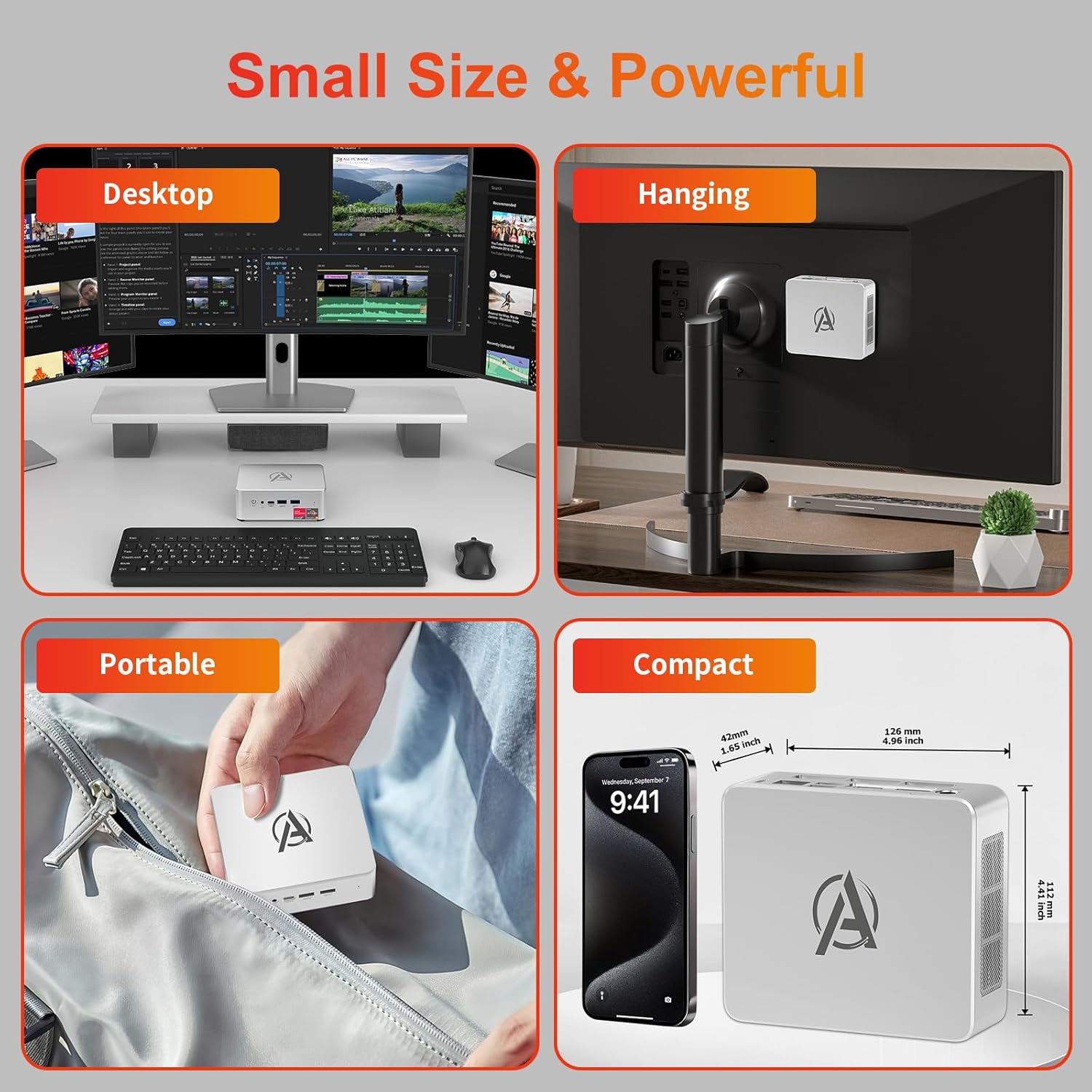
Image: Various usage scenarios for the Mini PC, including desktop, VESA-mounted behind a monitor, portable, and compact size comparison.
నిర్వహణ
- శుభ్రపరచడం: Use a soft, dry cloth to clean the exterior of the Mini PC. Do not use liquid cleaners or aerosols. Ensure ventilation openings are free from dust.
- సాఫ్ట్వేర్ అప్డేట్లు: సరైన పనితీరు మరియు భద్రతను నిర్ధారించడానికి విండోస్ నవీకరణలు మరియు డ్రైవర్ నవీకరణల కోసం క్రమం తప్పకుండా తనిఖీ చేయండి మరియు ఇన్స్టాల్ చేయండి.
- వేడి నిర్వహణ: Ensure the Mini PC is placed in a well-ventilated area. Avoid blocking the air vents. The intelligent cooling system is designed for low noise and efficient heat dissipation.

Image: Diagram illustrating the internal cooling fan and heat sink, showing airflow for efficient heat dissipation.
- నిల్వ నిర్వహణ: అనవసరమైన వాటిని ఎప్పటికప్పుడు శుభ్రం చేయండి files and applications to maintain system performance.
ట్రబుల్షూటింగ్
- శక్తి లేదు:
- Check if the power adapter is securely connected to both the Mini PC and the power outlet.
- పవర్ అవుట్లెట్ పని చేస్తుందని నిర్ధారించుకోండి.
- వేరే పవర్ అవుట్లెట్ని ప్రయత్నించండి.
- ప్రదర్శన లేదు:
- Verify that the HDMI/DP/USB-C cable is securely connected to both the Mini PC and the monitor.
- మానిటర్ ఆన్ చేయబడిందని మరియు సరైన ఇన్పుట్ సోర్స్కు సెట్ చేయబడిందని నిర్ధారించుకోండి.
- అందుబాటులో ఉంటే వేరే డిస్ప్లే కేబుల్ లేదా మానిటర్ ప్రయత్నించండి.
- నెమ్మదిగా పనితీరు:
- నేపథ్యంలో నడుస్తున్న అనవసరమైన అప్లికేషన్లను మూసివేయండి.
- ఏవైనా పెండింగ్లో ఉన్న Windows నవీకరణలు లేదా డ్రైవర్ నవీకరణల కోసం తనిఖీ చేసి, ఇన్స్టాల్ చేయండి.
- SSD లో తగినంత ఖాళీ స్థలం ఉందని నిర్ధారించుకోండి.
- Monitor CPU and RAM usage in Task Manager to identify resource-intensive processes.
- నెట్వర్క్ కనెక్టివిటీ సమస్యలు:
- వైర్డు కనెక్షన్ల కోసం, ఈథర్నెట్ కేబుల్ సరిగ్గా కనెక్ట్ చేయబడిందని మరియు రౌటర్ పనిచేస్తుందని నిర్ధారించుకోండి.
- For Wi-Fi, check if the Wi-Fi adapter is enabled and connected to the correct network. Restart your router/modem.
- సిస్టమ్ స్తంభించిపోతుంది/క్రాష్ అవుతుంది:
- Restart the Mini PC.
- Ensure the system is not overheating (check ventilation).
- Run a system diagnostic or check Windows Event Viewer for error messages.
స్పెసిఫికేషన్లు
| మోడల్ | AWOW BA7 Mini PC |
| ప్రాసెసర్ | AMD రైజెన్ 5 7430U (6 కోర్లు, 12 థ్రెడ్లు, 4.3 GHz వరకు) |
| గ్రాఫిక్స్ | ఇంటిగ్రేటెడ్ AMD రేడియన్ గ్రాఫిక్స్ |
| RAM | 16GB DDR4 (64GB వరకు విస్తరించుకోవచ్చు) |
| నిల్వ | 512GB PCIe 3.0 M.2 SSD (Expandable up to 2TB) |
| ఆపరేటింగ్ సిస్టమ్ | Windows 11 ప్రో |
| వీడియో అవుట్పుట్ | DP1.2 (4K@60Hz), HDMI2.0 (4K@60Hz), USB-C (4K@60Hz) - Supports Triple Display |
| కనెక్టివిటీ | WiFi 6, Bluetooth 5.2, 1000Mbps RJ45 LAN |
| ఓడరేవులు | 2x USB 3.2, 2x USB 2.0, 1x Type-C (Full Function), 1x DP1.2, 1x HDMI2.0, 1x RJ45 LAN, 1x 3.5mm Audio Jack, 1x DC IN |
| కొలతలు | 126mm x 112mm x 42mm (సుమారుగా 4.96 x 4.41 x 1.65 అంగుళాలు) |
| బరువు | 398 గ్రా (పరికరం మాత్రమే) Image: The Mini PC with its dimensions (126mm x 112mm x 42mm) and weight (398g) labeled. |
వారంటీ మరియు మద్దతు
AWOW provides comprehensive support for its products.
- వారంటీ: This product includes a 12-month service period from the date of purchase, covering manufacturing defects.
- సాంకేతిక మద్దతు: Lifetime technical support is available for all AWOW products.
- సంప్రదించండి: For technical assistance, warranty claims, or any product-related inquiries, please visit the official AWOW webసైట్ లేదా వారి కస్టమర్ సేవను సంప్రదించండి.

Image: AWOW brand message emphasizing fulfillment, lifetime technical support, and 12-month service.