
1. పరిచయం
Thank you for choosing the MERCUSYS MC510 2K 3MP Outdoor WiFi Camera. This manual provides detailed instructions for the installation, operation, and maintenance of your security camera. Please read this manual carefully before use to ensure proper functionality and safety. The MC510 offers 2K 3MP resolution, 360-degree panoramic view, color night vision, two-way audio, smart motion detection, and IP65 weather resistance for reliable outdoor surveillance.

Image: MERCUSYS MC510 2K Pan/Tilt Wi-Fi Camera mounted on a wall, highlighting its 2K resolution and IP65 weather resistance.
2. భద్రతా సమాచారం
- పవర్ అడాప్టర్ మీ స్థానిక విద్యుత్ సరఫరాకు అనుకూలంగా ఉందని నిర్ధారించుకోండి.
- కెమెరాను తీవ్రమైన ఉష్ణోగ్రతలు, తేమ లేదా క్షయ వాతావరణాలకు గురిచేయవద్దు.
- కెమెరాను బలమైన విద్యుదయస్కాంత క్షేత్రాల దగ్గర ఉంచకుండా ఉండండి.
- కెమెరా మరియు దాని ఉపకరణాలను పిల్లలకు అందకుండా ఉంచండి.
- తయారీదారు పేర్కొన్న ఉపకరణాలను మాత్రమే ఉపయోగించండి.
- శుభ్రపరిచే లేదా నిర్వహణ చేసే ముందు విద్యుత్తును డిస్కనెక్ట్ చేయండి.
- The camera is IP65 rated for outdoor use, but avoid submerging it in water.
3. ప్యాకేజీ విషయాలు
మీ ప్యాకేజీలో అన్ని అంశాలు ఉన్నాయని ధృవీకరించండి:
- MC510 Camera × 1
- పవర్ అడాప్టర్ × 1
- Mounting Sticker × 1
- మౌంటు బ్రాకెట్ × 1
- Mounting Screws × 4 + Bracket Screws × 2
- మౌంటు యాంకర్స్ × 4
- Waterproof Gasket × 1
- త్వరిత ప్రారంభ గైడ్
4. ఉత్పత్తి ముగిసిందిview
The MERCUSYS MC510 is a versatile outdoor security camera designed to provide comprehensive surveillance with advanced features.
ముఖ్య లక్షణాలు:
- 2K QHD with 360° View: Provides clear 2K 3MP video and full 360° horizontal coverage to see every corner and detail.
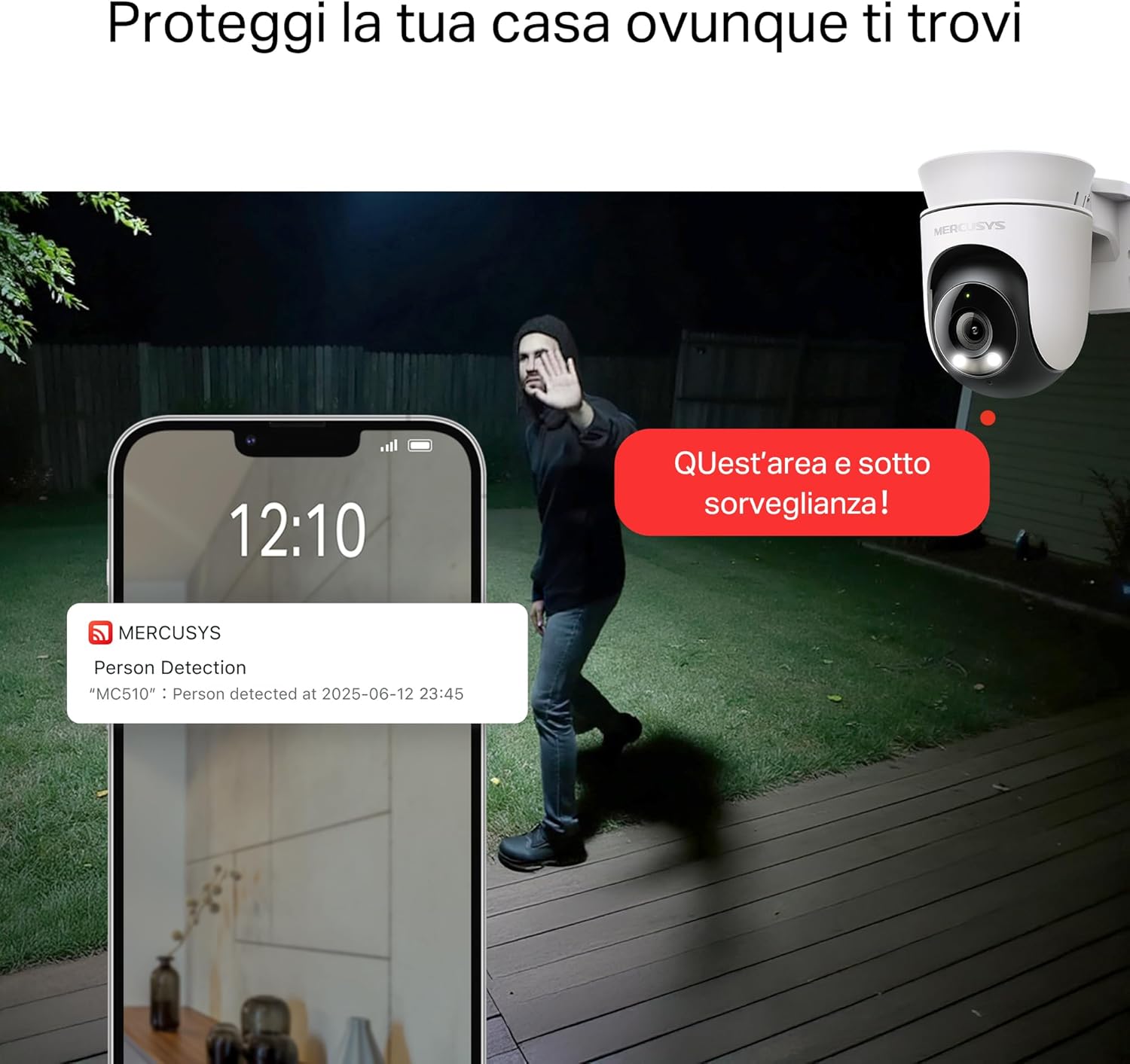
- Smart Motion Detection and Person Tracking: Automatically detects and tracks motion or people, ensuring key activities remain in focus.
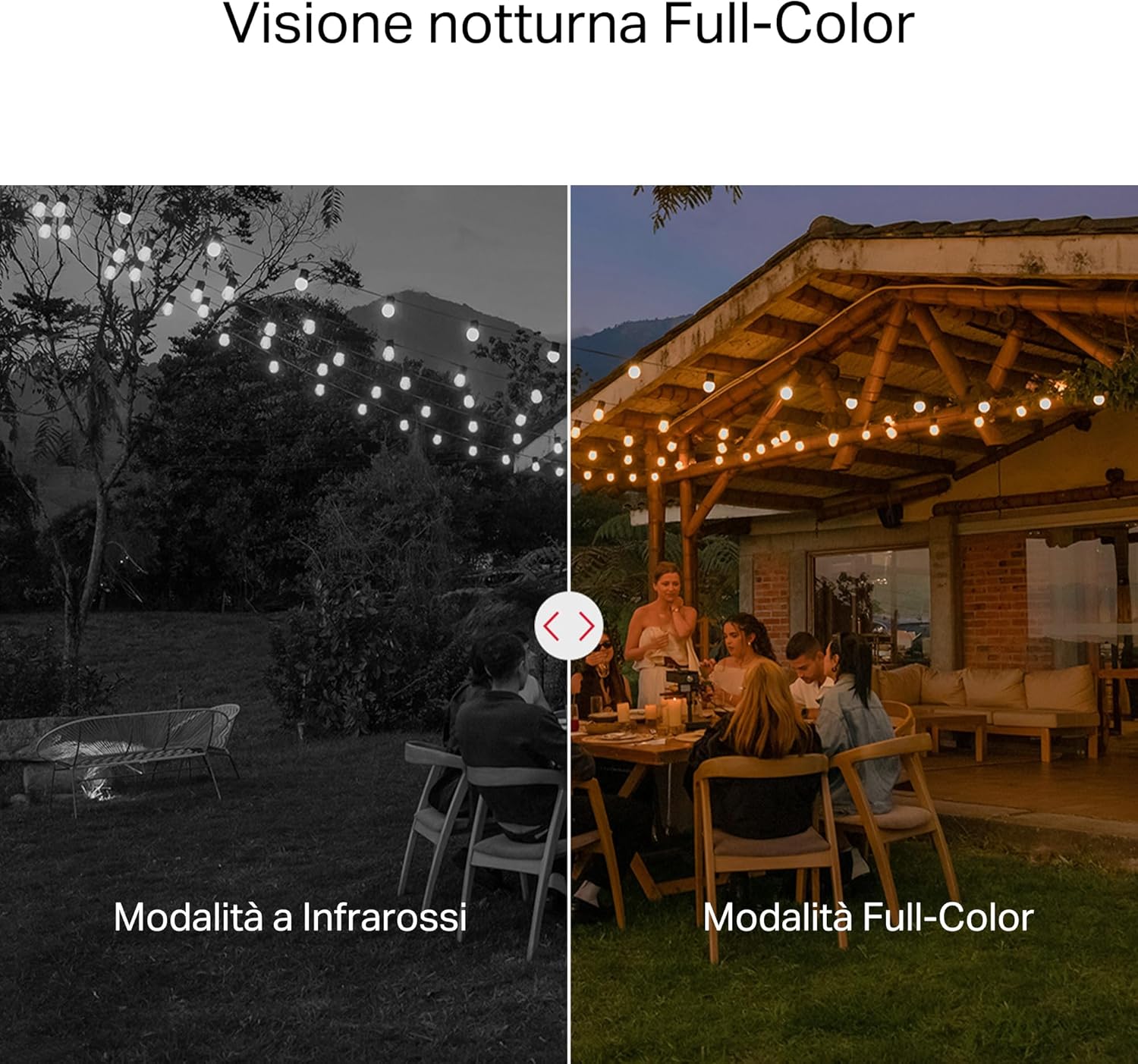
- కలర్ నైట్ విజన్: Provides vivid and detailed images even at night for 24/7 protection.
- అనుకూలీకరించదగిన కార్యాచరణ మండలాలు: Helps filter out irrelevant events and sends alerts only when necessary.
- స్థానిక మరియు క్లౌడ్ నిల్వ: Supports microSD cards up to 512GB and cloud storage for secure and flexible video backup.
- Weatherproof for Outdoor Use: IP65 certified for reliable performance in rain, dust, or snow. Easily mounts on walls, ceilings, or poles.
- Privacy Protection with Lens Shield: Activate the physical lens cover when surveillance is not needed for greater peace of mind at home.
- రెండు-మార్గం ఆడియో: Communicate directly through the camera.
Visual Features:

High-resolution 2K 3MP video capture.
360-degree panoramic rotation for full coverage.
Full-Color Night Vision for clear images in low light.

Physical lens shield for enhanced privacy.
5. సెటప్
5.1 భౌతిక సంస్థాపన
The MC510 camera is designed for outdoor use and can be mounted on walls, ceilings, or poles. Its IP65 rating ensures protection against dust and water jets.
- ఒక స్థానాన్ని ఎంచుకోండి: కావలసిన వాతావరణాన్ని అందించే తగిన బహిరంగ ప్రదేశాన్ని ఎంచుకోండి. viewకోణం మరియు స్థిరమైన Wi-Fi సిగ్నల్ కలిగి ఉంటుంది.
- మౌంటు: Use the provided mounting sticker to mark drill holes. Drill holes, insert anchors, and secure the mounting bracket with screws. Attach the camera to the bracket.
- పవర్ కనెక్షన్: Connect the power adapter to the camera and plug it into a power outlet. Ensure the waterproof gasket is properly installed for outdoor power connections.

Image: The camera is shown mounted outdoors, demonstrating its weather-resistant design.
5.2 యాప్ ఇన్స్టాలేషన్ & కనెక్షన్
The MC510 connects exclusively via Wi-Fi. An Ethernet port is not available.
- అనువర్తనాన్ని డౌన్లోడ్ చేయండి: Download the official MERCUSYS app from your smartphone's app store (iOS or Android).
- ఖాతాను సృష్టించండి: యాప్ని తెరిచి, కొత్త ఖాతాను సృష్టించండి లేదా మీకు ఇప్పటికే ఒకటి ఉంటే లాగిన్ చేయండి.
- కెమెరాను జోడించండి: Follow the in-app instructions to add your MC510 camera. This typically involves scanning a QR code on the camera and connecting it to your home Wi-Fi network.
5.3 మైక్రో SD కార్డ్ ఇన్స్టాలేషన్
For local storage, install a microSD card (up to 512GB, not included).
- పవర్ ఆఫ్: Disconnect the camera from power before inserting or removing the microSD card.
- స్లాట్ను గుర్తించండి: Refer to the camera's physical design to locate the microSD card slot, often protected by a cover.
- కార్డ్ని చొప్పించండి: మైక్రో SD కార్డ్ని స్లాట్లోకి క్లిక్ చేసే వరకు దాన్ని సున్నితంగా చొప్పించండి.
- ఫార్మాట్ కార్డ్: After powering on the camera and connecting it to the app, navigate to the camera settings to format the microSD card.

Image: Close-up of the camera showing the microSD card slot, indicating flexible storage options.
6. ఆపరేటింగ్ సూచనలు
6.1 ప్రత్యక్ష ప్రసారం View & ప్లేబ్యాక్
- ప్రత్యక్షం View: Open the MERCUSYS app and select your MC510 camera to view ప్రత్యక్ష ఫీడ్.
- పాన్/టిల్ట్ నియంత్రణ: Use the controls in the app to remotely rotate the camera horizontally (pan) and vertically (tilt) to adjust the viewing కోణం.
- ప్లేబ్యాక్: రికార్డ్ చేసిన fooని యాక్సెస్ చేయండిtage from the app's playback section. You can filter by date and event.

Image: Illustration of 360-degree rotation with motion tracking.
6.2 Motion Detection & Tracking
- గుర్తింపును ప్రారంభించండి: In the app settings, enable motion detection and person tracking.
- Customize Activity Zones: కెమెరాలోని నిర్దిష్ట ప్రాంతాలను నిర్వచించండి view where you want motion to be detected. This helps reduce false alarms.
- హెచ్చరికలను స్వీకరించండి: The camera will send notifications to your smartphone when motion or a person is detected in the monitored zones.

Image: A person running in a yard, with detection boxes, demonstrating motion detection and tracking.
6.3 టూ-వే ఆడియో
అంతర్నిర్మిత మైక్రోఫోన్ మరియు స్పీకర్ రెండు-మార్గం కమ్యూనికేషన్కు అనుమతిస్తాయి.
- Activate Audio: ప్రత్యక్ష ప్రసారంలో view interface of the app, tap the microphone icon to speak through the camera.
- వినండి: The speaker icon allows you to hear audio from the camera's vicinity.

Image: A person detected by the camera, with a phone notification and an on-screen alert, demonstrating customizable alarms and two-way audio.
6.4 కలర్ నైట్ విజన్
The MC510 provides full-color night vision for enhanced clarity in low-light conditions.
- ఆటోమేటిక్ యాక్టివేషన్: Color night vision activates automatically in low-light conditions.
- పరారుణ మోడ్: The camera also supports traditional infrared night vision (black and white) if preferred or in extremely dark environments.

Image: Comparison of infrared (monochrome) and full-color night vision modes.
6.5 Privacy Zone & Lens Shield
Protect your privacy by defining privacy zones or activating the physical lens shield.
- గోప్యతా మండలాలు: In the app, you can set up specific areas within the camera's view to be excluded from recording.
- Lens Shield: For complete privacy, use the app to activate the physical lens shield, which covers the camera lens.
7. నిర్వహణ
7.1 శుభ్రపరచడం
- కెమెరా శుభ్రం చేయడానికి ముందు పవర్ ఆఫ్ చేయబడిందని నిర్ధారించుకోండి.
- కెమెరా బాడీని తుడవడానికి మృదువైన, పొడి వస్త్రాన్ని ఉపయోగించండి.
- For the lens, use a lens cleaning cloth to avoid scratches. Do not use harsh chemicals or abrasive cleaners.
7.2 ఫర్మ్వేర్ నవీకరణలు
Regularly check for firmware updates through the MERCUSYS app. Updates provide new features, performance improvements, and security enhancements. Follow the in-app instructions to perform updates.
8. ట్రబుల్షూటింగ్
If you encounter issues with your MERCUSYS MC510 camera, refer to the following common problems and solutions:
| సమస్య | సాధ్యమైన పరిష్కారం |
|---|---|
| కెమెరా Wi-Fiకి కనెక్ట్ చేయడం లేదు | Ensure the camera is within range of your Wi-Fi router. Check Wi-Fi password. Restart the camera and router. The MC510 only supports Wi-Fi connection, no Ethernet. |
| పేలవమైన వీడియో నాణ్యత | Check your Wi-Fi signal strength. Ensure the camera lens is clean. Adjust camera placement to avoid glare or obstructions. |
| Motion detection issues | Verify motion detection is enabled in the app. Adjust sensitivity settings. Ensure activity zones are correctly configured. |
| MicroSD card not working | Ensure the card is inserted correctly. Format the microSD card via the app. Try a different compatible microSD card. Power cycle the camera after inserting the card. |
| రెండు-మార్గాల ఆడియో లేదు | Check microphone and speaker settings in the app. Ensure your phone's volume is up. |
9. స్పెసిఫికేషన్లు
| ఫీచర్ | వివరాలు |
|---|---|
| బ్రాండ్ | మెర్క్యుసిస్ |
| మోడల్ పేరు | MC510 |
| ఇండోర్/అవుట్డోర్ ఉపయోగం | అవుట్డోర్ |
| కనెక్షన్ ప్రోటోకాల్ | Wi-Fi |
| మౌంటు రకం | పైకప్పు, స్తంభం, గోడ |
| స్టిల్ ఇమేజ్ రిజల్యూషన్ | 3 ఎంపీ |
| అంతర్జాతీయ రక్షణ రేటింగ్ | IP65 |
| వైర్లెస్ టెక్నాలజీ | Wi-Fi |
| బ్యాటరీలు అవసరం | నం |
| వీడియో క్యాప్చర్ రిజల్యూషన్ | 2K 3MP |
| వీడియో క్యాప్చర్ ఫార్మాట్ | MPEG-4 |
| అంశాల సంఖ్య | 1 |
| చేర్చబడిన భాగాలు | MC510 Camera, Power Adapter, Mounting Sticker, Mounting Bracket, Mounting Screws, Mounting Anchors, Waterproof Gasket, Quick Start Guide |
| మూలం దేశం | చైనా |
| తయారీదారు | TP-లింక్ |
| అంశం కొలతలు | 14.1 x 9.3 x 12.2 సెం.మీ |
10. వారంటీ మరియు మద్దతు
వారంటీ సమాచారం మరియు సాంకేతిక మద్దతు కోసం, దయచేసి అధికారిక MERCUSYS ని చూడండి. website or contact their customer service. Details can typically be found in the Quick Start Guide included with your product or on the manufacturer's webసైట్.
ఆన్లైన్ మద్దతు: సందర్శించండి www.mercusys.com for FAQs, user manuals, and support resources.