
1. పరిచయం
This manual provides essential instructions for the setup, operation, and maintenance of your Laxasfit H9 Pro Max Smart Watch. Designed for daily wear, this smartwatch combines modern technology with a user-friendly interface to help you monitor your health and stay connected. Please read this manual thoroughly before using your device to ensure proper functionality and longevity.
2. ప్యాకేజీ విషయాలు
క్రింద జాబితా చేయబడిన అన్ని అంశాలు మీ ఉత్పత్తి ప్యాకేజీలో ఉన్నాయని నిర్ధారించుకోండి:
- H9 Pro Max Smart Watch
- USB ఛార్జింగ్ కేబుల్
- వినియోగదారు మాన్యువల్
- Extra Strap (Black Silicone)

ఒక ఓవర్ హెడ్ view of the H9 Pro Max Smart Watch package contents, including the watch with a pink strap, an additional black strap, a USB charging cable, and the product box.
3. ప్రారంభించడం
3.1. స్మార్ట్ వాచ్ ఛార్జింగ్
Before initial use, fully charge your H9 Pro Max Smart Watch. Connect the provided USB charging cable to the charging dock and align the watch with the magnetic pins on the dock. Connect the USB end to a standard USB power adapter (not included) or a computer USB port. A full charge typically takes approximately 2 hours.
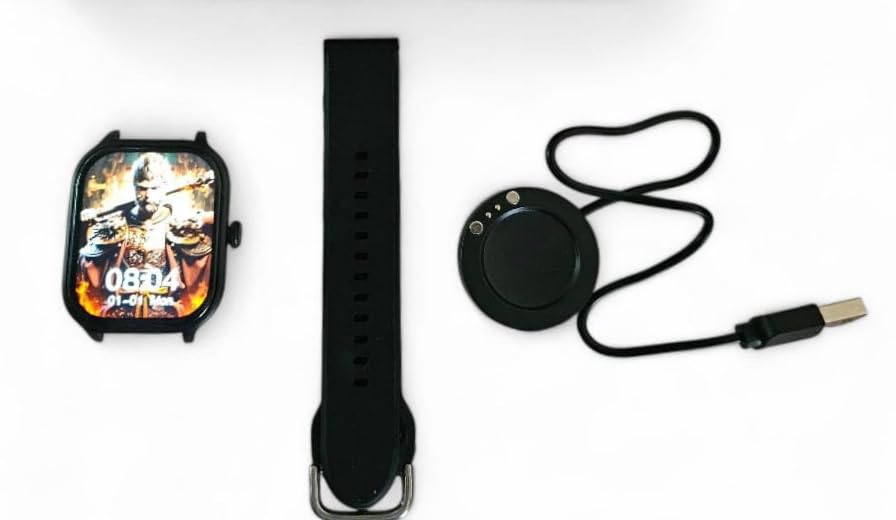
The H9 Pro Max Smart Watch face, a black silicone strap, and the circular USB charging dock laid out separately.
3.2. పవర్ చేయడం ఆన్/ఆఫ్
- పవర్ ఆన్ చేయడానికి: స్క్రీన్ వెలిగే వరకు సైడ్ బటన్ను నొక్కి పట్టుకోండి.
- పవర్ ఆఫ్ చేయడానికి: సైడ్ బటన్ను నొక్కి పట్టుకోండి, ఆపై స్క్రీన్పై 'పవర్ ఆఫ్' ఎంపికను ఎంచుకోండి.
3.3. స్ట్రాప్ ఇన్స్టాలేషన్
The H9 Pro Max Smart Watch comes with interchangeable straps. To attach or change a strap, align the spring bar with the lug holes on the watch body and gently push until it clicks into place. Ensure both ends of the spring bar are securely seated.
3.4. యాప్ ఇన్స్టాలేషన్ మరియు పరికర జత చేయడం
To unlock the full functionality of your smartwatch, download the companion application on your smartphone. The app is compatible with both Android and iOS devices.
- Scan the QR code in the user manual (if provided) or search for the official app in your smartphone's app store.
- మీ స్మార్ట్ఫోన్లో అప్లికేషన్ను ఇన్స్టాల్ చేయండి.
- మీ స్మార్ట్ఫోన్లో బ్లూటూత్ని ప్రారంభించండి.
- Open the app and follow the on-screen instructions to pair your H9 Pro Max Smart Watch. Ensure the watch is powered on and within Bluetooth range of your phone.
4. మీ స్మార్ట్ వాచ్ని ఆపరేట్ చేయడం
4.1. ప్రాథమిక నావిగేషన్
The H9 Pro Max Smart Watch features a responsive touchscreen display for navigation:
- పైకి/క్రిందికి స్వైప్ చేయండి: మెనూలు లేదా నోటిఫికేషన్ల ద్వారా స్క్రోల్ చేయండి.
- ఎడమ/కుడి స్వైప్ చేయండి: విభిన్న విడ్జెట్లు లేదా శీఘ్ర సెట్టింగ్లను యాక్సెస్ చేయండి.
- నొక్కండి: ఒక అంశాన్ని ఎంచుకోండి లేదా చర్యను నిర్ధారించండి.
- సైడ్ బటన్ నొక్కండి: Return to the home screen or activate a specific function (configurable in settings).
4.2. వాచ్ ఫేస్లను అనుకూలీకరించడం
Personalize your smartwatch by changing the watch face. You can select from various pre-installed designs or download additional options through the companion app. To change the watch face directly on the device, press and hold the current watch face, then swipe left or right to browse available options and tap to select.
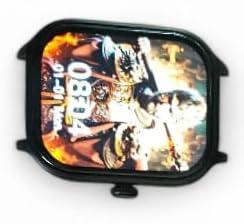
ఒక క్లోజప్ view of the H9 Pro Max Smart Watch display, showing a customized watch face with time and date.
4.3. స్మార్ట్ ఫీచర్లు
The H9 Pro Max Smart Watch offers several features to support your daily activities and health monitoring:
- కార్యాచరణ ట్రాకర్: తీసుకున్న అడుగులు, ప్రయాణించిన దూరం మరియు ఖర్చైన కేలరీలను పర్యవేక్షిస్తుంది.
- హార్ట్ రేట్ మానిటర్: Provides real-time heart rate readings.
- స్లీప్ మానిటర్: నిద్ర విధానాలు మరియు నాణ్యతను ట్రాక్ చేస్తుంది.
Access these features through the watch's menu or the companion app for detailed insights and historical data.
4.4. నోటిఫికేషన్లు
Once paired with your smartphone, the H9 Pro Max Smart Watch can display notifications for calls, messages, and app alerts. Ensure notification permissions are enabled in both your phone's settings and the companion app.
5. నిర్వహణ
5.1. శుభ్రపరచడం
To maintain the appearance and functionality of your smartwatch:
- స్క్రీన్ మరియు వాచ్ బాడీని మృదువైన, మెత్తటి బట్టతో తుడవండి.
- మొండి మచ్చల కోసం, కొద్దిగా dampen గుడ్డను నీటితో తడిపివేయండి. కఠినమైన రసాయనాలు లేదా రాపిడి పదార్థాలను ఉపయోగించకుండా ఉండండి.
- సమర్థవంతమైన ఛార్జింగ్ను నిర్ధారించడానికి ఛార్జింగ్ కాంటాక్ట్లను కాలానుగుణంగా శుభ్రం చేయండి.
5.2. బ్యాటరీ సంరక్షణ
బ్యాటరీ జీవితాన్ని పొడిగించడానికి:
- అధిక ఉష్ణోగ్రతలను నివారించండి, ఎందుకంటే అవి బ్యాటరీ పనితీరును దిగజార్చుతాయి.
- గడియారాన్ని క్రమం తప్పకుండా ఛార్జ్ చేయండి, కానీ ఎక్కువసేపు పూర్తిగా డిశ్చార్జ్ చేయకుండా ఉండండి.
- If storing the watch for a long time, charge it to about 50% before storage.
6. ట్రబుల్షూటింగ్
If you encounter issues with your H9 Pro Max Smart Watch, try the following common troubleshooting steps:
- వాచ్ ఆన్ అవ్వడం లేదు: వాచ్ పూర్తిగా ఛార్జ్ అయ్యిందని నిర్ధారించుకోండి. కనీసం 30 నిమిషాలు దానిని ఛార్జర్కి కనెక్ట్ చేయండి.
- స్మార్ట్ఫోన్తో జత చేయలేము: Check that Bluetooth is enabled on your phone and the watch. Restart both devices and try pairing again. Ensure the companion app has necessary permissions.
- సరికాని ఆరోగ్య డేటా: మీ మణికట్టు మీద వాచ్ గట్టిగా ధరించేలా చూసుకోండి, మరీ బిగుతుగా లేదా మరీ వదులుగా ఉండకూడదు. వాచ్ వెనుక ఉన్న సెన్సార్ను శుభ్రం చేయండి.
- నోటిఫికేషన్లు కనిపించడం లేదు: Verify that notifications are enabled in your phone's settings and within the smartwatch companion app. Check that the watch is connected via Bluetooth.
- స్క్రీన్ స్పందించడం లేదు: Try restarting the watch by pressing and holding the side button. If unresponsive, allow the battery to fully drain and then recharge.
7. ఉత్పత్తి లక్షణాలు
| ఫీచర్ | స్పెసిఫికేషన్ |
|---|---|
| బ్రాండ్ | లాక్సాస్ఫిట్ |
| మోడల్ | H9 Pro Max |
| ప్రదర్శన పరిమాణం | 1.9 అంగుళాలు |
| ప్రదర్శన రకం | డిజిటల్ |
| ఆపరేటింగ్ సిస్టమ్ అనుకూలత | ఆండ్రాయిడ్, iOS |
| అనుకూల పరికరాలు | స్మార్ట్ఫోన్లు |
| ప్రత్యేక లక్షణాలు | Activity Tracker, Heart Rate Monitor, Sleep Monitor |
| మెమరీ స్టోరేజ్ కెపాసిటీ | 1 MB |
| బ్యాటరీ రకం | Lithium Metal (Built-in) |
| బ్యాటరీ సగటు జీవితం | 1 రోజు వరకు |
| ఛార్జింగ్ సమయం | 2 గంటలు |
| వైర్లెస్ కనెక్టివిటీ | బ్లూటూత్ |
| కనెక్టర్ రకం | USB |
| Primary Interface | టచ్స్క్రీన్ |
| మెటీరియల్స్ | మెటల్, ప్లాస్టిక్ |
| వస్తువు బరువు | 85 గ్రా |
| ప్యాకేజీ కొలతలు | 15 x 12 x 8.5 సెం.మీ |
8. వారంటీ మరియు మద్దతు
Your Laxasfit H9 Pro Max Smart Watch comes with a 3 నెలల వారంటీ కొనుగోలు చేసిన తేదీ నుండి. ఈ వారంటీ సాధారణ ఉపయోగంలో తయారీ లోపాలను కవర్ చేస్తుంది. వారంటీ క్లెయిమ్ల కోసం దయచేసి మీ కొనుగోలు రుజువును ఉంచుకోండి.
For technical assistance, troubleshooting beyond this manual, or warranty inquiries, please refer to the contact information provided with your purchase documentation or visit the official Laxasfit support webసైట్.