
పరిచయం
This manual provides essential information for the safe and efficient use of your new Lenovo Slim 7 14ILL10 laptop. Please read it thoroughly before operating your device and retain it for future reference.
సెటప్
అన్ప్యాకింగ్ మరియు ప్రారంభ తనిఖీ
ప్యాకేజింగ్ నుండి అన్ని భాగాలను జాగ్రత్తగా తొలగించండి. అన్ని అంశాలు ఉన్నాయని నిర్ధారించుకోండి:
- Lenovo Slim 7 14ILL10 Laptop
- 65W AC అడాప్టర్
- 1 x 32GB USB Drive
- డాక్యుమెంటేషన్ (ఈ మాన్యువల్)
ఏదైనా భౌతిక నష్టం కోసం ల్యాప్టాప్ను తనిఖీ చేయండి. ఏదైనా నష్టం కనుగొనబడితే లేదా భాగాలు లేకుంటే, వెంటనే మీ రిటైలర్ను సంప్రదించండి.
పవర్ అడాప్టర్ను కనెక్ట్ చేస్తోంది
Connect the 65W AC adapter to the laptop's USB-C Thunderbolt 4 port (Power Delivery compatible) and then to a power outlet. It is recommended to fully charge the battery before first use.

చిత్రం: పై నుండి క్రిందికి view of the Lenovo Slim 7 14ILL10 laptop with the lid partially open, revealing the keyboard and trackpad. This view highlights the sleek design and port locations on the sides.
ప్రారంభ పవర్ ఆన్ మరియు విండోస్ సెటప్
Press the power button to turn on the laptop. Follow the on-screen instructions to complete the Windows 11 Pro setup process. This includes selecting your region, connecting to a Wi-Fi network, and creating a user account.
మీ ల్యాప్టాప్ను ఆపరేట్ చేయడం
కీబోర్డ్ మరియు టచ్ప్యాడ్
వివిధ లైటింగ్ పరిస్థితుల్లో సౌకర్యవంతంగా టైప్ చేయడానికి ల్యాప్టాప్ బ్యాక్లిట్ కీబోర్డ్ను కలిగి ఉంది. టచ్ప్యాడ్ నావిగేషన్ కోసం మల్టీ-టచ్ సంజ్ఞలకు మద్దతు ఇస్తుంది.

చిత్రం: వెనుక view of the Lenovo Slim 7 14ILL10 laptop with the screen open, showcasing the hinge mechanism and the Lenovo branding on the lid.
టచ్స్క్రీన్ డిస్ప్లే
The 14-inch WUXGA (1920 x 1200) OLED touchscreen supports touch input for intuitive interaction with Windows 11 Pro. It features 600 nits brightness, 100% DCI-P3 color gamut, Eyesafe certification, Dolby Vision, and DisplayHDR True Black 500 for a high-quality visual experience.
పోర్టులు మరియు కనెక్టివిటీ
మీ ల్యాప్టాప్ బాహ్య పరికరాలను కనెక్ట్ చేయడానికి వివిధ పోర్ట్లతో అమర్చబడి ఉంది:
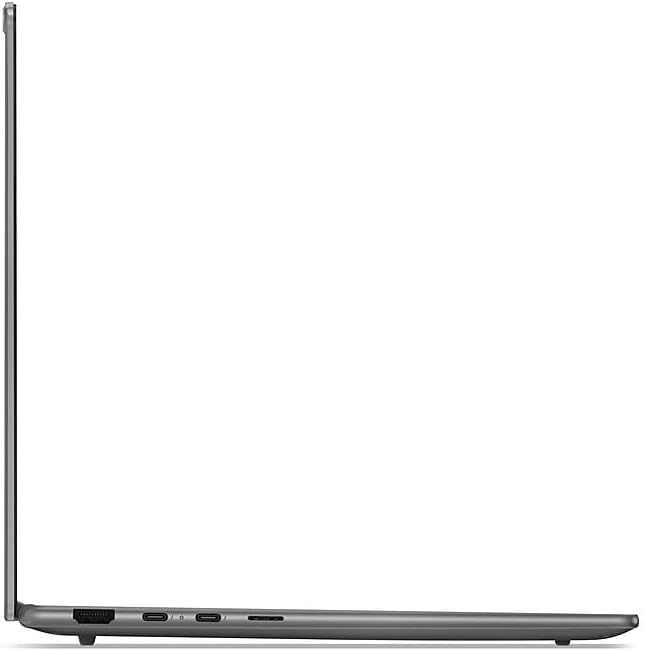
- 2x USB-C Thunderbolt 4 / USB4 40Gbps: Supports Power Delivery and DisplayPort 1.4.
- 1x USB 3.2 Gen 1 (Always On and 5Gbps): ప్రామాణిక USB పరికరాలను కనెక్ట్ చేయడానికి.
- 1x HDMI v2.1: బాహ్య డిస్ప్లేలకు కనెక్ట్ చేయడానికి.
- 1x హెడ్ఫోన్/మైక్రోఫోన్ కాంబో జాక్: ఆడియో ఇన్పుట్ మరియు అవుట్పుట్ కోసం.
Wireless connectivity includes Intel Wi-Fi 7 BE201 (2x2) and Bluetooth 5.3 for high-speed network access and peripheral connections.

చిత్రం: ఎడమ వైపు view of the Lenovo Slim 7 14ILL10 laptop, illustrating the placement of ports such as USB-C and the headphone jack.

చిత్రం: కుడి వైపు view of the Lenovo Slim 7 14ILL10 laptop, showing additional ports like USB-A and HDMI.
Webకెమెరా
The integrated 5.0MP + IR Camera supports video conferencing and Windows Hello facial recognition for secure login.
నిర్వహణ
బ్యాటరీ సంరక్షణ
The laptop is equipped with a 70Wh Lithium-Ion battery. To maximize battery lifespan:
- తీవ్రమైన ఉష్ణోగ్రతలను నివారించండి.
- బ్యాటరీని తరచుగా పూర్తిగా డిశ్చార్జ్ చేయవద్దు.
- ల్యాప్టాప్ను ఎక్కువసేపు ఉపయోగించకపోతే పాక్షిక ఛార్జ్తో (సుమారు 50%) నిల్వ చేయండి.
మీ ల్యాప్టాప్ను శుభ్రపరచడం
కొద్దిగా మెత్తని, మెత్తని బట్టను ఉపయోగించండి dampened with water or a screen cleaner specifically designed for electronics. Avoid harsh chemicals or abrasive materials. Ensure the laptop is powered off and unplugged before cleaning.
చిత్రం: దిగువన view of the Lenovo Slim 7 14ILL10 laptop, displaying the ventilation grilles for cooling and rubber feet for stability.
సాఫ్ట్వేర్ నవీకరణలు
లెనోవా మద్దతు నుండి ఆపరేటింగ్ సిస్టమ్ నవీకరణలు (విండోస్ నవీకరణ) మరియు డ్రైవర్ నవీకరణలను క్రమం తప్పకుండా తనిఖీ చేసి ఇన్స్టాల్ చేయండి. webసరైన పనితీరు మరియు భద్రతను నిర్ధారించడానికి సైట్.
ట్రబుల్షూటింగ్
ఈ విభాగం మీరు ఎదుర్కొనే సాధారణ సమస్యలను పరిష్కరిస్తుంది. మరింత క్లిష్టమైన సమస్యల కోసం, Lenovo మద్దతును చూడండి. webసైట్ లేదా కస్టమర్ సేవను సంప్రదించండి.
పవర్ లేదు / ఆన్ అవ్వదు
- AC అడాప్టర్ ల్యాప్టాప్ మరియు పనిచేసే పవర్ అవుట్లెట్ రెండింటికీ సురక్షితంగా కనెక్ట్ చేయబడిందని నిర్ధారించుకోండి.
- మరొక పరికరాన్ని ప్లగ్ చేయడం ద్వారా పవర్ అవుట్లెట్ పనిచేస్తుందో లేదో ధృవీకరించండి.
- వేరే పవర్ అవుట్లెట్ని ప్రయత్నించండి.
- బ్యాటరీ పూర్తిగా ఖాళీ అయిపోతే, పవర్ ఆన్ చేయడానికి ప్రయత్నించే ముందు కనీసం 30 నిమిషాలు ఛార్జ్ అవ్వనివ్వండి.
డిస్ప్లే సమస్యలు
- If the screen is blank, try pressing the function key to adjust brightness or toggle the display output (e.g., F7 or F8, refer to keyboard legends).
- బాహ్య మానిటర్లు సరిగ్గా కనెక్ట్ చేయబడి, పవర్ ఆన్ చేయబడ్డాయని నిర్ధారించుకోండి.
- ల్యాప్టాప్ను పునఃప్రారంభించండి.
కనెక్టివిటీ సమస్యలు (Wi-Fi/బ్లూటూత్)
- విండోస్ సెట్టింగ్లలో Wi-Fi లేదా బ్లూటూత్ ప్రారంభించబడిందో లేదో తనిఖీ చేయండి.
- Wi-Fi సమస్యల కోసం మీ రౌటర్/మోడెమ్ను రీస్టార్ట్ చేయండి.
- Ensure you are within range of the Wi-Fi network or Bluetooth device.
- Update network drivers from the Lenovo support webసైట్.
స్పెసిఫికేషన్లు
| ఫీచర్ | వివరాలు |
|---|---|
| మోడల్ పేరు | Slim 7 14ILL10 |
| మోడల్ సంఖ్య | 83MC0005US ద్వారా మరిన్ని |
| ప్రాసెసర్ | Intel Core Ultra 7 258V (8-Core, up to 4.8 GHz) |
| గ్రాఫిక్స్ | Intel Arc Graphics 140V |
| మెమరీ (RAM) | 32GB LPDDR5 8533 MHz |
| నిల్వ | 1TB SSD NVMe M.2 |
| ప్రదర్శించు | 14" WUXGA (1920 x 1200) OLED Touchscreen, 60Hz, 600 nits, 100% DCI-P3, Eyesafe, Dolby Vision, DisplayHDR True Black 500 |
| ఆపరేటింగ్ సిస్టమ్ | Windows 11 ప్రో |
| కీబోర్డ్ | బ్యాక్లిట్ కీబోర్డ్ |
| Webకెమెరా | 5.0MP + IR Camera |
| వైర్లెస్ కనెక్టివిటీ | ఇంటెల్ వై-ఫై 7 BE201 (2x2), బ్లూటూత్ 5.3 |
| ఓడరేవులు | 2x USB-C Thunderbolt 4 / USB4 40Gbps, 1x USB 3.2 Gen 1 (Always On), 1x HDMI v2.1, 1x Headphone/Microphone Combo Jack |
| బ్యాటరీ | 70Wh లిథియం-అయాన్ (6 గంటల వరకు) |
| కొలతలు (L x W x H) | 12.28 x 8.63 x 0.55 అంగుళాలు (31.19 x 21.92 x 1.4 సెం.మీ.) |
| బరువు | 2.82 పౌండ్లు (1.28 కిలోలు) |
| రంగు | లూనా గ్రే |
వారంటీ సమాచారం
Your Lenovo Slim 7 14ILL10 laptop comes with a పరిమిత వారంటీ. The product description indicates a 12-month warranty period. For detailed terms and conditions, please refer to the official Lenovo warranty documentation included with your purchase or visit the Lenovo support webసైట్.
If you require support within the warranty period, please contact the retailer or Lenovo customer service with your proof of purchase.
మద్దతు
For technical assistance, driver downloads, and additional resources, please visit the official Lenovo support webసైట్. మీరు తరచుగా అడిగే ప్రశ్నలు, ట్రబుల్షూటింగ్ మార్గదర్శకాలు మరియు కస్టమర్ సేవ కోసం సంప్రదింపు సమాచారాన్ని కనుగొనవచ్చు.
ఆన్లైన్ మద్దతు: support.lenovo.com
When contacting support, please have your laptop's model number (83MC0005US) and serial number ready.