
1. పరిచయం
The AJAZZ AK029 is a high-performance one-handed mechanical gaming keyboard designed for precision and speed. It features a compact 29-key layout, magnetic switches, an 8000Hz polling rate, and 0.01mm RT precision for an ultra-responsive gaming experience. This manual provides detailed instructions for setup, operation, maintenance, and troubleshooting.

Image: The AJAZZ AK029 one-handed gaming keyboard, showcasing its compact design and dimensions (155mm length, 122mm width, 33mm height).

చిత్రం: ఒక ఓవర్view of the AK029 gaming keyboard, highlighting its sleek design and gaming features.

Image: The AK029 keyboard being used in various scenarios, including gaming, video editing, and 3D modeling, demonstrating its versatility.
2. సెటప్
ప్యాకేజీ విషయాలు
- AJAZZ AK029 Keyboard Body
- USB-C కేబుల్ (1.6మీ)
- కీకాప్ పుల్లర్
- స్పేర్ స్విచ్లు
- వేరు చేయగలిగిన క్యారీయింగ్ స్ట్రాప్
- వినియోగదారు మాన్యువల్

Image: The complete package contents of the AJAZZ AK029, including the keyboard, USB-C cable, keycap puller, spare switches, and user manual.
కీబోర్డ్ను కనెక్ట్ చేస్తోంది
- Connect the USB-C end of the provided cable to the USB-C port on the keyboard.
- USB కేబుల్ యొక్క మరొక చివరను మీ కంప్యూటర్లో (Windows లేదా Mac) అందుబాటులో ఉన్న USB పోర్ట్కి కనెక్ట్ చేయండి.
- మీ ఆపరేటింగ్ సిస్టమ్ ద్వారా కీబోర్డ్ స్వయంచాలకంగా గుర్తించబడుతుంది.
3. ఆపరేటింగ్ సూచనలు
కీలక విధులు మరియు లేఅవుట్
The AK029 features a 29-key layout optimized for gaming and productivity. Many keys have secondary functions accessible via the Fn కీ.
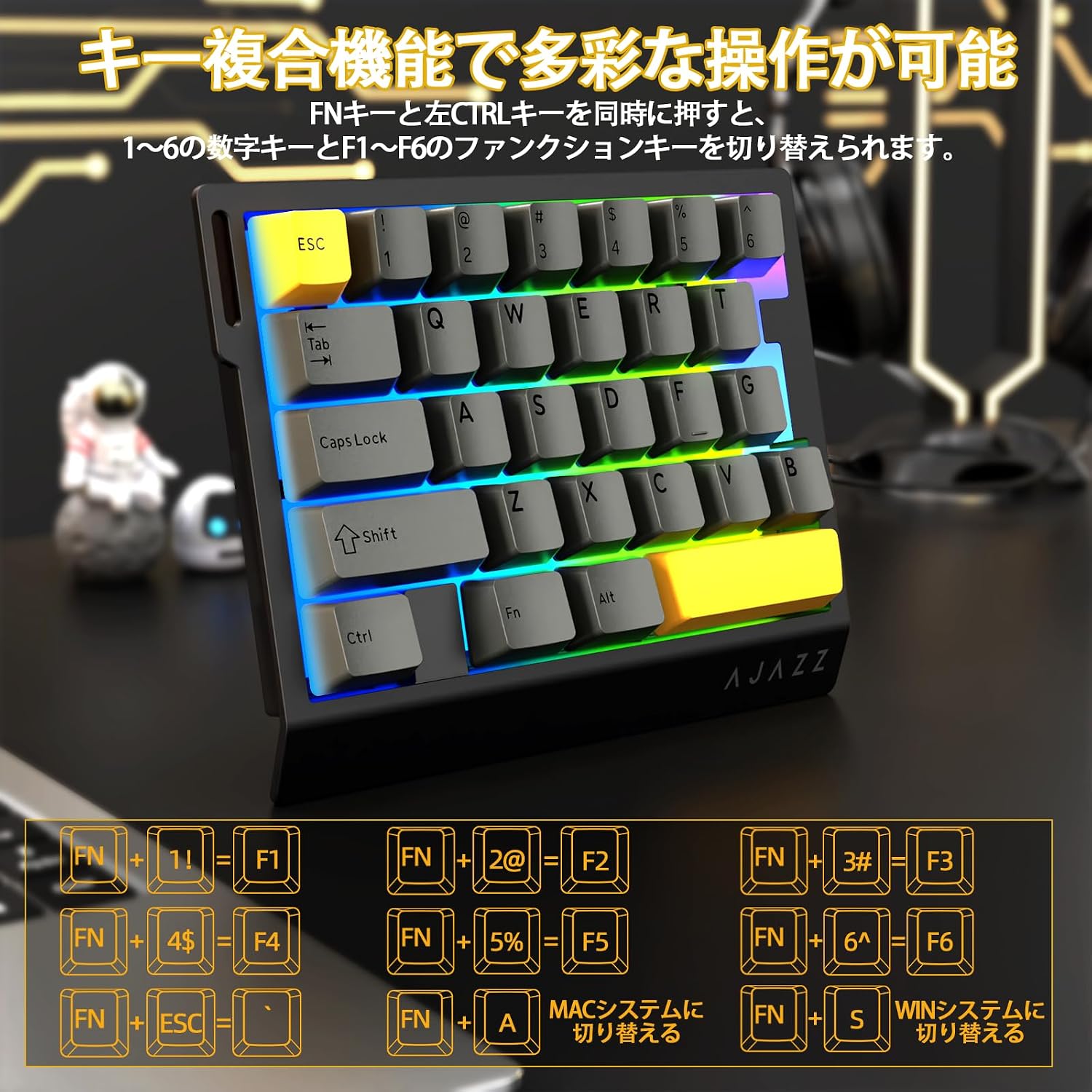
Image: Diagram illustrating the various FN key combinations for accessing secondary functions, such as F1-F6, tilde, and system switching.
- FN + 1-6: Switches between number keys (1-6) and function keys (F1-F6). Default is number keys.
- FN + Esc: Tilde (~)
- FN + A: Switches to Mac mode.
- FN + S: Switches to Windows mode.
Note: When using Mac mode on a Windows PC, the Windows key and Alt key functions may be reversed.
RGB లైటింగ్ మోడ్లు
The keyboard features vibrant RGB backlighting with multiple customizable effects.

Image: The keyboard displaying its colorful RGB backlight, which can be customized with various effects.
- FN + ట్యాబ్: Cycles through 20 different RGB lighting modes.
- FN + G: Increases backlight brightness (5 levels). Backlight flashes 3 times at maximum brightness.
- FN + F: Decreases backlight brightness (5 levels). Backlight flashes 3 times at minimum brightness.
- FN + V: Changes the direction of the lighting effect.
- FN + B: Changes the backlight color.
- FN + T: Increases the speed of the lighting effect (5 levels). Backlight flashes 3 times at maximum speed.
- FN + R: Decreases the speed of the lighting effect (5 levels). Backlight flashes 3 times at minimum speed.
- FN + C: Toggles side light mode (Streaming RGB constant light - Rainbow Breath - Off). Default is Streaming.
- FN + X: Toggles backlight on/off (side lights remain on).
- FN + Space (long press 3-5 seconds): Resets lighting settings to factory defaults. Keyboard lights flash 3 times.
సూచిక Lamps
- క్యాప్స్ లాక్ సూచిక: Pressing the Caps Lock key illuminates a white LED (uppercase input ON). Pressing it again turns off the LED (lowercase input).
- సిస్టమ్ సూచిక: The main key area lights flash 3 times to indicate successful system switching.
Web Driver Customization
The dedicated driver software allows for extensive customization of key functions, macros, and RGB lighting effects. This enables true personalization to match individual playstyles and preferences.

చిత్రం: స్క్రీన్షాట్ web driver interface, showing options for custom keys, lighting effects, macro management, and performance settings.
డ్రైవర్ Webసైట్: https://ajazz.driveall.cn/#/
4. నిర్వహణ
క్లీనింగ్
- Use a soft, dry cloth to wipe the keyboard surface.
- For dust between keycaps, use compressed air.
- కఠినమైన రసాయనాలు లేదా రాపిడి పదార్థాలను ఉపయోగించడం మానుకోండి.
Hot-Swappable Switch Replacement
The AK029 supports hot-swappable magnetic switches, allowing for easy replacement and customization.

చిత్రం: క్లోజప్ view of the hot-swappable magnetic switches, showing the mechanism and keycap removal tool.
- కావలసిన కీక్యాప్ను సున్నితంగా తొలగించడానికి కీక్యాప్ పుల్లర్ను ఉపయోగించండి.
- Use the switch puller to firmly grip the top and bottom tabs of the switch.
- Pull the switch straight upwards to remove it from the keyboard.
- Align the pins of the new switch with the holes on the keyboard.
- Gently push the new switch vertically until it clicks into place.
5. ట్రబుల్షూటింగ్
కీబోర్డ్ ప్రతిస్పందించడం లేదు
- USB-C కేబుల్ కీబోర్డ్ మరియు కంప్యూటర్ రెండింటికీ సురక్షితంగా కనెక్ట్ చేయబడిందని నిర్ధారించుకోండి.
- మీ కంప్యూటర్లోని కీబోర్డ్ను వేరే USB పోర్ట్కు కనెక్ట్ చేయడానికి ప్రయత్నించండి.
- కంప్యూటర్-నిర్దిష్ట సమస్యను తోసిపుచ్చడానికి మరొక కంప్యూటర్లో కీబోర్డ్ను పరీక్షించండి.
- మీ కంప్యూటర్ని పునఃప్రారంభించండి.
RGB Backlight Not Working or Incorrect
- Ensure the backlight is not turned off (FN + X).
- Adjust brightness using FN + G (increase) and FN + F (decrease).
- Cycle through lighting modes using FN + Tab.
- Perform a factory reset for lighting settings by long-pressing FN + Space for 3-5 seconds.
Key Input Issues or Inaccurate Response
- Ensure the correct system mode (Windows/Mac) is selected using FN + A or FN + S.
- If a specific key is not responding, try replacing its switch using the hot-swap procedure.
- Update the keyboard firmware using the dedicated web డ్రైవర్ సాఫ్ట్వేర్.
- Check for any physical obstructions under the keycap or switch.
6. స్పెసిఫికేషన్లు
| ఫీచర్ | వివరణ |
|---|---|
| బ్రాండ్ | A.JAZZ |
| మోడల్ | AK029 |
| కనెక్టివిటీ | USB-C వైర్డు |
| కీ లేఅవుట్ | 29 Keys (One-Handed) |
| స్విచ్ రకం | Magnetic Switches (Hot-Swappable) |
| పోలింగ్ రేటు | 8000Hz |
| జాప్యం | 0.125ms అల్ట్రా-తక్కువ జాప్యం |
| RT ప్రెసిషన్ | 0.01mm (0.03mm detection increments) |
| స్కాన్ రేటు | 130K |
| బ్యాక్లైట్ | RGB (20 lighting modes) |
| కీ రోల్ ఓవర్ | పూర్తి N-కీ రోల్ ఓవర్ |
| ప్లేట్ మెటీరియల్ | అల్యూమినియం మిశ్రమం |
| ధ్వని డిampening | 5-Layer Structure (PO sandwich cotton, IXPE switch pad, PET sound sheet, EPDM cotton, silicone gel) |
| ఎర్గోనామిక్స్ | Ergonomic design with stepped curved keycaps and wrist rest |
| అనుకూల OS | విండోస్, MAC |
| కొలతలు | 155mm (L) x 122mm (W) x 33mm (H) |
| బరువు | సుమారు 300గ్రా |
| కేబుల్ పొడవు | 1.6మీ |

Image: Detailed basic specifications of the AK029 keyboard, including brand, model, connectivity, dimensions, and lighting.

చిత్రం: పేలింది view of the keyboard's internal structure, highlighting the 5-layer sound dampening system and aluminum alloy plate for enhanced stability and acoustics.

Image: Illustration of the ergonomic design of the AK029, featuring stepped keycaps and a wrist rest for comfortable long-term use.
7. వారంటీ మరియు మద్దతు
వారంటీ సమాచారం
The AJAZZ AK029 keyboard comes with a 1-year manufacturer's warranty from the date of purchase. This warranty covers defects in materials and workmanship under normal use.
కస్టమర్ మద్దతు
For technical assistance, warranty claims, or any other inquiries, please contact AJAZZ customer support through their official webఉత్పత్తిని కొనుగోలు చేసిన సైట్ లేదా రిటైలర్.
అధికారిక Webసైట్: https://ajazz.driveall.cn/#/