
ముఖ్యమైన భద్రతా సూచనలు
ఎలక్ట్రికల్ ఉపకరణాలను ఉపయోగిస్తున్నప్పుడు, కింది వాటితో సహా ప్రాథమిక భద్రతా జాగ్రత్తలు ఎల్లప్పుడూ అనుసరించాలి:
- టోస్టర్ని ఆపరేట్ చేసే ముందు అన్ని సూచనలను చదవండి.
- వేడి ఉపరితలాలను తాకవద్దు. హ్యాండిల్స్ లేదా నాబ్లను ఉపయోగించండి.
- విద్యుత్ షాక్ నుండి రక్షించడానికి, త్రాడు, ప్లగ్ లేదా టోస్టర్ను నీటిలో లేదా ఇతర ద్రవంలో ముంచవద్దు.
- ఏదైనా ఉపకరణాన్ని పిల్లలు లేదా సమీపంలో ఉపయోగించినప్పుడు నిశిత పర్యవేక్షణ అవసరం.
- ఉపయోగంలో లేనప్పుడు మరియు శుభ్రపరిచే ముందు అవుట్లెట్ నుండి అన్ప్లగ్ చేయండి. భాగాలను ఉంచడానికి లేదా తీయడానికి ముందు చల్లబరచడానికి అనుమతించండి.
- పాడైపోయిన త్రాడు లేదా ప్లగ్తో లేదా ఉపకరణం పనిచేయకపోవడం లేదా ఏ పద్ధతిలో పాడైపోయిన తర్వాత ఏ పరికరాన్ని ఆపరేట్ చేయవద్దు.
- త్రాడు టేబుల్ లేదా కౌంటర్ అంచుపై వేలాడదీయవద్దు లేదా వేడి ఉపరితలాలను తాకవద్దు.
- వేడి గ్యాస్ లేదా ఎలక్ట్రిక్ బర్నర్ లేదా వేడిచేసిన ఓవెన్లో ఉంచవద్దు.
- ఉపకరణాన్ని ఉద్దేశించిన ఉపయోగం కాకుండా ఇతర వాటి కోసం ఉపయోగించవద్దు.
- టోస్టర్లో అతి పెద్ద ఆహార పదార్థాలు, మెటల్ ఫాయిల్ ప్యాకేజీలు లేదా పాత్రలను ఉంచకూడదు ఎందుకంటే అవి మంటలు లేదా విద్యుత్ షాక్ ప్రమాదాన్ని సృష్టించవచ్చు.
- టోస్టర్లు కప్పబడి ఉంటే లేదా కర్టెన్లు, డ్రేపరీలు, గోడలు మరియు వంటి వాటితో సహా మండే పదార్థాలను తాకినట్లయితే మంటలు సంభవించవచ్చు.
- టోస్టర్ ప్లగిన్ చేయబడినప్పుడు ఆహారాన్ని తీసివేయడానికి ప్రయత్నించవద్దు.
- గమనించకుండా ఆపరేట్ చేయవద్దు.
ఉత్పత్తి ముగిసిందిview
The WHALLULTRA Touchscreen Toaster is a 2-slice appliance designed for efficient and versatile toasting. It features a modern touchscreen interface, durable stainless steel construction, wide slots to accommodate various bread types, and an integrated warming rack. This toaster offers multiple functions including Bagel, Defrost, Reheat, and Cancel, along with adjustable shade settings.
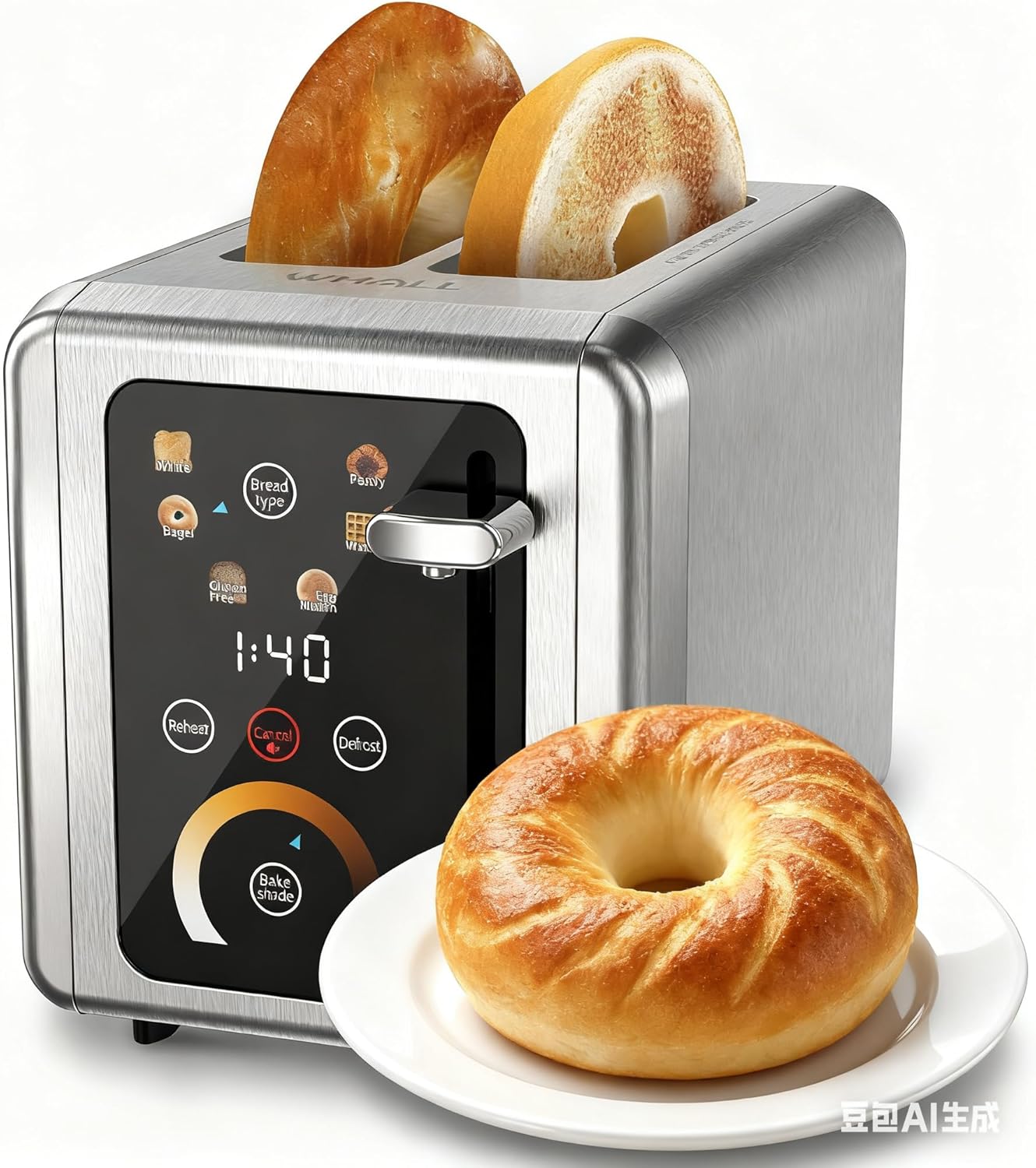
Image: The WHALLULTRA Touchscreen Toaster, showcasing its stainless steel finish and touchscreen control panel, with two toasted bagel halves emerging from the slots and a fresh bagel on a plate beside it.
సెటప్
- అన్ప్యాక్: టోస్టర్ మరియు అన్ని ప్యాకేజింగ్ సామగ్రిని జాగ్రత్తగా తొలగించండి. భవిష్యత్తులో నిల్వ లేదా రవాణా కోసం ప్యాకేజింగ్ను ఉంచండి.
- ప్లేస్మెంట్: టోస్టర్ను స్థిరమైన, చదునైన, వేడి-నిరోధక ఉపరితలంపై, మండే పదార్థాలకు దూరంగా ఉంచండి. టోస్టర్ చుట్టూ తగినంత వెంటిలేషన్ ఉండేలా చూసుకోండి.
- మొదటి ఉపయోగం (బర్న్-ఆఫ్): Before first use, operate the toaster without bread on the highest shade setting to burn off any manufacturing residues. A slight odor or smoke may be present; this is normal. Ensure the area is well-ventilated.
- పవర్ కనెక్ట్ చేయండి: పవర్ కార్డ్ను ప్రామాణిక ఎలక్ట్రికల్ అవుట్లెట్లోకి ప్లగ్ చేయండి.
ఆపరేటింగ్ సూచనలు
ప్రాథమిక ఆపరేషన్
- దశ 1: టోస్టర్ స్లాట్లలోకి బ్రెడ్ ముక్కలను చొప్పించండి.
- దశ 2: Use the touchscreen to select the desired bread type (e.g., White, Bagel, Gluten Free, Eng Muffin, Pastry, Waffle) and adjust the toast shade level. Press 'Defrost' or 'Reheat' if needed.
- దశ 3: Push the toast lever down until it locks into place. The toasting cycle will begin.
- దశ 4: Once the countdown ends, the toasted bread will automatically pop up.

Image: A visual guide illustrating the four basic steps of operating the toaster: inserting bread, selecting settings on the touchscreen, pushing down the lever, and the bread popping up when done.
నియంత్రణ ప్యానెల్ విధులు

చిత్రం: వివరణాత్మక view of the toaster's touchscreen control panel, highlighting the 'Bread Type', 'Cancel', 'Defrost', and 'Reheat' buttons with their respective functions explained.
- Bread Type: Press this button to cycle through different bread types (White, Bagel, Gluten Free, Eng Muffin, Pastry, Waffle) for optimized toasting.
- రద్దు చేయండి: Press to stop the current toasting cycle immediately. A long press for 2 seconds will mute the toaster's sound.
- డీఫ్రాస్ట్: Activates a longer toasting cycle (approximately 20% longer) suitable for toasting frozen bread.
- మళ్లీ వేడి చేయండి: Reheats bread for 30 seconds after a cycle has finished, without further browning.
టోస్ట్ షేడ్ ఎంపిక

Image: A graphic demonstrating various toast shade levels, from light to dark, with approximate toasting times ranging from 70 seconds to 230 seconds, indicating the toaster's adjustable shade control.
The toaster offers a range of shade settings, allowing you to customize your toast from lightly golden to dark and crispy. Use the 'Bake Shade' control on the touchscreen to select your preferred level. The display will show the remaining time for the selected shade.
బ్రెడ్ రకం ఎంపిక

Image: The WHALLULTRA Touchscreen Toaster centrally placed, with an arc of different bread types around it, including bagels, white bread, gluten-free bread, English muffins, waffles, and pastries, illustrating its versatility.
The 'Bread Type' function optimizes toasting for specific items. Select the appropriate type for best results:
- తెలుపు: Standard setting for white bread.
- బాగెల్: బయటి వైపును సున్నితంగా వేడి చేస్తూ, బేగెల్స్ కట్ చేసిన వైపును టోస్ట్ చేస్తుంది.
- Gluten Free: Optimized for gluten-free bread, which often requires a different toasting profile.
- Eng Muffin: Suitable for English muffins.
- పేస్ట్రీ: Ideal for pastries and thicker items.
- ఊక దంపుడు: For toasting waffles.
నిర్వహణ మరియు శుభ్రపరచడం
క్రమం తప్పకుండా శుభ్రపరచడం వల్ల మీ టోస్టర్ యొక్క పనితీరు ఉత్తమంగా ఉంటుంది మరియు దాని జీవితకాలం పెరుగుతుంది.
- టోస్టర్ను ఎల్లప్పుడూ అన్ప్లగ్ చేయండి మరియు శుభ్రం చేయడానికి ముందు పూర్తిగా చల్లబరచడానికి అనుమతించండి.
- చిన్న ముక్క: టోస్టర్ దిగువన ఉన్న క్రంబ్ ట్రేని బయటకు తీయండి. క్రంబ్స్ను పారవేసి, ట్రేని ప్రకటనతో శుభ్రంగా తుడవండి.amp cloth. Ensure the tray is completely dry before reinserting. Clean the crumb tray regularly to prevent crumb buildup, which can be a fire hazard.
- బాహ్య: టోస్టర్ యొక్క బాహ్య భాగాన్ని మృదువైన, d శుభ్రముపరచుతో తుడవండి.amp రాపిడి క్లీనర్లు లేదా మెటల్ స్కౌరింగ్ ప్యాడ్లను ఉపయోగించవద్దు, ఎందుకంటే అవి ఉపరితలంపై గీతలు పడవచ్చు.
- అంతర్గత: Never insert any objects into the toaster slots to clean. If food becomes lodged, unplug the toaster and carefully invert it to shake out the food.
- టోస్టర్ను నీటిలో లేదా మరే ఇతర ద్రవంలో ముంచవద్దు.
ట్రబుల్షూటింగ్
మీ టోస్టర్తో మీకు సమస్యలు ఎదురైతే, ఈ క్రింది సాధారణ సమస్యలు మరియు పరిష్కారాలను చూడండి:
| సమస్య | సాధ్యమైన కారణం | పరిష్కారం |
|---|---|---|
| టోస్టర్ ఆన్ అవ్వదు. | ప్లగ్ ఇన్ చేయబడలేదు; పవర్ అవుట్లెట్ సమస్య; సర్క్యూట్ బ్రేకర్ ట్రిప్ అయింది. | Ensure the toaster is securely plugged into a working outlet. Check your household circuit breaker. |
| లివర్ క్రిందికి ఉండదు. | టోస్టర్ ప్లగ్ ఇన్ చేయబడలేదు; అంతర్గత యంత్రాంగం సమస్య. | Ensure the toaster is plugged into a live electrical outlet. If the issue persists, contact customer support. |
| Bread is unevenly toasted. | బ్రెడ్ మందం అసమానంగా ఉండటం; ముక్కలు పేరుకుపోవడం. | Ensure bread slices are of uniform thickness. Clean the crumb tray and check for any obstructions in the slots. |
| పొగ లేదా మండే వాసన. | Crumb buildup; food lodged in slots; first use burn-off. | Immediately unplug the toaster. Clean the crumb tray. If food is lodged, carefully remove it after the toaster has cooled. Ensure adequate ventilation during first use. |
స్పెసిఫికేషన్లు
- మోడల్: WHALLULTRA Touchscreen Toaster 2 Slice
- శక్తి: 850W
- ముక్కలు: 2
- మెటీరియల్: స్టెయిన్లెస్ స్టీల్
- విధులు: Bagel, Defrost, Reheat, Cancel, Adjustable Shade Control, Multiple Bread Types
- నియంత్రణ: టచ్స్క్రీన్ ఇంటర్ఫేస్
వారంటీ మరియు మద్దతు
Your WHALLULTRA Touchscreen Toaster is covered by a manufacturer's warranty against defects in material and workmanship under normal household use. Please refer to the warranty card included with your purchase for specific terms and conditions, including the warranty period and how to make a claim.
For technical support, troubleshooting assistance, or warranty inquiries, please contact WHALLULTRA customer service. Contact information can typically be found on the product packaging or the official WHALLULTRA webసైట్.