
1. పరిచయం
This manual provides detailed instructions for the safe and efficient operation of your Romicta AK50MAX Stereo Audio Ampలైఫైయర్. పరికరాన్ని ఉపయోగించే ముందు దయచేసి ఈ మాన్యువల్ని పూర్తిగా చదవండి మరియు భవిష్యత్తు సూచన కోసం దాన్ని ఉంచండి.
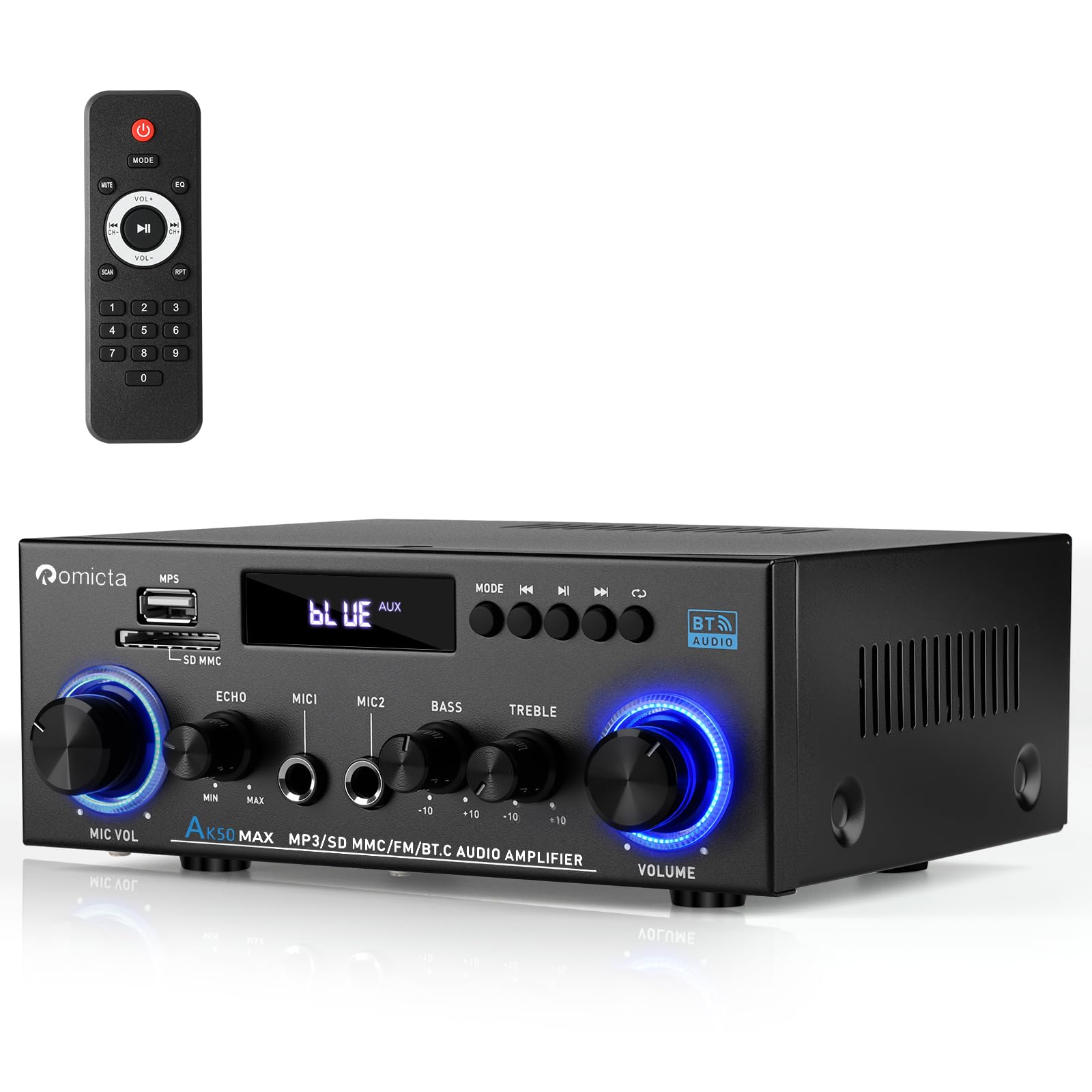
Figure 1: Romicta AK50MAX Stereo Audio Ampజీవితకాలం
2 కీ ఫీచర్లు
- శక్తివంతమైన అవుట్పుట్: 400W+400W peak power, 50W+50W rated power. Supports 4-16 inch passive speakers and active subwoofers.
- Microphone Input & Output with Echo Control: Equipped with MIC input and output ports, plus an independent Echo adjustment knob for karaoke or announcements.
- Enhanced Bluetooth 5.0: Extended transmission range up to 50ft/15m (open area) and faster pairing for seamless wireless streaming.
- USB/SD కార్డ్ ప్లేబ్యాక్: Supports USB 2.0 flash drives and SD cards for direct MP3 playback.
- Tone & Volume Control: Independent knobs for Bass, Treble, Master Volume, Mic Volume, and Echo. Includes a remote control for convenience.
- విస్తృత అనుకూలత: Connects with mobile phones, tablets, laptops, TVs, DVD players, home speakers, bookshelf speakers, gaming setups, car audio systems, and outdoor speakers.
3. పెట్టెలో ఏముంది
అన్ప్యాక్ చేసేటప్పుడు అన్ని వస్తువులు ఉన్నాయని నిర్ధారించుకోండి:
- 1x Romicta AK50MAX Stereo Audio Ampజీవితకాలం
- 1x పవర్ కేబుల్
- 1x FM యాంటెన్నా
- 1x రిమోట్ కంట్రోల్
- 1x యూజర్ మాన్యువల్ (ఈ పత్రం)
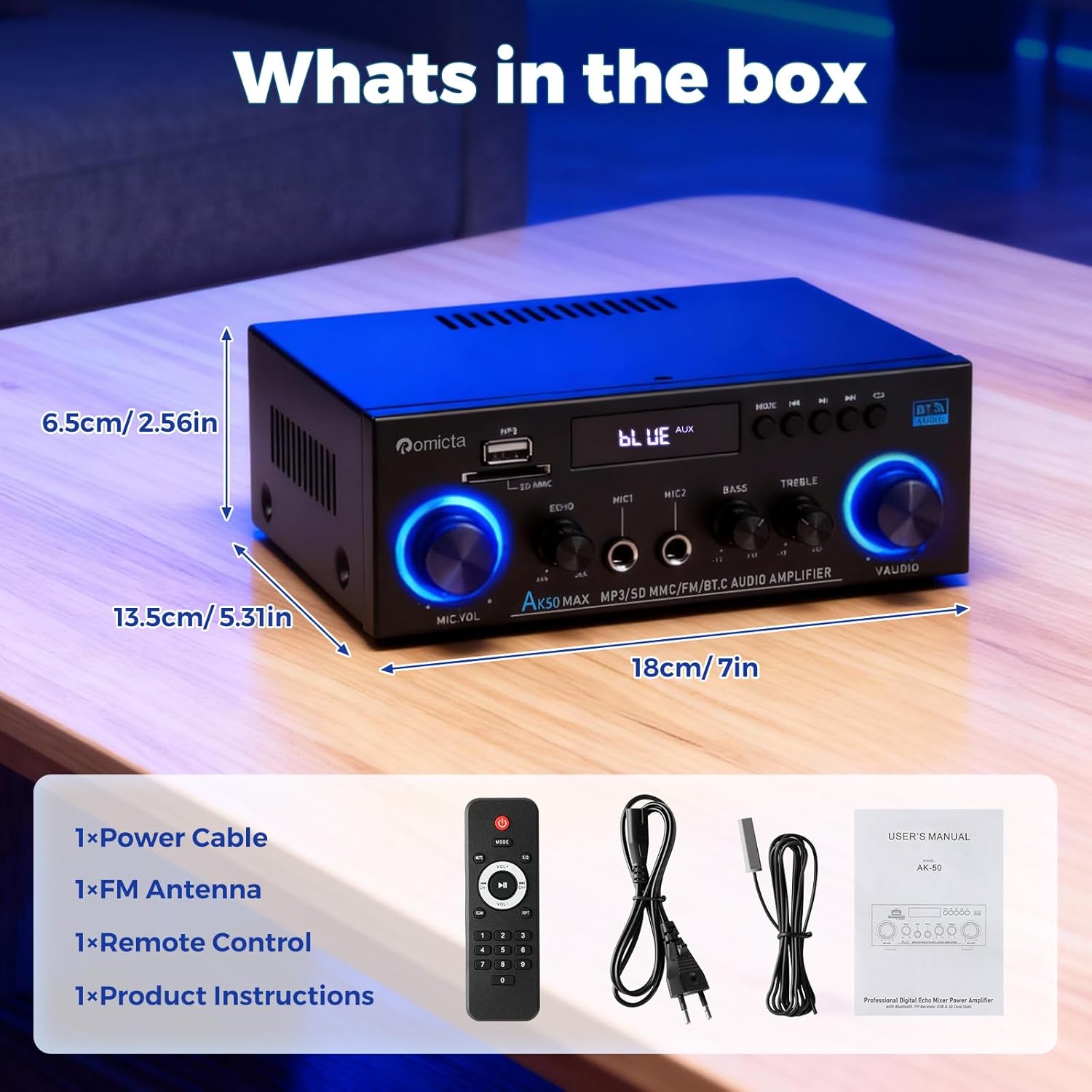
మూర్తి 2: ప్యాకేజీ కంటెంట్లు
4. ఉత్పత్తి ముగిసిందిview
4.1 ఫ్రంట్ ప్యానెల్

చిత్రం 3: ముందు ప్యానెల్ నియంత్రణలు
- పవర్ స్విచ్: తిరుగుతుంది ampలైఫైయర్ ఆన్/ఆఫ్.
- బాస్/ట్రెబుల్ నాబ్స్: Adjust low and high frequencies.
- USB/SD కార్డ్ స్లాట్లు: For direct MP3 playback.
- మోడ్ బటన్: Switches between input sources (AUX, USB, Bluetooth, FM, Optical, Coaxial).
- ప్లేబ్యాక్ నియంత్రణలు: Play/Pause, Previous/Next track.
- వాల్యూమ్ నాబ్: మాస్టర్ వాల్యూమ్ నియంత్రణ.
- MIC VOL నాబ్: మైక్రోఫోన్ వాల్యూమ్ను సర్దుబాటు చేస్తుంది.
- MIC 1/MIC 2 ఇన్పుట్లు: 6.35mm jack for microphones.
- Echo/Delay Knobs: Adjust microphone echo and delay effects.
4.2 వెనుక ప్యానెల్
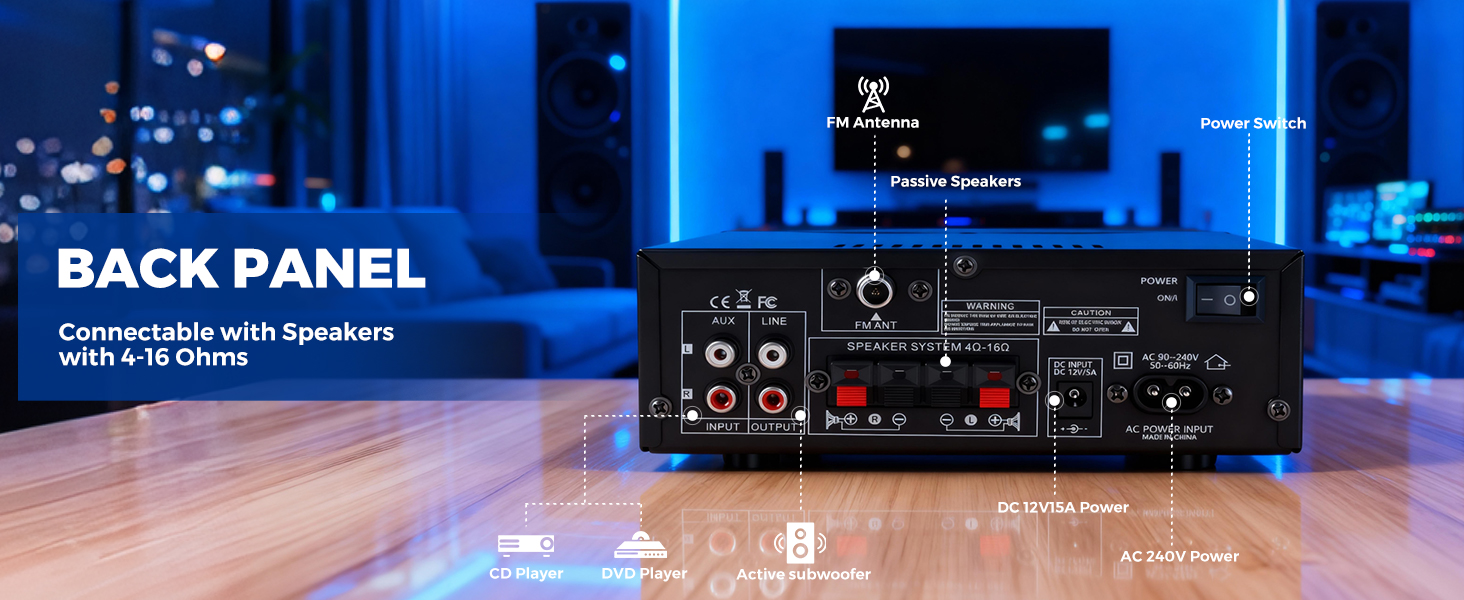
చిత్రం 4: వెనుక ప్యానెల్ కనెక్షన్లు
- Optical/Coaxial Inputs: Digital audio inputs.
- AUX/Line Inputs (RCA): Analog audio inputs for external devices.
- Line Output (RCA): Audio output for connecting to other audio equipment or active subwoofers.
- స్పీకర్ టెర్మినల్స్: పాసివ్ స్పీకర్లను కనెక్ట్ చేయండి (4-16Ω ఇంపెడెన్స్).
- DC ఇన్పుట్: Power input (DC 12V/5A).
- AC పవర్ ఇన్పుట్: Connects to the main power supply (AC 90-240V, 50-60Hz).
- FM ANT: FM antenna connection port.
5. సెటప్ సూచనలు
5.1 స్పీకర్లను కనెక్ట్ చేస్తోంది
Connect your passive speakers to the speaker terminals on the back panel. Ensure correct polarity (red to red, black to black) for optimal sound quality. The amplifier supports speakers with 4-16Ω impedance.
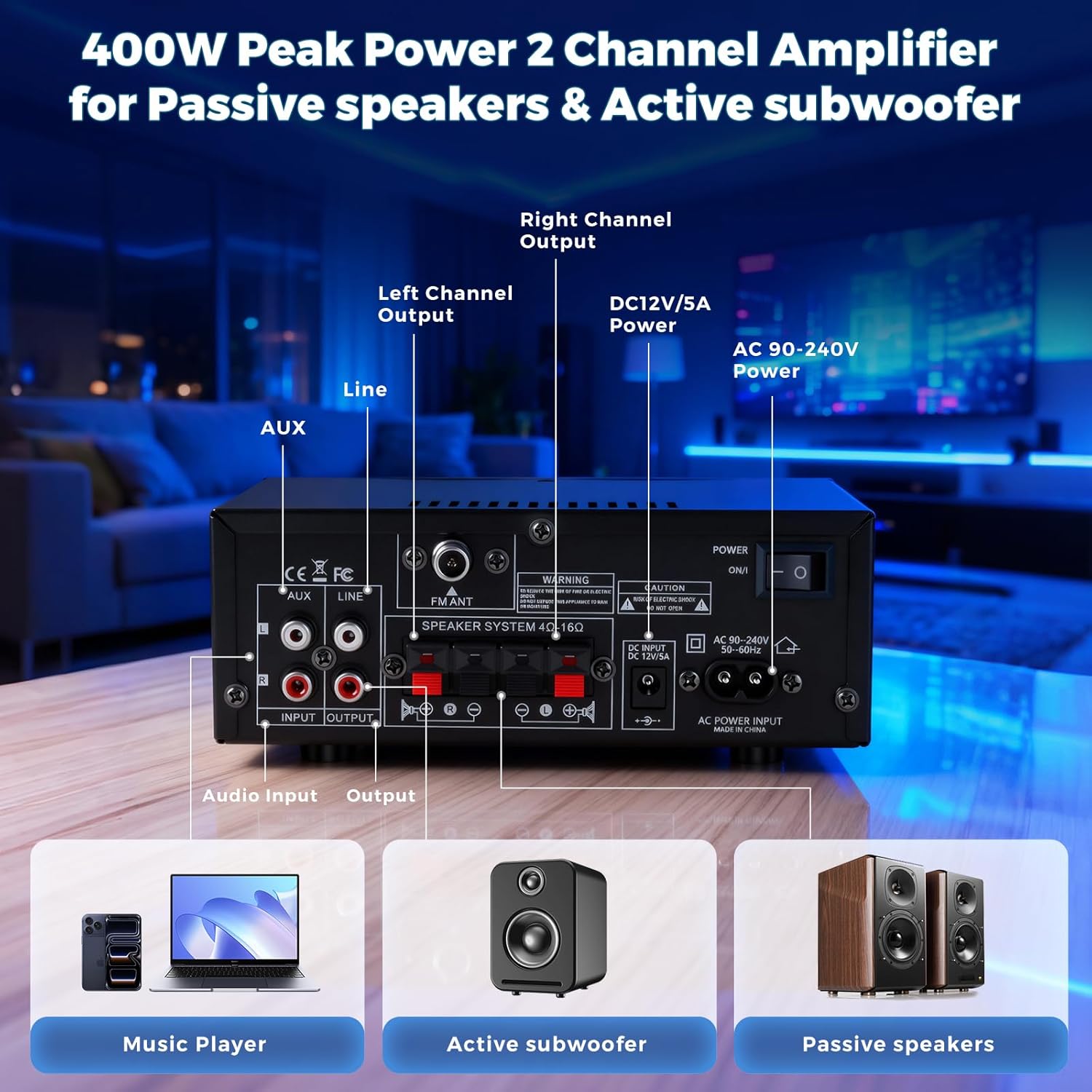
Figure 5: Speaker Connection Diagram
5.2 FM యాంటెన్నాను కనెక్ట్ చేస్తోంది
Attach the provided FM antenna to the 'FM ANT' port on the back of the amplifier for improved radio reception.
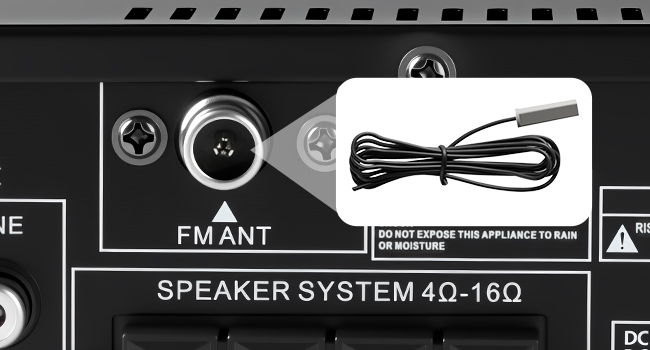
Figure 6: FM Antenna Connection
5.3 పవర్ కనెక్షన్
Connect the power cable to the 'AC Power Input' on the back panel and then plug it into a standard wall outlet. Alternatively, for DC power, use the 'DC Input 12V/5A' port.
Video 1: This Stereo Amplifier is Easy to Setup. This video demonstrates the basic setup process, including power and speaker connections.
6. ఆపరేటింగ్ సూచనలు
6.1 పవర్ ఆన్/ఆఫ్
Press the Power switch on the front panel to turn the amplifier on or off. The display will illuminate when powered on.
6.2 ఇన్పుట్ మూలాన్ని ఎంచుకోవడం
Press the 'Mode' button on the front panel or the remote control to cycle through available input sources: AUX, USB, Bluetooth, FM, Optical, and Coaxial.
6.3 బ్లూటూత్ కనెక్టివిటీ
1. Select 'Bluetooth' mode using the 'Mode' button. The display will show 'BLUE'.
2. On your device (phone, tablet, etc.), enable Bluetooth and search for 'AK50MAX'.
3. Select 'AK50MAX' to pair. Once connected, you can stream audio wirelessly.
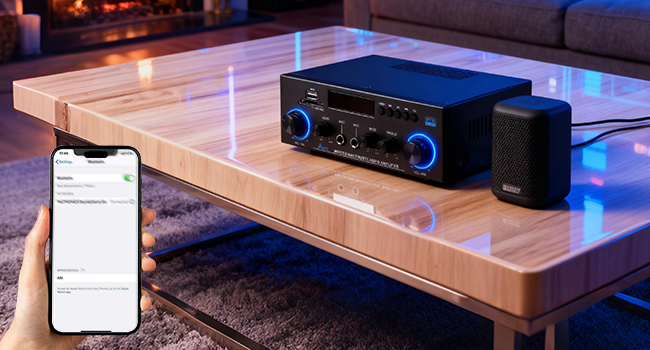
Figure 7: Bluetooth Pairing
6.4 USB/SD కార్డ్ ప్లేబ్యాక్
Insert a USB 2.0 flash drive or SD card into the respective slot on the front panel. The amplifier will automatically switch to USB/SD mode and begin playing MP3 files.
6.5 FM రేడియో ఆపరేషన్
1. Select 'FM' mode using the 'Mode' button.
2. Use the Previous/Next track buttons to manually tune or long-press to auto-scan for stations.
3. Ensure the FM antenna is properly connected for optimal reception.
6.6 మైక్రోఫోన్ వాడకం
1. Plug microphones into the 'MIC 1' or 'MIC 2' input jacks.
2. Adjust the 'MIC VOL' knob to control microphone volume.
3. Use the 'Echo' and 'Delay' knobs to add effects to the microphone audio.

Figure 8: Microphone Inputs and Controls
6.7 Tone and Volume Adjustment
Use the 'Bass', 'Treble', and 'Volume' knobs on the front panel to customize your audio output. The remote control also provides volume and EQ adjustments.

Figure 9: Tone Control Knobs
6.8 రిమోట్ కంట్రోల్
The included remote control allows for convenient adjustment of volume, input mode, EQ settings, and playback controls from a distance.
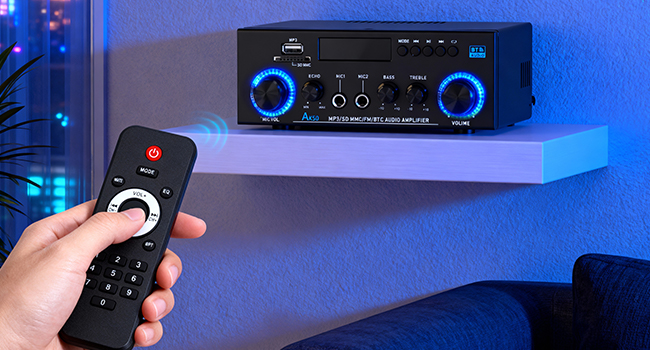
మూర్తి 10: రిమోట్ కంట్రోల్
7. నిర్వహణ
- శుభ్రపరచడం: వెలుపలి భాగాన్ని శుభ్రం చేయడానికి మృదువైన, పొడి వస్త్రాన్ని ఉపయోగించండి ampలిఫైయర్. లిక్విడ్ క్లీనర్లు లేదా ఏరోసోల్లను ఉపయోగించవద్దు.
- వెంటిలేషన్: వేడెక్కకుండా నిరోధించడానికి యూనిట్ చుట్టూ తగినంత వెంటిలేషన్ ఉండేలా చూసుకోండి. వెంటిలేషన్ ఓపెనింగ్లను నిరోధించవద్దు.
- నిల్వ: ఎక్కువ కాలం ఉపయోగంలో లేనప్పుడు, నిల్వ చేయండి ampప్రత్యక్ష సూర్యకాంతి మరియు విపరీతమైన ఉష్ణోగ్రతలకు దూరంగా చల్లని, పొడి ప్రదేశంలో లైఫైయర్.
8. ట్రబుల్షూటింగ్
| సమస్య | సాధ్యమైన కారణం | పరిష్కారం |
|---|---|---|
| శక్తి లేదు | పవర్ కేబుల్ కనెక్ట్ కాలేదు; పవర్ స్విచ్ ఆఫ్ చేయబడింది | Check power cable connection; Turn on power switch |
| సౌండ్ అవుట్పుట్ లేదు | Incorrect input source selected; Speaker wires loose/incorrectly connected; Volume too low; Device not paired (Bluetooth) | Select correct input mode; Check speaker connections and polarity; Increase volume; Re-pair Bluetooth device |
| FM రిసెప్షన్ పేలవంగా ఉంది | FM antenna not connected or poorly positioned | Connect FM antenna; Adjust antenna position for better signal |
| మైక్రోఫోన్ పని చేయడం లేదు | Microphone not plugged in; MIC VOL knob too low | Ensure microphone is securely plugged in; Increase MIC VOL |
| రిమోట్ కంట్రోల్ పనిచేయడం లేదు | Batteries depleted; Obstruction between remote and ampజీవితకాలం | Replace remote batteries; Remove any obstructions |
9. స్పెసిఫికేషన్లు
- బ్రాండ్: Romicta
- మోడల్ సంఖ్య: AK-50 MAX
- అవుట్పుట్ వాట్tage: 800 వాట్స్ (పీక్)
- ఛానెల్ల సంఖ్య: 2
- కనెక్టివిటీ టెక్నాలజీ: Bluetooth, MIC, USB, RCA, AUX, FM
- నియంత్రిక రకం: రిమోట్ కంట్రోల్, పుష్ బటన్
- అనుకూల పరికరాలు: Amplifier, PC, Smartphone, TV, Speakers
- ఆడియో అవుట్పుట్ మోడ్: స్టీరియో
- DC ఇన్పుట్: 12V/5A
- AC పవర్: 90-240V, 50-60Hz
10. వారంటీ మరియు మద్దతు
This product comes with a 30-day warranty. For any issues or support, please contact Romicta customer service.