
1. ఉత్పత్తి ముగిసిందిview
The OnePlus 15 is an advanced Android smartphone designed for high performance and extended usage. It features a powerful Snapdragon 8 Elite Gen 5 processor, a large 7,300mAh battery, and a vibrant 6.78-inch 165 Hz AMOLED display. The device is equipped with a triple 50 MP camera system for detailed photography and offers robust durability with IP66/IP68/IP69 and IP19K ratings for dust and water resistance.
ముఖ్య లక్షణాలు:
- Massive 7,300 mAh Battery: Provides extended power for all-day use and beyond.
- Tri-Chip System: Integrates the Snapdragon 8 Elite Gen 5, a dedicated Wi-Fi chip, and a CPU scheduler for optimized performance, connectivity, and efficiency.
- Triple 50 MP Camera System: Captures high-quality images with wide, ultra-wide, and telephoto capabilities.
- మన్నికైన డిజైన్: Built to resist dust and water, with IP66/IP68/IP69 and IP19K ratings for enhanced protection.
- 6.78-inch 165 Hz AMOLED Display: Delivers vivid colors, smooth motion, and exceptional clarity.
2. పెట్టెలో ఏముంది
మీ ఉత్పత్తి ప్యాకేజింగ్లో అన్ని అంశాలు ఉన్నాయని నిర్ధారించుకోండి:
- OnePlus 15 Smartphone x1
- ఛార్జర్ x1
- USB డేటా కేబుల్ x1
- SIM Ejector Tool x1
- త్వరిత గైడ్ x1
- Safety Guide x1

Image: Contents of the OnePlus 15 retail box, showing the smartphone, charger, USB data cable, SIM ejector tool, quick guide, and safety guide.
3. సెటప్
3.1 SIM కార్డ్ ఇన్స్టాలేషన్
- మీ OnePlus 15 వైపున SIM కార్డ్ ట్రేని గుర్తించండి.
- Insert the provided SIM ejector tool into the small hole on the SIM tray. Press firmly until the tray pops out.
- Place your Nano-SIM card(s) into the tray with the gold contacts facing down. Ensure they are correctly oriented according to the tray's outline.
- Carefully push the SIM tray back into the phone until it is flush with the device.
3.2 ప్రారంభ పవర్ ఆన్ మరియు కాన్ఫిగరేషన్
- Press and hold the Power button (located on the right side of the device) until the OnePlus logo appears.
- మీ భాషను ఎంచుకోవడానికి, Wi-Fi నెట్వర్క్కు కనెక్ట్ అవ్వడానికి మరియు మీ Google ఖాతాను సెటప్ చేయడానికి స్క్రీన్పై కనిపించే ప్రాంప్ట్లను అనుసరించండి.
- You may be prompted to transfer data from an old device. Follow the instructions or skip this step to set up as a new device.
- Configure security settings such as fingerprint unlock, face unlock, or a PIN/pattern.

చిత్రం: ముందు భాగం view of the OnePlus 15 smartphone, showcasing దాని డిస్ప్లే మరియు ముందు కెమెరా.
4. మీ పరికరాన్ని ఆపరేట్ చేయడం
4.1 Screen and Navigation
The OnePlus 15 features a 6.78-inch 165 Hz AMOLED display. Navigate the interface using touch gestures:
- నొక్కండి: ఒక అంశాన్ని ఎంచుకోండి లేదా ఒక ఫంక్షన్ను సక్రియం చేయండి.
- స్వైప్: స్క్రీన్లు లేదా జాబితాల ద్వారా స్క్రోల్ చేయండి.
- చిటికెడు: చిత్రాలను జూమ్ ఇన్ లేదా అవుట్ చేయండి మరియు web పేజీలు.
- లాంగ్ ప్రెస్: సందర్భోచిత మెనూలను యాక్సెస్ చేయండి లేదా చిహ్నాలను తరలించండి.
4.2 బటన్లు మరియు పోర్ట్లు
Familiarize yourself with the physical controls and connections:
- పవర్ బటన్: Located on the right side. Press to wake/sleep the screen, long press to power off or restart.
- వాల్యూమ్ బటన్లు: Located on the left side. Adjust media volume, ringtone volume, and alarm volume.
- USB టైప్-సి పోర్ట్: Located at the bottom. Used for charging, data transfer, and connecting Type-C headphones.
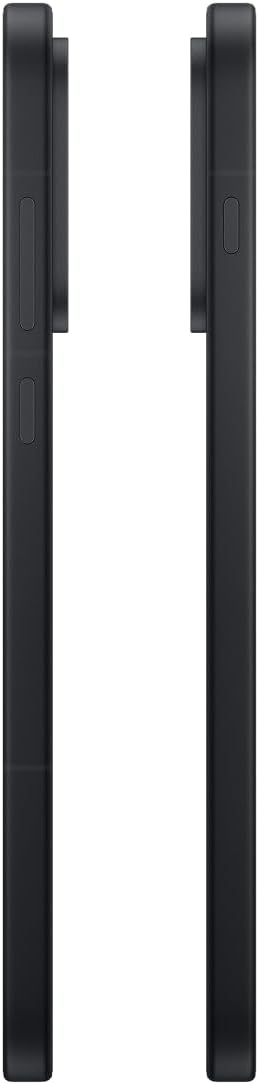
చిత్రం: వైపు view of the OnePlus 15, showing the placement of the power and volume buttons.
4.3 కెమెరా వినియోగం
The OnePlus 15 features a versatile triple 50 MP camera system. To open the camera app, tap the camera icon on your home screen or lock screen.
- స్విచ్ మోడ్లు: Swipe left or right on the screen to switch between Photo, Video, Portrait, and other modes.
- జూమ్: Pinch in or out on the viewfinder, or tap the zoom icons (e.g., 0.6x, 1x, 2x) to adjust magnification.
- క్యాప్చర్: ఫోటో తీయడానికి లేదా వీడియో రికార్డింగ్ ప్రారంభించడానికి/ఆపడానికి షట్టర్ బటన్ను నొక్కండి.
- సెట్టింగ్లు: Access camera settings for features like flash, timer, aspect ratio, and more.

చిత్రం: వెనుకకు view of the OnePlus 15, highlighting the triple 50 MP camera system.
4.4 బ్యాటరీ నిర్వహణ
Your OnePlus 15 is equipped with a 7,300 mAh battery. To optimize battery life:
- Adjust screen brightness and set a shorter screen timeout.
- ఉపయోగంలో లేనప్పుడు Wi-Fi, బ్లూటూత్ మరియు GPS లను నిలిపివేయండి.
- Close background apps that are consuming power.
- Utilize Battery Saver mode when your battery is low.
- Use the provided charger and USB cable for optimal fast charging.
5. నిర్వహణ
5.1 మీ పరికరాన్ని శుభ్రపరచడం
To clean your OnePlus 15:
- స్క్రీన్ మరియు వెనుక ప్యానెల్ తుడవడానికి మృదువైన, మెత్తటి బట్టను ఉపయోగించండి.
- మొండి మచ్చల కోసం, కొద్దిగా dampen నీటితో వస్త్రం లేదా స్క్రీన్ క్లీనర్.
- Avoid using harsh chemicals, abrasive materials, or compressed air.
5.2 సాఫ్ట్వేర్ నవీకరణలు
రెగ్యులర్ సాఫ్ట్వేర్ అప్డేట్లు కొత్త ఫీచర్లు, భద్రతా మెరుగుదలలు మరియు బగ్ పరిష్కారాలను అందిస్తాయి. అప్డేట్ల కోసం తనిఖీ చేయడానికి:
- వెళ్ళండి సెట్టింగ్లు > పరికరం గురించి > ఆక్సిజన్ OS వెర్షన్.
- నొక్కండి నవీకరణల కోసం తనిఖీ చేయండి.
- If an update is available, follow the on-screen instructions to download and install it. Ensure your device has sufficient battery and is connected to Wi-Fi before updating.
6. ట్రబుల్షూటింగ్
If you encounter issues with your OnePlus 15, try the following common troubleshooting steps:
- పరికరం స్పందించడం లేదు: రీస్టార్ట్ చేయమని బలవంతం చేయడానికి పవర్ బటన్ను దాదాపు 10 సెకన్ల పాటు నొక్కి పట్టుకోండి.
- క్రాష్ అవుతున్న యాప్లు: Clear the cache and data for the problematic app in సెట్టింగ్లు > యాప్లు > [యాప్ పేరు] > నిల్వ & కాష్.
- బ్యాటరీ త్వరగా ఖాళీ అవుతోంది: Review బ్యాటరీ వినియోగం సెట్టింగ్లు > బ్యాటరీ to identify power-hungry apps. Adjust settings as described in Section 4.4.
- నెట్వర్క్ కనెక్టివిటీ సమస్యలు: Toggle Airplane Mode on and off, restart your device, or reset network settings in సెట్టింగ్లు > సిస్టమ్ సెట్టింగ్లు > బ్యాకప్ చేసి రీసెట్ చేయండి > ఫోన్ని రీసెట్ చేయండి > Wi-Fi, మొబైల్ & బ్లూటూత్ని రీసెట్ చేయండి.
- Screen protector installation: For assistance with screen protector installation, refer to the following video guide:
Video: Installation guide for a screen protector on the OnePlus 15 5G. This video demonstrates the steps to correctly apply a screen protector to your device.
7. స్పెసిఫికేషన్లు
| మోడల్ పేరు | OnePlus 15 |
| అంశం మోడల్ సంఖ్య | CPH2749 |
| ఉత్పత్తి కొలతలు | 6.36 x 3.02 x 0.33 అంగుళాలు |
| వస్తువు బరువు | 1.29 పౌండ్లు |
| ఆపరేటింగ్ సిస్టమ్ | ఆండ్రాయిడ్ 16 |
| CPU మోడల్ | Snapdragon 8 Elite Gen 5 |
| CPU వేగం | 4.61 GHz |
| RAM మెమరీ ఇన్స్టాల్ చేయబడిన పరిమాణం | 12 GB |
| మెమరీ స్టోరేజ్ కెపాసిటీ | 256 GB |
| స్క్రీన్ పరిమాణం | 6.78 అంగుళాలు |
| రిజల్యూషన్ | 2772*1272 |
| రిఫ్రెష్ రేట్ | 165 Hz |
| బ్యాటరీ కెపాసిటీ | 7300 మిల్లీamp గంటలు |
| ఫోన్ టాక్ టైమ్ | 68.7 గంటలు |
| కనెక్టివిటీ టెక్నాలజీస్ | Bluetooth, Infrared, NFC, USB, Wi-Fi |
| ప్రత్యేక లక్షణాలు | Dual SIM, Wireless Charging |
| తయారీదారు | OnePlus |
8. ముఖ్యమైన భద్రతా సమాచారం
Please read all safety information before using your device to ensure safe and proper use. Improper use may cause damage to the device or personal injury.
- పరికరాన్ని ఎక్కువసేపు తీవ్రమైన ఉష్ణోగ్రతలకు లేదా ప్రత్యక్ష సూర్యకాంతికి గురిచేయవద్దు.
- Use only approved chargers, batteries, and accessories.
- పరికరాన్ని పడవేయడం లేదా తీవ్రమైన ప్రభావానికి గురిచేయడం మానుకోండి.
- Keep the device away from water and liquids, despite its water resistance ratings, to prevent potential damage.
- పరికరాన్ని విడదీయడానికి లేదా సవరించడానికి ప్రయత్నించవద్దు.
9. వారంటీ మరియు మద్దతు
Your OnePlus 15 is covered by a manufacturer's warranty. For detailed warranty information, technical support, or service inquiries, please visit the official OnePlus webసైట్ లేదా కస్టమర్ సేవను సంప్రదించండి.
You can find additional support and product information on the OnePlus Store.