1. పరిచయం
This manual provides instructions for the assembly, operation, and maintenance of your Generic HS-DY4 3-Tier 3D Printer Stand and Filament Storage Rack. This multi-functional organizer is designed to provide a dedicated space for your 3D printer and efficient storage for filament spools, enhancing your workspace organization.
2. భద్రతా సమాచారం
- అసెంబ్లీ మరియు ఉపయోగం ముందు అన్ని సూచనలను జాగ్రత్తగా చదవండి.
- అస్థిరతను నివారించడానికి అసెంబ్లీ సమయంలో అన్ని భాగాలు సురక్షితంగా బిగించబడ్డాయని నిర్ధారించుకోండి.
- Do not overload the shelves beyond their intended capacity.
- చిన్న భాగాలు మరియు ప్యాకేజింగ్ సామగ్రిని పిల్లలకు దూరంగా ఉంచండి.
- When moving the stand, ensure the casters are unlocked and move slowly to prevent tipping. Lock casters once in desired position.
- For the integrated power strip, ensure it is connected to a grounded outlet and do not exceed its electrical rating.
3. ప్యాకేజీ విషయాలు
Please verify that all the following components are present before beginning assembly:
- Carbon Steel Frame Components (vertical posts, horizontal bars, shelf supports)
- MDF Boards (3 shelves)
- Casters (4, typically 2 with locking mechanism)
- Integrated Power Strip with USB ports
- Assembly Hardware (screws, bolts, nuts, Allen wrench/screwdriver)
- Filament Spool Holders (rods or dividers)
4. అసెంబ్లీ సూచనలు
Follow these steps to assemble your 3D Printer Stand and Filament Storage Rack. It is recommended to assemble on a soft, clean surface to prevent scratching components.
- క్యాస్టర్లను అటాచ్ చేయండి: Secure the four casters to the bottom of the base frame using the provided hardware. Ensure two locking casters are placed on the front for stability.
- బేస్ ఫ్రేమ్ను సమీకరించండి: Connect the horizontal base bars to the vertical posts, forming the lowest tier of the frame. Do not fully tighten screws until all major components are in place.
- దిగువ షెల్ఫ్ను ఇన్స్టాల్ చేయండి: Place the first MDF board onto the assembled lower frame. Secure it with the appropriate hardware.
- Assemble Middle and Upper Tiers: Continue by attaching the next set of vertical posts and horizontal bars to form the middle tier. Install the second MDF board. Repeat for the top tier and the third MDF board.
- Install Filament Holders: Insert the filament spool holders or dividers into the designated slots on the middle and lower shelves.
- Mount Power Strip: Attach the integrated power strip to the side or back of the upper frame, as indicated by the design, using the provided mounting hardware.
- తుది బిగింపు: Once all components are in place and aligned, systematically tighten all screws and bolts to ensure the stand is stable and secure.
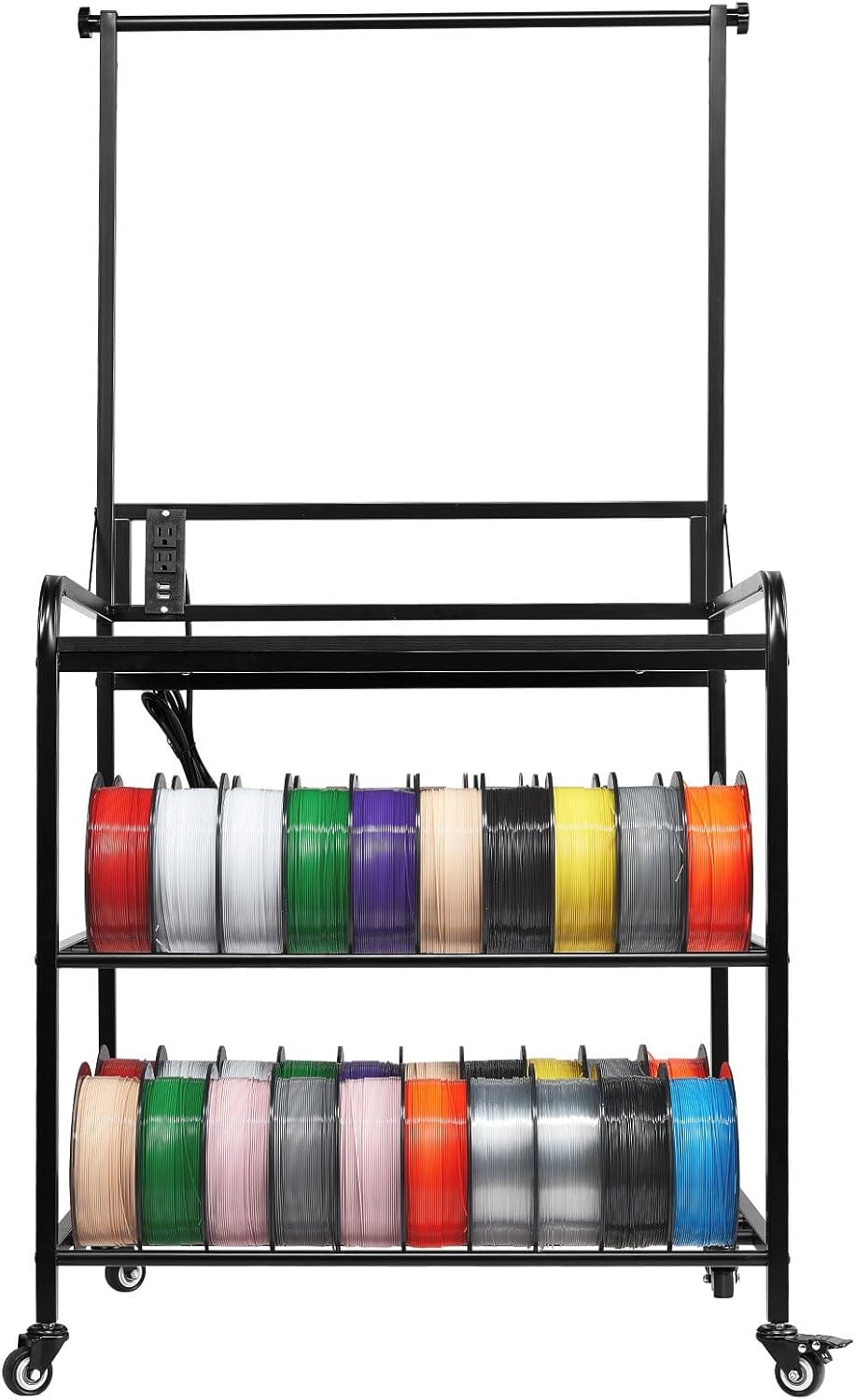
మూర్తి 4.1: Fully assembled 3-tier 3D printer stand, showcasing the top platform for a printer, two lower shelves for filament storage, and an integrated power strip. The stand is equipped with casters for mobility.
5. ఆపరేటింగ్ సూచనలు
- ప్రింటర్ ప్లేస్మెంట్: Place your 3D printer on the top shelf. Ensure it is centered and stable.
- Filament Storage: Utilize the middle and lower shelves for organizing your 3D printer filament spools. The integrated holders are designed to keep spools neatly arranged and easily accessible.
- పవర్ స్ట్రిప్ వినియోగం: Connect your 3D printer and other peripherals (e.g., laptop, tools) to the integrated power strip. This provides convenient power access directly at your workstation.
- చలనశీలత: To move the stand, unlock the casters. Once the stand is in the desired location, lock the casters to prevent accidental movement and ensure stability during operation.
6. నిర్వహణ
- శుభ్రపరచడం: Wipe down the carbon steel frame and MDF boards with a soft, damp వస్త్రం. ముగింపును దెబ్బతీసే రాపిడి క్లీనర్లు లేదా కఠినమైన రసాయనాలను నివారించండి.
- హార్డ్వేర్ తనిఖీ: అన్ని స్క్రూలు మరియు బోల్ట్లు బిగుతుగా ఉన్నాయని నిర్ధారించుకోవడానికి కాలానుగుణంగా వాటిని తనిఖీ చేయండి. నిర్మాణ సమగ్రతను కాపాడుకోవడానికి అవసరమైతే మళ్ళీ బిగించండి.
- కాస్టర్ కేర్: Keep casters free of dust and debris to ensure smooth movement.
7. ట్రబుల్షూటింగ్
- స్టాండ్ వణుకు పుట్టిస్తోంది: Ensure all assembly hardware is fully tightened. Check that the stand is on a level surface.
- సజావుగా తిరగని కాస్టర్లు: Check for debris caught in the caster wheels. Ensure casters are unlocked when attempting to move the stand.
- పవర్ స్ట్రిప్ పనిచేయకపోవడం: Verify the power strip is plugged into a functional wall outlet. Check for tripped circuit breakers.
8. స్పెసిఫికేషన్లు
| మోడల్ సంఖ్య | HS-DY4 ద్వారా మరిన్ని |
| Total Layers | 3 పొరలు |
| రంగు | Black (Iron Frame + Tabletop) |
| శైలి | ఇంటిగ్రేటెడ్ |
| ఉత్పత్తి కొలతలు (L x W x H) | 29.13 x 23.23 x 59.06/59.64 inches (740 x 590 x 1500/1515 mm) |
| నికర బరువు | 26.68 పౌండ్లు (12.1 కిలోలు) |
| ప్రధాన పదార్థం | Carbon Steel & MDF Boards |
9. వారంటీ మరియు మద్దతు
For warranty information or technical support, please refer to the documentation provided at the time of purchase or contact the seller directly. Keep your purchase receipt as proof of purchase.


