
పరిచయం
The iLive Cinema Pop-up Movie Kit is a comprehensive portable entertainment solution designed to transform any space into a personal cinema. This kit includes a 720p projector, a 120-inch ultra-bright projector screen, an adjustable tripod, and a powerful Bluetooth 5.0 speaker system. Enjoy crisp images and rich audio for both indoor and outdoor movie nights.
ఏమి చేర్చబడింది
- 720p ప్రొజెక్టర్
- 120-inch Anti-Wrinkle Polyester Projector Screen (16:9 aspect ratio, 1.3 gain)
- Professional-Grade Tripod with integrated bubble level (360-degree pan, ±180-degree tilt, 41.73-inch max height, 4 kg capacity)
- Bluetooth 5.0 Speaker System (dual 4-inch full-range speakers, 16W peak output, LED light effects, rechargeable battery)
- రిమోట్ కంట్రోల్
- పవర్ కేబుల్
- HDMI కేబుల్
- 3.5mm ఆడియో కేబుల్
- USB కేబుల్
- క్యారీయింగ్ కేసు
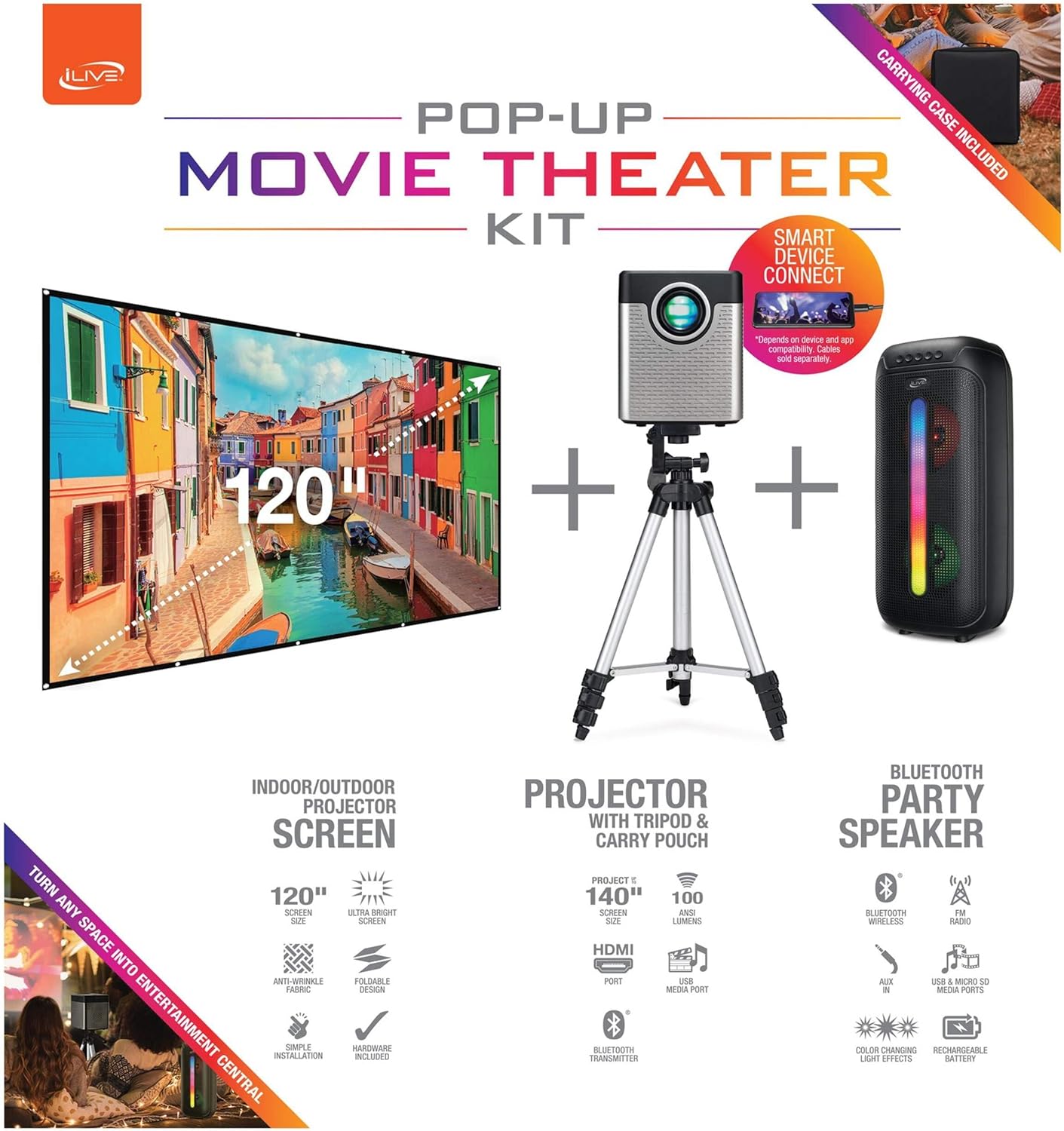
Figure 1: Diagram of the iLive Cinema Pop-up Movie Kit components.

Figure 2: The complete kit packed in its carrying case.
సెటప్
- భాగాలను అన్ప్యాక్ చేయండి: మోసుకెళ్ళే కేసు నుండి అన్ని వస్తువులను జాగ్రత్తగా తొలగించండి.
- Assemble Tripod: Extend the legs of the tripod and secure them. Adjust the height to your desired viewing level. The integrated bubble level assists in ensuring a stable and level base.
- మౌంట్ ప్రొజెక్టర్: Securely attach the projector to the tripod mount. Ensure it is stable and facing the desired projection area.
- Set Up Screen: Unfold the 120-inch anti-wrinkle screen. If using the tripod, attach the screen to the tripod frame using the provided fasteners. Ensure the screen is taut and wrinkle-free for optimal viewing. For alternative mounting, use the grommets along the screen's edges with appropriate wall hooks (not included).
- స్పీకర్ స్థానం: Place the Bluetooth speaker in a location that provides optimal sound distribution for your viewing ప్రాంతం.
- పవర్ కనెక్ట్ చేయండి: పవర్ కేబుల్ను ప్రొజెక్టర్కు మరియు తగిన పవర్ అవుట్లెట్కు కనెక్ట్ చేయండి.
- పరికరాలను కనెక్ట్ చేయండి (ఐచ్ఛికం): Connect your media source (e.g., laptop, gaming console, Blu-ray player) to the projector using an HDMI or USB cable. For external audio, use the 3.5mm audio input or connect wirelessly via Bluetooth to the speaker.

Figure 3: Projector mounted on the tripod.

చిత్రం 4: ఉదాample outdoor setup with the projector and screen.
ఆపరేటింగ్ సూచనలు
ప్రొజెక్టర్ ఆపరేషన్
- పవర్ ఆన్/ఆఫ్: Press the power button on the projector or remote control to turn the unit on or off.
- ఇన్పుట్ మూలం: Use the remote control to select the desired input source (HDMI, USB, etc.).
- ఫోకస్ సర్దుబాటు: Adjust the focus ring on the projector lens until the image is clear.
- కీస్టోన్ దిద్దుబాటు: If the projected image appears trapezoidal, use the keystone correction feature (manual or automatic, if available) to adjust the image to a rectangular shape. The projector supports vertical keystone correction.
- కారక నిష్పత్తి: Select between 16:9 and 4:3 aspect ratios based on your content and preference.
- ప్రొజెక్షన్ దూరం: The projector has a flexible projection range of 2.6 to 12.5 feet. Adjust the distance to achieve the desired screen size.
బ్లూటూత్ స్పీకర్ ఆపరేషన్
- పవర్ ఆన్/ఆఫ్: Press and hold the power button on the speaker to turn it on or off.
- బ్లూటూత్ పెయిరింగ్: మీ పరికరంలో బ్లూటూత్ను యాక్టివేట్ చేయండి (ఉదా. స్మార్ట్ఫోన్, టాబ్లెట్). కోసం వెతకండి the iLive speaker in the list of available devices and pair.
- వాల్యూమ్ నియంత్రణ: స్పీకర్ లేదా మీ కనెక్ట్ చేయబడిన పరికరంలోని నియంత్రణలను ఉపయోగించి వాల్యూమ్ను సర్దుబాటు చేయండి.
- LED లైట్ ఎఫెక్ట్స్: The speaker features LED light effects. Refer to the speaker's specific controls for adjusting or disabling these effects.
- నిజమైన వైర్లెస్ స్టీరియో (TWS): If you have two iLive Bluetooth speakers, you can pair them together for a True Wireless Stereo experience. Follow the instructions provided with the speaker for TWS pairing.
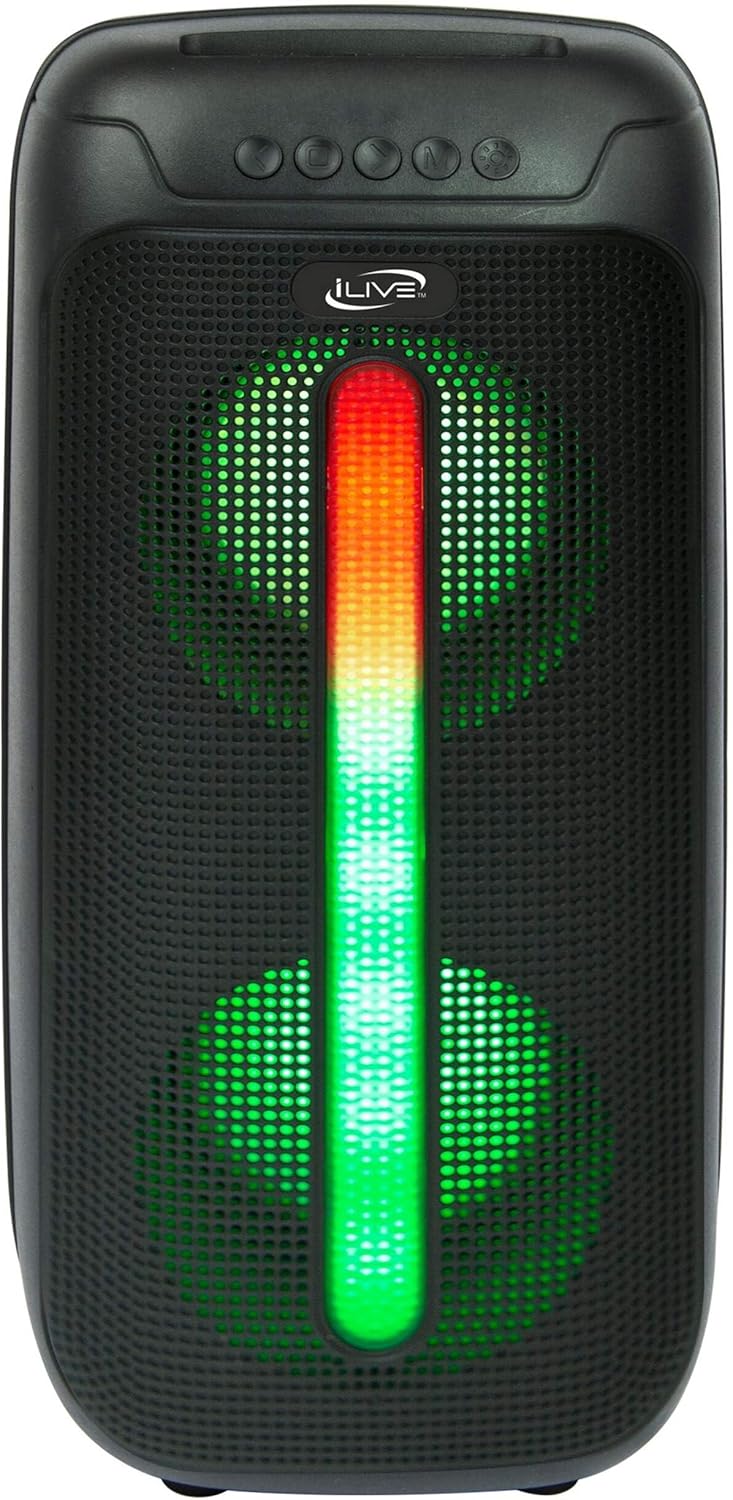
Figure 5: iLive Bluetooth 5.0 Speaker.
నిర్వహణ
- ప్రొజెక్టర్ లెన్స్: Use a soft, lint-free cloth to gently clean the projector lens. Avoid abrasive materials or harsh chemicals.
- Projector Vents: Ensure the projector's ventilation openings are clear of dust and debris to prevent overheating.
- స్క్రీన్ క్లీనింగ్: The anti-wrinkle polyester screen can be gently wiped with a damp cloth if necessary. Allow it to air dry completely before folding or storing.
- స్పీకర్ కేర్: Keep the speaker dry and clean. Avoid exposing it to extreme temperatures or direct sunlight.
- నిల్వ: When not in use, store all components in the provided carrying case in a cool, dry place to protect them from dust and damage.
ట్రబుల్షూటింగ్
- స్క్రీన్పై చిత్రం లేదు:
- Ensure the projector is powered on and the lens cap is removed.
- ప్రొజెక్టర్లో సరైన ఇన్పుట్ సోర్స్ ఎంచుకోబడిందని ధృవీకరించండి.
- Check all cable connections (HDMI, USB) are secure.
- అస్పష్టమైన చిత్రం:
- ప్రొజెక్టర్ లెన్స్పై ఫోకస్ రింగ్ని సర్దుబాటు చేయండి.
- Ensure the projection distance is within the recommended range (2.6-12.5 ft).
- Distorted Image (Trapezoidal):
- Use the keystone correction feature to adjust the image geometry.
- Ensure the projector is placed on a level surface or the tripod is properly adjusted.
- No Sound from Speaker:
- స్పీకర్ ఆన్ చేయబడి, ఛార్జ్ చేయబడిందని నిర్ధారించుకోండి.
- Verify Bluetooth pairing or 3.5mm audio cable connection.
- Check volume levels on both the speaker and the connected device.
- బ్లూటూత్ జత చేయడం సమస్యలు:
- స్పీకర్ జత చేసే మోడ్లో ఉందని నిర్ధారించుకోండి.
- స్పీకర్ను మీ పరికరానికి దగ్గరగా తరలించండి.
- Disconnect and re-pair the device.
స్పెసిఫికేషన్లు
| ఫీచర్ | స్పెసిఫికేషన్ |
|---|---|
| మోడల్ సంఖ్య | THE2024BDL |
| డిస్ప్లే రిజల్యూషన్ | 1280 x 720 (720p) |
| ప్రదర్శన రకం | LED |
| ప్రకాశం | 3000 ల్యూమన్ |
| కాంట్రాస్ట్ రేషియో | 1000:1 |
| కారక నిష్పత్తులు | 16:9, 4:3 |
| లైట్ సోర్స్ లైఫ్ | 20,000 గంటలు |
| ప్రొజెక్షన్ పరిధి | 2.6 - 12.5 అడుగులు |
| గరిష్ట చిత్ర పరిమాణం | 120 అంగుళాలు |
| కనెక్టివిటీ | HDMI, USB, 3.5mm Audio, Bluetooth 5.0 |
| స్పీకర్ అవుట్పుట్ | 16W Peak (Dual 4-inch drivers) |
| Speaker Battery Life | 4 గంటల వరకు (50% వాల్యూమ్ వద్ద) |
| ట్రైపాడ్ ఫీచర్లు | Integrated bubble level, 360-degree pan, ±180-degree tilt, 41.73-inch max height, 4 kg capacity |
| వీడియో ఎన్కోడింగ్ మద్దతు | H.264, H.265 |
| నియంత్రణ పద్ధతి | రిమోట్ కంట్రోల్ |
అధికారిక ఉత్పత్తి వీడియోలు
ఈ సమయంలో ఈ ఉత్పత్తికి అధికారిక విక్రేత వీడియోలు అందుబాటులో లేవు.
వారంటీ మరియు మద్దతు
For warranty information or technical support, please contact iLive customer service at 1-888-999-4215. Please have your model number (THE2024BDL) and proof of purchase ready when contacting support.