
పరిచయం
The Fender Mustang LTX50 is a versatile 50-watt modeling combo amplifier designed for guitarists seeking a wide range of authentic Fender tones and modern features. Equipped with a 12-inch Celestion G12P-80 speaker, it delivers dynamic sound suitable for practice, rehearsal, and performance. This amplifier offers 25 amp models and 25 effects, covering various musical styles from clean to high-gain. Its intuitive color display, onboard tuner, and 100 user preset slots provide easy customization and quick access to your preferred sounds. The Mustang LTX50 also features Bluetooth audio streaming for playing along with tracks and USB-C connectivity for direct recording and monitoring.
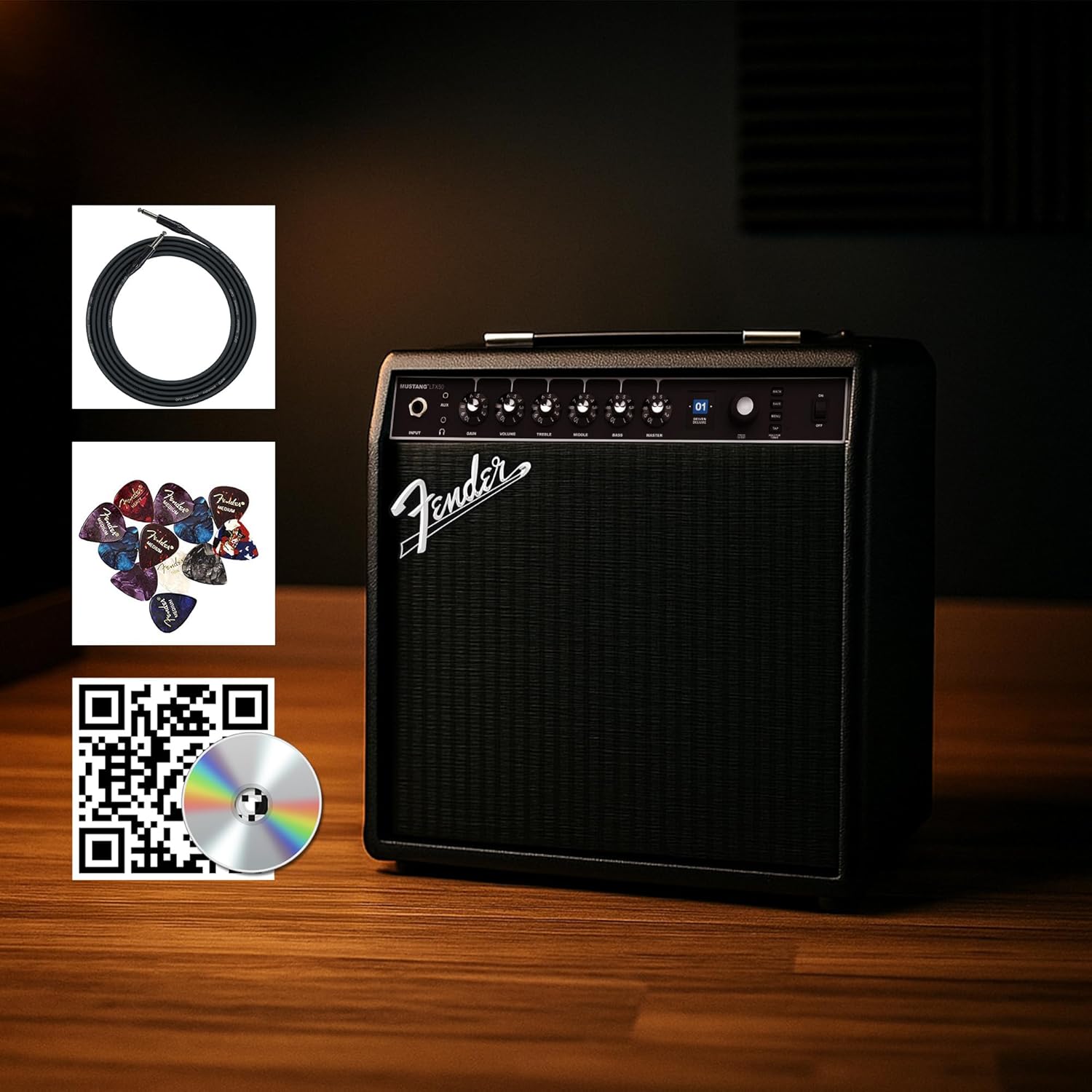
Figure 1: Fender Mustang LTX50 Guitar Combo Amplifier with included accessories.
సెటప్
1. అన్బాక్సింగ్ మరియు ప్రారంభ తనిఖీ
- జాగ్రత్తగా తొలగించండి ampప్యాకేజింగ్ నుండి లైఫైయర్ మరియు అన్ని ఉపకరణాలు.
- తనిఖీ చేయండి amplifier for any signs of damage that may have occurred during shipping.
- Confirm all included items are present: Mustang LTX50 amplifier, power cord, instrument cable, 12-pack guitar picks, and instructional DVD.
2. కనెక్ట్ పవర్
- నిర్ధారించండి ampలైఫైయర్ యొక్క పవర్ స్విచ్ ఆఫ్ స్థానంలో ఉంది.
- Connect the included power cord to the AC input on the rear panel of the ampజీవితకాలం.
- పవర్ కార్డ్ యొక్క మరొక చివరను గ్రౌన్దేడ్ ఎలక్ట్రికల్ అవుట్లెట్లోకి ప్లగ్ చేయండి.
3. మీ గిటార్ను కనెక్ట్ చేస్తోంది
- Use the included instrument cable to connect your guitar to the ఇన్పుట్ jack on the front panel of the ampజీవితకాలం.
4. Basic Controls Overview
Familiarize yourself with the front panel controls before powering on the ampజీవితకాలం.
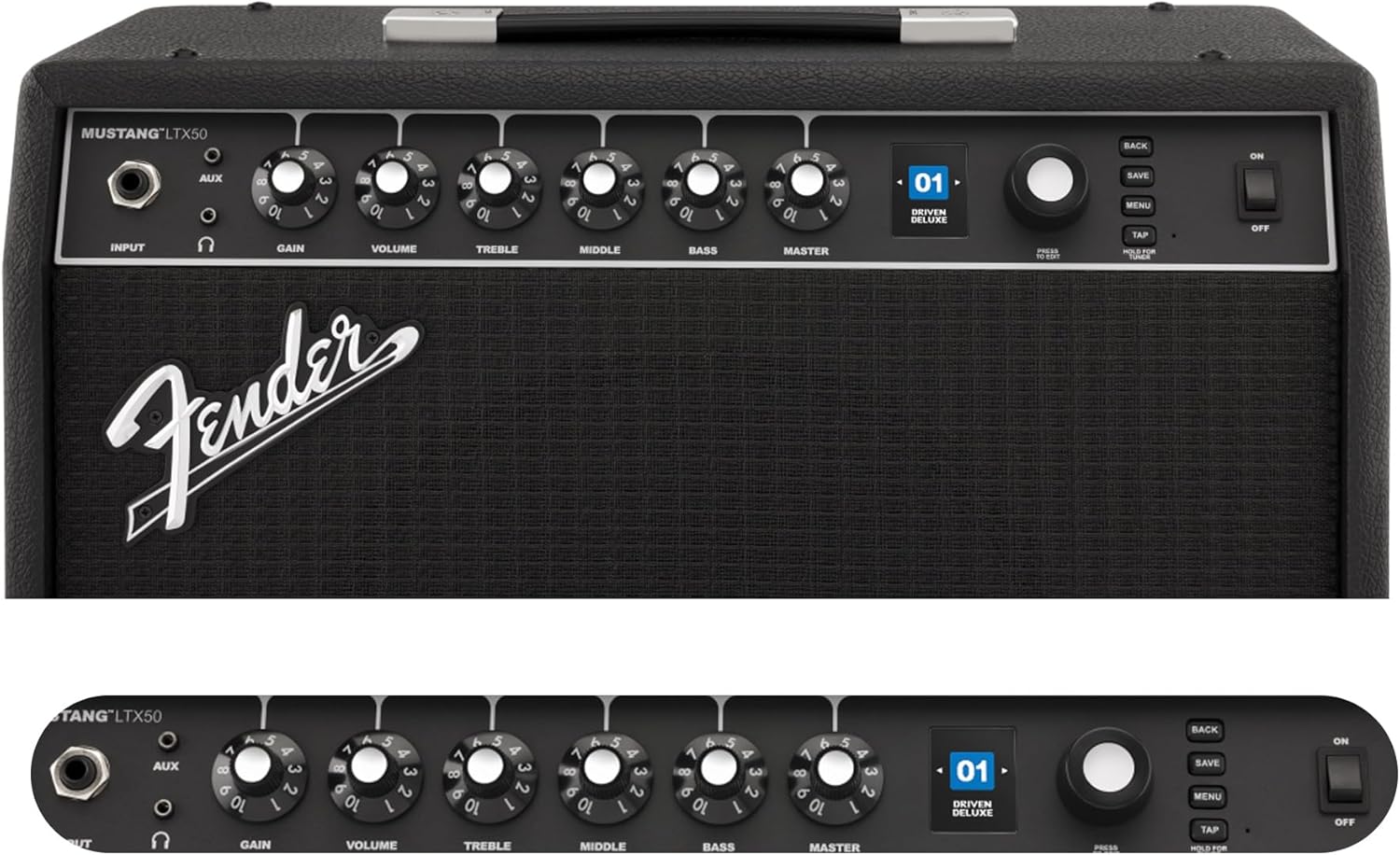
Figure 2: Front Panel Controls of the Mustang LTX50.
ఆపరేటింగ్ సూచనలు
1. పవర్ చేయడం ఆన్/ఆఫ్
- To power on, ensure all volume controls are set to minimum, then flip the శక్తి ఆన్ స్థానానికి మారండి.
- To power off, flip the శక్తి OFF స్థానానికి మారండి.
2. Navigating Presets
- ఉపయోగించండి ఎన్కోడర్ knob (large rotary knob) to scroll through the 100 available presets (70 factory, 30 user).
- నొక్కండి ఎన్కోడర్ knob to select a preset.
- The color LCD displays the current preset number and name.
3. సర్దుబాటు చేయడం Amp నమూనాలు మరియు ప్రభావాలు
- నొక్కండి మెనూ యాక్సెస్ చేయడానికి బటన్ amplifier's settings.
- Navigate through options like AMP, STOMP, MOD, DELAY, REVERB using the ఎన్కోడర్.
- Select an option and use the ఎన్కోడర్ to choose different amp models or effects.
- Adjust parameters for each effect using the smaller control knobs (GAIN, VOLUME, TREBLE, MIDDLE, BASS, MASTER) or by selecting parameters on the display.
- నొక్కండి సేవ్ చేయండి to store your customized preset.
4. అంతర్నిర్మిత ట్యూనర్ను ఉపయోగించడం
- నొక్కండి మరియు పట్టుకోండి ట్యాప్ చేయండి button to activate the chromatic tuner.
- Play a single note on your guitar; the display will show the note and indicate if it is sharp, flat, or in tune.
- Press any button or play for a few seconds to exit tuner mode.
5. Fender Tone 3.0 App Control
- Download the Fender Tone 3.0 app from your device's app store (iOS/Android).
- మీ మొబైల్ పరికరంలో బ్లూటూత్ని ప్రారంభించండి.
- న ampలైఫైయర్, నొక్కండి మెనూ button, navigate to "Bluetooth," and select "Pair."
- Select "Mustang LTX50" from your device's Bluetooth settings to connect.
- Use the app to wirelessly create, edit, save, and share presets, and to manage your ampలైఫైయర్ సెట్టింగులు.
6. Playing Along with Audio (Bluetooth)
- Once paired via Bluetooth, you can stream audio from your mobile device directly to the ampజీవితకాలం.
- Adjust the volume of the streamed audio from your mobile device.
- Alternatively, connect an external audio source to the AUX IN jack on the front panel using a 3.5mm stereo cable.
7. Recording via USB-C
- Connect a USB-C cable from the amplifier's USB-C port to your computer (Mac or PC).
- ది amplifier functions as a bidirectional audio interface, allowing direct recording and monitoring.
- Refer to your Digital Audio Workstation (DAW) software's manual for specific setup instructions.
నిర్వహణ
1. శుభ్రపరచడం
- డిస్కనెక్ట్ చేయండి amplifier from power before cleaning.
- బయటి ఉపరితలాలను తుడవడానికి మృదువైన, పొడి వస్త్రాన్ని ఉపయోగించండి.
- మొండి ధూళికి, కొద్దిగా damp తేలికపాటి సబ్బు ఉన్న వస్త్రాన్ని ఉపయోగించవచ్చు, తరువాత పొడి వస్త్రాన్ని ఉపయోగించవచ్చు.
- Avoid using abrasive cleaners, solvents, or waxes, as these can damage the finish.
2. నిల్వ
- నిల్వ చేయండి ampప్రత్యక్ష సూర్యకాంతి మరియు విపరీతమైన ఉష్ణోగ్రతలకు దూరంగా చల్లని, పొడి ప్రదేశంలో లైఫైయర్.
- అధిక తేమ ఉన్న ప్రాంతాల్లో నిల్వ చేయడాన్ని నివారించండి.
- If storing for extended periods, cover the amplifier to protect it from dust.
3. Safety Warnings (Proposition 65)
ఈ ఉత్పత్తిలో క్యాన్సర్, పుట్టుకతో వచ్చే లోపాలు లేదా ఇతర పునరుత్పత్తి హాని కలిగించే రసాయనాలు కాలిఫోర్నియా రాష్ట్రానికి తెలిసిన ఉండవచ్చు. మరిన్ని వివరాల కోసం, సందర్శించండి www.P65Warnings.ca.gov.
ట్రబుల్షూటింగ్
సౌండ్ లేదు
- నిర్ధారించండి amplifier is powered on and the power cord is securely connected.
- Check that your guitar is properly connected to the ఇన్పుట్ జాక్.
- అని ధృవీకరించండి మాస్టర్ volume and individual preset volume controls are not set to zero.
- Test with a different instrument cable and guitar to rule out faulty equipment.
- If using headphones, ensure they are fully plugged into the headphone jack and that the main speaker is not muted.
వక్రీకరించిన లేదా అవాంఛిత శబ్దం
- మీ గిటార్ వాల్యూమ్ మరియు టోన్ నియంత్రణలను తనిఖీ చేయండి.
- తగ్గించండి లాభం న సెట్టింగ్ ampజీవితకాలం.
- Ensure your instrument cable is not damaged or poorly shielded.
- Try a different power outlet to rule out electrical interference.
- If using high-gain amp models, some distortion is inherent. Adjust settings accordingly.
బ్లూటూత్ కనెక్టివిటీ సమస్యలు
- Ensure Bluetooth is enabled on both your mobile device and the ampజీవితకాలం.
- నిర్ధారించుకోండి amplifier is in pairing mode (refer to "Fender Tone 3.0 App Control" section).
- Move your mobile device closer to the ampజీవితకాలం.
- పరికరాలను అన్పెయిర్ చేసి, తిరిగి జత చేయడానికి ప్రయత్నించండి.
- రెండింటినీ పునఃప్రారంభించండి amplifier and your mobile device.
Amplifier Not Responding
- శక్తి చక్రం amplifier by turning it off, waiting 10 seconds, and turning it back on.
- If the issue persists, a factory reset may be necessary. Consult the Fender support website for instructions on performing a factory reset for the Mustang LTX50.
స్పెసిఫికేషన్లు
| మోడల్ పేరు | MUSTANG LTX50 |
| మోడల్ సంఖ్య | 2311700000 |
| బ్రాండ్ | ఫెండర్ |
| Ampజీవిత రకం | డిజిటల్ మోడలింగ్ |
| పవర్ అవుట్పుట్ | 50 వాట్స్ |
| స్పీకర్ | 1 x 12" Celestion G12P-80 |
| Amp మోడల్స్ | 25 |
| ప్రభావాలు | 25 (distortion, overdrive, compression, modulation, reverb, delay, octave, etc.) |
| ప్రీసెట్లు | 70 factory + 100 user slots |
| ప్రదర్శించు | Color LCD with onboard chromatic tuner |
| కనెక్టివిటీ | Bluetooth audio, USB-C bidirectional audio |
| అవుట్పుట్లు | XLR line out, Headphone out |
| యాప్ మద్దతు | Fender Tone 3.0 app (iOS/Android) |
| ఎన్క్లోజర్ మెటీరియల్ | మెటల్ |
| అంశం కొలతలు (D x W x H) | 22.3"డి x 19.9"వా x 12.3"హ |
| వస్తువు బరువు | 26.4 పౌండ్లు |
| UPC | 840262259088 |

Figure 3: Rear Panel Connections of the Mustang LTX50.
వారంటీ సమాచారం
The Fender Mustang LTX50 Guitar Combo Amplifier is covered by a 2-సంవత్సరం పరిమిత వారంటీ. This warranty covers defects in materials and workmanship under normal use. For full terms and conditions, please refer to the warranty documentation included with your product or visit the official Fender webసైట్.
మద్దతు
For further assistance, technical support, or service inquiries regarding your Fender Mustang LTX50 amplifier, please visit the official Fender support webసైట్:
You may also find additional resources, FAQs, and software updates on the Fender webసైట్.