
1. పరిచయం
The NIVIAN WiFi Home Alarm System provides comprehensive security for your home or office. This wireless system is designed for easy installation and offers intelligent control via a smartphone application and voice assistants. It includes essential components for immediate protection against intrusion and tampఈరింగ్.
ముఖ్య లక్షణాలు ఉన్నాయి:
- Wireless installation with 433MHz sensor communication up to 100 meters outdoors.
- App control via TUYA (iOS & Android) for remote arming, disarming, notifications, and real-time monitoring.
- Compatibility with Alexa and Google Assistant for voice control.
- Multiple access methods: integrated keypad, key fob, remote control, and RFID cards.
- Expandable system supporting up to 52 sensors and 6 remote controls.
- Integrated siren, anti-sabotage function, and internal backup battery for continuous protection.
2. ప్యాకేజీ విషయాలు
క్రింద జాబితా చేయబడిన అన్ని వస్తువులు మీ ప్యాకేజీలో చేర్చబడ్డాయని ధృవీకరించండి:
- Alarm Panel with integrated WiFi module and keypad
- పిఐఆర్ మోషన్ సెన్సార్
- డోర్/కిటికీ సెన్సార్
- రిమోట్ కంట్రోల్
- RFID Cards (2 units)
- Power Adapter for Alarm Panel
- వినియోగదారు మాన్యువల్ (ఈ పత్రం)

చిత్రం 2.1: పైగాview of the NIVIAN WiFi Home Alarm System components.
3. సెటప్
3.1 ప్రారంభ పవర్-అప్
- Connect the alarm panel to a power outlet using the provided power adapter.
- Ensure the panel powers on and the indicator lights activate.
3.2 యాప్ డౌన్లోడ్ మరియు ఖాతా సృష్టి
- Download the "TUYA Smart" app from the App Store (iOS) or Google Play Store (Android).
- కొత్త ఖాతా కోసం నమోదు చేసుకోండి లేదా మీకు ఇప్పటికే ఒకటి ఉంటే లాగిన్ అవ్వండి.

Figure 3.1: TUYA Smart app interface for managing the alarm system.
3.3 Connecting the Alarm Panel to WiFi
- Follow the in-app instructions to add a new device. Select "Security & Video Surveillance" then "Alarm (Wi-Fi)".
- Put the alarm panel into pairing mode (refer to the panel's specific instructions for this, usually by pressing a button combination).
- Enter your WiFi network credentials in the app to connect the panel.
3.4 జత చేసే సెన్సార్లు మరియు ఉపకరణాలు
The sensors (motion sensor, door/window sensor) and accessories (remote control, RFID cards) communicate wirelessly with the alarm panel.
- In the TUYA app, navigate to the alarm system settings and select "Add Accessory" or "Add Sensor".
- Activate each sensor or accessory according to its individual instructions (e.g., press a button on the sensor, swipe an RFID card near the panel).
- Confirm successful pairing in the app.

చిత్రం 3.2: ఉదాample placement of the alarm keypad and motion sensor.
4. ఆపరేటింగ్ సూచనలు
4.1 వ్యవస్థను ఆయుధపరచడం మరియు నిరాయుధీకరించడం
The alarm system can be armed or disarmed using several methods:
- Via TUYA App: Open the app and select the desired arming mode (e.g., Home Arm, Away Arm, Disarm).
- కీప్యాడ్ ద్వారా: Enter your user code on the alarm panel keypad and press the arm/disarm button.
- రిమోట్ కంట్రోల్ ద్వారా: Press the corresponding arm or disarm button on the remote control.
- RFID కార్డ్ ద్వారా: Swipe an authorized RFID card over the designated area on the alarm panel.

Figure 4.1: Various methods for controlling the alarm system.
4.2 User Management and Permissions
The TUYA app allows you to manage multiple users and assign different access rights, suitable for family members, employees, or guests.
- In the app, navigate to "Family Management" or "User Settings".
- Add new users and define their permissions (e.g., full control, arm/disarm only).
- Assign specific RFID cards or remote controls to individual users if desired.

Figure 4.2: Sharing permissions with family and guests via the app.
4.3 SOS ఫీచర్
The remote control includes an SOS button for emergency situations. Pressing this button will trigger an immediate alarm and send notifications to pre-configured emergency contacts.

Figure 4.3: The SOS feature on the remote control for emergency alerts.
5. నిర్వహణ
5.1 బ్యాటరీ నిర్వహణ
The alarm panel features an internal 1500 mAh backup battery, ensuring continued operation during power outages. Sensors are typically battery-powered and will indicate low battery status through the app or on the sensor itself. Replace sensor batteries promptly when indicated.
5.2 System Checks
Regularly check the status of all sensors and the alarm panel via the TUYA app to ensure they are online and functioning correctly. Test the alarm system periodically by triggering a sensor in armed mode to confirm siren activation and notification delivery.
5.3 Anti-Sabotagఇ ఫంక్షన్
The system is equipped with an anti-sabotage function that detects and reports attempts to tamper with the alarm panel or sensors. Ensure all components are securely mounted to prevent false alarms or system compromise.
6. ట్రబుల్షూటింగ్
| సమస్య | సాధ్యమైన కారణం | పరిష్కారం |
|---|---|---|
| Alarm panel not connecting to WiFi | Incorrect WiFi password; panel too far from router; 5GHz network selected. | Verify WiFi password. Move panel closer to router. Ensure you are connecting to a 2.4GHz WiFi network. Restart router and panel. |
| Sensor not pairing | Sensor battery low; sensor out of range; not in pairing mode. | Replace sensor battery. Move sensor closer to the alarm panel. Ensure both panel and sensor are in pairing mode as per instructions. |
| నోటిఫికేషన్లు అందలేదు | App notifications disabled; phone not connected to internet; app not running in background. | Check app notification settings on your phone. Ensure your phone has an active internet connection. Allow the TUYA app to run in the background. |
| తప్పుడు అలారాలు | Improper sensor placement; pets triggering motion sensor; loose sensor. | Review sensor placement guidelines. Adjust motion sensor sensitivity or placement to avoid pet detection. Securely mount all sensors. |
| Remote control or RFID card not working | Not paired; battery low (remote control). | Ensure the accessory is correctly paired with the alarm panel. Replace the battery in the remote control if applicable. |
7. స్పెసిఫికేషన్లు
| ఫీచర్ | వివరాలు |
|---|---|
| మోడల్ సంఖ్య | NVS-KEYPADALARM-W |
| బ్రాండ్ | NIVAN |
| కనెక్టివిటీ టెక్నాలజీ | Wireless (WiFi, 433MHz RF) |
| శక్తి మూలం | Battery Powered (internal backup battery), AC Adapter |
| అంతర్గత బ్యాటరీ సామర్థ్యం | 1500 mAh (for alarm panel) |
| Wireless Range (Sensors) | Up to 100 meters (outdoors) |
| అనుకూల పరికరాలు | అలెక్సా, గూగుల్ అసిస్టెంట్ |
| నియంత్రణ పద్ధతులు | App, Remote, Voice, Keypad, RFID |
| హెచ్చరిక రకం | Audio (siren) & Motion (notifications) |
| ఉత్పత్తి కొలతలు (L x W x H) | 12 x 7 x 5 సెం.మీ |
| వస్తువు బరువు | 0.65 కిలోలు |
8. వారంటీ మరియు మద్దతు
NIVIAN products come with a manufacturer's warranty. Please refer to your purchase documentation or the official NIVIAN webనిర్దిష్ట వారంటీ నిబంధనలు మరియు షరతుల కోసం సైట్.
సాంకేతిక మద్దతు
For technical assistance, troubleshooting, or further information, please visit the NIVIANHOME WEB portal or contact NIVIAN customer support.
- అధికారిక Webసైట్: www.nivianhome.com
- Instagరామ్: @nivianhome_es
- YouTube: NIVIAN Official Channel
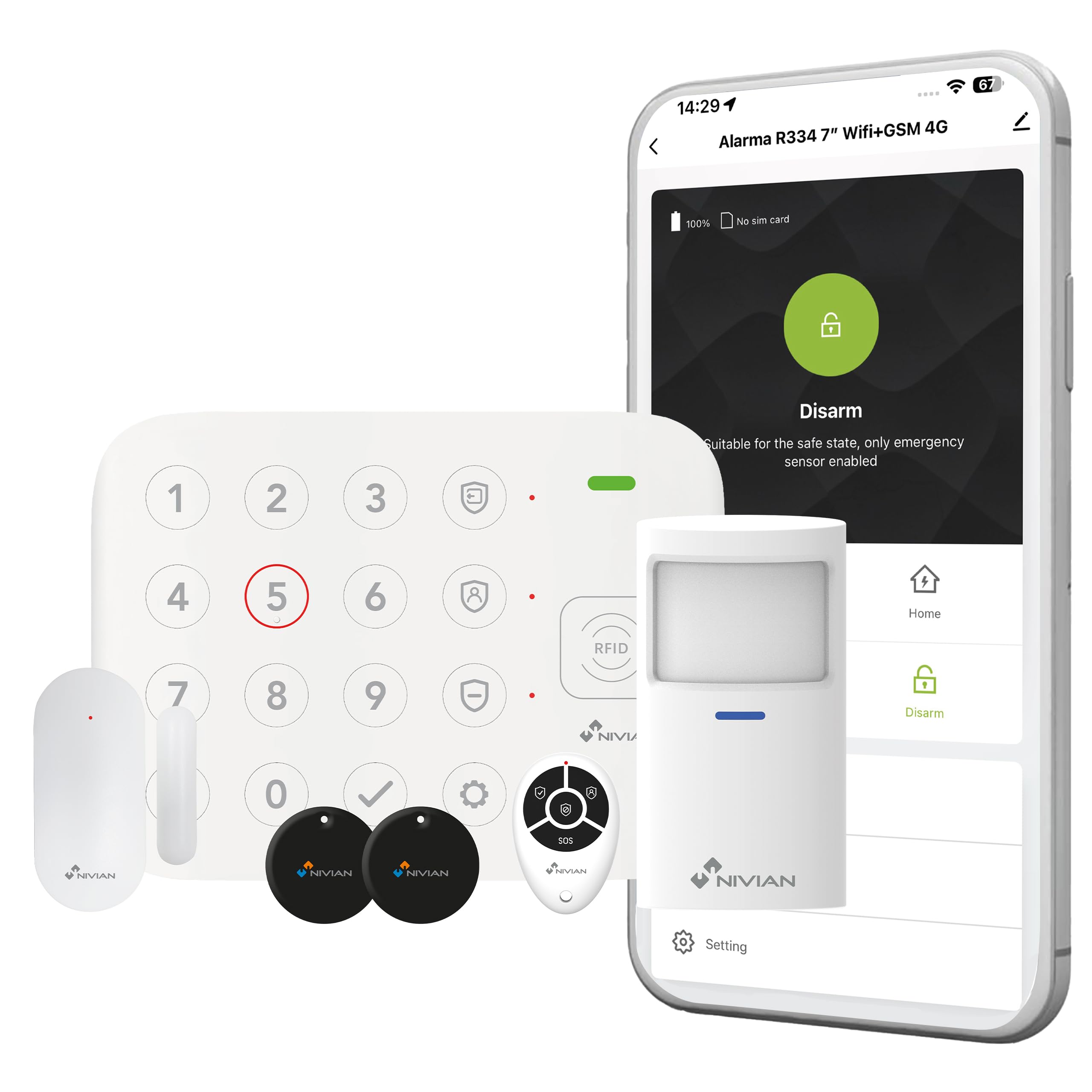
Figure 8.1: NIVIAN support and social media information.